
The interactive scratchpad for hackers.Using Codi as a Python scratchpad through the shell wra 2021-06-05 01:28:21 Author: hakin9.org(查看原文) 阅读量:156 收藏
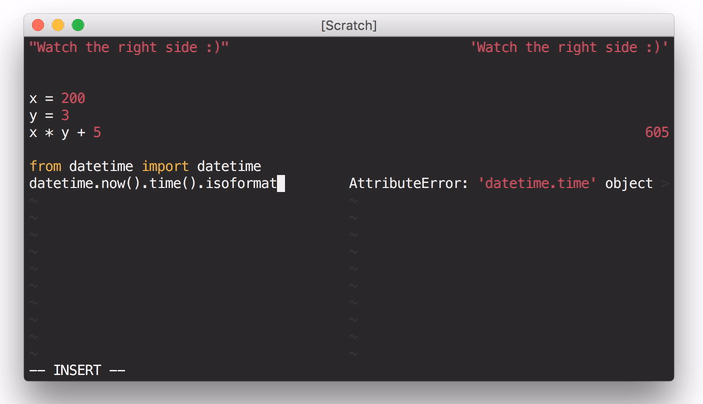
The interactive scratchpad for hackers.

Using Codi as a Python scratchpad through the shell wrapper
Codi is an interactive scratchpad for hackers, with a similar interface to Numi. It opens a pane synchronized to your main buffer which displays the results of evaluating each line as you type (with NeoVim or Vim with +job and +channel, asynchronously). It's extensible to nearly any language that provides a REPL (interactive interpreter)!
Languages with built-in support: Python, JavaScript, CoffeeScript, Haskell, PureScript, Ruby, OCaml, R, Clojure/ClojureScript, PHP, Lua, C++, Julia, Elm, Elixir, TypeScript, Mathjs
Pull requests for new language support welcome!
Note: without async support, evaluation will trigger on cursor hold rather than text change.
For more information, check out the documentation. Watch a screencast!
Installation
Use your favorite package manager (vim-plug, Vundle, pathogen.vim), or add this directory to your Vim runtime path.
For example, if you're using vim-plug, add the following line to ~/.vimrc:
Plug 'metakirby5/codi.vim'
Dependencies
- OS X or Linux (Windows support coming soon!)
- Vim 7.4 (with
+joband+channelfor asynchronous evaluation) or NeoVim (still in its infancy - please report bugs!) uname- If not using NeoVim,
script(BSD or Linux, man page should say at least 2013)
Each interpreter also depends on its REPL. These are loaded on-demand. For example, if you only want to use the Python Codi interpreter, you will not need ghci.
Default interpreter dependencies:
- Python:
python - JavaScript:
node - CoffeeScript:
coffee - Haskell:
ghci(be really careful with lazy evaluation!) - PureScript
pulp psci - Ruby:
irb - OCaml:
ocaml - R:
R - Clojure:
planck - PHP:
psysh - Lua:
lua - C++:
cling - Julia:
julia - Elm:
elm - Elixir:
iex - TypeScript:
tsun - Mathjs:
mathjs
Usage
Codi [filetype]activates Codi for the current buffer, using the provided filetype or the buffer's filetype.Codi!deactivates Codi for the current buffer.Codi!! [filetype]toggles Codi for the current buffer, using the provided filetype or the buffer's filetype.
Shell wrapper
A nice way to use Codi is through a shell wrapper that you can stick in your ~/.bashrc:
# Codi
# Usage: codi [filetype] [filename]
codi() {
  local syntax="${1:-python}"
  shift
  vim -c \
    "let g:startify_disable_at_vimenter = 1 |\
    set bt=nofile ls=0 noru nonu nornu |\
    hi ColorColumn ctermbg=NONE |\
    hi VertSplit ctermbg=NONE |\
    hi NonText ctermfg=0 |\
    Codi $syntax" "[email protected]"
}
Options
g:codi#interpretersis a list of user-defined interpreters. See the documentation for more information.g:codi#aliasesis a list of user-defined interpreter filetype aliases. See the documentation for more information.
The below options can also be set on a per-interpreter basis via g:codi#interpreters:
g:codi#autocmddetermines what autocommands trigger updates. See the documentation for more information.g:codi#widthis the width of the Codi split.g:codi#rightsplitis whether or not Codi spawns on the right side.g:codi#rightalignis whether or not to right-align the Codi buffer.g:codi#autocloseis whether or not to close Codi when the associated buffer is closed.g:codi#rawis whether or not to display interpreter results without alignment formatting (useful for debugging).g:codi#syncis whether or not to force synchronous execution. No reason to touch this unless you want to compare async to sync.
Autocommands
CodiEnterPre,CodiEnterPost: When a Codi pane enters.CodiUpdatePre,CodiUpdatePost: When a Codi pane updates.CodiLeavePre,CodiLeavePost: When a Codi pane leaves.
FAQ
- Why doesn't X work in Codi, when it works in a normal source file?
- Codi is not meant to be a replacement for actually running your program; it supports nothing more than what the underlying REPL supports. This is why Haskell language pragmas don't work and OCaml statements must end with
;;.
- Codi is not meant to be a replacement for actually running your program; it supports nothing more than what the underlying REPL supports. This is why Haskell language pragmas don't work and OCaml statements must end with
- Codi leaves a bunch of old processes running, what's going on?
- The cause of this issue is still unknown, but it happens infrequently. See
:h codi-introduction-warningsfor more information.
- The cause of this issue is still unknown, but it happens infrequently. See
- Codi doesn't seem to work on my setup.
- Check
:h codi-introduction-gotchas.
- Check
Thanks to
- @DanielFGray and @purag for testing, feedback, and suggestions
- @Joaquin-V for helping me discover critical bugs with vanilla settings
- Everyone who has reported an issue or sent in a pull request :)
Original repository: https://github.com/metakirby5/codi.vim
如有侵权请联系:admin#unsafe.sh