
How to Serve FilesCustom GET ResponsesCustom Response HeadersRead Request Path and Query StringsRead 2020-11-16 13:57:46 Author: parsiya.net(查看原文) 阅读量:125 收藏
The other day I customized the Python built-in SimpleHTTPServer with some routes. I did not find a lot of info about it (most use it to serve files). This is how I did some basic customization.
This is for Python 3.8.6 (which what I have in my testing VM) but it should work on Python 3.9 (and probably the same for Python 2).
Code is at https://github.com/parsiya/Parsia-Code/tree/master/python-simplehttpserver.
python -m http.server 8080 --bind 127.0.0.1.
But I needed to customize the path. Let's start with a simple implementation. We need to create our own BaseHTTPRequestHandler.
from http.server import HTTPServer, BaseHTTPRequestHandler

class MyHandler(BaseHTTPRequestHandler):
    def do_GET(self):
        pass

httpd = HTTPServer(('localhost', 10000), MyHandler)
httpd.serve_forever()
To respond to GET requests we need to add code to do_GET. Let's say we want to
return a 200 response that says It works!.
# 01.py
def do_GET(self):
# send 200 response
self.send_response(200)
# send response headers
self.end_headers()
# send the body of the response
self.wfile.write(bytes("It Works!", "utf-8"))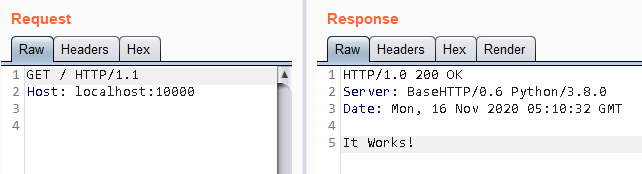 01.py
01.py
Note the server adds some default headers. To modify these we can use
send_header before calling end_headers. This is
very useful for adding the Content-Type header.
# 02.py
def do_GET(self):
# send 200 response
self.send_response(200)
# add our own custom header
self.send_header("myheader", "myvalue")
# send response headers
self.end_headers()
# send the body of the response
self.wfile.write(bytes("It Works!", "utf-8"))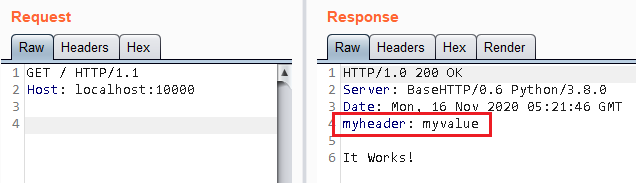 02.py
02.py
To override a header we cannot use send_header because it will just add it as
a new header to the response. Based on the documentation it seems like the
Date and Server response headers cannot be changed :(.
The complete path and query strings are in the self.path object inside
do_GET and similar methods. First we need to parse it with
urllib.parse.urlparse. Then we can get the query string and path
from the parsed object's fields query and path, respectively.
from urllib.parse import urlparse

def do_GET(self):
    # first we need to parse it
    parsed = urlparse(self.path)
    # get the query string
    query_string = parsed.query
    # get the request path, this new path does not have the query string
    path = parsed.path
I needed to read the incoming request headers. These are stored in the
headers object. It is of type http.client.HTTPMessage which is a
subclass of email.message.Message.
We can get the first value of a header by name with headers.get("header name")
. To get all values for a specific header (because headers can be repeated) use
headers.get_all("header name").
# 03.py
def do_GET(self):
    # get the value of the "Authorization" header and echo it.
    authz = self.headers.get("authorization")
    # send 200 response
    self.send_response(200)
    # send response headers
    self.end_headers()
    # send the body of the response
    self.wfile.write(bytes(authz, "utf-8"))
Note: Header names are not case-sensitive in HTTP (or in this module).
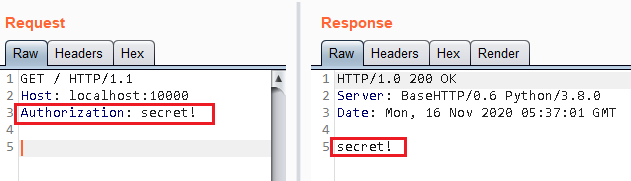 03.py
03.py
To handle POST requests we need to implement do_POST (surprise). To read the
body of the POST request we:
- Read the
Content-Lengthheader in the incoming request. - Read that many bytes from
self.rfile.- I could not find a way to read "all bytes" in
rfile. I had to rely on theContent-Lengthheader.
- I could not find a way to read "all bytes" in
| |
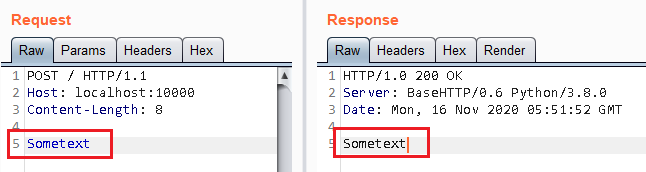 04.py
04.py
First, you need to create a private key and certificate in pem format. To
create a self-signed certificate/key in one line with OpenSSL:
openssl req -newkey rsa:2048 -nodes -keyout key.pem -x509 -days 365 -out certificate.pemThen modify the last lines of the original script to:
httpd = HTTPServer(('localhost', 443), MyHandler)
httpd.socket = ssl.wrap_socket(httpd.socket, server_side=True, certfile="certificate.pem", keyfile="key.pem")
httpd.serve_forever()如有侵权请联系:admin#unsafe.sh