
Digital triage rarely stops at a single running PC. 2026-11-23 09:0:36 Author: blog.elcomsoft.com(查看原文) 阅读量:2 收藏

Digital triage rarely stops at a single running PC. In both field operations and lab intake, examiners receive evidence packaged as forensic disk images, virtual machine containers, or mobile file system extractions. Traditionally, checking whether an image holds relevant evidence meant chaining together third-party mounting utilities, unpacking large archives onto scratch drives, or ingesting the entire dataset into a heavyweight forensic suite before answering basic questions.
The latest release of Elcomsoft Quick Triage eliminates that pre-processing bottleneck by adding native ingestion and mounting for forensic disk images, virtual machines, and ZIP/TAR archives, bringing the same rapid, artifact-driven workflow used on live Windows systems directly to offline images.
Mount volumes as folders
Most Windows mounting utilities attach volumes by assigning available drive letters (D:, E:, F:, and so on). In forensic workflows, that approach quickly runs into practical limits:
- Drive-letter exhaustion: Windows only has 26 letters (
A:–Z:), and several are already claimed by local drives, optical media, and network shares. Mounting a couple of multi-partition images can exhaust available letters almost immediately. - Unnecessary OS friction: Exposing mounted volumes as top-level drive letters clutters File Explorer and invites background Windows shell processes to interact with the mounted storage.
Instead of assigning drive letters, Elcomsoft Quick Triage mounts each partition directly as a folder inside the host file system and builds a MetaFS layer per mounted volume. As a result, you get immediate, transparent access to the image’s directory tree, both inside EQT’s triage engine and directly through Windows Explorer or third-party tools.
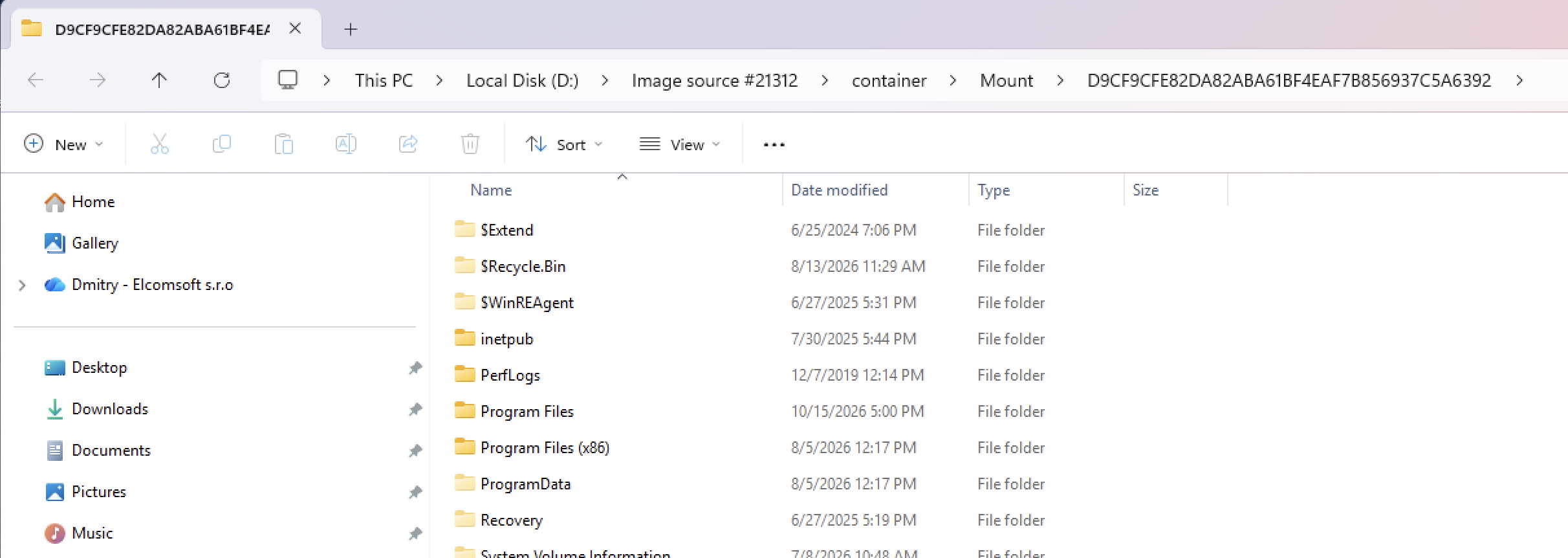
Volume mounted as a local directory path in Windows Explorer rather than as a drive letter
Original drive letters preserved
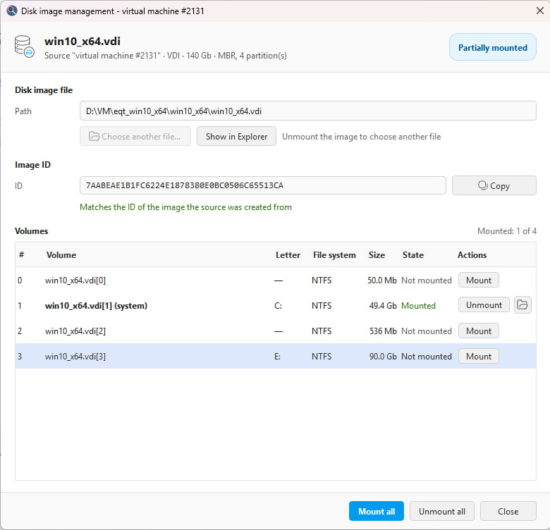
When you mount a multi-partition Windows disk image with a generic tool, the operating system volume might appear as F:\ while a secondary data partition – originally E:\ on the suspect’s computer – shows up as G:\. That mismatch forces examiners to mentally translate paths when reviewing Registry hives, Jump Lists, LNK files, browser download histories, or application MRU lists.
During ingestion, EQT automatically detects the operating system, populates System and User paths, and reconstructs the original Windows drive-letter assignments (C:, E:, and so on) whenever that volume metadata is present. You see immediately which partition served as the system drive and which held secondary user storage, making it straightforward to correlate paths and extract files from secondary partitions without losing provenance.
Full file system extractions from iOS and Android devices frequently arrive as .tar archives containing tens or hundreds of gigabytes, sometimes terabytes, of nested directories and small database files. Unpacking a large .tar or .zip archive onto a local NTFS drive before examining it creates three immediate problems:
- Wasted time on disk I/O: Extracting hundreds of thousands of small files can take longer than the triage review itself.
- Doubled storage consumption: You need enough free scratch space to hold both the original archive and the extracted directory tree.
- Windows file system collisions: Unpacking Unix or mobile directory trees onto NTFS frequently triggers
MAX_PATHlength limits or invalid filename character errors.
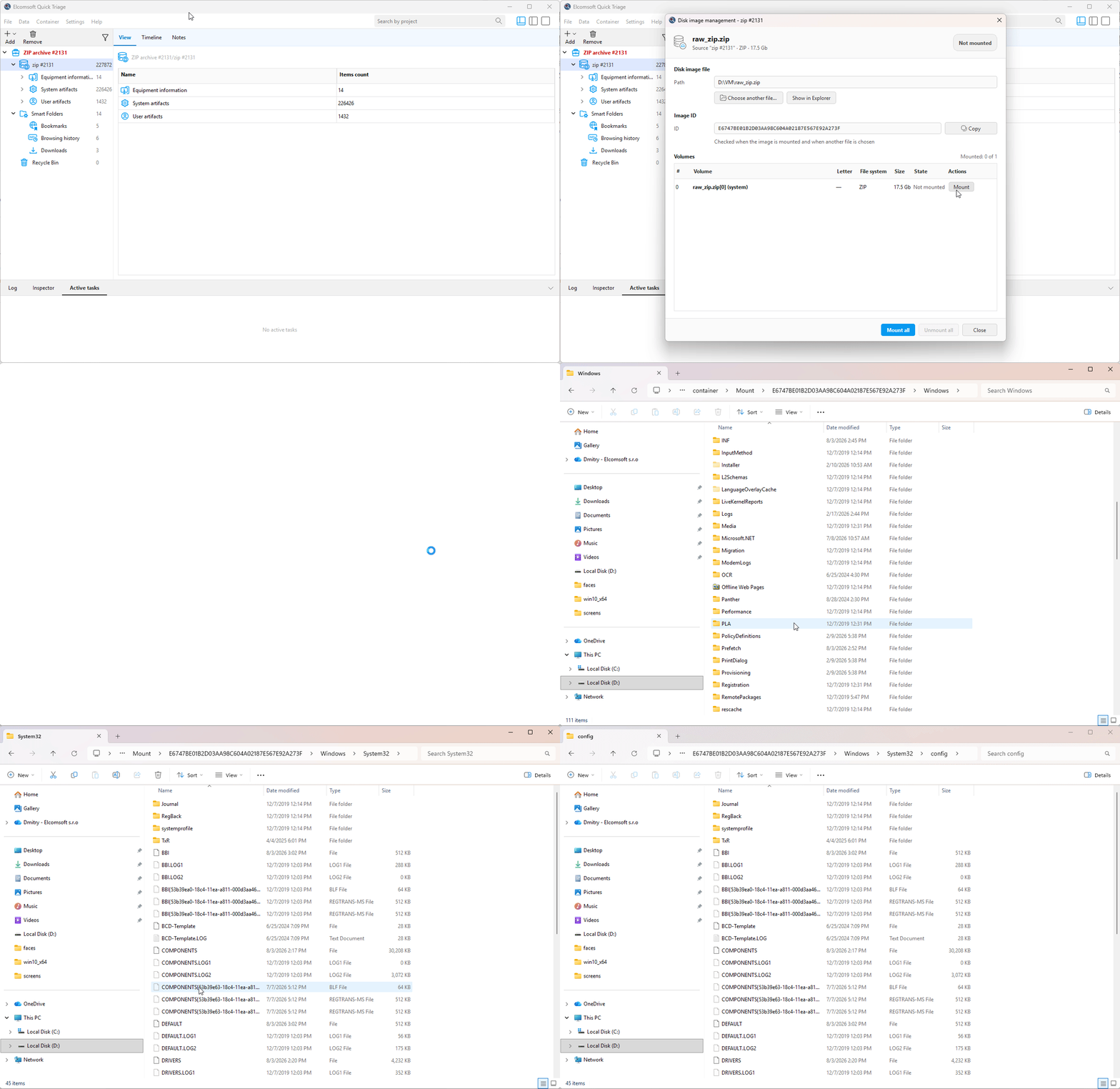
Elcomsoft Quick Triage mounts .tar and .zip archives directly as virtual images without decompressing a single file. Once mounted, the archive’s directory tree is immediately browsable in Windows Explorer and ready for searching and triage parsing.
Because EQT runs on Windows, this also solves a common cross-platform friction point: investigators can mount and examine containers originating from other operating systems, such as smartphone .tar extractions, Linux or macOS virtual machine disks (QCOW2, VDI, VMDK, Parallels .hds), and cross-platform exFAT or FAT32 volumes, directly on their primary Windows workstation without spinning up separate Linux VMs or macOS utilities.
Supported formats and file systems
Elcomsoft Quick Triage supports a number of standard forensic containers, hypervisor formats, and archives:
- Forensic Disk Images: RAW/DD (
.dd,.raw,.img,.bin), EnCase (.E01), and AFF4. - Virtual Machine Containers: Microsoft VHD/VHDX, VirtualBox VDI, VMware VMDK, Parallels (
.hds), and QEMU/KVM QCOW, QCOW2, and QED. - Archives: ZIP and TAR (mounted directly without decompression).
- Partition Schemes & File Systems: MBR and GPT partition tables as well as unpartitioned single-volume images formatted with NTFS, FAT16, FAT32, and exFAT.
Download the free trial of Elcomsoft Quick Triage to test native disk image, virtual machine, and archive mounting on your Windows forensic workstation.
REFERENCES:

Elcomsoft Quick Triage
Elcomsoft Quick Triage is a tool designed to rapidly extract and analyze the most important evidence from a target computer or disk. It is equally effective during on-site operations and in laboratory environments, helping investigators make informed decisions at the earliest stages of an investigation.
如有侵权请联系:admin#unsafe.sh