
Every security team eventually has to decide where its tools will run.
For years, the on-premises vs. cloud debate was mostly about IT infrastructure and who keeps the servers running. For security operations, the stakes are higher. The answer decides where your security data lives, where detection runs, and whether analysts can keep working when an internet connection drops.
Cloud computing has become the default for many organizations, and for good reason. Yet plenty of enterprises, public bodies and operators in highly regulated industries still keep sensitive data inside their own perimeter. Many end up somewhere in between.
This guide explains the key differences between cloud and on-premises infrastructure, how hybrid cloud service providers fit in, and what each model means for a security operations center (SOC). It also clears up a term that often gets mixed into the conversation, self-hosted, which is a different thing from on-premises.
What is cloud computing?
Cloud computing is the delivery of computing resources, such as servers, storage, databases and software applications, over the internet. Instead of buying physical hardware, you rent virtualized computing resources and pay for what you use.
How cloud providers deliver cloud services
Cloud services usually fall into a few categories.
- Infrastructure as a service (IaaS) gives you raw compute and storage.
- Platform as a service (PaaS) adds the tools to build and run applications.
- Software as a service (SaaS) delivers a finished application that the provider runs for you.
Cloud providers also offer different deployment types.
- A public cloud is shared infrastructure operated by a third-party provider and used by many customers.
- A private cloud is dedicated to a single organization, either in its own data centers or hosted by a provider.
Who secures what in cloud environments
Cloud security runs on a shared responsibility model. The provider secures the underlying infrastructure, including data centers, physical security, networks and hypervisors. The customer stays responsible for what it puts in the cloud, such as identities, access policies, configuration and data.
That split matters. A misconfigured storage bucket or an overly broad permission is the customer's problem, not the provider's. Moving to the cloud shifts some security work away from your teams, but it never removes it.
What is on-premises infrastructure?
On-premises infrastructure is hardware and software that an organization buys, installs and runs in its own facilities. The servers sit in your data centers or server rooms. Your IT teams handle everything from operating systems and security patches to power, cooling and physical security.
That model gives you full control over the IT environment. You decide how data is stored, who can access it and which security measures apply. You also carry the whole operational load. Hardware needs replacing, software licenses need renewing, and capacity has to be planned months ahead.
Many organizations still run on-premises solutions because some legacy systems are hard to move, because regulations limit where data can go, or because certain networks are deliberately cut off from the internet.
On-premises vs. cloud: Key differences at a glance
| Factor | On-premises | Cloud |
|---|---|---|
| Upfront costs | High (hardware, licenses, setup) | Low, with little to buy |
| Cost model | Capital expense plus ongoing maintenance | Operating expense, pay as you go |
| Scalability | Planned in steps, limited by hardware | Up or down on demand |
| Control | Full control over the stack | Shared with the provider |
| Security responsibility | Entirely yours | Shared responsibility model |
| Compliance | Data stays in your perimeter | Depends on provider regions and certifications |
| Connectivity | Works on local and isolated networks | Needs a stable internet connection |
| Updates | Your team schedules and applies them | Applied by the provider |
| Deployment speed | Slower, with hardware to procure | Fast, with no hardware to procure |
Cost of cloud solutions vs. on-premises
On-premises infrastructure comes with significant upfront costs. You buy servers, storage and networking equipment before anything runs, which makes it a capital expense (CAPEX). Ongoing costs follow, including power, cooling, floor space, maintenance contracts and the staff who keep it all running. Additional hardware purchases come every few years as equipment ages or demand grows.
Cloud computing uses a pay-as-you-go model, which makes it an operating expense (OPEX). There's little to buy upfront, and you can start small. Cloud costs can climb fast if nobody watches them, though. Data transfer fees, idle resources and storage that keeps growing without review add up month after month.
For stable, predictable workloads, on-premises can work out cheaper over the long term once the initial investment is paid off. For variable workloads, the cloud is usually more cost effective. Security data sits somewhere in the middle. Log volumes tend to grow steadily, so the right answer depends on how much you ingest and how long you keep it.
Scalability
Cloud environments scale up and down quickly. If your SOC suddenly needs to ingest far more telemetry after an acquisition, a cloud platform can absorb it without a hardware order. When demand drops, you stop paying for the extra capacity.
On-premises systems scale in steps. Adding capacity means planning, procurement, installation and configuration, which can take weeks or months. Scaling down is harder still, since you can't return hardware you've already bought.
Control and data security
On-premises gives you complete control over the underlying infrastructure. You choose the hardware, the network design, the encryption, and where data and encryption keys are stored. Nobody outside your organization gets access unless you grant it.
Control comes with responsibility. Every patch, access review and backup is yours to manage. A well-run on-premises environment can be very secure. A neglected one can be far weaker than a major cloud platform, where providers invest heavily in security measures and dedicated teams.
In the cloud, you trade some control for that investment. You decide how to configure your environment, and you rely on the provider for the layers underneath.
Compliance and data sovereignty
Compliance requirements often settle the on-premises vs. cloud question before cost does. Highly regulated industries, such as defense, government, healthcare, energy and finance, may face rules on where data is stored, who can access it and which jurisdiction it falls under.
Major cloud providers hold widely recognized certifications such as ISO 27001 and offer regional hosting to help customers meet data residency rules. For many organizations, that's enough. For others, including critical infrastructure operators and bodies handling classified information, data has to stay inside infrastructure they control. In those cases, data sensitivity drives the decision more than preference does.
Connectivity and remote access
Cloud services are available from anywhere with an internet connection, which helps distributed teams and remote access. The flip side is dependence. If the connection fails, so does access to the platform.
On-premises systems keep working on the local network. Some environments go further and are fully air-gapped, with no external connectivity at all. Industrial sites, defense networks and classified systems often work this way, and cloud software can't operate there.
Maintenance, updates and security patches
In the cloud, the provider handles infrastructure maintenance and updates. New features and security patches arrive without work on your side, though you have less say over timing.
On-premises, your IT teams own the update cycle. That means testing patches, scheduling maintenance windows, and keeping operating systems, databases and applications current. Done well, it gives you control over change. Done poorly, it leaves systems exposed to known vulnerabilities.
What is hybrid cloud?
A hybrid cloud combines on-premises infrastructure or a private cloud with public cloud services, connected so data and workloads can move between them. It's the everyday reality in most large organizations. Few enterprises are fully on-premises or fully in the cloud.
How hybrid cloud infrastructure works
In a hybrid cloud approach, each workload runs where it fits best. Highly sensitive data and legacy systems can stay on-premises, while customer-facing applications, analytics or development environments run in the public cloud. Networking, identity and management tools tie the pieces together.
When hybrid cloud solutions make sense
Hybrid cloud solutions are a good fit when:
- Some data must stay in a specific location, but other workloads are free to move.
- You want cloud scalability for peaks without giving up your existing data centers.
- Legacy systems can't be migrated yet, or ever.
- Disaster recovery plans call for copies of data in more than one environment.
Hybrid cloud environments can reduce IT infrastructure costs by putting each workload on the most suitable platform. They also add complexity. A hybrid cloud strategy needs careful planning around networking, identity, data flows and, above all, security.
Securing hybrid cloud environments
Hybrid environments create a specific challenge for security teams. Telemetry comes from data centers, cloud workloads, SaaS tools and sometimes operational technology. If each environment has its own tools and detection rules, analysts end up switching consoles, and investigations stop at the boundary between environments.
The aim is consistent operations. The same detection logic, investigation workflow and response options should apply wherever the data comes from. We cover this in more depth in The future of the SOC is deployment freedom.
Cloud deployment for cybersecurity: Why location matters for your SOC
For most business applications, choosing between cloud and on-premises is an IT decision. For a security platform, it's also a security decision.
A SOC platform collects some of the most sensitive data an organization has. Logs reveal user activity, network architecture, privileged accounts and weak points. Where that data is stored and processed matters to regulators, and it matters to threat actors.
Several factors are specific to cybersecurity:
- Detection content: Threat actors change their tools and infrastructure constantly. A security platform is only as good as its detection rules and threat intelligence, so updates have to reach it reliably, wherever it runs.
- Operational continuity: Your SOC needs to keep detecting and responding during an outage or an intrusion on your network.
- Data volume: Security telemetry grows fast. Ingesting and storing it has cost and capacity consequences in every model.
- Isolated networks: Classified and air-gapped environments still need monitoring, even though they can't reach a cloud platform.
Cloud deployment suits SOCs that want speed and minimal infrastructure work. Running the platform yourself suits SOCs that need to keep data inside a defined perimeter or operate without external connectivity. Neither is more modern than the other.
Self-hosted vs. on-premises, cloud, SaaS and managed services
Self-hosted often gets used as a synonym for on-premises. The two overlap, but they describe different things, and the difference matters when you compare security platforms.
On-premises describes where infrastructure sits, which is in your own facilities. Self-hosted describes who runs the software. You do, on infrastructure you choose. That might be servers in your own data center, virtual machines in a private cloud, or a fully air-gapped network.
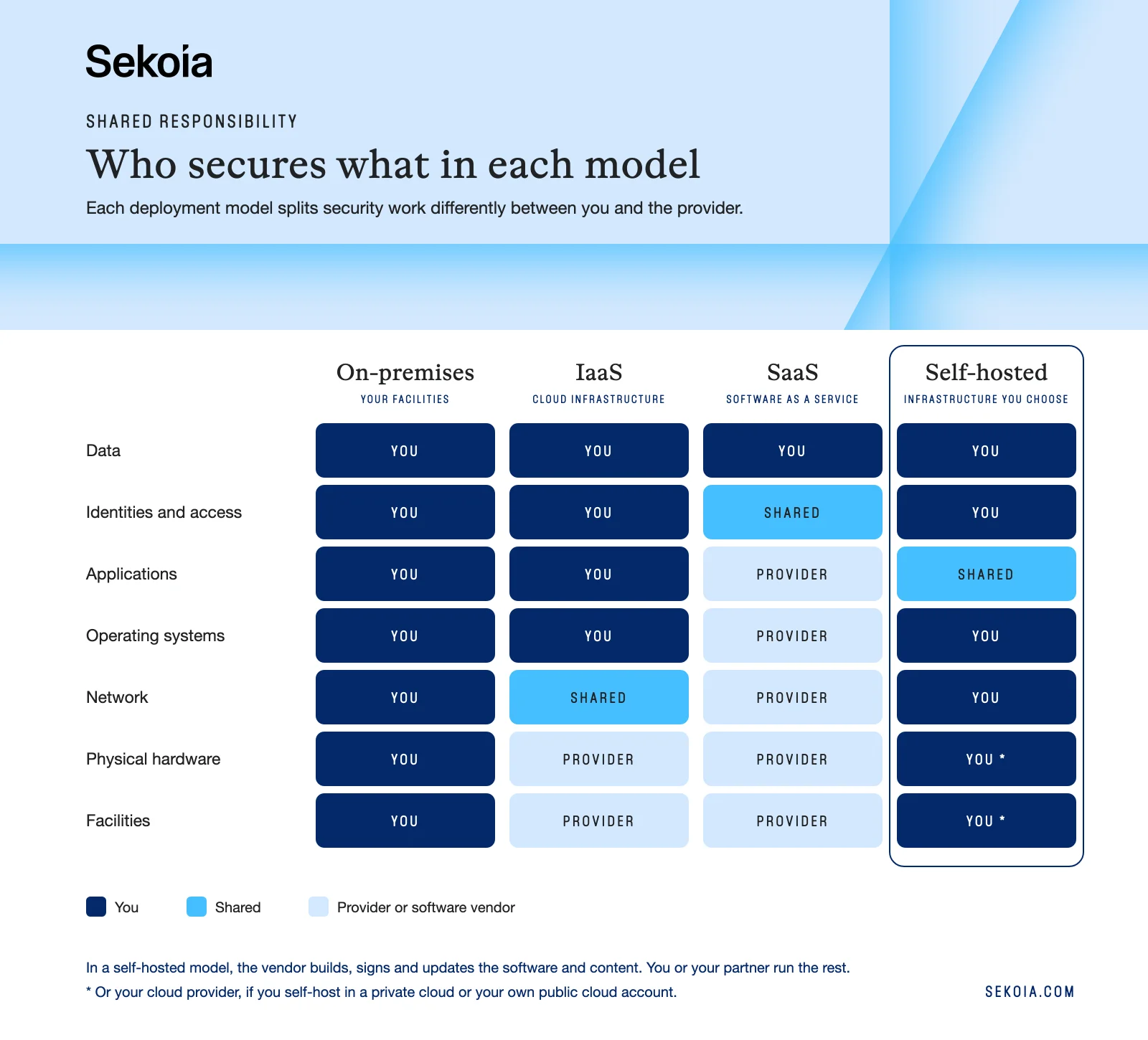
Self-hosted vs. on-premises
A self-hosted deployment can run on-premises, but it doesn't have to. On-premises is one possible location, while self-hosted is the operating model. A self-hosted security platform gives you ownership of data processing and storage wherever your infrastructure happens to be. That flexibility matters for organizations that run a mix of physical data centers and private cloud.
Self-hosted vs. cloud
Cloud usually means the software runs on infrastructure owned and operated by a provider. Self-hosted means it runs on infrastructure under your authority, which can itself be a private cloud. So the useful question isn't "cloud or not". It's who holds authority over the environment where your data is processed.
Self-hosted vs. SaaS
SaaS is a delivery model where the vendor hosts, runs, updates and scales the application for you. With self-hosted software, the vendor provides the software and you deploy and operate it. SaaS gets you running faster with no infrastructure work. Self-hosted gives you control over data location, network isolation and the timing of updates, in exchange for running the platform yourself.
Self-hosted vs. managed service
A managed service hands day-to-day operations to a third party, such as a managed security service provider (MSSP). Self-hosted and managed aren't opposites. An organization can self-host a platform and have an MSSP partner help operate it, keeping data under its own authority while sharing the workload.
How to choose between cloud and on-premises for security operations
Start with your requirements rather than a preference for one model. These questions help:
- Which security data must stay in a specific country, region or environment?
- Do any of your networks have limited or no internet connectivity?
- How fast is your telemetry volume growing, and how predictable is it?
- Do you have the skills and staff to run, patch and monitor a platform yourself?
- Do you need to control when updates are applied, or would you rather they arrive automatically?
- Does your organization prefer capital or operating expenses?
- Will your analysts get the same detection and investigation capabilities in each model?
If most answers point to speed, scale and minimal infrastructure work, cloud is likely the right fit. If they point to sovereignty, isolation and authority over your environment, a self-hosted deployment makes more sense. Many large organizations find they need different answers for different parts of the business.
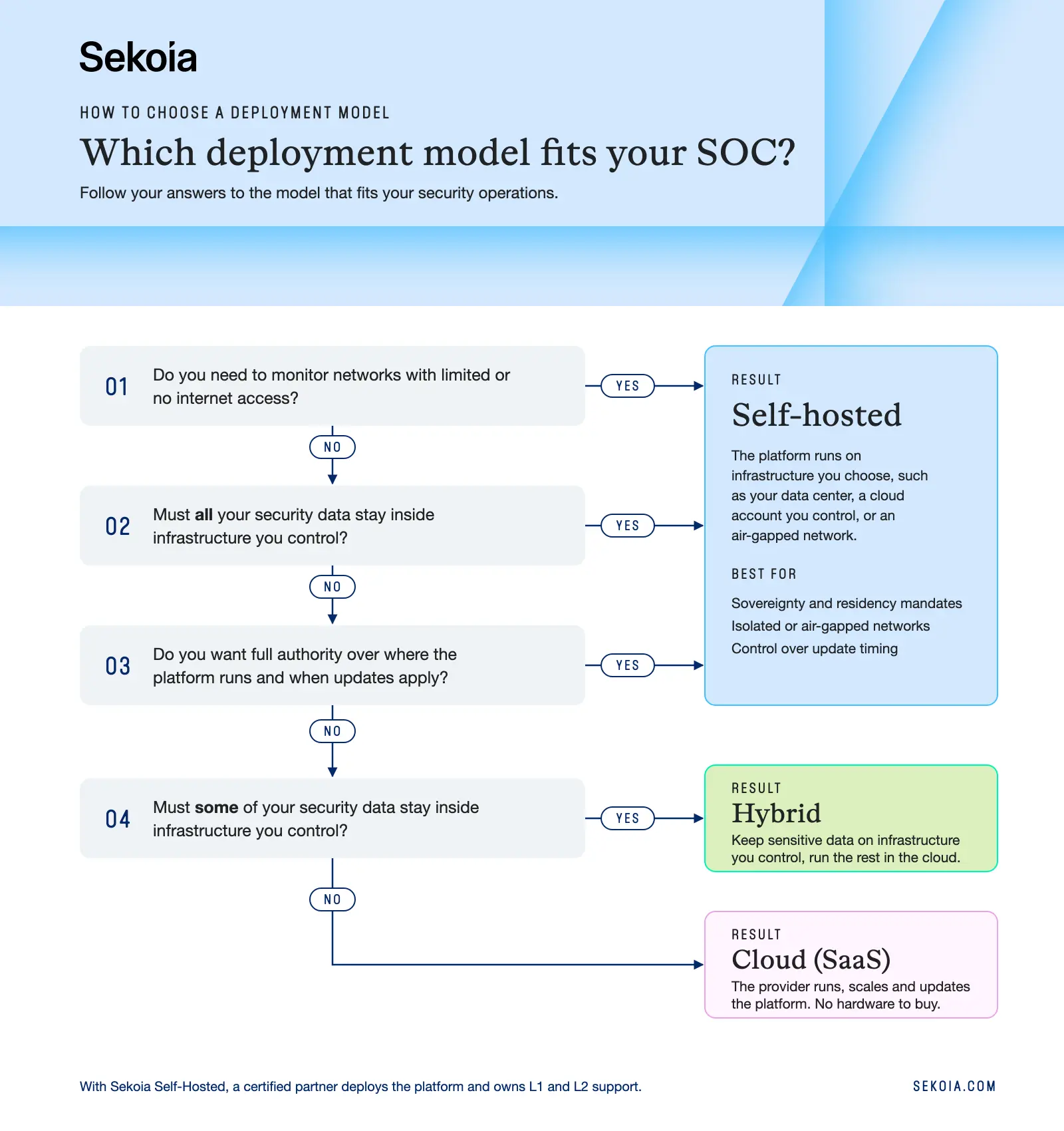
Sekoia SaaS and Sekoia Self-Hosted: One SOC platform, two deployment models
The Sekoia SOC platform is available in two deployment models, so you can decide where it runs based on your data and your team.
Sekoia SaaS is built for speed. The platform runs in Sekoia's cloud infrastructure with no setup overhead, and you choose your hosting region. Sekoia manages scaling and the platform lifecycle, so your analysts can focus on triage and response. You get every module from day one, 300+ integrations out of the box, and continuous updates to threat intelligence and detection rules.
Sekoia Self-Hosted is built for organizations that need total authority over their environment. The platform runs on infrastructure you choose, from your own data center or private cloud to your own public cloud account or an air-gapped site. It's deployed with digitally signed binaries, Docker images and Helm charts. Security data stays on your infrastructure, and the platform works in isolated networks where external connectivity is restricted or prohibited. Releases and content arrive as signed archives, and detection rules update on your schedule, separately from platform releases.
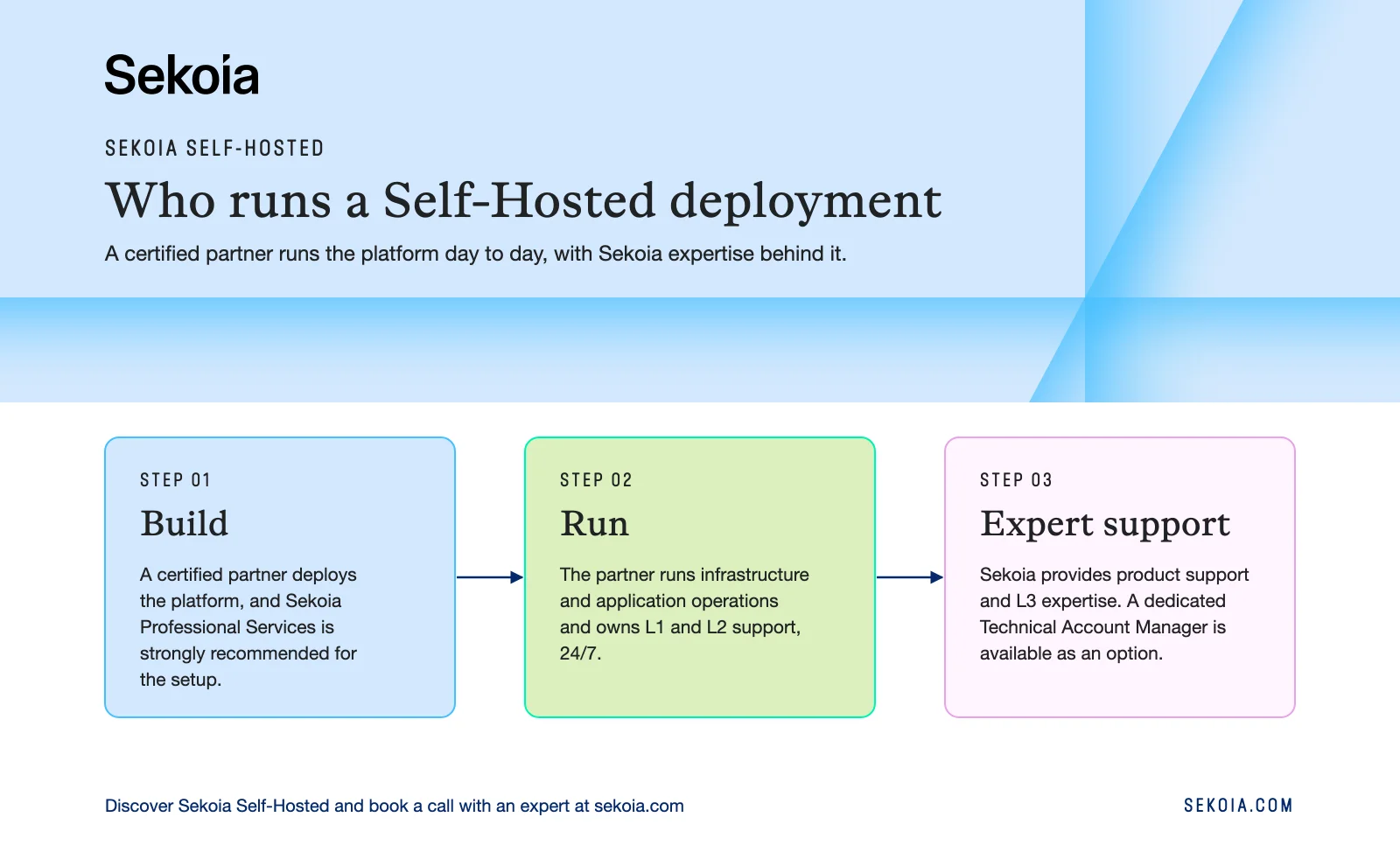
Sekoia Self-Hosted is designed for government, defense, critical infrastructure and regulated enterprises running dedicated security operations. Every Sekoia Self-Hosted deployment is run by a certified partner, with Sekoia expertise behind it:
- Build: The partner deploys the platform. Sekoia Professional Services is strongly recommended for the setup and is always part of a partner's first deployment.
- Run: The partner runs infrastructure and application operations and owns L1 and L2 support, 24/7.
- Expert support: Sekoia provides product support and L3 expertise. A dedicated Technical Account Manager (TAM) is available as an option.
Curious how a self-hosted platform stays current? Read Self-hosted does not have to mean stagnant.
Not sure which model fits? Book a call with an expert to talk through the best options for you.