
httpx takes a list of hostnames and tells you which of them are running a web server, and what is on it: the status code, the page title, the address the name resolves to, the CDN in front of it and the technology it detects. It is the step between finding subdomains and testing them, the job of turning a long list of names into a short list of targets. Before any of that, though, make sure you have the right httpx: the name also belongs to a Python library’s command-line client, and on Kali the tool you want is not called httpx at all.

What is httpx?
This httpx is ProjectDiscovery’s, the company behind subfinder and Nuclei. It is a single Go binary under the MIT licence, and its help describes it as “a fast and multi-purpose HTTP toolkit that allows running multiple probes using the retryablehttp library”. The README credits its probing to tomnomnom’s httprobe. httpx keeps the probe and piles a great deal on top: titles, status codes, response hashes, favicon hashes, TLS details, technology detection, screenshots through a headless browser, and filters and matchers to cut the output down to what you care about.
Advertisement
The current release is v1.12.0, from 8 September 2026, and the project is busy: commits were still landing on its development branch in the first week of November.
httpx vs httpx-toolkit vs Python’s httpx
Search for httpx and nearly everything you get back is about HTTPX, the Python HTTP client library. That library has an optional command-line client of its own, installed with pip install 'httpx[cli]', and it is also called httpx. It sends a request to a URL and shows you the response, which makes it a handy curl alternative and the wrong tool for probing a list of hosts.
Kali has the same collision on disk. Its python3-httpx package already provides /usr/bin/httpx, so Kali ships ProjectDiscovery’s tool as httpx-toolkit, installed with sudo apt install httpx-toolkit and run as httpx-toolkit. That is the usual reason a command from a guide written elsewhere gives you “command not found”, or the Python client, on Kali. It is the same program under another name: Kali’s own page shows its help running as httpx-toolkit -h.
The catch is the version. On 7 November, Kali’s package page listed httpx-toolkit at 1.9.0, three releases behind GitHub. That matters more than usual for a probe, because v1.12.0’s release notes include “fix: stop reporting TLS-only ports as plain http”, and 1.9.0 predates it. If you are probing ports beyond 80 and 443, I would take the release binary instead. Whichever you run, -version prints the ProjectDiscovery banner and the version number, which settles which httpx you have.
How to install httpx on Windows, Linux and macOS
Each GitHub release carries zip files for Windows, Linux and macOS, and a checksums file beside them. The Windows zip holds the binary, the licence and the README, and nothing needs installing: unzip it and run .\httpx.exe in PowerShell, or ./httpx from the Linux and macOS zips. The Windows zip for v1.12.0 is 18,633,379 bytes, and its published SHA-256 is:
14d8ccaa2d95ce9365162682f1a2ba3f14d2000bb4bfb0924af65ec5163ae021 |
Check it before you unzip it:
Advertisement
Get-FileHash .\httpx_1.12.0_windows_amd64.zip -Algorithm SHA256 |
To build it yourself, the README’s install line is:
go install -v github.com/projectdiscovery/httpx/cmd/httpx@latest |
The v1.12.0 README says that needs Go 1.25 or later, but the release’s own go.mod asks for Go 1.26, and it is go.mod that the build follows. The release zips need no Go at all, which is the simpler route on Windows.
How to use httpx with subfinder
Give httpx a file of hostnames with -l, and say which details you want. For a first look, status code and title are enough:
.\httpx.exe -l hosts.txt -sc -title |
It also reads from standard input unless you pass -no-stdin, so on Linux the usual form is a pipe straight from subfinder: subfinder -d example.com -silent | httpx -sc -title.
To see what that hand-over looks like on a real list, I took the 17 names our subfinder run had found for darknet.org.uk without API keys, the list that article suggests probing with a tool such as httpx, and ran httpx 1.12.0 against them, on our own domain only. Only one of the 17 answered: www. The subfinder article had already found that www was the only name with a DNS record, and httpx agreed, so the other 16, among them jenkins, k8s and vpn names, are names passive sources still list, not hosts that answer.
On a client’s domain that is the useful result, read for what it is: silence means nothing answered httpx’s HTTPS-then-HTTP probe on the default ports. A name with no DNS record, like those 16, is simply stale. A name that resolves and stays quiet may still run a web server on another port, so give those a second pass with -p before you strike them off.
For the one host that did answer, the default output leaves something out. httpx tries HTTPS first and falls back to HTTP only if HTTPS is unreachable, so the plain run printed a single line, https://www.darknet.org.uk [200], and said nothing about port 80. Add -no-fallback and it reports both schemes:
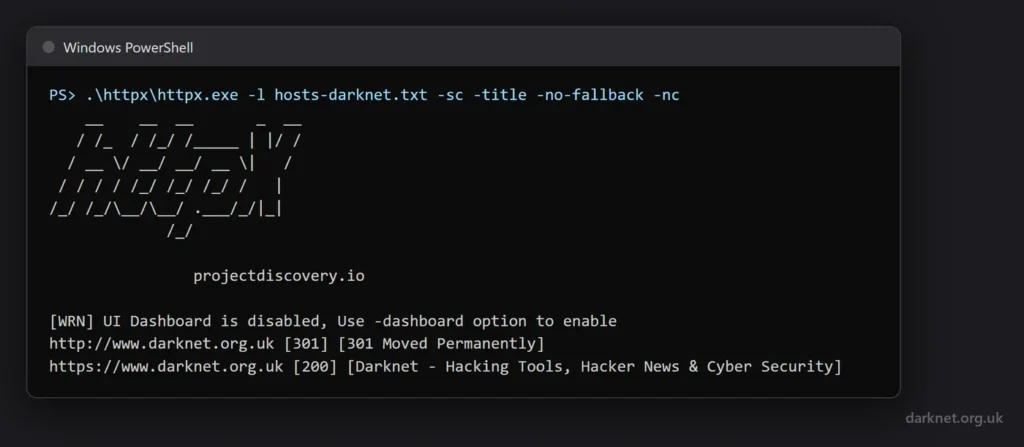
-no-fallback: plain HTTP redirects, HTTPS serves the page.Here the HTTP side is a 301 redirect, which is what you want to see. On a target, the hosts where plain HTTP serves its own page instead of redirecting are exactly the ones the default run hides from you, so -no-fallback is worth the extra line of output whenever you are writing up findings rather than just building a target list.
Useful httpx commands
A handful of flags cover most of what people use httpx for. -td adds technology detection from the Wappalyzer dataset, -ip the address the name resolves to (behind a CDN, that is the CDN’s address, not the origin’s), -cdn the CDN or WAF in front of the host, and -json writes one JSON object per host, which is the form to keep if anything else is going to read the results:
.\httpx.exe -l hosts.txt -sc -title -td -ip -cdn -json -o results.jsonl |
To keep only some responses, -mc matches status codes and -fc filters them out, so -mc 200,302 or -fc 404 trims a long list quickly. -p probes other ports in nmap syntax, and -path requests a path on every host. The README’s recipes put that to work, for example finding which hosts publish a security.txt file:
echo target.com | httpx -path '/.well-known/security.txt,/security.txt' -mc 200 -mdc 'contains(content_type, "text/plain") && contains(body, "Contact:") && contains_any(body, "mailto:", "https://")' |
For screenshots there is -ss, which drives a headless browser, and -system-chrome to use the Chrome you already have installed. Run it on the short list, not the long one.
Reading what httpx tells you
The JSON from our run held more than I had asked for. With -td but neither -cpe nor -wp, the record still carried a list of CPE matches and a list of WordPress plugins and themes. The CPE list named three products. One matched a plugin in the WordPress list; the other two, a Java application server among them, appeared in neither the plugin list nor the technology list from the same response. Treat the CPE field as a list of leads to confirm, not an inventory, and never paste it into a report as what a host runs.
It also helps to know what httpx sends. By its own help, it uses a random User-Agent by default, and it checks for its own updates when it starts unless you add -duc. Our probe runs also printed a warning that the “UI Dashboard is disabled”. That is ProjectDiscovery’s cloud service, which can store and display results, and there are two ways into it: -dashboard (-pd) sends a run’s output there, and -dashboard-upload (-pdu) uploads a JSONL file you have already saved. Our runs used neither. If a client’s scope rules out sending data to third parties, those are the two flags to leave alone.
Where httpx fits
The names usually come from subfinder, OWASP Amass or theHarvester, and the short list httpx leaves usually goes to Nuclei, ProjectDiscovery’s template scanner. If you need protocol handshakes beyond HTTP, or want to grab banners across a whole address range, ZGrab2 does that job; httpx is narrower, built around a list of hostnames and the web servers behind them.
You can download httpx here:
Or read more here.
Advertisement