On Thursday afternoon, millions of inboxes stopped loading at once. Emails would not send, 2026-11-13 05:46:52 Author: thecyberexpress.com(查看原文) 阅读量:0 收藏
On Thursday afternoon, millions of inboxes stopped loading at once. Emails would not send, Outlook on the web returned errors, and the problem quickly spread to Teams, Copilot and the rest of Microsoft’s workplace suite. The Microsoft 365 outage did not come from a surge of users or a broken update on people’s devices.
According to Microsoft’s own updates, the cause sat inside its infrastructure: servers that kept dropping out of service, and kept failing even after engineers brought them back.
How Big Was the Microsoft 365 Outage?
Disruptions were first reported after midday Eastern time on Thursday and continued into the night, affecting many companies and some government operations. Nearly 130,000 users on Downdetector reported problems with Outlook just after 1 p.m. EST. Many said they could not send or receive email, or could not load their inboxes at all.
Thousands also reported problems with Teams, Copilot and wider Microsoft 365 services. By Friday mid-morning in Asia, users there were reporting issues too. In Australia, an IBM sales director wrote on LinkedIn that inboxes had been failing since about 5:15 a.m. AEDT.
Microsoft’s public status page listed Outlook.com, OneDrive, OneNote, To Do, Teams and Microsoft 365 for the web among the affected services. It also noted that administrators might not be able to reach the admin center itself.
What Caused It?
Microsoft’s account changed as its engineers learned more, and the sequence explains why the fix took so long.

Its first update, on X, said it was investigating problems reaching Exchange Online mailboxes in the Americas. It soon confirmed that users in any region could be affected, and said part of its infrastructure was under “elevated load.”
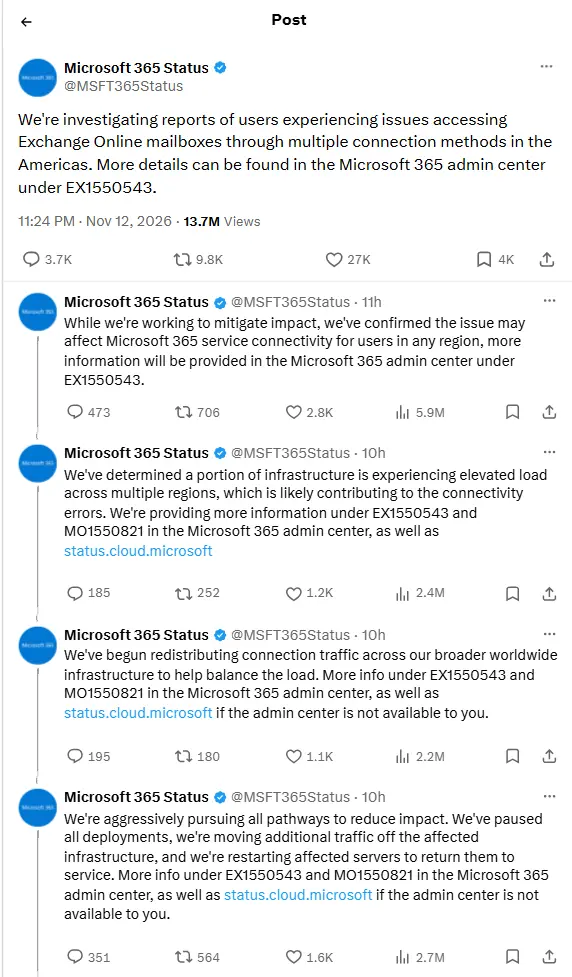
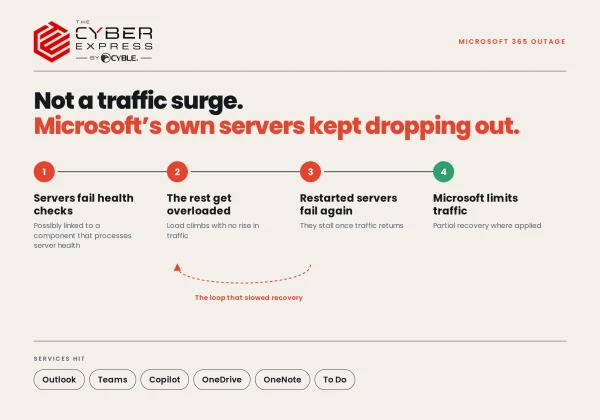
Then came the key finding. Microsoft said the load was not caused by more traffic, but by “a number of servers being unexpectedly unavailable,” which strained the servers left running. Those servers were failing automated health checks, and Microsoft said the failures may have come from a specific component responsible for processing server health.
Microsoft said it had not found a recent change linked to the start of the problem. However, it later said it was assessing whether reverting a small number of recent configuration updates could speed up recovery. The incident is tracked under the ID EX1550543.
Why Didn’t the Fixes Work Right Away?
Microsoft paused all deployments, moved traffic off the affected servers, and restarted them. It also tested an alternative health check method, which let some servers return to service.
But the relief did not hold. Microsoft said its actions “have not provided the anticipated relief,” and that a core process on affected servers was becoming overwhelmed. Worse, servers returned to service could become unresponsive again once they started receiving traffic. Engineers responded by limiting which types of traffic could reach the affected infrastructure.
In its latest updates, Microsoft said it was adjusting traffic protocols, redistributing traffic and applying “strategic traffic blocking measures,” and was seeing partial recovery in regions where these steps had been applied.
Was It a Cyberattack?
None of Microsoft’s public status updates describe an attack. Every explanation it has given points to an internal server and infrastructure problem: servers failing health checks, overloaded processes, and traffic that the remaining capacity could not handle.
What Should Users and Admins Do During the Microsoft 365 Outage?
For individual users, Microsoft’s guidance is simple: this is not a device problem. If Outlook is down because of a Microsoft-side incident, local repairs will not help. Users should watch the public status page at status.cloud.microsoft and try again once Microsoft marks the service as restored.
For administrators, the guidance includes:
- Check service health in the Microsoft 365 admin center, open the Outlook or Exchange Online incident, and record its ID, status, and latest update.
- Avoid organisation-wide fixes such as reinstalling Outlook, clearing caches, or switching between new and classic Outlook while the incident is active.
- If the admin center will not load, use the public status page instead.
- Communicate with staff through a channel outside Microsoft 365, such as phone or SMS, and tell users not to repeatedly reset passwords or remove accounts.
- Once the service is restored, test one mailbox on the web first, then desktop and mobile. Only troubleshoot individual users if problems remain after that.
If the incident does not appear in a tenant’s service health dashboard, admins can report it there and open an urgent support request.
What Remains Unclear in Microsoft Outage
Microsoft has not given a time for full restoration or a final root cause. It has not yet said why the health-check component began failing, or whether the recent configuration updates it reviewed played a role.
Until those answers come, the outage shows how much daily work now depends on a single cloud platform staying online.
如有侵权请联系:admin#unsafe.sh