
For this project I wanted something new. Something that involves art. A new type of art. I wanted to 2026-10-23 20:35:53 Author: hackernoon.com(查看原文) 阅读量:20 收藏
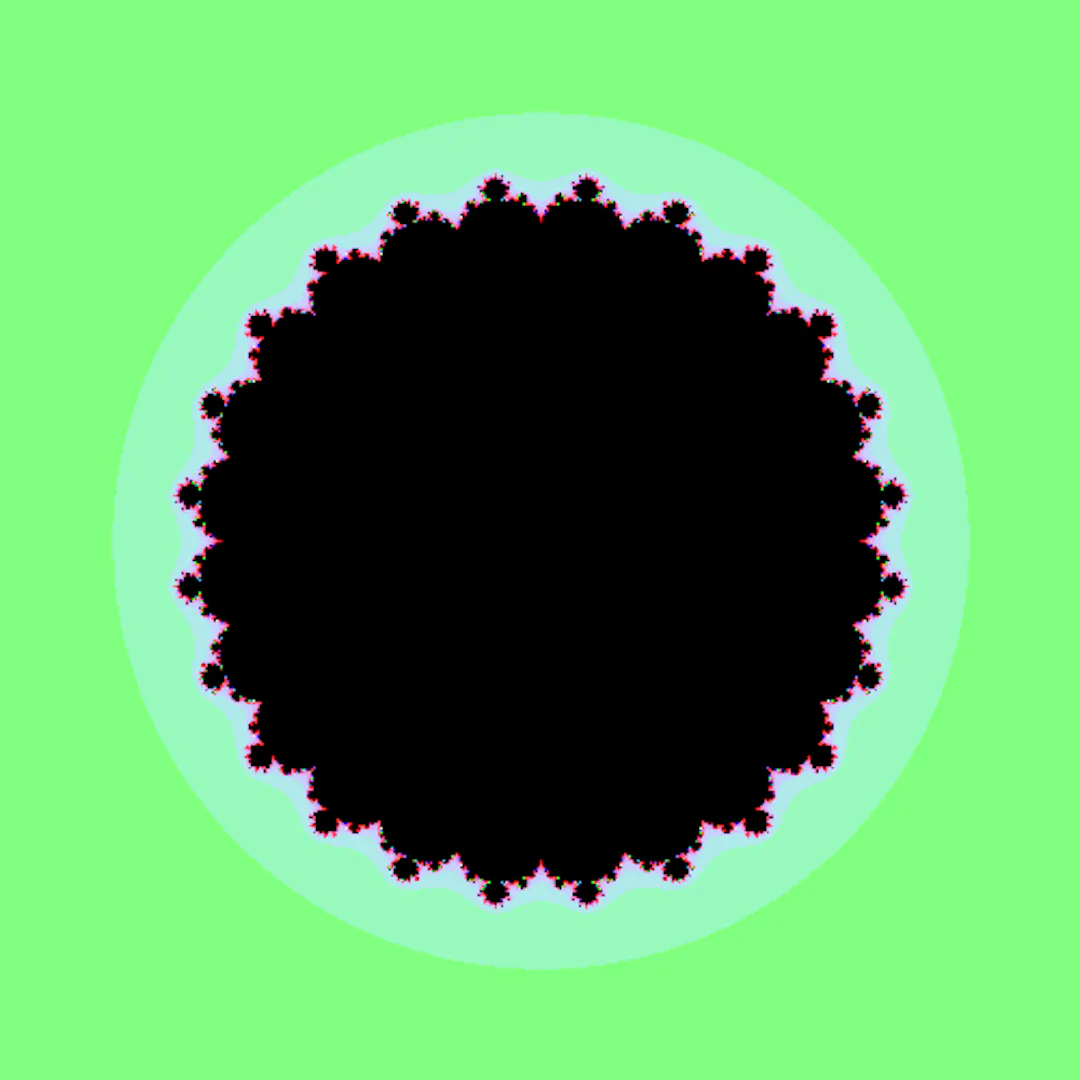
For this project I wanted something new. Something that involves art. A new type of art. I wanted to combine mathematics visuals with formulas so you can experiment and create your own art.
But how?
You change the numbers and exponents, add z or c, and create your own art. Your imagination is the limit. What I created is a fractal laboratory.
You can:
- Enter the data.
- View the shape.
- Download it as a PNG or SVG.
What is fractal art?
In simple terms, fractal art is digital art created using mathematical formulas and repeated patterns rather than drawing every shape manually.
In another way, fractal art is a form of art that uses mathematics to display perfect geometric shapes. That could not be created manually.
The fun part of the code:
The full code:
<!DOCTYPE html>
<html lang="en">
<head>
  <meta charset="UTF-8">
  <meta name="viewport" content="width=device-width, initial-scale=1.0">
  <title>Responsive Mathematical Fractal Generator</title>
  <script src="https://cdnjs.cloudflare.com/ajax/libs/mathjs/11.8.0/math.js"></script>
  <style>
    :root {
      --bg-color: #0f111a;
      --panel-bg: #1e2230;
      --accent-color: #6366f1;
      --accent-hover: #4f46e5;
      --text-color: #f3f4f6;
      --text-muted: #9ca3af;
      --border-color: #374151;
    }

    * {
      box-sizing: border-box;
      margin: 0;
      padding: 0;
      font-family: -apple-system, BlinkMacSystemFont, 'Segoe UI', Roboto, Helvetica, Arial, sans-serif;
    }

    body {
      background-color: var(--bg-color);
      color: var(--text-color);
      display: flex;
      flex-direction: column;
      min-height: 100vh;
      min-height: 100dvh; /* Dynamic viewport height for mobile browsers */
      overflow: x-hidden;
    }

    /* Responsive Main Layout (Column on Mobile, Row on Desktop) */
    .app-container {
      display: flex;
      flex-direction: column;
      flex: 1;
      width: 100%;
      height: 100%;
    }

    @media (min-width: 850px) {
      .app-container {
        flex-direction: row;
        height: 100vh;
        overflow: hidden;
      }
    }

    /* Sidebar controls */
    .sidebar {
      width: 100%;
      background-color: var(--panel-bg);
      border-bottom: 1px solid var(--border-color);
      padding: 16px;
      display: flex;
      flex-direction: column;
      gap: 14px;
    }

    @media (min-width: 850px) {
      .sidebar {
        width: 340px;
        min-width: 340px;
        border-bottom: none;
        border-right: 1px solid var(--border-color);
        padding: 20px;
        overflow-y: auto;
      }
    }

    h1 {
      font-size: 1.2rem;
      font-weight: 600;
      color: #fff;
    }

    .input-group {
      display: flex;
      flex-direction: column;
      gap: 6px;
    }

    label {
      font-size: 0.85rem;
      color: var(--text-muted);
      font-weight: 500;
    }

    input[type="text"], input[type="number"], select {
      background: #11131f;
      border: 1px solid var(--border-color);
      color: var(--text-color);
      padding: 10px;
      border-radius: 6px;
      font-size: 0.95rem;
      outline: none;
      width: 100%;
    }

    input[type="text"]:focus, input[type="number"]:focus, select:focus {
      border-color: var(--accent-color);
    }

    .btn {
      background-color: var(--accent-color);
      color: white;
      border: none;
      padding: 12px;
      border-radius: 6px;
      font-weight: 600;
      cursor: pointer;
      transition: background 0.2s;
      width: 100%;
      touch-action: manipulation;
    }

    .btn:hover {
      background-color: var(--accent-hover);
    }

    .btn-secondary {
      background-color: transparent;
      border: 1px solid var(--border-color);
      color: var(--text-color);
    }

    .btn-secondary:hover {
      background-color: #2a2f45;
    }

    .button-row {
      display: flex;
      gap: 8px;
    }

    .download-section {
      display: flex;
      gap: 10px;
      margin-top: 6px;
    }

    @media (min-width: 850px) {
      .download-section {
        margin-top: auto;
      }
    }

    /* Canvas Viewport */
    .main-viewport {
      flex: 1;
      display: flex;
      justify-content: center;
      align-items: center;
      position: relative;
      background: #090a0f;
      padding: 12px;
      min-height: 350px;
    }

    .canvas-container {
      position: relative;
      width: 100%;
      max-width: 600px;
      aspect-ratio: 1 / 1;
      display: flex;
      justify-content: center;
      align-items: center;
    }

    canvas {
      width: 100% !important;
      height: 100% !important;
      box-shadow: 0 10px 30px rgba(0,0,0,0.5);
      border-radius: 6px;
      touch-action: none;
    }

    .status-overlay {
      position: absolute;
      top: 10px;
      right: 10px;
      background: rgba(0, 0, 0, 0.75);
      padding: 6px 12px;
      border-radius: 16px;
      font-size: 0.75rem;
      color: var(--text-muted);
      pointer-events: none;
    }
  </style>
</head>
<body>

  <div class="app-container">
    <div class="sidebar">
      <h1>Fractal Generator</h1>

      <div class="input-group">
        <label for="formula">Formula f(z, c):</label>
        <input type="text" id="formula" value="z^2 + c" placeholder="e.g. z^2 + c">
      </div>

      <div class="input-group">
        <label for="type">Fractal Type:</label>
        <select id="type">
          <option value="mandelbrot">Mandelbrot Style (Vary c)</option>
          <option value="julia">Julia Set (Fixed c, Vary z)</option>
        </select>
      </div>

      <div class="input-group" id="julia-params" style="display: none;">
        <label>Constant c (Real, Imaginary):</label>
        <div style="display: flex; gap: 8px;">
          <input type="number" id="c_real" value="-0.7" step="0.05" placeholder="Real">
          <input type="number" id="c_imag" value="0.27015" step="0.05" placeholder="Imag">
        </div>
      </div>

      <div class="input-group">
        <label for="maxIter">Resolution / Iterations:</label>
        <input type="number" id="maxIter" value="50" min="10" max="250">
      </div>

      <div class="input-group">
        <label for="colorPalette">Color Palette:</label>
        <select id="colorPalette">
          <option value="electric">Electric Neon</option>
          <option value="fire">Fire & Gold</option>
          <option value="ocean">Deep Ocean</option>
          <option value="grayscale">Monochrome</option>
        </select>
      </div>

      <div class="button-row">
        <button class="btn" id="renderBtn">Render</button>
        <button class="btn btn-secondary" id="resetBtn">Reset</button>
      </div>

      <div class="download-section">
        <button class="btn btn-secondary" id="downloadPNG">PNG</button>
        <button class="btn btn-secondary" id="downloadSVG">SVG</button>
      </div>
    </div>

    <div class="main-viewport">
      <div class="canvas-container">
        <div class="status-overlay" id="status">Ready</div>
        <canvas id="fractalCanvas" width="500" height="500"></canvas>
      </div>
    </div>
  </div>

  <script>
    const canvas = document.getElementById('fractalCanvas');
    const ctx = canvas.getContext('2d');
    const statusEl = document.getElementById('status');

    let zoom = 1;
    let centerX = 0;
    let centerY = 0;

    // Toggle Julia controls
    document.getElementById('type').addEventListener('change', (e) => {
      document.getElementById('julia-params').style.display =
        e.target.value === 'julia' ? 'flex' : 'none';
    });

    // Color Palettes
    function getColor(iter, maxIter, palette) {
      if (iter === maxIter) return [0, 0, 0];

      let t = iter / maxIter;

      if (palette === 'electric') {
        return [
          Math.sin(t * 10) * 127 + 128,
          Math.cos(t * 15) * 127 + 128,
          Math.sin(t * 25) * 127 + 128
        ];
      } else if (palette === 'fire') {
        return [
          Math.min(255, iter * 8),
          Math.min(255, iter * 3),
          Math.min(255, iter * 0.5)
        ];
      } else if (palette === 'ocean') {
        return [
          Math.sin(t * 5) * 50,
          Math.sin(t * 10) * 100 + 100,
          Math.sin(t * 20) * 127 + 128
        ];
      } else {
        let val = Math.floor((iter / maxIter) * 255);
        return [val, val, val];
      }
    }

    // Main Render Loop
    function renderFractal() {
      statusEl.innerText = "Rendering...";

      setTimeout(() => {
        const formulaStr = document.getElementById('formula').value;
        const fractalType = document.getElementById('type').value;
        const maxIter = parseInt(document.getElementById('maxIter').value);
        const palette = document.getElementById('colorPalette').value;

        const cRealFixed = parseFloat(document.getElementById('c_real').value);
        const cImagFixed = parseFloat(document.getElementById('c_imag').value);

        let compiledExpr;
        try {
          compiledExpr = math.compile(formulaStr);
        } catch (err) {
          alert("Invalid Formula: " + err.message);
          statusEl.innerText = "Error";
          return;
        }

        const width = canvas.width;
        const height = canvas.height;
        const imgData = ctx.createImageData(width, height);
        const data = imgData.data;

        const scale = 3.0 / (zoom * Math.min(width, height));

        for (let py = 0; py < height; py++) {
          for (let px = 0; px < width; px++) {

            let x0 = (px - width / 2) * scale + centerX;
            let y0 = (py - height / 2) * scale + centerY;

            let z, c;
            if (fractalType === 'mandelbrot') {
              z = math.complex(0, 0);
              c = math.complex(x0, y0);
            } else {
              z = math.complex(x0, y0);
              c = math.complex(cRealFixed, cImagFixed);
            }

            let iter = 0;
            let escaped = false;

            while (iter < maxIter) {
              try {
                z = compiledExpr.evaluate({ z: z, c: c });
                if ((z.re * z.re + z.im * z.im) > 4.0) {
                  escaped = true;
                  break;
                }
              } catch (e) {
                escaped = true;
                break;
              }
              iter++;
            }

            const [r, g, b] = getColor(iter, maxIter, palette);
            const pixelIdx = (py * width + px) * 4;
            data[pixelIdx] = r;
            data[pixelIdx + 1] = g;
            data[pixelIdx + 2] = b;
            data[pixelIdx + 3] = 255;
          }
        }

        ctx.putImageData(imgData, 0, 0);
        statusEl.innerText = "Done";
      }, 20);
    }

    // Export Handlers
    document.getElementById('downloadPNG').addEventListener('click', () => {
      const link = document.createElement('a');
      link.download = 'fractal.png';
      link.href = canvas.toDataURL('image/png');
      link.click();
    });

    document.getElementById('downloadSVG').addEventListener('click', () => {
      const dataURL = canvas.toDataURL('image/png');
      const svgString =
`<svg xmlns="http://www.w3.org/2000/svg" width="${canvas.width}" height="${canvas.height}">
  <image href="${dataURL}" width="${canvas.width}" height="${canvas.height}" />
</svg>`;

      const blob = new Blob([svgString], { type: 'image/svg+xml;charset=utf-8' });
      const link = document.createElement('a');
      link.download = 'fractal.svg';
      link.href = URL.createObjectURL(blob);
      link.click();
    });

    // Control Listeners
    document.getElementById('renderBtn').addEventListener('click', renderFractal);

    document.getElementById('resetBtn').addEventListener('click', () => {
      zoom = 1;
      centerX = 0;
      centerY = 0;
      renderFractal();
    });

    // Zoom on Click / Tap
    canvas.addEventListener('click', (e) => {
      const rect = canvas.getBoundingClientRect();
      const clickX = (e.clientX - rect.left) * (canvas.width / rect.width);
      const clickY = (e.clientY - rect.top) * (canvas.height / rect.height);

      const scale = 3.0 / (zoom * Math.min(canvas.width, canvas.height));
      centerX += (clickX - canvas.width / 2) * scale;
      centerY += (clickY - canvas.height / 2) * scale;
      zoom *= 2;

      renderFractal();
    });

    // Initial render
    renderFractal();
  </script>
</body>
</html>
Explaining parts of the code:
HTML structure:
<input type="text" id="formula" value="z^2 + c">
Fractal type selector:
<select id="type">

  <option value="mandelbrot">Mandelbrot Style (Vary c)</option>

  <option value="julia">Julia Set (Fixed c, Vary z)</option>

</select>
What it does:
Lets the user switch between two mathematical approaches.
Interaction control
<input type="number" id="maxIter" value="50" min="10" max="250">
What it does:
Controls how many mathematical iterations are performed for each pixel.
Math.js
<script src="https://cdnjs.cloudflare.com/ajax/libs/mathjs/11.8.0/math.js"></script>
What it does:
It loads MathJS, which allows the webpage to understand mathematical expressions.
The renderFractal() function
This is the core of the project.
function renderFractal() {
The pixel-by-pixel calculation:
for (let py = 0; py < height; py++) {

  for (let px = 0; px < width; px++) {
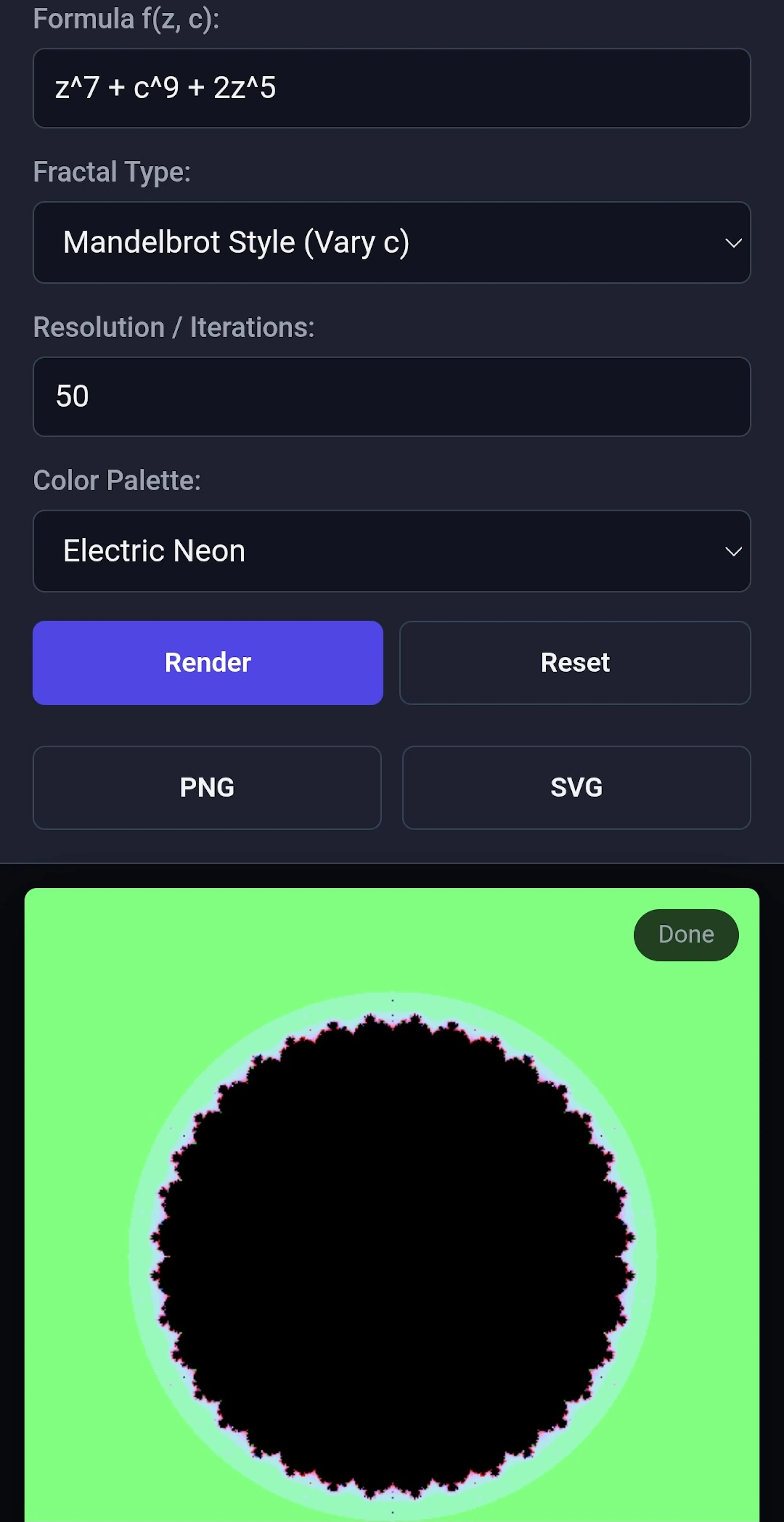
And if you want to try it yourself here is a demo.
Who can benefit from it?
Artists:
Artists can experiment with new formulas to create their own.
I even experimented with a couple of formulas.
Research / experimentation
It could serve as a simple visualization environment for experimenting with families of interactive equations.
As art for webpages
UI developers can use the results for webpages to display them on.
In general, everyone is interested in art. Or this type of art.
How to start:
Start by simple formulas for example:
Z² + c
Or
Z³ + c
And expand with each step to become something like
Z³ + 4c² + 3z²
Why did I build it?
The purpose of the project is to show that mathematics could be used for very beautiful types of art.
It's easy and fun and could show the beauty of mathematics.
Conclusion
This project shows that art has many ways to be implemented. It's fun and could be done by anyone. Artist, programmers, and anyone interested.
And now you can also create your own type of art. With this project.
如有侵权请联系:admin#unsafe.sh