Intro:This is a quick write up on how to set up network and VMs in Proxmox to allow traffic inbound 2026-10-1 23:53:27 Author: www.boredhackerblog.info(查看原文) 阅读量:3 收藏
Intro:
This is a quick write up on how to set up network and VMs in Proxmox to allow traffic inbound but not allow VM to send traffic outbound.
Why?
I may want to host a service/server that may potentially get compromised and run malicious code on it. Maybe I'm hosting a honeypot (see honeypot post here: https://www.boredhackerblog.info/2026/08/honeypot-notes-part-1-deploymentdesign.html )
Essentially, inbound traffic so people can use the service is fine but if someone compromises the service, I don't want them having access to my network or the internet from the compromised host.
Theoretically, you can do this with firewall rules like this:
ufw default deny outgoing
ufw default deny incoming
ufw allow in ssh or whatever service.
Problem with this is that if we were to assume that the attacker escapes the container and escalates privileges, they can just remove these firewall rules.
You could have a secondary firewall that attacker doesn't have management access to obviously but that could get annoying to manage and setup.
The setup:
I'll use the word VM but know that you can do VM or container in proxmox, obviously, in theory, an attacker could escape KVM VM or LXC container.
You'll need to set up a Linux Bridge in proxmox then set up two VMs. One where your service will run and another one that will do traffic forwarding.
It would look something like this:

Create a new Linux Bridge. Only required thing is the bridge name and autostart. You do not need to fill out the IP configuration fields or anything else. Do add a comment. Apply configuration.


NOTE: if your container or VM isn't already running the service you wanna expose, set it up as normal and install & configure your service then assign your new bridge network to the interface.
When creating VM that's gonna host your service, be sure to give it only one network adapter/interface and select the new bridge you made. Assign static IP to the interface. (192.168.3.2)

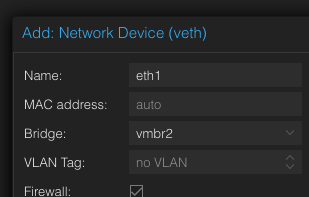
Create a new VM that will do traffic forwarding with normal vmbr0 bridge which provides internet connection. Later on add a new network device with Bridge being the new bridge you made. Be sure to assign static IP to this interface. (192.168.3.3 for example)

Forwarding traffic:
Do pings, curl, or whatever to ensure that your VM hosting the vulnerable service and traffic forwarder can communicate.
You can do traffic forwarding in several ways, see https://github.com/opsdisk/the_cyber_plumbers_handbook
Since I expose my services using cloudflared/cloudflare tunnel, I'd install it directly on my traffic forwarder VM and point it to my service VMs IP or URL.
Alternatively, if you set up tailscale or zerotier tunnel, you can do forwarding with Caddy reverse proxy, rinetd, or socat as well. (obv try not to run a vulnerable service on your traffic forwarder itself and expose it to the service VM that will potentially get compromised)
When the service gets compromised and the attacker eventually gets root, they'll still need to escape VM to get access to additional resources.
One thing to keep in mind is that if you're running wordpress or webapp that gets compromised, the threat actor can technically use that for setting up a phishing page/lure page or host malware/payload since inbound traffic is allowed.
如有侵权请联系:admin#unsafe.sh