Shared context is one of the strongest ideas in HubSpot's new AI architecture.The company now descri 2026-9-30 06:8:19 Author: hackernoon.com(查看原文) 阅读量:19 收藏
Shared context is one of the strongest ideas in HubSpot's new AI architecture.
The company now describes Growth Context as a combined understanding of the business, team, and customer. Context Home can make foundational knowledge available across AI tools. Projects can add instructions, files, HubSpot content, knowledge vaults, and connected applications. Agents can use CRM data and approved tools to complete work.
The obvious benefit is consistency. Teams should not have to explain the company from scratch every time they open an assistant or create an agent.
The less obvious consequence is blast radius.
Disclosure: I am the founder and CEO of INSIDEA, an Elite HubSpot Partner. This article reflects practical experience and independent research. It is not sponsored by HubSpot or any other company mentioned.
When context is shared, one bad instruction, overbroad file, outdated methodology, or inappropriate memory can influence many outputs. I recommend a Least-Context Architecture: give each AI task the smallest set of current, authorized knowledge required to produce a useful result.
Least privilege is not enough
Traditional access control asks whether a user or application may read a record or call an endpoint.
AI systems introduce another question: even if the system may access the information, should that information influence this decision?
A sales project may have permission to read support tickets. That does not mean every internal support comment should shape a prospecting email. A service agent may have access to a product roadmap. That does not mean it should promise an unreleased feature. A marketing assistant may read a deal note. That does not mean a confidential negotiation should become campaign language.
Permission controls availability. Context controls influence.
Enterprise governance needs both.
Four context layers inside HubSpot AI
HubSpot's current documentation exposes several layers with different scopes:
- Portal context: reusable business, brand, product, team, process, and custom context managed through Context Home.
- Knowledge vaults: curated information manually attached to projects or agents for defined use cases.
- Project context: instructions, files, HubSpot records, connected applications, and memories available within a Breeze project.
- User and conversation context: user profile, email personality, saved memories, previous conversations, attached files, and selected sources.
These layers are useful because they let teams reuse knowledge at different levels. They also create possible context paths that are harder to see than a normal permission table.
For each AI output, teams should be able to answer:
- Which layer supplied each important claim?
- Why was that layer in scope?
- Was the information current?
- Did the user have access to the source?
- Could the agent write back to the CRM or another connected tool?
- Would the same context be appropriate for a different team or customer?
If those questions cannot be answered, shared context has become an unbounded dependency.
The six gates of Least-Context Architecture
1. Task gate
Start with the exact outcome.
"Help sales" is not a task boundary. "Summarize the last 30 days of verified buying signals for internal account planning" is.
The task gate defines which knowledge categories are necessary and which are irrelevant. A meeting-preparation summary may need activity history, open tickets, active deals, and recent product usage. It does not automatically need a full employee handbook, all marketing assets, or every private project memory.
2. Audience gate
Define who will receive or rely on the output.
An internal draft, manager recommendation, customer email, public page, and CRM write have different exposure and correction costs.
Audience should determine context eligibility. Confidential commercial context may be appropriate for an internal renewal brief but excluded from a customer-facing response. Sensitive support details may help an escalation manager without belonging in a sales sequence.
3. Source gate
Select authoritative source types before retrieval.
Breeze Assistant can show citations and a Sources section for some responses, including records, connected apps, and memories. That transparency should become part of the decision rule.
For a pricing question, the current product library and approved pricing policy may be eligible. A salesperson's old email and an unapproved deck may be useful clues but should not govern the answer.
Source selection should be allowlisted by task, not left to whichever text is easiest to retrieve.
4. Lifetime gate
Limit how long context remains influential.
HubSpot projects can retain shared instructions, reference materials, and memories across conversations. Persistence improves continuity. It can also preserve an outdated assumption after the campaign, territory, product, or policy changes.
Assign a lifetime to temporary context:
|
Context |
Example lifetime |
|---|---|
|
Brand principles |
Annual review |
|
Product launch messaging |
Launch window plus review |
|
Campaign offer |
End date of offer |
|
Territory exception |
Approved period |
|
Incident instruction |
Until incident closure |
|
User preference |
Until user changes or deletes it |
Expiry should remove the item from default retrieval or force review, not merely add a warning nobody sees.
Separate knowledge access from side-effect permission.
HubSpot projects can include tools such as Write to the CRM. Agent configurations can include actions. Connected applications may expose additional data or capabilities.
An assistant that can read broadly and write broadly has a much larger blast radius than one that can only draft. Use stages:
retrieve bounded context
        ↓
produce a cited draft
        ↓
run deterministic checks
        ↓
obtain the required approval
        ↓
execute one scoped write
        ↓
record the receipt
Do not let the presence of good context substitute for authorization. Knowing what should happen and being allowed to make it happen are separate controls.
6. Review gate
Match review depth to consequence.
Low-consequence internal summaries can use sampling and source inspection. External messages, pricing commitments, lifecycle changes, access changes, deletion, and other consequential actions need stronger validation.
The review gate should verify both the output and the context path. A polished answer can still be unsafe if it relied on an inappropriate source.
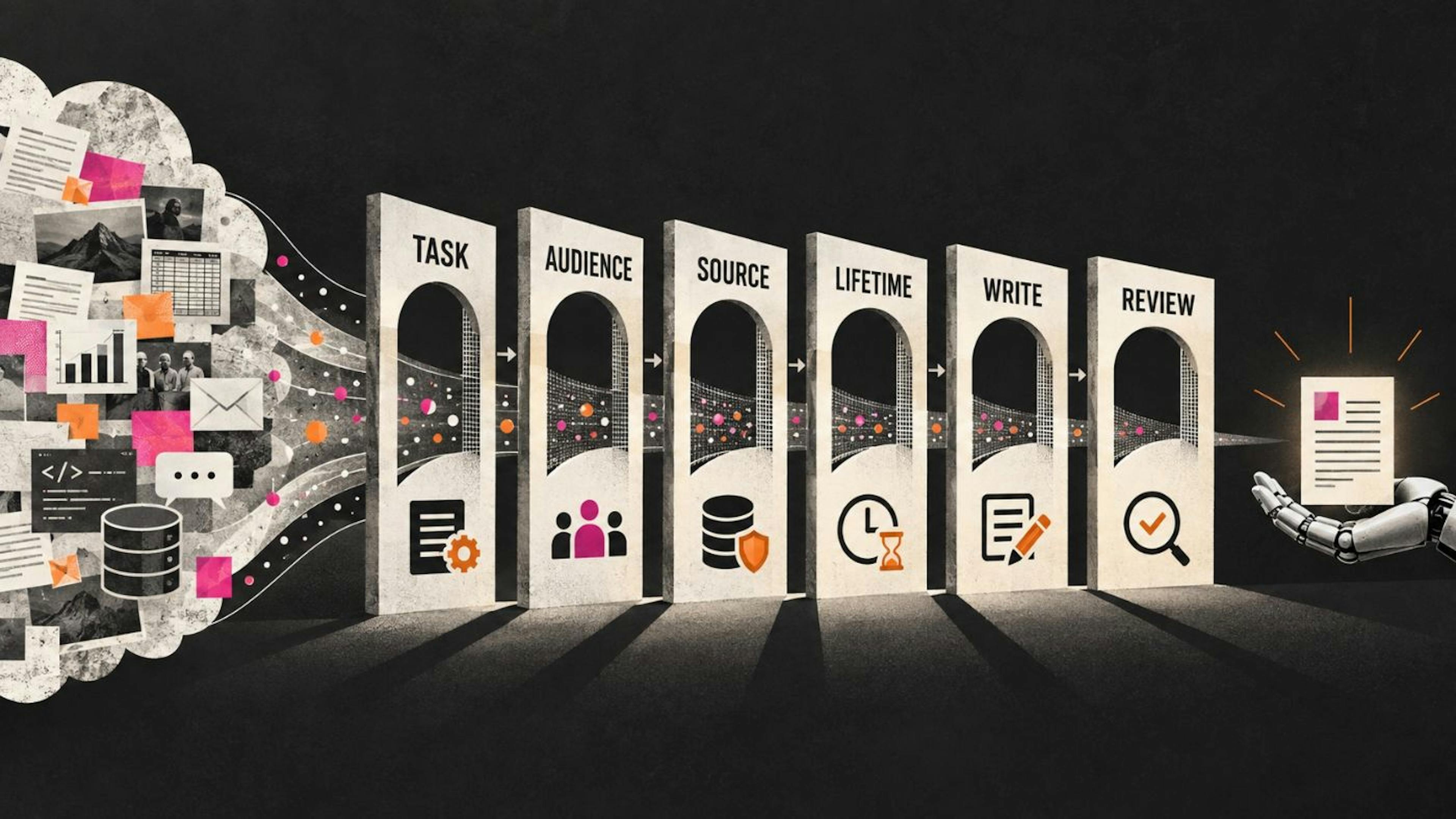
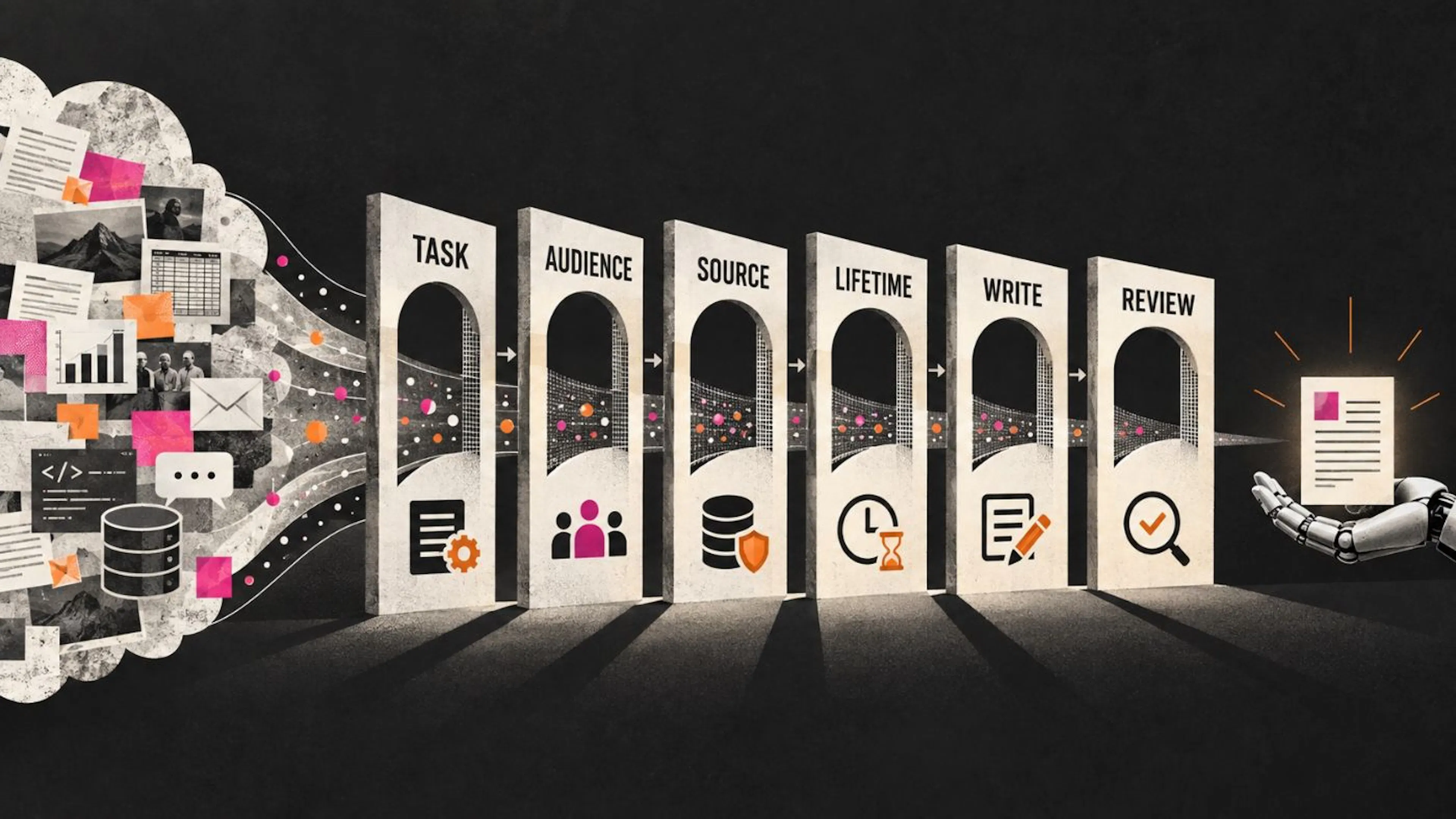 Six narrowing gates labeled task, audience, source, lifetime, write, and review reduce a large context cloud into one bounded AI action.
Least-Context Architecture infographic
Image credit: Original AI-assisted illustration created for this article.
A worked cross-team failure
Consider a company using HubSpot for marketing, sales, and service.
The marketing team creates a project for an upcoming product launch. It contains draft positioning, an estimated release date, target industries, and a file describing features still under legal review. The project is useful for internal planning.
A sales team later creates a prospecting agent. To save time, someone adds the same knowledge vault and broad connected-app access. The agent sees a support conversation where a strategic customer asks for one unreleased capability. It combines the draft roadmap, the customer request, and an old sales memory that says "early access available for enterprise accounts."
The resulting email is persuasive and wrong. It implies the feature is committed and available.
The problem is not that the AI lacked context. It had too much context with too few boundaries.
The six gates produce a different path:
- Task: prospect research and draft outreach, not roadmap commitment.
- Audience: external prospect, so confidential roadmap details are excluded.
- Source: approved product catalog and current messaging guide only.
- Lifetime: old early-access memory is expired.
- Write authority: the agent may draft but not send.
- Review: a person confirms claims and sources before external use.
The AI can still mention the customer's problem and propose a discovery conversation. It cannot turn internal possibility into an external promise.
Context segmentation patterns
Use a small number of repeatable patterns instead of custom rules for every project.
Public-safe context
Approved brand statements, public product facts, published documentation, and reviewed educational material. Suitable for broad content work, subject to freshness checks.
Team-operational context
Processes, methodologies, routing rules, internal definitions, and working instructions. Visible to the relevant team and approved agents, not automatically available across the portal.
Customer-specific context
Contracts, account history, tickets, calls, consent, commitments, and negotiated terms. Retrieved for the resolved customer and task, with record-level permissions and source citations.
Restricted decision context
Security findings, legal advice, sensitive HR content, financial exceptions, access credentials, and other high-consequence material. Use dedicated systems, narrow retrieval, explicit approvals, and auditable actions.
The categories can map to Context Home, knowledge vaults, projects, CRM records, and external systems. The key is to avoid treating storage location as the only security boundary.
Test the blast radius
Before releasing a project or agent, run boundary tests:
- Ask for information from an unrelated team's context.
- Request a customer-facing answer based on an internal draft.
- Add an expired file and verify it is excluded.
- Place conflicting instructions in portal and project context.
- Ask the AI to cite the sources that governed its answer.
- Remove a user's access and verify the context path closes.
- Turn off CRM write capability and confirm the agent cannot mutate records.
- Change a knowledge vault and identify every dependent project or agent that needs retesting.
The expected result is not always refusal. A safe system may answer with a narrower scope, ask for a current source, produce an internal draft, or create a review task.
Metrics for context exposure
Track controls that reveal whether shared knowledge is becoming universal:
- average number of context sources retrieved per action;
- percentage of outputs with source citations or a decision trace;
- expired context items retrieved;
- cross-team context accesses;
- projects with CRM write enabled;
- externally visible outputs requiring correction;
- agent runs blocked because a source was out of scope;
- time to remove or replace a context item across dependent projects;
- unowned knowledge vaults and custom context items.
More context is not a success metric. Appropriate context is.
HubSpot's Growth Context direction addresses a real weakness in enterprise AI: assistants and agents often work without enough knowledge of the business, customer, or team.
The solution should not recreate the opposite problem, where every task inherits every piece of available knowledge.
Use portal context for stable foundations. Use knowledge vaults for curated domains. Use projects for bounded work. Use customer records when the resolved customer is in scope. Use permissions for access, and the six gates for influence and action.
Shared context makes AI more consistent. Least Context makes that consistency safer, easier to explain, and easier to contain when something changes.
Vested-interest disclosure: INSIDEA is linked because I lead the company and its work includes HubSpot, CRM, RevOps, automation, and AI services. The framework and recommendations in this article are independent analysis, not sponsored content.
Sources
- HubSpot, Manage AI context
- HubSpot, Create and manage projects in Breeze Assistant
- HubSpot, Use Breeze Assistant
- HubSpot, Search connected apps with Breeze Assistant
- HubSpot, AI Trust and Safety
- HackerNoon, Before You Automate a Task, Decide Who Can Say No
Hero image credit: Original AI-assisted illustration created for this article.
如有侵权请联系:admin#unsafe.sh