
The walkthrough we kept coming back to was twenty-five years old. We wanted one that reached the rea 2026-9-28 06:0:11 Author: hackernoon.com(查看原文) 阅读量:3 收藏
The walkthrough we kept coming back to was twenty-five years old. We wanted one that reached the reader on our desk. This is our attempt, including the wrong turns.
What this article covers
In
We build a small applet called CollarMAC. It receives a challenge from the host, computes a MAC over it with an AES key that never leaves the chip, and returns the result. A MAC - a message authentication code - is a short fingerprint that proves you hold a secret key; it has nothing to do with a network MAC address. Simple in concept. The journey to get it running on actual hardware is anything but.
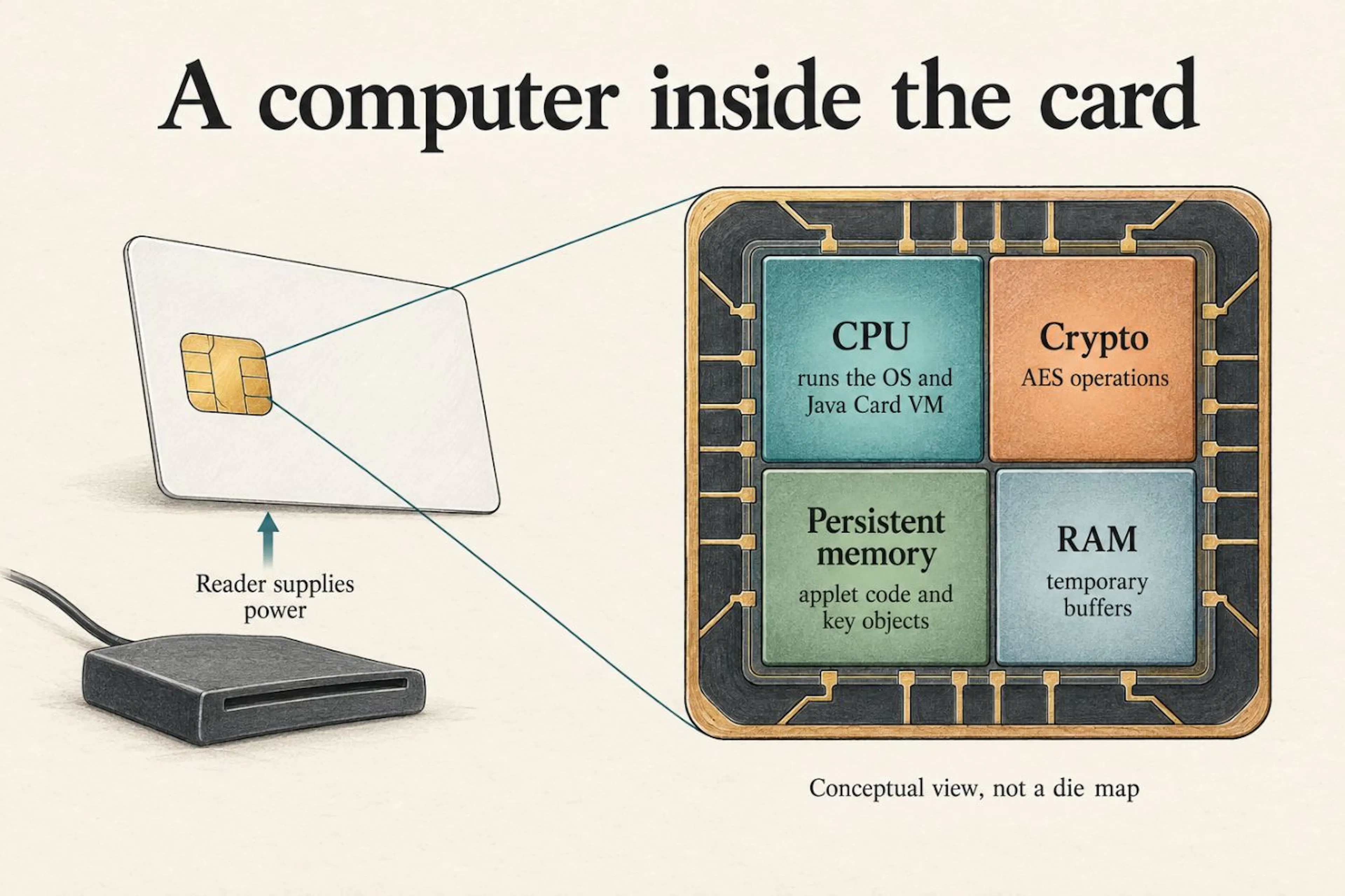 Fig. 1 - A conceptual view of the card: CPU, crypto operations, persistent memory, and RAM.
Prerequisites
- One development card (we use NXP J3R150; with known ISD keys and AES-CMAC support for this build)
- One CCID smartcard reader (ours cost about $10 and reported as "Generic EMV Smartcard Reader")
- Java 17+ (for compilation; Java Card SDK handles the rest)
- Python 3 with the
cryptographypackage (for the host-side scripts) - One evening, if everything goes right. Two, if it does not. This article is about the second evening.
What to buy (and what not to)
The card is the hardest prerequisite, so let us save you our mistake.
Marketplace cards need documentation. Our listing advertised an "unfused, blank" development card and supplied its ISD keys. The secure channel opened and code loaded, but installation returned 6985. We blamed the card for a week. Independent review found a malformed INSTALL command. Before judging a seller, check the bytes you sent; before buying, ask for the ISD keyset and supported Java Card version.
Development kits buy you documentation. Our older Mikron card came with factory keys and a vendor loader. That gave us a useful second implementation to compare. The marketplace J3R150 also ran our applet once we corrected INSTALL. Price alone had told us very little.
What to look for: the Java Card version, GlobalPlatform version, and ISD keyset in hex. "Payment-grade" and "Visa ready" do not answer those questions. An advertised feature is only useful here if you can load and run your own code.
(If you already own a card from the PI260905-2133 batch: the keyset is in the companion repository, and the full cycle - load, install, personalize, answer, rotate - runs end to end with the standard INSTALL form documented there.)
Environment first. On macOS:
git clone https://github.com/Vitaliy69/j3r150-field-kit
cd j3r150-field-kit
python3 -m venv .venv
source .venv/bin/activate
python3 -m pip install cryptography
The Python transport loads macOS PCSC.framework through ctypes; these scripts do not run unchanged on Linux or Windows. They do not use pyscard. The independent javax.smartcardio console in tools/ApduTest.java offers another transport where Java can see a PC/SC reader. For the build, use the repository's SDK and a JDK; the commands below were checked with JDK 21.
Insert the card and start with identification. Then authenticate using its documented keys. Installation and personalization change the card; use a development card whose contents you are prepared to replace.
python3 scripts/card_id.py
Read-only. You should see the reader's name, the negotiated protocol, and the card's ATR. No keys needed, nothing is written. If this prints an ATR and a friendly 9000 on SELECT of the card manager - the hardware half of the tutorial already works.
python3 scripts/open_channel.py
# full installation pipeline (standard INSTALL form):
#   python3 scripts/gp_lite.py delete   # clear the slot, separate session
#   python3 scripts/gp_lite.py full0c   # load + install + make selectable
This runs Step 2's handshake. Success ends with SECURE CHANNEL OPEN. Our case-3 command worked; a separate GPPro v25.10.20 run returned 6D00 for case-4 on this Mac and reader. Gotcha 5 records that result and its limits.
python3 scripts/gp_lite.py open       # channel + registry snapshot
python3 scripts/gp_lite.py delete     # clear the slot (own session)
python3 scripts/gp_lite.py full0c     # load + INSTALL + make selectable
python3 scripts/gp_lite.py perso      # personalize + verify one MAC
The pipeline deletes the old package, loads the CAP, and installs a selectable instance. perso then personalizes it and checks one MAC; rotation has its own example and transcript. For a week INSTALL returned 6985. The corrected data field returns 9000 (Gotcha 18).
Reader caveat from our bench: this Generic EMV reader on macOS sometimes fails the next connection with 0x80100066, even after a successful SELECT-only session. Reseat the card before each independent command above if your setup behaves the same way. A handle kept open survived two minutes without APDUs; reconnecting after it closed failed. SCardDisconnect(UNPOWER) did not cure it. We have not isolated the reader, driver, or card as the cause. The repository's diagnostic notes contain the timings.
The channel-opening scripts default to our batch keyset. gp_lite.py also accepts GP_KEYSET, GP_KENC and GP_KMAC. Use the values supplied for your own card. GP_INSTANCE chooses the installed instance AID; it does not change the module AID compiled into the CAP. card_id.py needs no keys.
Test in a simulator first. Before touching real hardware, run your applet in
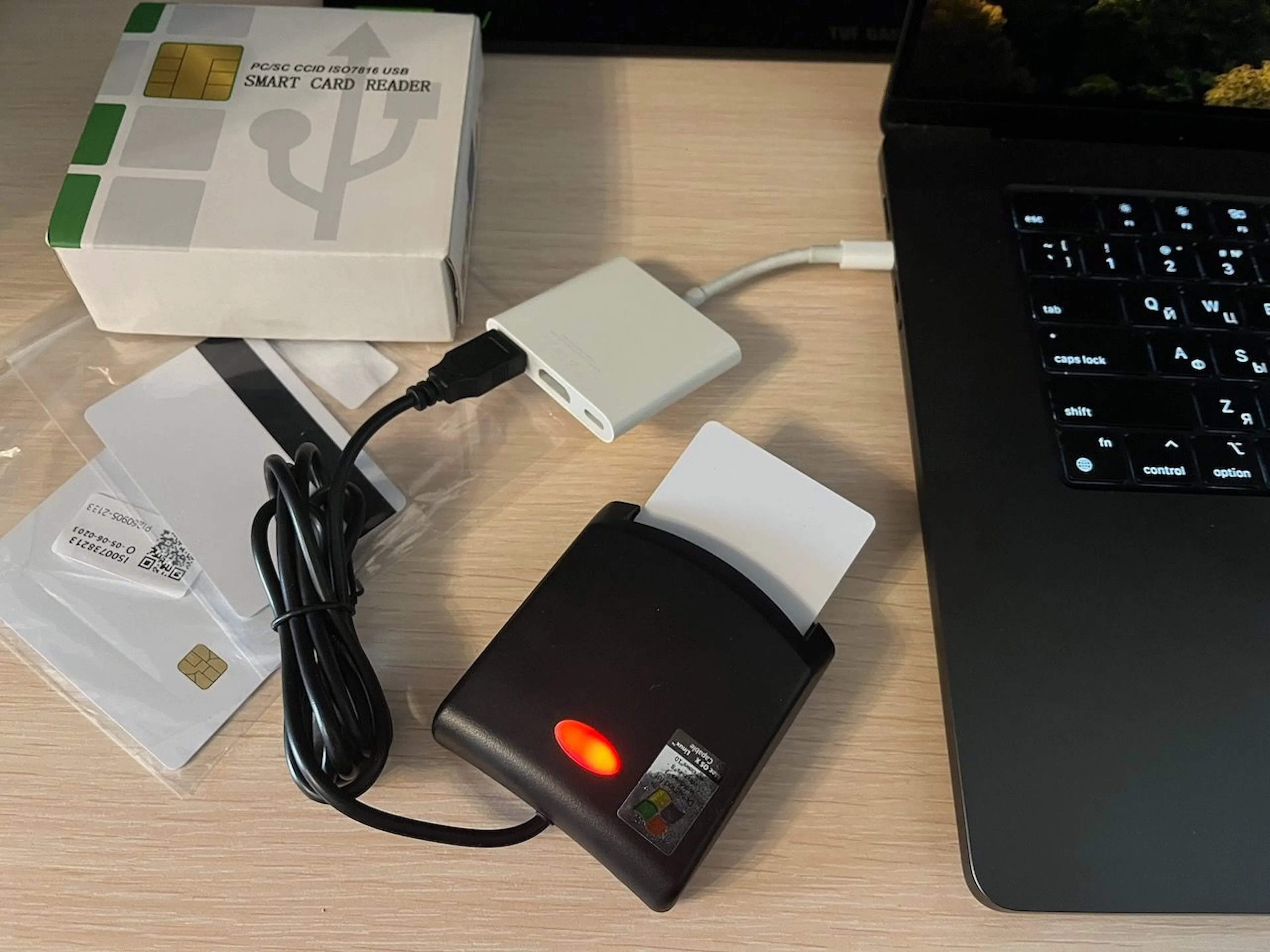 Fig. 2 - The bench: a $10 reader, a dev card, and nothing else.
The 25-year gap
We found API references, old tutorials, and plenty of source code. What we struggled to find was a walkthrough that joined them up on our hardware.
GlobalPlatformPro's SCP02Wrapper.java helped us follow the MAC chain. The vendor's 2019 Smacon logs gave us a working LOAD exchange for the older card. And the specification tables eventually explained the command we had spent a week calling a firmware lock.
We were blind kittens more often than we would like to admit. At 2 AM, a byte dump feels more useful than another chapter. It helps to have both open. We learned that part late.
Step 1: Build the applet
The applet source
The applet has two commands to start with: personalize a key, then MAC a challenge. Rotation comes later.
Three entry points matter:
installis the card calling your constructor. The card manager runs it when GlobalPlatform installs the CAP file.register()puts the applet into the card's registry.processis yourmain, one APDU at a time. Every command arrives here. Check everything: CLA, INS, P1, P2 - the four header bytes of every command, dissected in Step 2.- The AID is the address. One AID names the package, another names the applet. When you SELECT (ask the card to activate an applet) and get
6A82("no such thing"), you probably addressed the package instead of the applet.
Note the naming convention: the package AID is F000000001DEAD (7 bytes), and the applet instance AID is F000000001DEAD01 (8 bytes - the package AID plus one byte). These are two different addresses for two different things: the package is the code container, the applet is the running instance. You SELECT the applet AID, not the package AID.
A note on older cards (Java Card 2.2.2)
The listing uses ALG_AES_CMAC_128, available in Java Card 3.0.5. The older example in applet/CollarMAC222.java uses ALG_AES_MAC_128_NOPAD, which is CBC-MAC. Changing the constant does not port this protocol: CBC-MAC requires block-aligned input and a different host calculation. With our context byte, alignment applies to context || message, not just the challenge. Use the separate older example to explore that API; do not substitute it into this CMAC demo.
Building the CAP file
The converter packages Java classes into a CAP file. The repository's complete source is sim/CollarMACRotate.java; it includes the rotation command introduced later. From the repository root, with JDK 21 on PATH:
# Remove stale classes from this applet package before converting.
rm -rf build/collarmac
mkdir -p build
javac --release 8 -classpath sdk/jc305u2/lib/api_classic.jar -d build sim/CollarMACRotate.java
python3 -c "from pathlib import Path; p=Path('build/collarmac/CollarMACRotate.class'); d=bytearray(p.read_bytes()); d[7]=51; p.write_bytes(d)"
java -cp sdk/jc305u2/lib/tools.jar \
  com.sun.javacard.converter.Main -config CollarMACRotate.opt
The CAP appears at build/cap/collarmac/javacard/collarmac.cap. The class-header patch below works for this small source; it is not a translator for arbitrary modern Java features.
Gotcha 1: The converter rejects modern bytecode. Java Card 3.0.5 converter (2017) does not accept class files above major version 51 (Java 7). Java Card 2.2.2 converter (2005) does not accept anything above major version 48 (Java 1.4). JDK 17's minimum is --release 7 (major 51). Our older SDK experiment also patched the class header to major 48. That only changes the declared version; it cannot translate unsupported bytecode or APIs.
Gotcha 2: The converter requires a real Java package. The default package (no package statement) causes input class directory not found. Wrap your applet in a package.
Gotcha 3: keep the CAP stream tied to the tested build. A CAP contains separate components for code, imports, metadata, and other runtime information. Our current installer sends them in COMPONENT_ORDER, including Descriptor when present. Earlier Mikron experiments associated a Descriptor-bearing stream with 644F; that does not prove Descriptor must never be uploaded. The current J3R150 build loaded successfully with this component selection. Save the CAP hash and inspect what your installer actually sends.
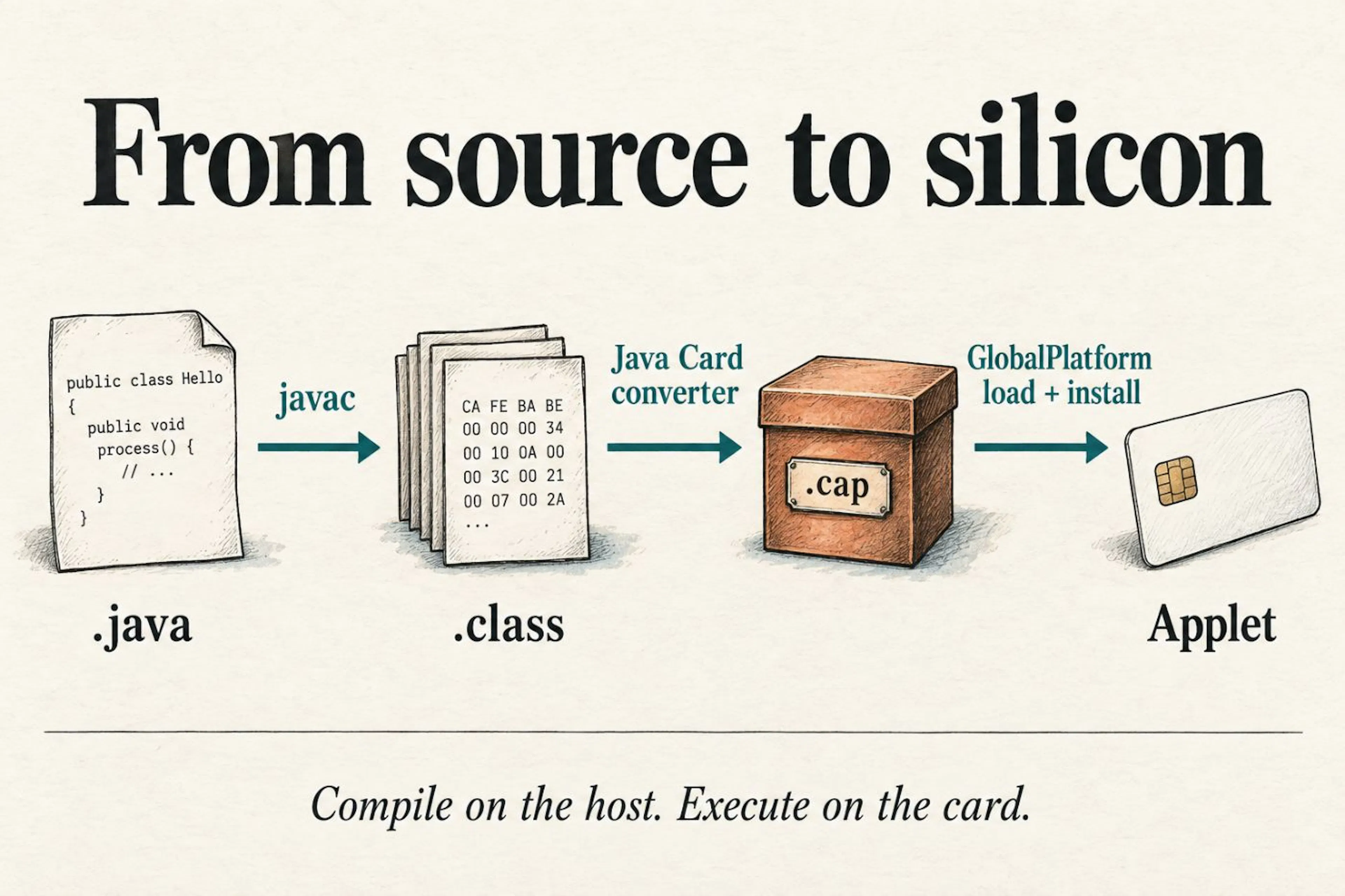 Fig. 3 - Compile on the host, convert to CAP, load and install on the card.
Step 2: Open a secure channel
Before you can install anything, you need to authenticate to the card's Issuer Security Domain (ISD) using GlobalPlatform's Secure Channel Protocol 02 (SCP02). This is a three-step dance: SELECT, INITIALIZE UPDATE, EXTERNAL AUTHENTICATE.
A command starts with CLA, INS, P1, and P2. Data and length fields depend on its case. This short SELECT includes both Lc and Le:
|
Byte |
Name |
Role |
|---|---|---|
|
00 |
CLA |
the class of the command |
|
A4 |
INS |
the instruction: SELECT |
|
04 |
P1 |
select by AID |
|
00 |
P2 |
no qualifier |
|
08 |
Lc |
eight bytes of data follow |
|
F0 00 00 00 01 DE AD 01 |
DATA |
the applet AID |
|
00 |
Le |
up to 256 response bytes in a short APDU |
The card answers with two status bytes: 9000 for yes, 6A82 for "no such thing", 6D00 for "I do not know this instruction", 6982 for "you are not who this is for", 6985 for "not under these conditions".
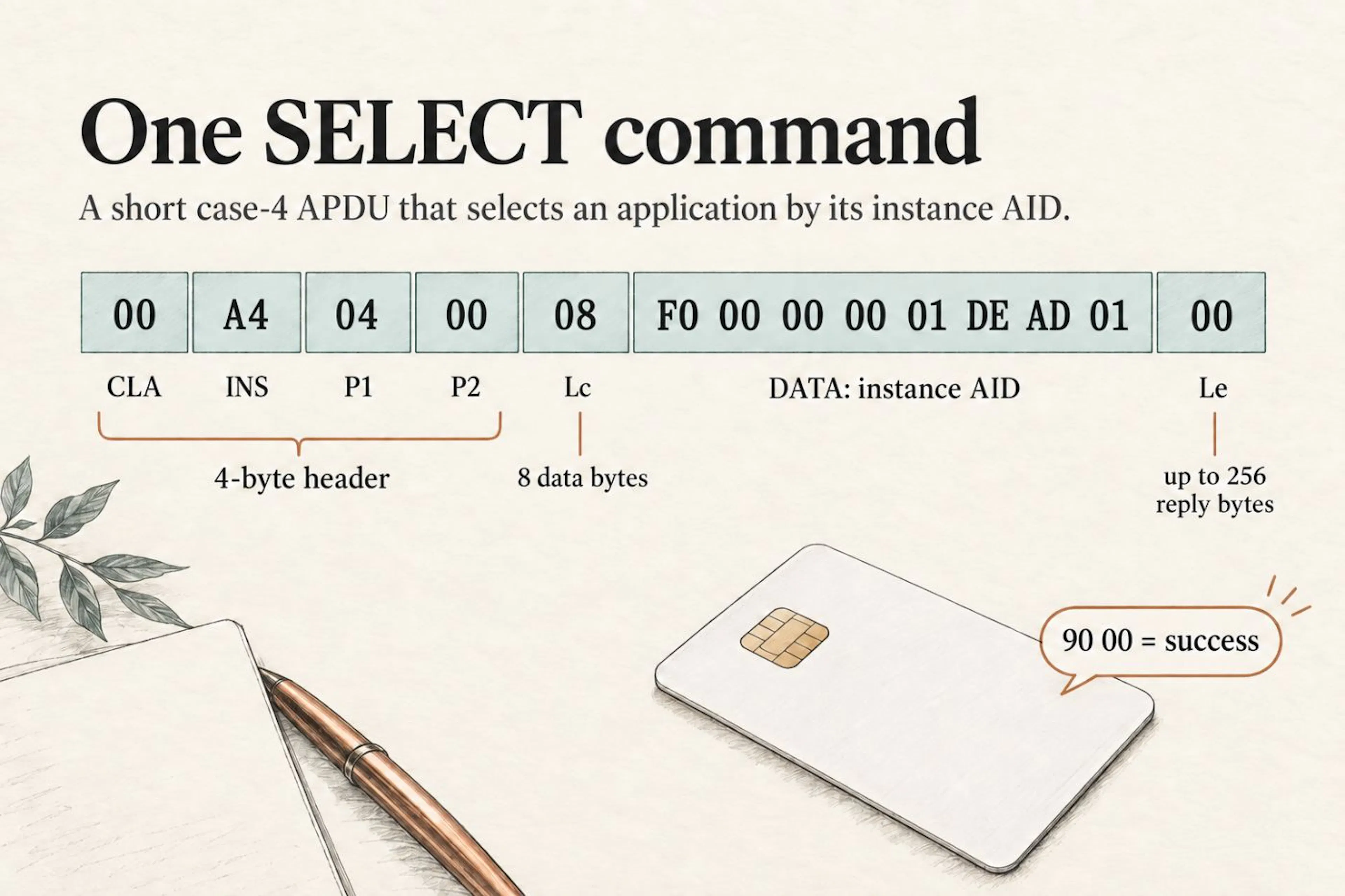 Fig. 4 - One short SELECT APDU: four header bytes, Lc, the instance AID, and Le.
The commands below share that header structure. Some carry data; some request a response. A successful MAC exchange looks like this:
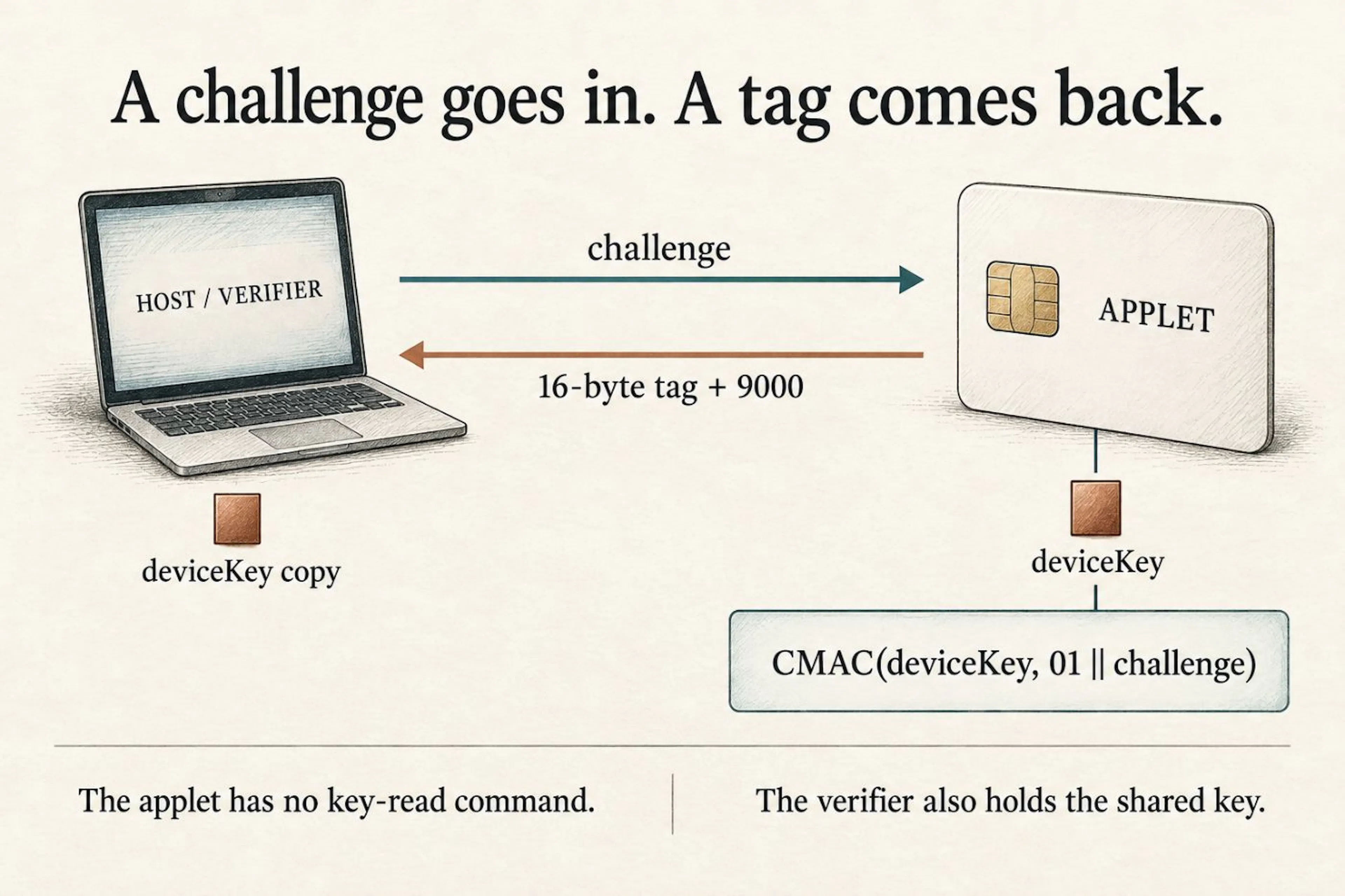 Fig. 5 - The applet returns CMAC(deviceKey, 01 || challenge). The verifier holds its own key copy."
INITIALIZE UPDATE
80 50 00 00 08 <host_challenge 8 bytes>
The response payload is 28 bytes: diversification data (10), key version (1), SCP identifier (1), sequence counter (2), card challenge (6), and card cryptogram (8). The status word follows separately. Verify the cryptogram before sending EXTERNAL AUTHENTICATE.
Gotcha 4: The response we thought was truncated - the firmware was innocent. Our INIT UPDATE responses kept arriving 26 bytes long where 28 were expected, and we wrote it down as a card quirk. An independent review traced it to our own transport: when a response arrives chained (61xx then GET RESPONSE), our assembler stripped the status word twice - once while concatenating, once on return - silently eating two payload bytes of every chained exchange. The fix was one flag. The lesson stayed: when a card misbehaves, unit-test the client against a mock before accusing the silicon.
Deriving session keys
The three static ISD keys have separate roles: KENC supports channel authentication and encryption, KMAC authenticates commands, and KDEK protects sensitive data such as replacement keys. Each session key uses the two-byte sequence counter:
Here x2 is the sequence counter. derive encrypts 01 || usage || x2 || 12 zero bytes with 3DES-CBC and a zero IV: 16 bytes, or two DES blocks. See
EXTERNAL AUTHENTICATE
84 82 01 00 10 <host_cryptogram 8 bytes> <C-MAC 8 bytes>
Gotcha 5: case-3 worked on our bench; case-4 failed. The two forms differ by one trailing Le byte. An independent GPPro v25.10.20 run, through javax.smartcardio on macOS 26.7 and our Generic EMV reader using T=0, returned 6D00 for case-4 EXT AUTH. That reproduced the failure without our Python binding. Our working client sends case-3. This is evidence about that setup, not every tool release or every reader; we have not isolated which layer rejects the other form.
The card reports SCP02 support, and a verified handshake confirms it. Its advertised data and the working MAC chain are separate observations. We previously claimed that an OID ending in 02 proved encrypted ICVs. That inference was wrong: SCP02's option byte is a bit map, and ICV encryption uses bit 0x10, not 0x02. The kit reproduces the chain that worked on this bench.
Use documented keys. We did not establish an authentication-attempt limit or a permanent-lock threshold for this card. The earlier "3-10 attempts" warning was not a measured result. Check the card cryptogram locally before EXT AUTH; a mismatch means stop and check the keys, diversification, and client calculation.
For the working chain, the first post-authentication command uses DES-ECB(s_mac[:8], EXT_AUTH_MAC) as its ICV. Later commands use the previous command MAC in the same way. This is the ICV-encryption mechanism described in
Gotcha 6: The ICV chain starts at EXT AUTH. The comment in GPPro's source says "ICV MUST be always 0" - but that is misleading. The EXT AUTH command itself is the first command wrapped by the secure channel, so its MAC becomes the ICV for the second command. The first post-auth command uses DES-ECB(EXT_AUTH_MAC) as its ICV, not zeros. Every subsequent command uses DES-ECB(previous_MAC).
Step 3: Load the code
INSTALL for load
Before sending code, tell the card which package is coming.
Gotcha 7: an empty field still needs its length. GP 2.2.1 has five fields here: load-file AID, security-domain AID, hash, load parameters, and Load Token. Their lengths remain present when values are empty. Our old "four-field versus five-field dialect" explanation was another misreading. See
The working command is:
84 E6 02 00 1C
07 F000000001DEAD       # load-file AID
08 A000000151000000     # security-domain AID
00                     # empty hash
00                     # empty load parameters
00                     # empty Load Token
<8-byte C-MAC>
The data field is 20 bytes before the MAC, so Lc is 28 (1C) after wrapping. No extra signature slot is needed.
LOAD blocks
The code arrives in blocks, wrapped in a TLV:
C4 <length_encoding> <CAP component bytes...>
Where <length_encoding> depends on the total payload size (see Gotcha 8): one byte for 0-127, 81 xx for 128-255, or 82 xx xx for 256+. Our 593-byte payload used 82 02 51.
Gotcha 8: BER-TLV length encoding matters. For payloads of 128-255 bytes, the length field must be 81 xx (two bytes with prefix 81), not a single byte. For 256+ bytes, it must be 82 xx xx. Sending C4 DA for 218 bytes is invalid (218 > 127) and gives 6A80.
Gotcha 9: LOAD block boundaries mattered in our tests. A word about the bench first: it held cards from two vendors. One is the NXP J3R150 - the modern payment-platform chip this tutorial targets. The other is a Mikron IoT card, a Java Card 2.2.2 part from a 2019 pet-tracker project, kept around precisely because it is a different animal. Same specification on paper, same SCP02 channel, comparable management operations, but two different observed choices of what a LOAD block should look like:
|
Format |
Description |
Accepted by |
|---|---|---|
|
Combined |
TLV header + data in the same block, ~247B per block |
NXP J3R150 |
|
Split |
Block 1 = TLV header only (4 bytes), blocks 2+ = data (220B each) |
Mikron IoT cards |
From the transcripts, the first block of each dialect:
Combined (what the J3R150 accepted): 84 E8 00 00 FF C4 82 03 37 01 00 11 DE ... - the C4 tag, the three-byte length (0x0337 = 823 bytes of code), and the first chunk of code, all in block one.
Split (what the Mikron accepted): block one carries four bytes of data - just the tag and the total length (C4 82 xx xx; the full APDU is 84 E8 00 00 04 C4 82 xx xx). The code itself starts in block two: 84 E8 00 01 DC <220 bytes>, block after block.
In those sessions, neither card accepted the other tested block layout. The J3R150 rejects the split format with 6A80 on block 1. The Mikron rejects the combined format with 644F on block 2. The vendor's tool (Smacon) uses the split format; GlobalPlatformPro uses the combined format - those tool versions used different block boundaries.
The traces show different accepted block boundaries. They do not establish a universal NXP-versus-Mikron split, or prove why the combinations failed. Keep the accepted sequences as test cases, with reader, OS, protocol, and CAP recorded. Change one variable at a time.
The LOAD dialect issue may also be protocol-dependent. Our Mac reader negotiated T=0 with both cards, but a Windows reader might negotiate T=1 (where data is sent in blocks with CRC rather than character-by-character with procedure bytes). We confirmed that the J3R150 is T=0-only on our Mac reader; the Mikron accepted both protocols. If you are building a cross-platform installer, you may need to handle both T=0 and T=1 LOAD block formatting.
Can you choose the protocol? Partially - it is negotiated between reader and card at connect time. In pyscard you can request one explicitly (SCardConnect(..., SCARD_PROTOCOL_T0, ...) instead of SCARD_PROTOCOL_ANY) and read back what you actually got from SCardStatus. Our scripts log it on every connect - SCardConnect: 0x0 | proto: T=0 - which is how we know. A T=1-only request may fail when that protocol is unavailable. Always check both the return code and negotiated protocol.
INSTALL for install
After the code is loaded, you instantiate it:
84 E6 0C 00 Lc <LV package> <LV module> <LV instance> 01 00 02 C9 00 00 <8-byte C-MAC>
Gotcha 10: the INSTALL "dialect" that was not a dialect. We first believed the standard form carries the Security Domain AID as the third field, and called the instance-AID form a Mikron dialect. The reverse is true: in GP 2.2.1 the third AID field is the application instance AID, followed by [01 00] (privileges, length-value - canonical), [02 C9 00] (parameters), and a final [00] (empty Install Token length). Our "dialect" was the spec; our "standard" was the misreading that cost a week (Gotcha 18).
Step 4: Talk to your applet
SELECT
00 A4 04 00 08 F0 00 00 00 01 DE AD 01 00
Status 9000 means the applet is alive and selectable.
Personalization
80 40 00 00 20 <device_key 16B> <CMAC_under_transport_key_over_device_key 16B>
The second block is a CMAC computed with the transport key (the factory test key hardcoded in the applet listing - 4041...4E4F) over the device key: proof that the sender knows the factory secret. The applet verifies the CMAC before accepting the key. Before personalization, the MAC command returns 6985 (conditions not satisfied) - by design.
Personalization is one-shot. The personalized boolean is stored in EEPROM. Once set to true, it cannot be reset. A second personalize command returns 6985. This is deliberate: if you could re-personalize, so could an attacker who has the transport key. A second PERSONALIZE cannot reset the instance. The rotation extension below is separate; if the current key is compromised, possession of that key no longer distinguishes the owner from an attacker.
MAC command
80 32 00 00 08 51 42 43 44 45 46 47 48
The card responds with 16 bytes of AES-CMAC and 9000.
On the host side, verify. Here card_response is the returned MAC payload, with the two status bytes already removed:
Where this was verified. Transcript 39 proves personalization and MAC on hardware for the earlier, unprefixed build. Transcript 41 covers the later build with domain separation, rotation, and key persistence. Use the current source and its matching host calculation together. The simulator harness and both raw sessions are in the
Step 5: PUT KEY (change the card's keys)
If you have a card whose keys you know (factory defaults, or a published batch keyset), you can replace them with your own:
84 D8 00 81 Lc <new_version> [for each key: <type> <length> <encrypted_key> <kcv_len> <kcv>]
Gotcha 11: PUT KEY encoding is P2-sensitive. P2 must be 0x81 (key 1, "more keys follow"). P2=0x00 gives 6A86. The per-key encoding does NOT include the key ID byte - keys are identified by their position in the sequence, starting from the key number in P2.
Keys are encrypted with the session DEK key (the third session key from Step 2) in 3DES-ECB - each 8-byte block independently, no chaining. Each key's KCV (key check value - a fingerprint that lets the card verify it decrypted the right material) is the first 3 bytes of 3DES-ECB(zeros) under that key. The data block, decoded: new key version 01, then for each of the three keys: a type byte, length 10, 16 encrypted key bytes, KCV length 03, the KCV. The card answered 01 8BAF47 8BAF47 8BAF47 - the new version number and the same KCV three times, because we had installed one factory key as all three (ENC, MAC, DEK), and the card confirmed each.
On our J3R150, PUT KEY successfully replaced the batch keyset (version 0xFF) with the factory default 404142434445464748494A4B4C4D4E4F (version 0x01). The card confirmed the new keyset with three KCV responses (8BAF47 three times - the same key used for ENC, MAC, and DEK). After PUT KEY, the card accepted authentication on the new keyset. However, the INSTALL failure (6985) persisted regardless of which keyset was active - which we read as a firmware-level lock. The persistence had a simpler cause: our INSTALL data field was malformed, and a malformed field fails identically under every keyset (Gotcha 18). (Replacing the listing's advertised transport key with the factory default is the classic dev-card initialization ritual - the JCOP21 generation did exactly this with its own printed TK for a decade.)
Gotcha 12: Algorithm names differ - and they are NOT equivalent. Signature.ALG_AES_CMAC_128 (JC 3.0.5+) implements CMAC as defined in NIST SP 800-38B: it handles arbitrary-length input through subkey derivation and padding. Signature.ALG_AES_MAC_128_NOPAD (JC 2.2.2) implements raw CBC-MAC without padding: it requires 16-byte-aligned input and produces a cryptographically different result. They share a purpose but not a construction. Always check which JC version your card runs, use the matching constant, and adjust your host-side verification accordingly (Python's cmac.CMAC matches ALG_AES_CMAC_128, not NOPAD).
Gotcha 13: EEPROM has finite write cycles - and you inherit an unknown count. A development card is not a USB stick, but it is also more durable than our first interpretation suggested. Card EEPROM is typically rated on the order of 100,000 erase/write cycles per cell - twenty install/delete cycles in one session cannot exhaust healthy memory. Our Mikron became unresponsive during that session: mid-experiment, one long bench session layered on top of seven years of unknown prior life. Whether that was accumulated wear finally crossing the line or plain component age is not diagnosable from outside the die. That observation is not a wear measurement. Avoid needless write loops, but do not diagnose worn-out EEPROM from a connection error.
Gotcha 14: a successful session can still be followed by a failed reconnect. We reproduced this with native Apple PC/SC calls and SELECT only. Keeping the handle open for 120 seconds preserved a working SELECT. Closing it and reconnecting failed after 14 seconds; explicitly unpowering at close also failed on the next probe. The USB reader remained present. Reseating the card restored access. That narrows the symptom to reconnection in our setup, but does not identify a faulty component. An unhandled 61xx is not needed to trigger it.
Gotcha 15: GET STATUS P1 values vary by firmware generation. Some cards accept combined P1 values (0x82 for ISD+apps), others require sequential queries (P1=0x80 for ISD, then P1=0x40 for apps, then P1=0x20 for load files). The sequential approach with P2=0x02 (TLV format) is the most portable.
Step 6: Managing the card
DELETE - removing what you put there
84 E4 00 00 Lc 4F <AID_length> <AID> 00
This is the exact form that worked on our J3R150 (transcript 08): the 4F tag, the length, the package AID, a trailing zero, then the C-MAC. About that trailing 00: ISO 7816-4 explicitly allows meaningless 00 or FF bytes before, between, or after BER-TLV objects - so this is most likely exactly that: padding the firmware happens to expect (or simply tolerate), not a second data field with its own role. We reproduce it byte-for-byte rather than assign it a meaning the specification does not support. P2=0x80 requests deletion of related objects; it is not a "delete by unique AID" selector. The Mikron was pickier - several DELETE encodings died with 6A80/6A82 (transcript 20) - the dialect story again. Expect 6A88 when there is nothing to delete; on an empty registry that is a clean run.
SET STATUS - walking the lifecycle
84 F0 80 07    (ISD -> INITIALIZED)
84 F0 80 0F    (ISD -> SECURED)
P1=0x80 targets the ISD's lifecycle state. P2 carries the new status: 0x07 for INITIALIZED, 0x0F for SECURED. We successfully walked the J3R150 through OP_READY, INITIALIZED, and SECURED - the status changes were confirmed by GET STATUS (the 9F70 tag - the lifecycle status field in the response - changed from 01 to 07 to 0F). On the J3R150, changing lifecycle did NOT change the INSTALL answer - identical 6985 in all three states. We read that as "the lock is deeper than lifecycle"; in hindsight the malformed INSTALL never depended on lifecycle at all. On the Mikron card, SET STATUS was never needed because the card was already in a working state.
GET STATUS with AID filter - confirming your code arrived
84 F2 20 02 Lc <4F> <AID_length> <your_AID>
This is the most satisfying command in the pipeline: it asks the card "do you have my package?" and the card answers with its registry entry. When we saw 4F 07 F000000001DEAD in the response, we knew the code was physically on the chip.
What is proven where
|
Operation |
Where |
Result |
Transcript (repo) |
|---|---|---|---|
|
CAP build (JDK 21, |
host |
current build and hardware check |
41 |
|
SCP02 channel, LOAD, INSTALL (standard form) |
card, batch keys |
|
38 |
|
Personalize; MAC vs host computation |
card, |
byte-for-byte |
39 |
|
One-shot personalization |
card |
repeat -> |
39 |
|
Cross-domain forgery (MAC tag replayed to ROTATE) |
card + simulator |
rejected |
40, 41 |
|
Rotation, key persistence, superseded-tag replay |
card |
|
41 |
|
Boundary lengths 1..32 vs host |
simulator |
18/18 |
40 |
The walls, including two we built ourselves
Gotcha 16: preserve the working LOAD trace. Our NXP and Mikron sessions accepted different block boundaries (Gotcha 9). Save the exact CAP and exchange. "LOAD failed" leaves the next person guessing at the bytes, reader, and protocol.
Gotcha 17: Development cards from marketplaces have unknown remaining write cycles. You are buying a used car without an odometer. The card might have been used for two years of daily debugging (like our Mikron) or might be genuinely fresh. There is no way to tell from the listing.
 Fig. 6 - Two phantoms from our own code: malformed INSTALL data and a broken PC/SC binding. Illustration; hardware evidence is in transcripts 38-41.
The original sessions covered two marketplace cards and the older Mikron. A later J3R150, labeled #3 in the repository, supplied the corrected INSTALL and rotation proof. The two earlier J3R150 units have not been re-verified with the corrected command.
Card 1: NXP J3R150 from AliExpress (the one we called locked)
Sold as "unfused, blank developer card" from batch PI260905-2133, card serial I500738213, ATR (Answer To Reset - the byte string a card sends when it powers up) 3B 6A 00 FF 00 31 C1 73 C8 40 00 00 90 00. The registry was populated; the fuse state and prior use were not established.
Here is what we could read: the ISD reports an associated Supplementary Security Domain (A0000001515350), and the registry carries five Visa load files (A000000003... family - three variants of the Visa Token Service, plus two legacy Visa applets) and an NFC Forum applet (D276000085304A434F900001 - the standard NFC stack that payment chips ship with). Individually, none of these entries is a fingerprint: GPPro discussion #341 documents a similar registry (same SSD, same NFC Forum applet) on an ordinary development card that authenticates with factory test keys and carries obvious test applets. We found no obvious test applets and did find the Visa Token Service load-file set. Neither observation establishes that the seller misrepresented the card. For a week we added a third item to that list - the instantiation "lock" - and built a payment-pipeline story on top of it; the lock dissolved the moment our INSTALL data field was corrected (below), and the story retired with it. What the registry still says: this card's history is unknown, and we can prove only what the card answers. We did not inspect payment personalization. ISD lifecycle alone does not establish the state of those applications.
The card's ISD keyset, meanwhile, is no secret - and no leak. The seller stream cross-lists on AliExpress and Amazon; the Amazon listing prints all three values under a "TK VALUE SETTING EXAMPLES" bullet, next to a ready-made GPCMAUTH authentication example (ENC 90379A3E7116D455E55F9398736A01CA, MAC 473F36161A7F7F60CC3A766EA4BE5247, DEK D3749ED4FF42FD58B39EEB562B017CD9.
A detail worthy of the genre: the listing's ENC key contains a Cyrillic З where the ASCII 3 belongs - copy the value straight from the page and authentication dies with "Card cryptogram invalid"; the working ASCII form is what the discussion and this article carry. That is the advertised transport key for the product line - the same genre of printed front-door key the JCOP21 generation shipped with for a decade. It distinguishes this card from nothing: every buyer of the listing receives the same key.
These are management keys. They authorize card-content operations. They are not the payment applications' transaction keys, and our tests did not establish access to payment credentials. The seller publicly supplied this ISD keyset for development.
What works after correction: LOAD, INSTALL, SELECT, personalization, MAC, and rotation on the J3R150 used for transcripts 38-41. The older failures remain in the archive with their original commands.
What did not work - and then what actually did: INSTALL for install answered 6985 for a week: three cards, two keysets, every lifecycle state. We diagnosed everything around it - inventoried the keys (no token keys exist on the card), excluded the token and DAP mechanisms, probed the encrypted-session levels, split the combined command to localize the refusal. Everything except the command itself. An independent review laid our data field against the spec tables and found it in an afternoon: the third AID slot in INSTALL [for install] belongs to the application instance, and we had been sending the ISD's AID there - a built-in AID conflict - with the Install Token length missing from the tail. The corrected standard form answered 9000 on the first try. The hardware-level lockdown was our own bytes.
Gotcha 18: the phantom lock - your best diagnostics cannot save you from your own bytes. A 6985 on INSTALL says only "conditions not satisfied", and we chased it properly: we inventoried the card's keys (only the three transport 3DES keys - no token keys, so the token mechanism was never even personalized), split the combined INSTALL into its halves to localize the refusal, probed the C-DECRYPTION level with every advertised key value, walked the lifecycle through all three states. Rigorous - and beside the point, because every probe reused the same malformed data field: the ISD's AID sitting in the instance slot, the token length missing from the tail. No amount of characterizing the card's answers will find a bug that lives in your question. The test we skipped was the first one to run: lay the command bytes against the specification tables, field by field.
The same week taught the lesson twice. The "SELECT hang" that ended our hardware sessions turned out to be our own PC/SC binding - a structure twice the size the SDK defines, an extra argument, and a return code we never checked. An independent javax.smartcardio transport selected the applet in thirty milliseconds. Both phantoms died the same way: someone else read our code. The historical probes remain in the transcripts. The current installer uses the corrected standard form; the invalid encrypted-install experiment is archived. Start with the specification tables before repeating a diagnostic sweep.
Why we withdrew the seller theory: the Visa-pipeline story explained a lock that did not exist. What remains true: the Visa Token Service load files in the registry, the missing test applets, the supplementary security domain - the card's history is genuinely unknown. But "refuses to run" was never the card's behavior; it was an honest answer to a malformed question. The best guess retired with the lock.
Card 2: Same batch, untouched
Identical 6985 on a factory-fresh card from the same seller - which we read as "the lock is innate to the batch." In truth, two cards cannot corroborate a lock if both are answering the same broken question. Reproducibility confirmed our bug, not the vendor's.
Card 3: Mikron IoT development card (2019, from a pet-tracker project)
A genuine development card from a Russian chipmaker (ATR 3B 78 13 00 00 80 31 C0 72 F7 41 81 07), originally used for an NB-IoT asset-tracking project - the same project that became part one of this series. Uses factory keys (404142434445464748494A4B4C4D4E4F for all three). Runs Java Card 2.2.2 with SCP02.
What worked: Loading, installation, SELECT, and the pre-personalization guard. On Windows, using the vendor's Smacon tool (Smacon is the chipmaker's proprietary loader, shipped with their development kits - there is no public download; ours came from the same 2019 project archive as the card): INSTALL for load, LOAD (4 blocks), INSTALL for install, SELECT, MAC before personalization (6985). The applet was alive and responding.
What stopped working: Later in the session, the Mikron stopped answering with SCARD_W_UNRESPONSIVE_CARD, including in our cross-platform checks. That happened after roughly twenty install/delete cycles, on a card with years of prior use. Timing alone does not identify EEPROM wear, component failure, or reader interaction. We stopped the experiment without establishing the cause.
Why this matters: Development cards have finite write cycles. The EEPROM wears out. When buying a "used development card" from a marketplace, you are buying remaining write cycles you cannot count.
The key lifecycle, now with hands
Part one followed a device key from generation to revocation. The applet demo follows that key; SCP02 uses a different set of management keys.
|
Device-key stage |
Operation |
Evidence |
|---|---|---|
|
Generate |
Host generates 16 random bytes |
Python example below |
|
Personalize |
INS |
Step 4; transcripts 39, 41 |
|
Authenticate |
INS |
Transcript 41 |
|
Rotate |
INS |
Transcript 41 |
|
Revoke |
Backend rejects the device; card can still compute tags |
Python example below |
Separately, SCP02 derives session keys from the ISD keyset. EXT AUTH opens a management session; PUT KEY changes management keys; DELETE removes an applet instance or package. None of those operations is backend revocation.
One-shot personalization prevents another factory-key holder from resetting an enrolled instance. Rotation still requires the current device key. If an attacker already knows that key, this protocol alone cannot decide which holder is legitimate.
One key's whole life: personalize, authenticate, rotate, revoke
Everything so far has been one command at a time. Time to run the actual life cycle of a device key - the thing part one kept insisting is "the product" - as a runnable script, with no card required. The same source ships in examples/collar_lifecycle.py. Its stub implements the applet's MAC domains and input checks. Python memory is inspectable; this is a protocol model, not key isolation. A hardware adapter must implement all three card commands.
The backend remembers one outstanding challenge and consumes it after a valid response. Rotation keeps the old registry key until the card proves it holds the new one. State lives only in memory; durable recovery after a crash or lost reply is outside this demo.
Run it and the script prints the whole biography of one key:
1) personalized at production, enrolled on backend
2) auth: accepted (round 1)
2) auth: accepted (round 2)
3) forgery via plain MAC rejected (domain separation holds)
   rotated: card and backend both hold fresh keys
4) auth with fresh key: accepted
5) after revocation: REJECTED: unknown or revoked device
   the card itself still MACs fine - it is healthy, just orphaned
Read the last two lines twice, because they carry the least intuitive lesson of the series. Revocation is not an instruction you send to a stolen card - a stolen card would ignore it anyway. Revocation is a fact the backend knows and the card never learns. The chip keeps computing perfect MACs with a perfectly good key; the server simply stops caring. An orphaned card is harmless precisely because it was never trusted to arbitrate its own trust.
The same life, on real hardware
The hardware has the same MAC domains as the stub. PERSONALIZE sends the device key with a CMAC under the applet's transport key. The bytes are not encrypted; the bench needs a confidential path, and the verifier keeps its own copy. The applet exposes no key-read command.
INS 32 authenticates a challenge using deviceKey; INS 42 replaces that key after verifying a rotation tag. EXT AUTH and PUT KEY belong to the separate ISD management channel. DELETE removes the installed applet; a backend revoke flag can reject a device without talking to the card at all.
The stub makes the backend decisions visible. The transcripts check what the chip actually did. Together they cover more than either could alone.
On the applet side, the card already speaks half this protocol - INS_PERSO from Step 4 enrolled the key. The missing half is one more instruction, rotation, refusing to do anything useful without proof:
Notice what the rotation case does not contain: any way to read the old key out, and any way to install a new one without proving knowledge of the current one. And one refinement matters more than the rest: each device-key MAC in the finished build includes a one-byte context tag - 0x01 before ordinary MAC input, 0x02 before a rotation key - so a tag obtained from the plain MAC command can never be replayed as rotation authorization. Without that separation the listing above has a hole: anyone who can talk to the card could ask it to MAC a chosen "new key" and hand the tag right back to ROTATE. The first version of this applet had exactly that hole; an independent review found it. The harness now tests the forgery explicitly (rejected, 6982), and on hardware the rotation succeeds, the new key survives a power cycle, and the superseded tag is refused. The wrap under the device key proves knowledge of the current key; the context tag proves which command the proof is for.
Production needs more than the factory test key in this listing. Keep provisioning secrets under controlled custody, protect the transfer against disclosure, and plan recovery before rotating a fleet. A hardware security module can help enforce those boundaries; it does not make a station holding a plaintext key unable to copy it. The demo does not implement a manufacturing system.
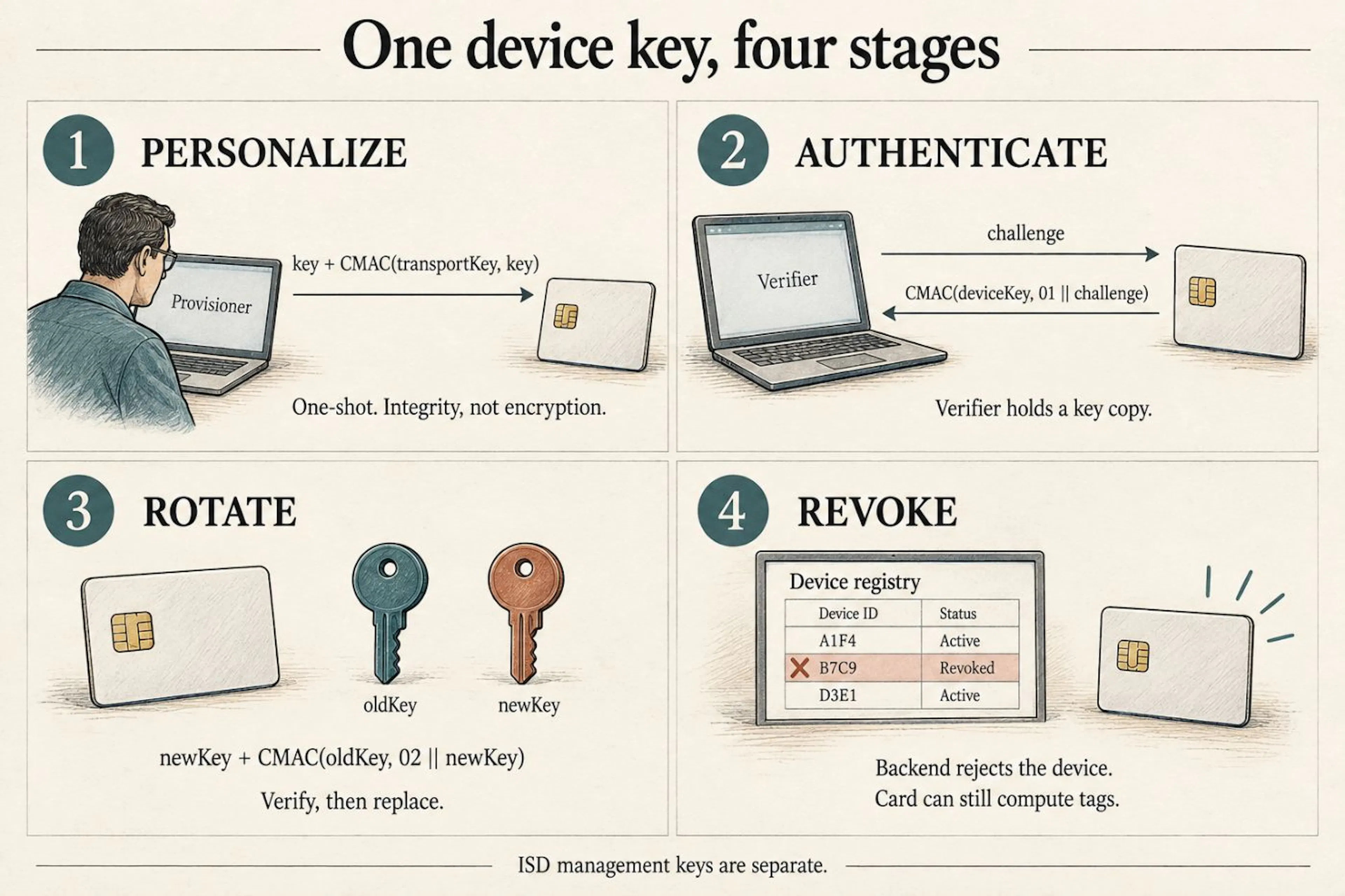 Fig. 7 - Personalize, authenticate, rotate, revoke. Key-plus-MAC packets are not encrypted; revocation is a backend decision.
Two cards (and one you cannot eject)
Once you have seen personalize-authenticate-rotate-revoke as one ceremony, you stop being able to unsee it. It runs at civilization scale in your wallet right now. One of the three cards on this bench arrived straight from that world - the one we spent a week calling locked, a payment platform's load files still sitting in its registry.
A payment card is this tutorial with a budget: the family resemblance is easy to see. It has applications, keys, and AIDs. A terminal selects an application, supplies transaction data, and receives cryptographic evidence from the chip. The issuer can verify an online transaction cryptogram; the payment protocol also has rules for offline decisions. Our challenge-response demo covers only a small part of that machinery.
Reissue and hotlisting offer another useful comparison. New plastic can carry new keys. Reporting a card stolen changes decisions elsewhere in the system; it does not make the chip forget how to compute. A stolen payment card computing perfect cryptograms into a network that has stopped caring is our orphaned CollarMAC wearing a bank logo. Offline acceptance and network policy complicate the comparison, so our backend's immediate revoke flag is a simpler model.
A SIM is the same lesson in a uniform - historically the largest Java Card deployment on Earth, which quietly makes this tutorial's platform one that already lives in a few billion pockets. The card holds a subscriber secret; the operator's authentication system holds the corresponding material. A challenge-response exchange authenticates the subscription and helps derive session keys. Billing is not the SIM's business; the meter lives in the operator's core - but the meter does not start without the handshake.
The details changed across generations. UMTS added mutual authentication, so the card can authenticate the network too. 5G introduced SUCI to protect the permanent subscriber identity in supported configurations. Those protocols have their own counters, key derivations, and failure rules; our tiny MAC applet is a way into the subject, not their implementation.
An eSIM makes provisioning visible in another way: profiles can be downloaded and changed without replacing the chip. Remote provisioning has its own authentication and policy machinery. The family resemblance is useful; it is not the same operation as running our local installer.
Homework
The applet now personalizes, MACs, and rotates. A few next experiments:
- Add
INS_VERIFY(pick0x34): send challenge plus candidate MAC, let the card compare viamac.verify, answer9000or6985. You have just built a one-round authentication protocol. - Keep a monotonic counter in EEPROM (
Util.arrayCopyinto a persistent array), increment on every MAC, include it in the MAC input. Have the verifier reject counters it has already accepted. Part one explained why; now feel it. - Send three MAC commands in a row without SELECTing in between. Notice nothing breaks - and then find the card's limit. Every chip has a session, and the session has rules.
Then test resets, lost replies, and repeated challenges. A happy-path MAC exchange is a start; recovery is where the next tutorial begins.
The 150 KB world
A word on the bill of materials, because tutorials hide it: the entire capital budget of this exercise is one reader, one card, and a cable; the eighteen walls in this article cost hours, not money. The reader cost less than lunch - part one measured it that way, and lunch has not caught up. The card costs more than lunch and less than a textbook, which feels about right for what it teaches.
A closing thought the size of the card. The J3R150 has 150 kilobytes of EEPROM. The applet is small; the key objects, the counters, the registry entries - the entire security personality of a device - fits in a rounding error of a phone's memory. Servers measure security budgets in cores and rack units; this world measures them in bytes, and it has been getting by on that budget inside every bank card on Earth for decades. There is something bracing about a platform whose entire philosophy is: be small, be honest, and never, ever give up the key.
Six questions you already have
Is there actually a CPU in there - what executes my code? Yes. A microcontroller runs the card OS and Java Card runtime, which executes the applet bytecode. Crypto operations can use dedicated hardware. Persistent memory holds applets and keys; RAM holds temporary buffers. This contact setup supplies power through the reader. Without power, a card goes inert - and keeps its secrets. The exact chip layout and firmware version are not established by that description.
Can I skip the reader and use my phone's NFC? The J3R150 is dual-interface, so physically yes - phone apps exist that forward APDUs over NFC. But the contact reader is what makes this article reproducible on any desk for the price of a coffee, and reproducible is the whole point; treat the phone path as a party trick.
Why is the MAC exactly sixteen bytes? We request the full AES-CMAC tag: sixteen bytes. Protocols can choose a shorter tag, with a corresponding reduction in forgery resistance. Part one trimmed its demo MIC to eight bytes for tidiness; the chip hands you the full sixteen without asking.
My ATR looks nothing like the article's. Is my card fake? Probably not - ATRs differ across chip families and even firmware generations, and the informative part is the historical bytes, where some cards literally spell out their family name. Different is normal; silent is not.
Can I brick it? Heroically, yes. But a failed command is not a death certificate. Bad applet code can often be removed through a working management channel. Losing management keys or damaging hardware is another matter; DELETE is not a universal recovery command.
python3 scripts/card_id.py         # check contact and SELECT the ISD
python3 scripts/gp_lite.py delete  # remove the demo package and its instances
python3 scripts/gp_lite.py open    # inspect the registry in a fresh session
Reseat between commands if your reader has the reconnect issue described above. card_id.py does not list the registry. Removing our package leaves the ISD keyset, card lifecycle, and other applications in place. We did not test forensic erasure, and deleting an applet does not return the whole card to its factory state.
Is my office badge one of these? It depends on the badge technology. Some systems rely on a static identifier; others use cryptographic challenge-response. Wiegand describes a reader-to-controller link, so spotting that wiring alone does not tell you what the card computes. Ask which credential and authentication mode the system uses - and you will know which kind of door you are opening.
What we wish we had read first
We started with an old tutorial and expected a short porting exercise. The useful part of the week was discovering which assumptions to stop carrying forward.
The chain of walls is the tutorial:
- The converter rejects your modern bytecode - fixable with a class-file patch.
- Case-3 EXT AUTH worked on our setup; the independent case-4 GPPro run returned
6D00. - The ICV chain starts at EXT AUTH - the source code comment is misleading.
- INSTALL for load needs all five length fields, including an empty Load Token.
- Preserve the LOAD block boundaries that worked, along with their test environment.
- CAP component selection must match the stream you actually tested.
- BER-TLV length encoding has three forms and using the wrong one gives a generic error.
- PUT KEY encoding is P2-sensitive and the per-key format omits key IDs.
- A card that seems to lock applet instantiation permanently may be answering your own malformed command - verify the INSTALL data field against the specification tables before believing the lock (this cost us a week).
- EEPROM has finite write cycles.
The source code explained the tools. The specification caught our malformed commands. A second transport separated an applet problem from a binding problem. We needed all three.
This tutorial exists because we kept the receipts. Every status word, every byte dump, every failed hypothesis - documented in the
The companion repository
All scripts, transcripts, and the applet source are available at
scripts/card_id.py- read-only card identificationscripts/open_channel.py- manual SCP02 handshake (case-3 EXT AUTH)scripts/gp_lite.py- minimal installer (INSTALL/LOAD/INSTALL pipeline)examples/collar_lifecycle.py- the full key lifecycle demo from this article (no card needed)sim/CollarMACRotate.java- the current applet, including domains, rotation, and length checksapplet/CollarMAC.java- the earlier, unprefixed MAC example; not the current build targetapplet/CollarMAC222.java- the applet (JC 2.2.2, for older cards)transcripts/- complete console output from every sessiondocs/keys.md- the batch keyset and how it was founddocs/quirks.md- observations, client bugs, and remaining uncertainties
Pocket glossary
|
Term |
Meaning |
|---|---|
|
AID |
Application Identifier - the 5-16 byte address of an applet or package |
|
APDU |
Application Protocol Data Unit - one command-response pair |
|
ATR |
Answer To Reset - the byte string a card sends when powered up |
|
CAP |
Converted Applet file - the card's executable format |
|
CMAC |
Cipher-based MAC (NIST SP 800-38B) - the AES MAC variant used here |
|
EEPROM |
Electrically Erasable Programmable Read-Only Memory - where code and data persist |
|
GP |
GlobalPlatform - the framework that manages applet lifecycle |
|
ICV |
Initial Chaining Value - the block chained between MAC operations (an IV) |
|
ISD |
Issuer Security Domain - the card's root administrator |
|
MAC |
Message Authentication Code - a fingerprint proving possession of a key |
|
SCP02 |
Secure Channel Protocol 02 - the authentication mechanism |
|
SW |
Status Word - the two-byte answer (9000 = success) |
|
TLV |
Type-Length-Value - the encoding used in LOAD data |
References and further reading
GlobalPlatformPro - the one tool that works (source code is essential reading)GlobalPlatform Card Specification 2.2.1 - command tables and SCP02Java Card 3.0.5 API - the runtime APIJava Card 2.2.2 specification - the older platformThe seller's listing - prints the transport keyset under TK VALUE SETTING EXAMPLES (at the time of writing)GPPro discussion #382 - independent documentation of the same keysetGPPro discussion #341 - the counter-example we checked: a similar registry pattern on a dev card with factory keysNXP - manufacturer of the J3R150 secure element
The applet code, host scripts, and every transcript from these sessions are open source in the
如有侵权请联系:admin#unsafe.sh