The profession of software and product engineering has changed a lot over the last year. We used to 2026-9-28 07:0:19 Author: hackernoon.com(查看原文) 阅读量:2 收藏
The profession of software and product engineering has changed a lot over the last year. We used to have coding tools like Cursor doing small changes to our code, but eventually when Claude Code got really good, most of software engineering became purely knowing how to prompt coding agents well, and more importantly, managing multiple agents at once to do more work than one engineer in the past could do.
As a software engineer myself, these days, I spend most of my time commanding these agents to produce tons of code at a time, but I slowly realized a bottleneck: I could not test my features as fast as I could run my fleet of coding agents. My solution to this was to let my agents test my product and conduct QA for me -- every single feature built must pass through a QA round just like how I test my features by manually clicking through buttons and going through pages, seeing if the feature was built correctly. I normally use the Playwright MCP for this, hooked up to my Claude Code open on my repo.
All is good with this flow, until I realized that my agents often spend time rediscovering how certain pages work: the typical loop it often goes through is open a page, then take a screenshot, then observe what it is, then take an action (e.g. clicking or filling out a text input). Every time it does that, it 1) wastes a lot of tokens because it discovers the product as if it's seeing it for the first time and 2) spends a lot of time understanding what certain things are and how certain features work, often by grepping through the code. (2) makes a lot of sense considering the only thing it has is CLAUDE.md, which we often keep small & with only the necessary information the agent needs to operate e.g. how to run scripts, high level architecture of the app, etc.
None of the context has ever given it a digestible understanding of how a product works and how to test it. It struck me that, to truly build an AI-native software development lifecycle, we have really only solved the code production part with better and better coding agents, but not really the testing / verification part.
The art of verification
One of the engineers behind Grok Bot, Lauren Tan (also known on X as @poteto), talked about exactly this in her guide to agentic software engineering. The core emphasis is “Verification is all you need” -- giving the agentss all the necessary tools and resources they need to run and test things is important, so giving them things like Playwright MCP and a reliable computer + dev environment to test in is very important.
It doesn't end there though. Your agents with the proper tools but not the same context as you -- an engineer with the combined knowledge of how certain things work within your app -- end up taking much longer rediscovering surfaces, especially when your app is very complex. Lauren solves this with Feature Maps in her article, which is essentially just markdown files detailing how certain features work in the app, pieced into a /verification-skill so that the next time you invoke it, it has that detailed knowledge base of the different product features as context.
It was actually good when I tried it out! My coding agents that used to spend 25mins testing a feature that requires clicking through multiple screens ended up spending 15mins. However, I found that there were still gaps:
- Maintaining a full feature map required rescanning through all the changes up to a certain point.
- It still treated features as a flat list, so nested overlays and cross-surface journeys were hard to plan as paths.
For this to work at my company’s scale, it needs to operate across a pretty complex product surface. We run an internet marketplace with multiple personas: customer-facing products, admin and reporting features, and a large set of internal tools used to run a lot of the on-platform operations. Each area has its own workflows, terminology, and business logic. That means the agent needs to:
- Know where things live. Given a feature or workflow to test, it should be able to figure out which parts of the product it needs to navigate and what needs to be exercised.
- Do that efficiently. It can't rediscover the product from scratch on every run -- the amount of context and tokens required to execute a test must be minimal.
- Understand the codebase. It should be able to connect a code change to the product behavior it affects, so it knows what changed and what actually needs to be tested.
What this led me to was building a knowledge graph that captures how our product works: where things live, how different users navigate the platform, and the workflows they use to get things done.
Giving agents a map of the product
There has actually been a lot of research that has gone into optimizing computer-use agents. One line of papers treats GUIs as graphs instead of linear click chains: PG-Agent turns past trajectories into a page graph so a planner can reuse shared hubs across tasks. Another more recent line of papers called ActionEngine (Georgia Tech and Microsoft Research) goes further and builds an offline state-machine of page/window states, then the agent plans a whole program against that graph instead of going through a screenshot, reason, click loop. On a subset benchmark run on WebArena, they hit 95% in their task success rate, versus the baseline which scored 66%. These papers have shown that successfully navigating a product takes more than agentic intelligence alone: the agent needs a map it can use to chart its path and actions.
I basically took that same idea -- I named it a product-surface graph. There were actually some modifications when I started applying it to our product; the core idea being that pages alone aren't enough. In a modern web app, say for a SaaS product, a person sitting on /home doesn't necessarily only "navigate to a new page" when they click on something -- they can open a modal, which can be addressed by some query parameters e.g. ?item_id=<ID>, and that modal can have multiple tabs, where you can bounce between inside that overlay. If your map only knows pages, the agent still has to rediscover that modal every run, which essentially is token waste.
So instead, in my graph, each node is a surface: a destination a user (or an agent) can actually occupy and act from. It can be a page, a modal, a sheet, a drawer, a shell, or any in-page region. It's also not necessarily every React component in the codebase, or not every button on the page -- buttons and clicks instead live on the edges as triggers (such as by clicking, or through a hyperlink, or via a submit action on a form).
Here's an example flow as destinations and triggers: home opens the modal, and Overview (a tab) hangs off it as a child node, which we call a region:
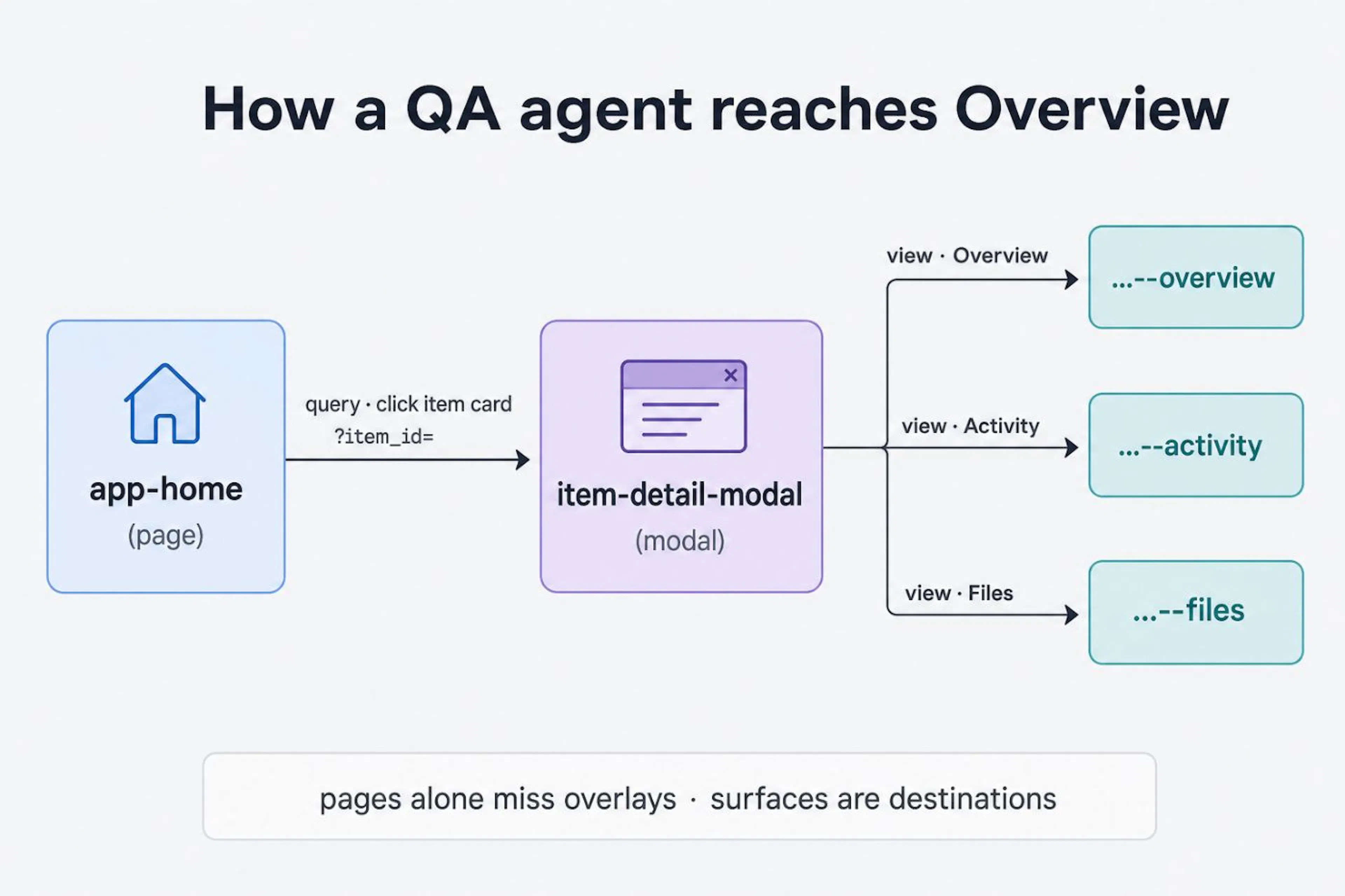 Figure: Home opens a modal, Overview hangs off it as a region. Image by the author.
One of the core parts is actually getting the graph built. There are several challenges here that I had to wrangle with:
- How granular should you go? Too fine i.e. every button or slider as a node and you get a glorified component/import graph that is hard to read at a glance. Too coarse, say pages only, and you miss the overlays and in-page regions where most QA failures actually live -- modals, sheets, drawers, and tab regions.
- How do you cleanly establish nested surfaces? It's common that our app has nested modals, tabs inside of sheets, forms inside of a tab inside of a modal. Without clear hierarchies, it's hard for agents to reason about navigating such an app, since it's not simply navigating between pages.
- How do you define a unique surface area? We don't want our agent misinterpreting or creating duplicate surfaces and inflating the actual numbers in the graph.
What we did was we leaned on the design-system primitives we already have. We use React for our frontend, leveraging modern design system components built from Radix, so a lot of the primitives e.g. sheets and modals are already well-encapsulated, which made it easier to draw those boundaries cleanly.
In practice, a node is one of those destinations (e.g. page, modal, sheet, drawer, shell, region), tied back to the code components that compose it via a path and an export name. Edges are how you go from one surface to another, with a trigger kind and some metadata for what actually causes the traversal -- so buttons live on edges, not as nodes. Nested surfaces point at a parent, and tab/region children get ids like parent--slug (e.g. user-profile-modal--overview), with view edges connecting a parent surface to its tab regions.
In the end, our graph schema ends up looking something like this:
type SurfaceKind = "page" | "modal" | "sheet" | "drawer" | "shell" | "region";
type EdgeKind =
  | "click" | "link" | "submit" | "query" | "redirect" | "open" | "close" | "view";

type SurfaceNode = {
  id: string;
  name: string;
  kind: SurfaceKind;
  parentId?: string; // regions / nested destinations
  description: string;
  components: { path: string; exportName: string }[]; // code this surface owns
};

type SurfaceEdge = {
  from: string;
  to: string;
  kind: EdgeKind;
  triggerLabel: string; // e.g. "Click an item card"
};

// Schema of the graph (materialized to a JSON file and stored in the repo)
type GraphFile = {
  nodes: SurfaceNode[];
  edges: SurfaceEdge[];
};
Building the graph
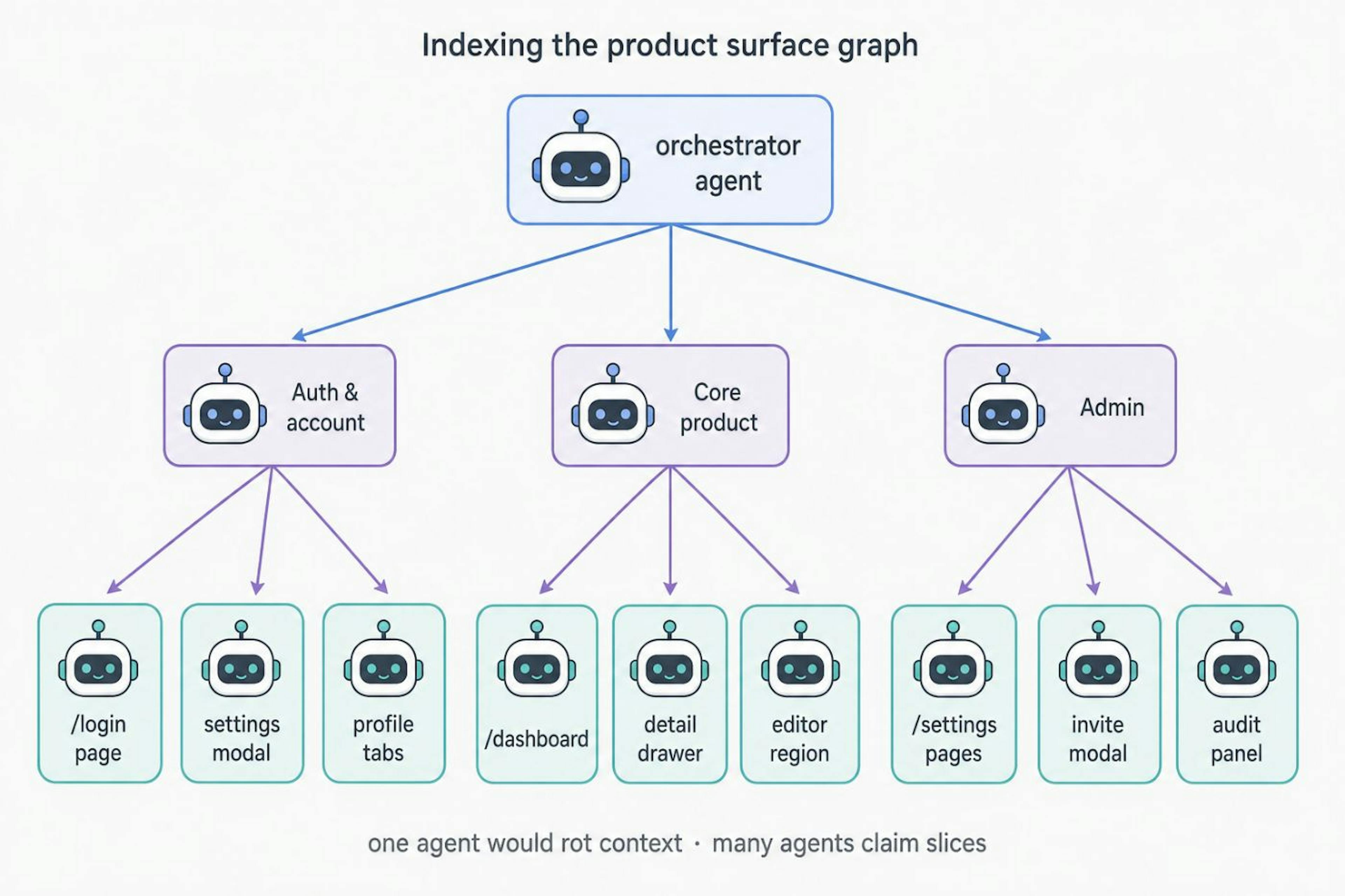
Defining the UX/UI boundaries solved one part, but what about how to efficiently build out the graph when starting from zero? We have a massive surface area (200+ pages, all doing various different things across our platform), so having one coding agent chug through all the work would lead to context rot.
To overcome context rot, I relied on orchestrating different subagents, each targeting a different set of UX surfaces based on a set of high-level domains that were given in the beginning by me according to my understanding of the different areas in our app. The core idea here is to break a large app down to smaller, well-separated chunks of work so that the task of indexing their portion of the codebase can be completed without getting overwhelmed.
One key thing I gave the subagents that allowed them to be very powerful is the ability to also call children subagents on their behalf to explore a sub-surface if need be. This is because I wouldn't know ahead of time if a single surface I defined is granular enough -- we have a lot of different surface areas in our app that built up over time, owned by different developers on our team, and I only know at a very high level what certain domains do. Instead of exploring all of those areas myself, I instead relied on the agents to parse and understand those different areas as part of the exploration instead, since I alone would take too long parsing through all the code. Nonetheless, while the agents do all of this, I'm still in the loop with sanity checking the output, correcting the agents along the way if some of the parts are inaccurate or are near duplicates to other parts that would warrant merging them together.
As to what should constitute a subagent spawning of a grandchild subagent here, I gave it some rules of thumb within the prompt as well as guided it on using some React code analysis tools to help it do this. In particular, the core rule is that if the total number of resolved React components down the tree is over a certain threshold that we deem too large, then it should orchestrate agents to run on it, so that the agent is not overwhelmed trying to scan a large surface area on its own.
The prompt looks something like this:
You are indexing the "Core product" domain of our product-surface graph.

Your job:
1. Claim work with `pnpm psg claim` so other agents don't collide.
2. For each claimed surface, read the owning React files and upsert nodes/edges
   via the CLI (pages, modals, drawers, tab regions as `parent--slug`).
3. Mark coverage for every file you resolve (indexed or skipped + reason).

When to spawn a grandchild subagent (do this yourself -- don't wait for me):
- Resolve the React tree under the surface's entry component (imports + JSX).
- If that tree resolves to more than ~40 product components (ignore design-system
  primitives like Button/Modal/Input), STOP expanding it yourself.
- Spawn a child agent scoped to that sub-surface (e.g. the item-detail modal, or
  just its Files tab region). Pass it the parent surface id, the entry file, and
  the claim it should hold.
- When the child finishes, merge its nodes/edges and continue.

Do not flatten a fat surface into one giant node. Prefer a parent destination plus
region children. Prefer skipping plumbing files with a clear reason over inventing
fake destinations.
A lot of this idea is modeled after a Recursive Language Model (RLM), where the agent can orchestrate itself, by breaking down a large problem into smaller subproblems that can be independently solved on their own:
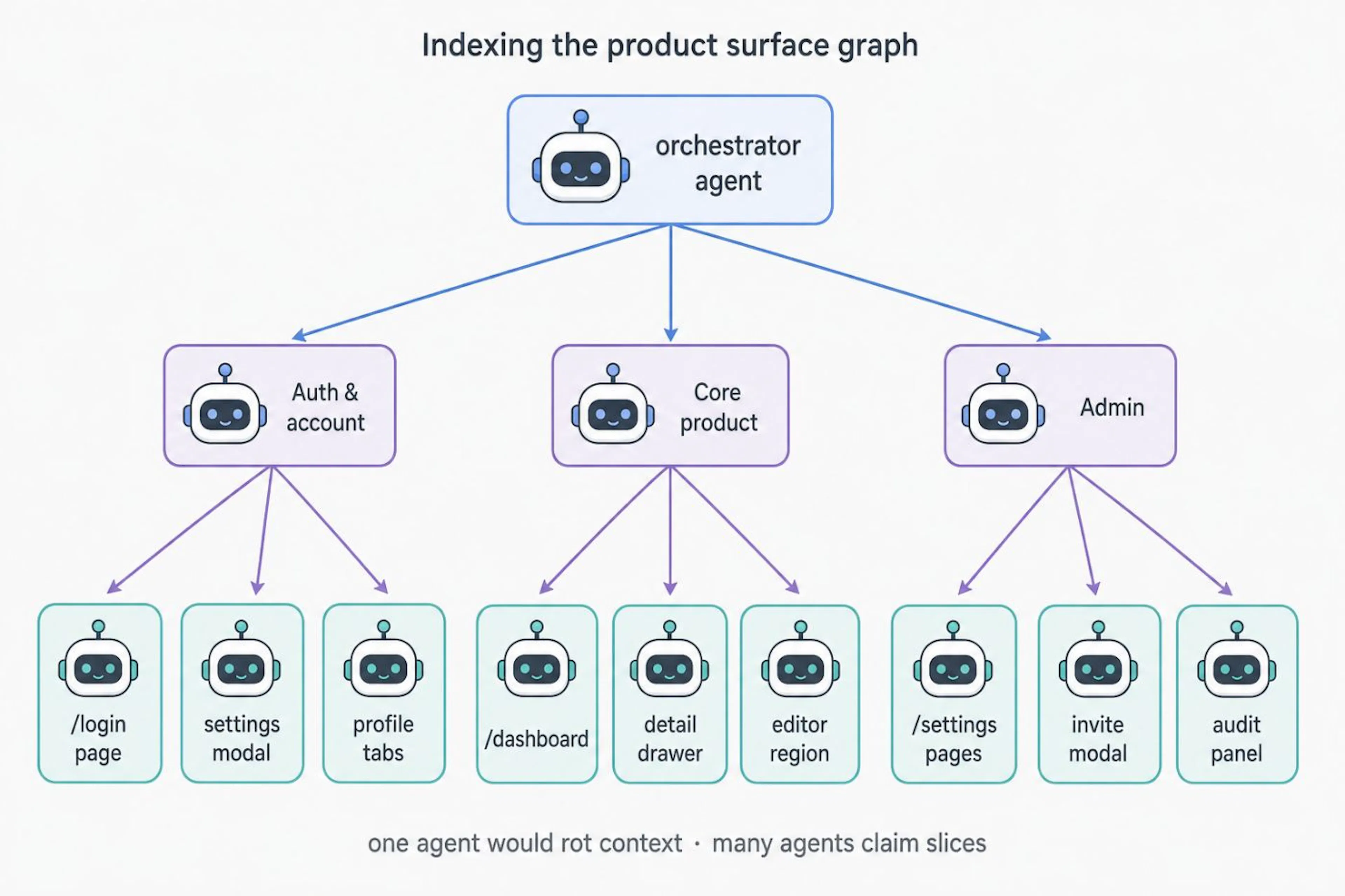 Figure: Recursive subagent fan-out while indexing the graph. Image by the author.
I also gave all agents a way to manage the graph without conflicting with each other's work. The graph is simply a JSON file with a certain schema, managed through a CLI. Agents can claim certain files as discovered / pending, and other agents won't explore that surface area -- implementation behind this uses file locking to ensure atomicity. Our CLI also needs to have a method to search the graph to find nodes i.e. surfaces through natural language so that it can look up if a certain surface area has already been built or not. I implemented a tiny in-process BM25 via the minisearch package for this.
As for when the agents should stop, the graph is considered fully indexed if we achieve 100% coverage on all the UX surfaces implemented by our code.
The run on my team's codebase took a total of 30 agents + subagents, with a total token spend of ~25 million. We used Sonnet 5 for this, so the spend was around $250 to index the graph.
Putting it to the test
Once the graph exists, the way an agent does a QA run changes -- agents stop rediscovering the product and start looking things up. In practice, I just have them search for a surface in plain English, something like psg search "item detail modal", which under the mini BM25 index will accurately pin down the exact surface node based on its description. It will then grab the node, check its neighbors via a psg get item-detail-modal command, then ask for a path between two places to chart a way to get from a certain screen / modal to that screen, instead of wasting tokens figuring out how to do that either via clicking around or grepping the codebase and tracing through the React component import graphs.
That path is what turns into the Playwright script, which the agent can then execute against a browser session on any computer. This can either be on a teammate's laptop or on a cloud agent's sandbox computer e.g. Cursor Cloud or Devin.
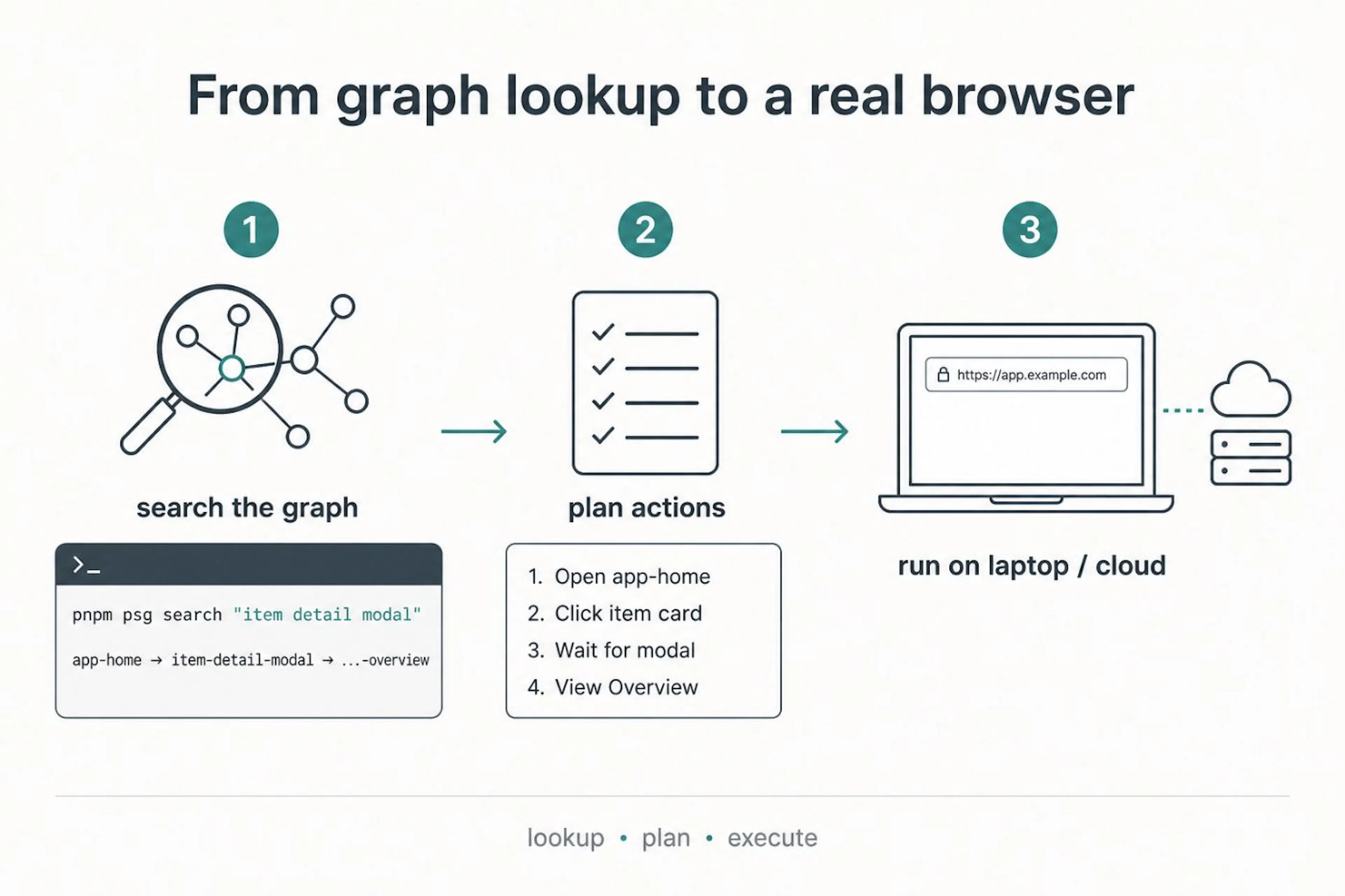 Figure: Search the graph, plan a path, execute in a browser. Image by the author.
To put the graph to the test and see if it improves testing performance in general, we ran a comparison where Claude Code agents tested 10 common user flows on our product, difficulties ranging from a simple 2-page navigation to complex multi-page stuff with sheets nested with tabs and forms inside modals, and the short version is the runs with the graph spent ~3× fewer tokens and took ~2× less time:
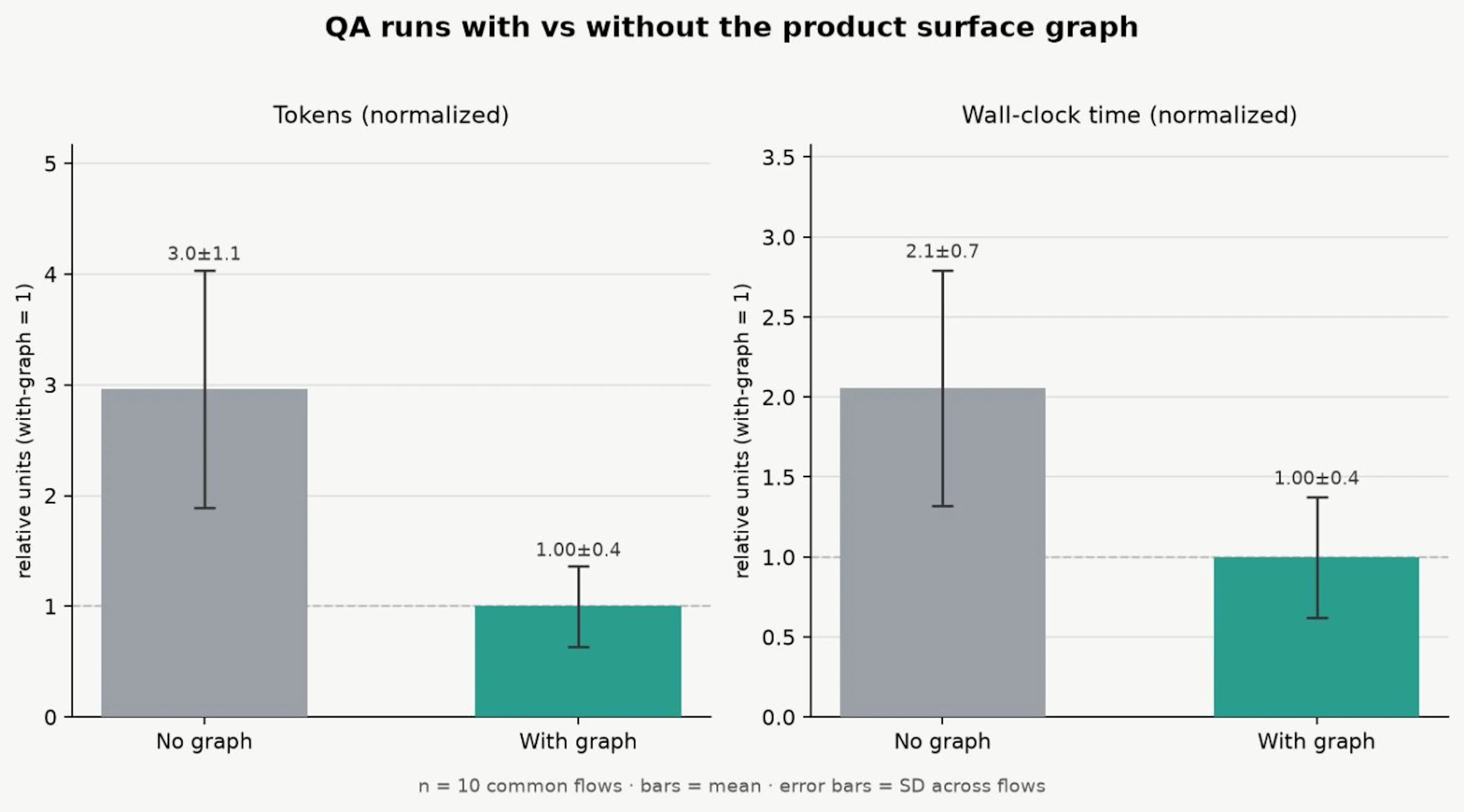 Figure: Ablation — with vs without graph; token & time ratios. Image by the author.
Maintaining the graph
I noticed pretty quickly that if the code for a surface changes, the description of that surface in the graph might be wrong now. Maybe Overview grew a new tab. Maybe the item-detail modal no longer opens from home the same way. Maybe a file got deleted and the surface shouldn't exist at all.
To solve this problem, I tied every surface back to which code it came from (e.g. the modal file, the tab panel, or the navigation helper that sets ?item_id=). Once you have that link, editing ItemDetailModal.tsx means something about item-detail-modal (and potentially its Overview / Activity / Files tabs) might need a fresh look.
That code-surface map is what we stored alongside the graph. For each file we've already indexed, we keep a fingerprint of its contents via a SHA256 hash plus the surface ids that file was condensed into. You can think of it less as a fancy ledger and more as a receipt, i.e. "the last time we looked at this file, it looked like this, and we used it to describe these surfaces."
Here's what the schema of that map looks like:
type CoverageEntry = {
  status: "pending" | "indexed" | "skipped";
  surfaceIds?: string[]; // surfaces this file was condensed into
  reason?: string; // why skipped (or why pending)
  contentHash?: string; // SHA256 at resolution time
  updatedAt?: string;
};

type CoverageFile = {
  files: Record<string, CoverageEntry>; // keyed by repo-relative path
};
And a slice of what that looks like after a few files have been resolved:
{
  "version": 1,
  "files": {
    "components/ItemDetailModal.tsx": {
      "status": "indexed",
      "surfaceIds": [
        "item-detail-modal",
        "item-detail-modal--overview",
        "item-detail-modal--activity",
        "item-detail-modal--files"
      ],
      "contentHash": "825296cc79755b87",
      "updatedAt": "2026-09-01T00:43:59.284Z"
    },
    "components/ItemCard.tsx": {
      "status": "indexed",
      "surfaceIds": ["app-home"],
      "contentHash": "361e5cb87f11b1cd",
      "updatedAt": "2026-08-21T21:46:58.113Z"
    },
    "components/ui/Modal.tsx": {
      "status": "skipped",
      "reason": "Design-system primitive / overlay plumbing, not a product destination.",
      "contentHash": "13d7c6a751c17d30",
      "updatedAt": "2026-08-16T04:17:47.332Z"
    },
    "components/ItemFiltersDrawer.tsx": {
      "status": "pending"
    }
  }
}
When ItemDetailModal.tsx changes, its hash no longer matches and those surfaceIds get a fresh pass.
What this enables is a cheap and fast way to know exactly which surfaces are stale after any code change -- after a PR lands, we don't need to ask whether the whole graph is still good, but instead, we ask which receipts no longer match the working tree. All that's needed is to recompute the hash of the files that were changed via the git logs/diffs, compare to what was stored, and we get a short list: this file is fresh, that one changed, that one disappeared.
In practice, I made a script where we can run psg stale, and it will then take the changed files and marks their linked surfaces as needing a fresh pass, so the same indexing agents that built the graph can come back and rewrite just those nodes and edges instead of re-walking the entire product. It also has the same claiming/lockfile rules mechanism, so we can orchestrate multiple agents to reindex large changes if needed without stepping on each other's work.
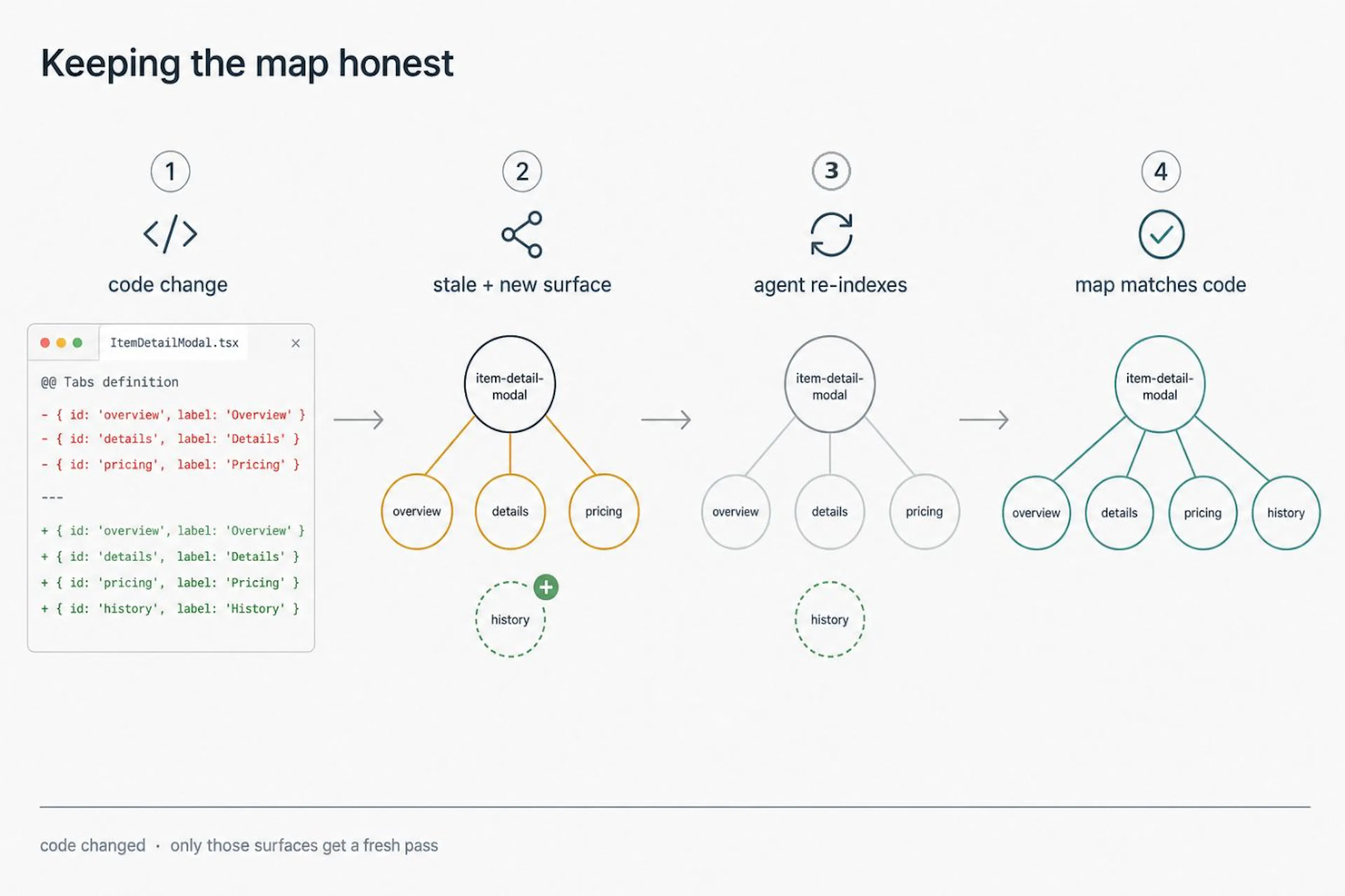 Figure: Keeping the map honest — stale detection and reindex. Image by the author.
What this looks like in our day-to-day development cycle right now is: when someone reshapes the item detail modal, we have psg stale in our CI run, which lights up item-detail-modal and its tab regions, and we update those nodes in the same PR instead of waiting for the next QA agent to rediscover the overlay by screenshot. The rule we try to follow is simple: if you change a page or overlay that's in the graph, update the graph in the same change. This allows us to keep the graph fresh at all times in the production branch.
Takeaways
Coding agents can already build products pretty fast, but testing and verification is still where the software development lifecycle thrashes if the only loop they have is screenshot, guess, and click.
The product surface graph I built is a practical fix for my team's use case: give QA agents a map of the product so they can look up a path and go directly to a Playwright plan instead of tracing through code to rediscover the app every time.
Keeping that map useful is its own problem; you need interfaces agents can actually call, a way to notice when the graph drifts from the code (psg stale in CI is ours), and rigorous comparison runs so you know the map is still buying tokens and time in real development, not just on paper.
如有侵权请联系:admin#unsafe.sh