Back to the days of the telephone, helping your friend with the computer was a bit like this:Human 2026-9-26 19:0:34 Author: hackernoon.com(查看原文) 阅读量:0 收藏
Back to the days of the telephone, helping your friend with the computer was a bit like this:
- Human A - Hey, so, yes, wait, you need to close the window.
- Human B - What window?
- Human A - Well, how many windows you have?
- Human B - I have 20 tabs.
- Human A - So, close that tab.
- Human B - What?
- Human A - The one you want to close.
- HUman B - Ah, right.
In the world of humans, we keep on connecting people to subjects to solve specific problems. And we give them tools that work with spaces. With computer desktop sharing, for example, human B exposes a mini world in order to solve problem X.
As natural AI voice continues to advance, we’ve moved beyond that old telephone-call experience, where we can say things like “hey buddy, can you search the web for me about XYZ?” ChatGPT Voice, for example, now uses OpenAI’s new generation of models known as
The very fact that it works so well takes us to want them in our spaces, to observe, to perceive, and ultimately to help get things done. Consider what it means to be present, and to participate in our worlds, the physical or digital spaces we live in:
If it only talks but can’t observe anything, it’s like that old telephone call. If it can observe and touch everything but doesn’t respect the playbook, it’s like an alien in the starship.
An educational use case, therefore, helps us to organize and understand how to set our AI buddy in the scene in a way that is not arbitrary. Let’s first look at the game design to understand the human-to-robot communication dynamics beyond continuous speech. In the second section, there is an overview about some of the GPT-Live capabilities used, plus a video demonstration and the source code.
Docking starship educational game using GPT-Live
The game is simple and was made using OpenAI Codex and their Astra model. The narrative was based on the Docking Scene of the movie Interstellar. If you haven’s seen the movie, I repeat, do not continue any further:
There they are, the pilot and a robot inside starship A. Their mission is to save starship B before it gets pulled by the gravitational force of planet P. So they are pressured by time. To complicate things further, starship B is spinning because of an explosion that happened before. The plan is, as decided by the pilot:
- Get closer to the ship
- Figure out starship B spin rotation
- Start spinning starship A
- Match spin rotation
- Get closer and dock
None of this is a big deal, except that the time pressure in the scene even prompted the robot to say, “This is no time for caution!” We will go back to how we make our robot pass on pressure signals to the user. Let’s start with rules first:
Starship controls and rules
For collaboration to work, we need to define the things that the human can do and the things that only the robot can do. As they perform these actions, we need a process of accountability in order to determine the outcomes from those actions. Let's breakdown some of the user commands:
- bot - can trigger an operation to analyse the rotation of starship B
- bot - can trigger an operation to engage the docking mechanism
- bot - can trigger moving forward, or brake/reverse
- bot - can check time
- human - can set the starship to rotate after typing the rotation in degress into a specific control panel
- human - can align the docking mechanism, using up/down/left/right keys
- human - can communicate with the bot
In other words, the human-user cannot simply take the pedals or engage the docking mechanism. Yes, the user can try to guess and set the rotation of the ship, but good luck with that because setting rotation consumes energy, plus the clock is ticking. Like it or not, the best thing for the user is to collaborate with the robot.
To simplify the game, the rotation of the target ship is a numeric value initialized at the beginning, and as indicated only acessible by the robot.
With these settings, they can collaborate, depend on each other, and get things done. One more thing, the human can turn on the radio, which opens up a YouTube player that loads the Interstellar Docking Scene soundtrack by Hans Zimmer. The following is a recording of a demonstration:
Setting the environment and pressure
Most missions in life are accomplished as a function of the environment. In our case, after one minute passes and if docking hasn’t worked, the game is over. In this situation, like in any other organization, objectives and key results are part of the game.
We advance not by the activities performed, but by the outcomes produced by these activities (as measured by the environment). Like in real life, we need to keep track of these activities, and constantly keep on checking the gap. How close are we from our goal? The world of games, and business management, agree that goal outcomes should be a function of the output from our activities. In a corporate space, for example, this gap can be tracked with dashboards. HR and managers also love to set the stage by creating narratives, or environmental narratives, like rewards connected with dashboards.
Back to the game, we should ask ourselves if we can also do these things we do in real life. Can our mission/environment send signals just like when the car’s seat belt isn’t fastened?
It is up to the design to take measuments for the things that matter. And along with that, if certain conditions are met, to poke the participants passing data that contributes to the narrative. And we can add pressure too, of course. As an example, we tell the robot to tip the user about the remaining time, after 30 seconds, and to hurry up around 10 seconds.
Let’s see an overview about some of the GPT-Live’s concepts that solves this game design.
Using GPT-Live to set the robot into the game environment and mission
This game project was developed using Visual Studio Code, using Codex and OpenAI’s Astra model. The game’s
The experience of the user and the robot in a voice call starts with establishing a channel between the user in the browser, and OpenAI servers. The underlying technology is WebRTC, the same infrastructure that makes video conferences in the browser possible.
With that, as discussed in the prior section, the robot needs to be present in the experience: We want the robot to perform certain operations, such as calling functions that affect the game dynamics. And we want the robot to be informed about other situations such as when they are running out of time.
With GPT-Live, these behaviors can be done using Responses delegation. That is how a GPT-Live ongoing conversation can delegate responses to another model on OpenAI’s servers, in our case it’s gpt-5.6-terra. This approach does not seem to be too far from the mechanism that we use:
The parallel I make here is with driving. When I am driving and talking, I usually keep driving straight while talking nonstop.
But if a co-pilot (human) prompts me to solve a problem, such as saying that I missed an exit, something odd happens.
I can feel myself delegating—like sending an order to a spoon-sized brain—which then triggers a response.
That response, by the way, triggers back the said nonstop-talking model to say something like, “Ah, yeah, let me turn back,” which, by the way, has nothing to do with actually turning back.
The following is a timeline diagram intended to illustrate a few areas that “light up” at a specific moment during the game. Imagine that the user is already talking with the robot. Then she says, “Can you analyze the starship’s rotation speed?” As you can see, GPT-Live delegates to the other layer, before the code can listen to (what it needs) and do something about it:
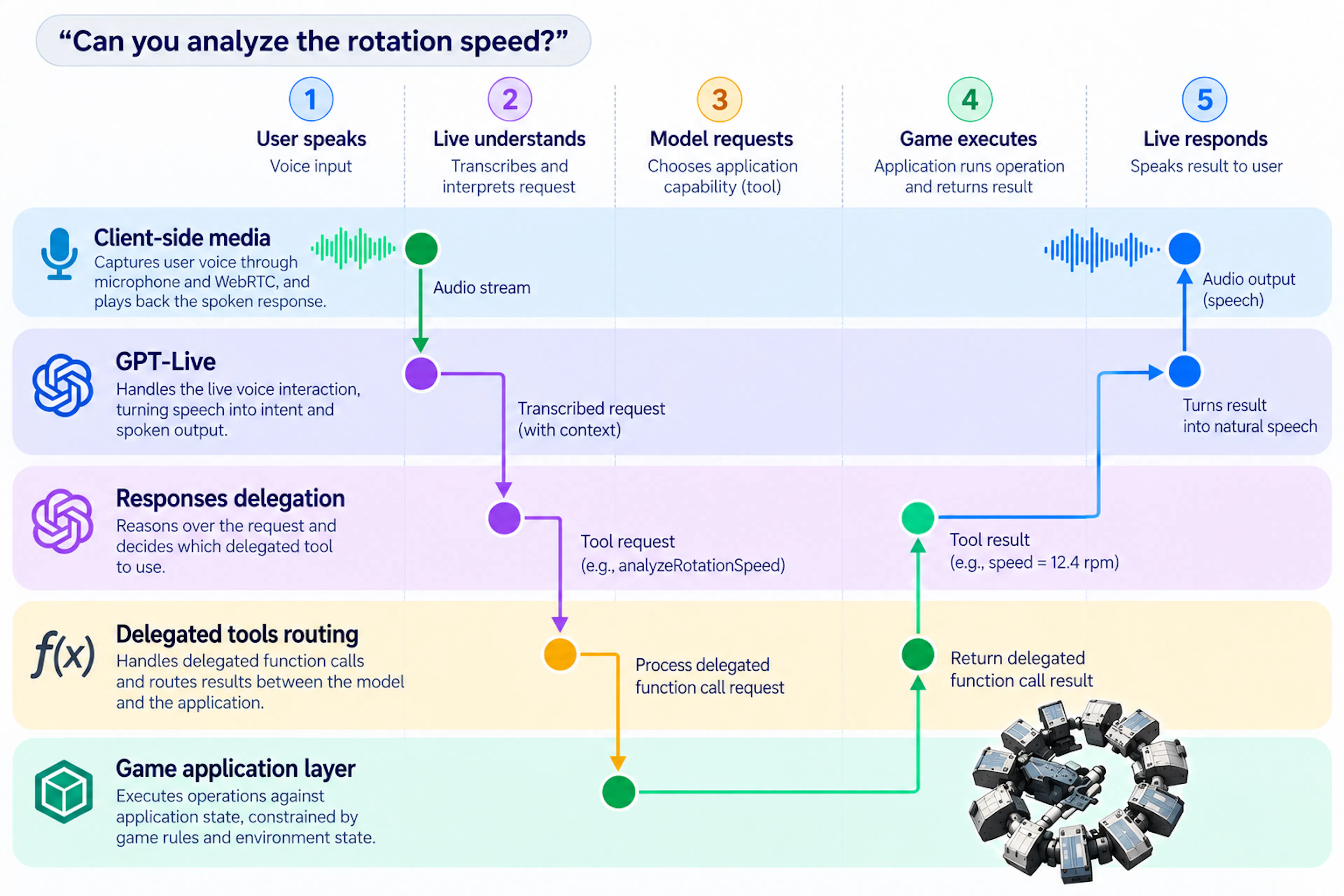
Handling delegated actions
In our design, GPT-Live is instructed to work with the other OpenAI model, which is also instructed on when to call tools, in addition to a set of tools definitions. The following example shows a simplified session where a copilot assistant knows that it can “analyze rotation of a ship.”
{
  model: "gpt-live-1",
  instructions:
    "You are the copilot of the user." +
    "If the user wants to know the rotation of the other ship, delegate that. ",
  delegation: {
    type: "responses",
    responses: {
      model: "gpt-5.6-terra",
      instructions:
        "Use analyze_rotation_speed for a measured target speed and tell the user. ",
      tools: [analyzeRotationSpeedTool],
      tool_choice: "auto",
      parallel_tool_calls: false,
    },
  },
};
In this example, the “analyseRotationSpeedTool” is the reference to an object that informs the model details about our custom function call, primarily:
const analyzeRotationSpeedTool = {
  type: "function",
  name: "analyze_rotation_speed",
  description:
    "Read the current angular speed of the continuously rotating ring station.",
  parameters: {
    type: "object",
    properties: {},
    required: [],
    additionalProperties: false,
  },
  strict: true,
};
Now the model is aware that certain actions can be delegated. Keep in mind that, like in real life, that delegation does not imply action. To close the loop, the code needs to subscribe to a special data channel in order to see the events associated with these function calls:
// A generic function hander that receives the kind of event sent
// by OpenAI's WebRTC meta data channel. Keep in mind that call_id
// is how you track.

function handleDataEvent(dataEvent) {
  if (
    dataEvent.type === "response.event" &&
    dataEvent.event?.type === "response.output_item.done" &&
    dataEvent.event.item?.type === "function_call"
  ) {
    const call = dataEvent.event.item;

    const result = {
      rotationSpeed: 12.5,
    };

    // Assuming you want to send a result right away
    sendFunctionResult(call.call_id, result);
  }
}

function sendFunctionResult(callId, result) {
  send({
    type: "response.item.create",
    item: {
      type: "function_call_output",
      call_id: callId,
      output: JSON.stringify(result),
    },
  });

  send({
    type: "response.create",
  });
}
This process, of listening to and sending back messages about these events, can be done in the browser client or on the server. On the client, it involves creating a data channel labeled “oai-events” and setting it on the WebRTC connection object before initialization. Check out this example of an agent where you can ask the time and the browser page responds with the date/time object. The server approach is what we used in our game design. It also involves creating a data channel (referred to as a sideband) and binding it to the connection. Read more about sideband in Delegation and tools in GPT-Live.
Telling about environment changes
Now that the robot can “do things” and get feedback from the starship controls after these executions, we can talk about how to poke the robot when things happen. Remember that since the time gap is closing, our design goal involves telling the robot about that and tipping off the user.
In the implementation, to keep things simple, we use the same sideband connection to send a message of type session.commentary.append. Read more about how to steer the live conversation from your application. We send signals to the robot in three circumstances:
- 30s left - “we have 30 seconds left, inform the user”.
- 10s left - “be short, 10s left, tell the user. Or hurry, 10s. “
- 0s - left- “see you on the other side”.
References
- Video demo of the voice-based collaboration starship docking game
- The Docking Scene | From the Soundtrack to "Interstellar" by Hans Zimmer
- Source code of using GPT-Live to build a voice-based starship docking collaborative game
- Source code of using GPT-Live to build a simple voice-based bot accessing JavaScript
Getting started with GPT-Live GPT-Live WebRTC guide Delegation and tools in GPT-Live
如有侵权请联系:admin#unsafe.sh