AI agents are now running on employee devices, cloud platforms, and across developer workflows. Sec 2026-9-24 16:0:0 Author: www.microsoft.com(查看原文) 阅读量:0 收藏
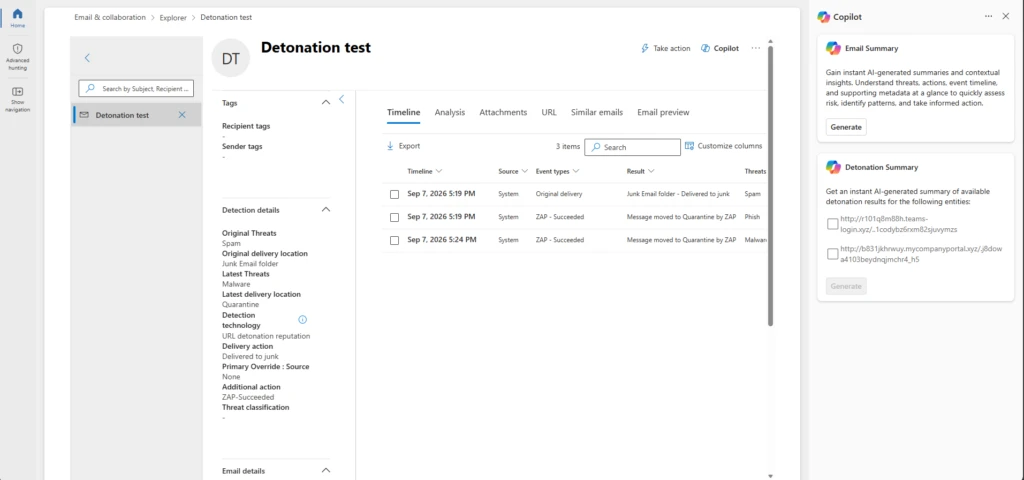
AI agents are now running on employee devices, cloud platforms, and across developer workflows. Security teams need to see those agents, govern what they can reach, and contain them when something goes wrong. This month’s updates help you discover and control local AI agents, extend Zero Trust to agent traffic, and strengthen the security operations center (SOC) foundations that AI-era operations depend on.
Here’s what’s new:
Extend protection and support investigations with Microsoft Defender
Bring more context into email investigation and hunting with Microsoft Security Copilot
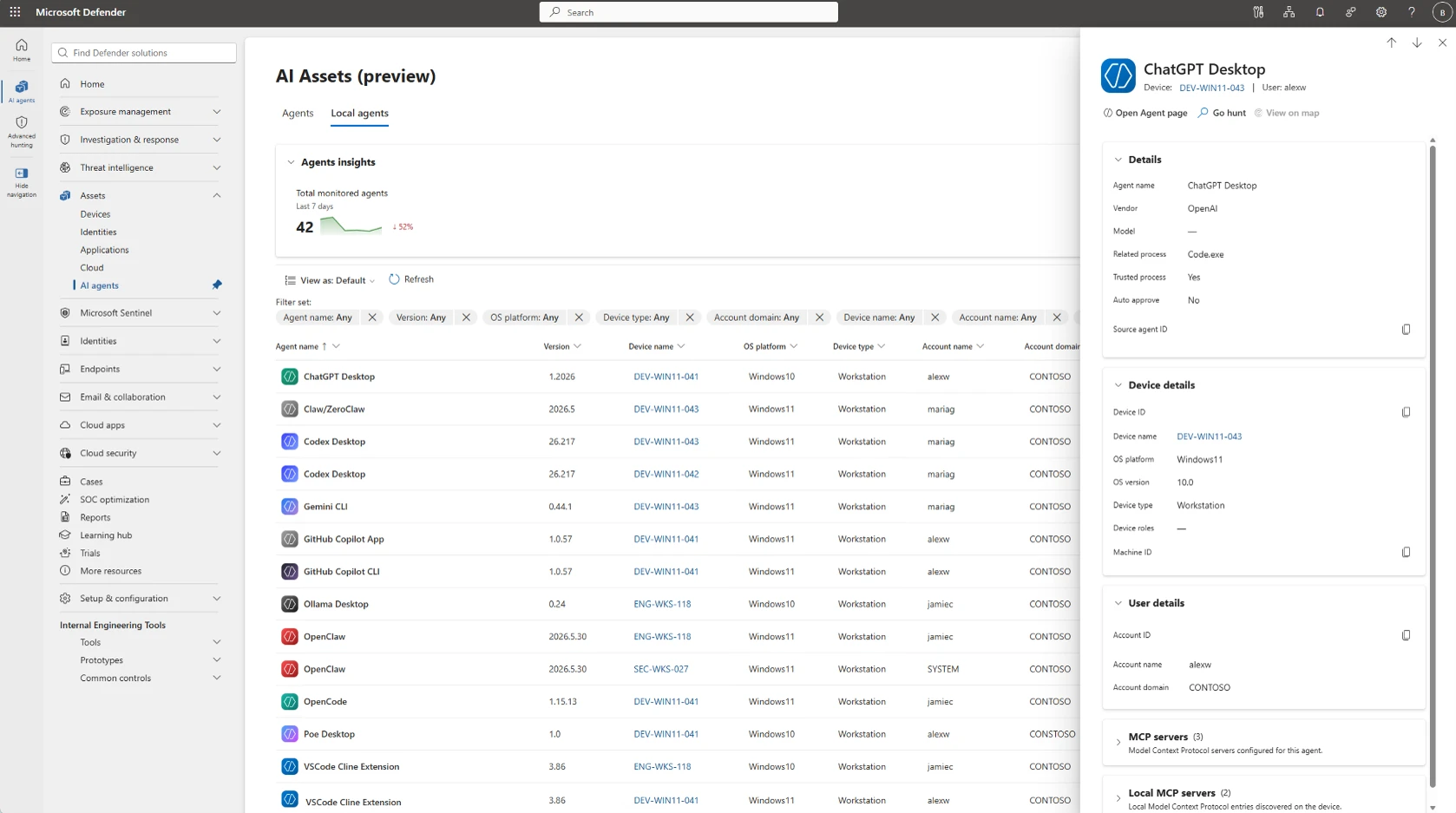
Available for organizations using both Microsoft Defender and Microsoft Security Copilot, a new email detonation summary delivers AI-generated explanations of URL and file sandboxing results, helping SOC teams investigate faster by reducing the manual effort required to correlate detonation evidence and contextual signals.
Protect sensitive data in motion with Microsoft Purview and Microsoft Entra
Stop sensitive data from reaching shadow AI over the network
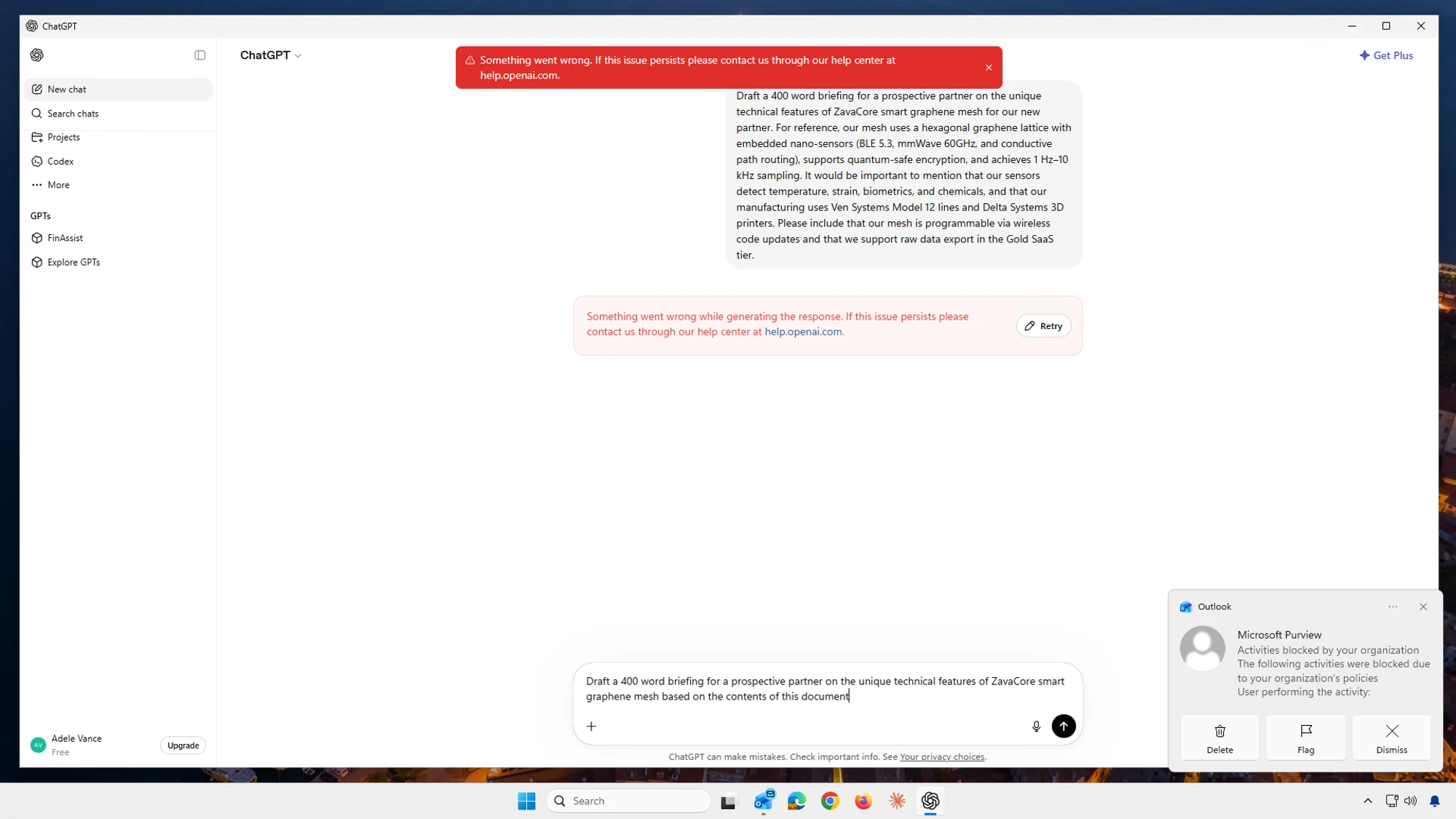
Now generally available, Microsoft Purview and Microsoft Entra Global Secure Access bring data security to the network across human actions and on-behalf-of (OBO) agentic traffic. Context-aware Microsoft Purview classification and policies are enforced by Entra at the network layer. Organizations can discover sensitive files and text in real time and block them from being shared to risky destinations. For example, if an employee or OBO agent tries to upload a sensitive document to an unsanctioned AI tool, the policy can stop the transfer before the data leaves.
Protect, investigate, and clean up enterprise data with Microsoft Purview
Manage labeling at enterprise scale with less administrative overhead
Microsoft Purview auto-labeling helps organizations automatically apply data security controls to sensitive content at enterprise scale. New auto-labeling enhancements improve policy scale, admin experience, and reporting. Policies now support simulations of up to 20 million items and up to 50,000 sites through adaptive scopes. Administrators can edit a policy without re-running simulation. New audit insights and reporting show policy coverage and processing activity. Together, these enhancements help organizations scale auto-labeling across larger environments with less administrative effort.
Investigate content created in Copilot apps such as Microsoft Loop, Copilot pages through established compliance processes
Microsoft Purview eDiscovery now supports search, hold, review, and export content in user-owned SharePoint embedded containers, to help streamline eDiscovery processes for legal, regulatory, and internal investigations. Investigators can find content from AI-powered experiences, including Microsoft Loop, Copilot Pages, Copilot Notebooks, and applications, such as Outlook newsletters, mapped to a user without requesting the container URL from a SharePoint administrator. An optional HTML conversion produces a more readable version for downstream legal tools, improving the review and export experience for experts.
Archive and permanently remove inactive content to improve AI readiness
With Microsoft Purview Data Lifecycle Management, administrators can now archive inactive SharePoint content without archiving the entire site. Archived content remains subject to retention and legal hold policies, and remains discoverable for eDiscovery, while dropping out of Microsoft 365 Copilot indexing (until reactivated). Organizations can also use Priority Cleanup to permanently delete approved content, including stale Teams recordings and transcripts, so it is no longer discoverable in eDiscovery, SharePoint search, or Microsoft 365 Copilot. Together, these capabilities help organizations meet compliance regulations, including those in highly regulated industries.
Advanced endpoint management extends to GCC High and DoD with Microsoft Intune
Bring modern endpoint management to regulated environments
Microsoft Intune Enterprise Application Management, Microsoft Cloud PKI, and Intune Remote Help are coming to Government Community Cloud with High security needs (GCC High), with Enterprise Application Management also being offered to organizations of the Department of Defense (DoD). These capabilities help government and defense organizations simplify application management, modernize certificate lifecycle management, resolve device issues faster, and reduce total cost of ownership, all while operating within their accredited cloud environment.
Stay in the Loop
Microsoft Security continually ships meaningful innovations across our portfolio, as well as research-driven insights and reports for the security community. In the Loop posts are your reliable source of what’s new across Microsoft Security and what it means for your security strategy. Check back for the next drop.
And join us at Microsoft Ignite, from November 17 to 20, 2026, in San Francisco or online, to see Microsoft Security innovations in action and go hands-on with the team that built it.
To learn more about Microsoft Security solutions, visit our website. Bookmark the Security blog to keep up with our expert coverage on security matters. Also, follow us on LinkedIn (Microsoft Security) and X (@MSFTSecurity) for the latest news and updates on cybersecurity.
如有侵权请联系:admin#unsafe.sh