Home > Mac administration, macOS, Rosetta 2 > Intel apps and macOS Golden GateIntel apps 2026-9-15 15:12:37 Author: derflounder.wordpress.com(查看原文) 阅读量:23 收藏
Home > Mac administration, macOS, Rosetta 2 > Intel apps and macOS Golden Gate
Intel apps and macOS Golden Gate
As part of Apple’s ongoing transition from Intel processor support, Apple announced a transition timeline for macOS’s Rosetta 2 translation environment in 2026. At that time, Apple said that Rosetta 2 would continue in its current form for both macOS 26 and macOS 27. That means that macOS Golden Gate 27 is the last version of macOS which will offer Intel app support in its current form.
As part of that change, Apple has introduced new warnings for Intel apps in macOS Golden Gate. which specifically say they will not open in macOS 28. This is a change from previous warnings in macOS Tahoe which stated that they would not open in a future release of macOS.

For example, an earlier version of an Automator app I wrote named Show or Hide Desktop Icons.app is an Intel-based app. On macOS Golden Gate 27.0.0, launching this earlier version of the Show or Hide Desktop Icons app will periodically result in the following message being displayed by the OS.

These warnings also now appear in the Get Info window for Intel applications.

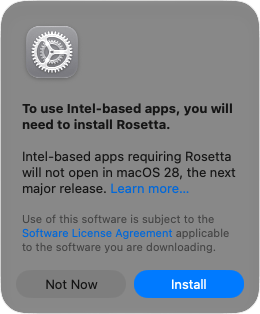
If installing Rosetta on macOS Golden Gate, this warning about Intel apps not opening on macOS 28 is likewise displayed as part of the Rosetta install prompt.

如有侵权请联系:admin#unsafe.sh