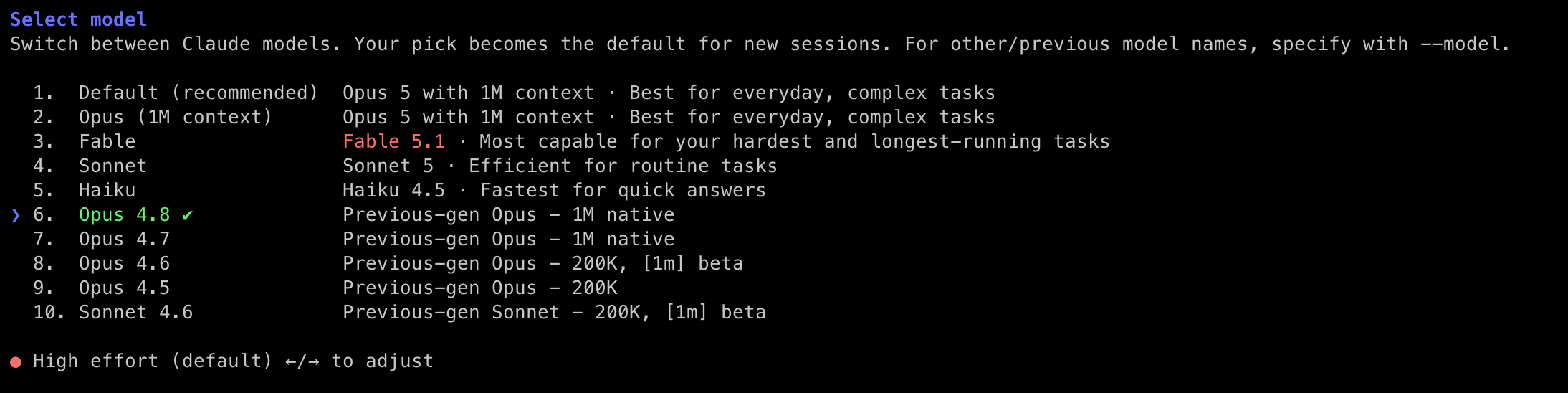
Some tips for using older models and configs for Claude Code

Anyone who is playing around with AI for offensive and defensive tooling has likely already hit the dreaded safeguard warnings when doing something so benign but claude decides you're on the naughty step and will continue to refuse:
Fable 5.1's safeguards flagged this message. Our intentionally broad safeguards allow us to deliver more capabilities faster, but can sometimes flag legitimate coding, cybersecurity, and biology tasks. Switched to Opus 4.8. Send feedback with /feedback or learn more

Details: `[cyber]`
Then when it falls back it then proceeds to thow you on the second naughty step:
API Error: Opus 4.8's safeguards flagged this message. Our intentionally broad safeguards allow us to deliver more capabilities faster, but can sometimes flag legitimate cybersecurity work. Apply to the Cyber Verification Program to reduce these interruptions.It feels like back in the good old days 4.6/4.7 were the last models to happily comply and with every iteration of Claude the model selector gets updated and in some instances you will lose your beloved 4.6 models. So this blog post pulls together a quick guide to bring them back and embed them in your config for easier reference:

Pinning Older Models in Model Picker
Claude Code's /model picker only shows the current generation of models, but the CLI's built-in model catalog goes back further than that. Older models are already there; the picker just doesn't surface them by default. Getting to them is a matter of telling the CLI you want them, and there are a few ways to do that depending on how permanent you want the choice to be.
Pick whichever matches how long you want the choice to stick around. These are alternatives.
Just for this session, simply type the model ID directly into /model. The picker filters the list it shows you, but the underlying command accepts any valid catalog ID:
/model claude-opus-4-6
As your default for every session: add a model key to ~/.claude/settings.json. Both full IDs and aliases work here:
json"model": "claude-opus-4-6[1m]"As permanent picker rows: add a modelPicker block to the same file. This gives you labelled rows you can arrow through in the picker, and they persist across upgrades.
"modelPicker": {
  "options": [
    { "model": "claude-opus-4-8",   "label": "Opus 4.8",   "description": "Previous-gen Opus - 1M native" },
    { "model": "claude-opus-4-7",   "label": "Opus 4.7",   "description": "Previous-gen Opus - 1M native" },
    { "model": "claude-opus-4-6",   "label": "Opus 4.6",   "description": "Previous-gen Opus - 200K, [1m] beta" },
    { "model": "claude-opus-4-5",   "label": "Opus 4.5",   "description": "Previous-gen Opus - 200K" },
    { "model": "claude-sonnet-4-6", "label": "Sonnet 4.6", "description": "Previous-gen Sonnet - 200K, [1m] beta" }
  ]
}
Row Schema
Each row in options supports four fields which can be useful for additional expansion for example if you're using claude code as a harness for other local models this sometimes works nicely.
model(required) - the catalog ID, or a provider ID you've mapped viamodelOverrides.label(optional) - what the picker displays. This is entirely yours to name; it doesn't have to match the catalogs owndisplay_name.description(optional) - the dimmer second line shown under the label.behavesAs(optional) - only useful when the current CLI build doesn't know the model ID you're specifying. Set it to a model the build does know, and the CLI borrows that model's prompt profile, capability flags, and effort defaults. It doesn't change the label or the ID sent to the API.There's one more sibling field worth knowing:
replaceBuiltInOptions. Set that totrueat the same level asoptionsand the picker shows only the Default entry plus your rows, hiding the built-in lineup entirely. Leave it unset and your rows will append after the defaults.
What Each Row Gets You
So now we're a bit more familiar with the options available, the models themselves hold some slightly different benefits. All of it very much matters what you're feeding the model as input. And, a harness which depends on the output you get and how heavy the guard rails end up being, I've written about harnesses in the past which you can find more about here.
These figures come straight from the catalog compiled into Claude Code build 2.1.261. Capability flags matter more than version numbers here they determine whether effortLevel settings and the [1m] suffix do anything at all.
Every row below has context_management. Max output is listed as default / upper.
| Row | Catalog ID | Context | Max Output | Capabilities |
|---|---|---|---|---|
| Opus 4.8 | claude-opus-4-8 |
1M native | 64K / 128K | effort, xhigh, adaptive |
| Opus 4.7 | claude-opus-4-7 |
1M native | 64K / 128K | effort, xhigh, adaptive |
| Opus 4.6 | claude-opus-4-6 |
200K · 1M beta | 64K / 128K | effort, no xhigh, no adaptive |
| Opus 4.5 | claude-opus-4-5 |
200K | 32K / 64K | no effort, no adaptive |
| Sonnet 4.6 | claude-sonnet-4-6 |
200K · 1M beta | 32K / 128K | effort, no xhigh, no adaptive |
Things That Will Catch You Out
Precedence: modelPicker doesn't merge across settings sources. Whichever source has the highest precedence and defines modelPicker wins outright so if you mess this up the others are ignored entirely. The key is also only read from managed settings, --settings/SDK, and user settings. A project-level .claude/settings.json is ignored for this key specifically so you need to set it globally for it to work properly.
Effort levels: A global "effortLevel": "high" does nothing on Opus 4.5, which has no effort capability at all. On Opus 4.6 and Sonnet 4.6, high and max work but xhigh doesn't as that flag only arrived with 4.7.
Snapshot IDs: Write the bare model ID not the dated snapshot to load it into Claude Code, for exampleclaude-opus-4-5 resolves to the correct dated snapshot (claude-opus-4-5-20251101) automatically on a per-provider basis. Writing the date yourself risks creating a string the catalog won't match.
The [1m] suffix: "1M context" covers three different things. native_1m means the window is already a million tokens (4.7, 4.8). supports_1m_beta means the suffix genuinely widens a 200K window (4.6, Sonnet 4.6). supports_1m_suffix on its own just means the suffix parses without erroring Opus 4.5 has that flag and nothing more, so the suffix won't actually get you more context.
Allowlists: if availableModels is set anywhere in your config, it still filters these rows. An undefined availableModels permits everything; an empty array permits only the default model.
Restart required picker rows are read at startup. A settings change needs a new session, not just a new prompt.
After a CLI Upgrade
The model catalog is compiled into each build, so a model can disappear when you upgrade, and an ID you want might predate a given build entirely. Both situations are recoverable.
Dump the catalog of whatever build is installed:
# the CLI is a standalone binary, one file per version
F=~/.local/share/claude/versions/$(claude --version | awk '{print $1}')

strings -a "$F" | grep -o 'id:"claude-[a-z0-9-]*",family:"[a-z]*",display_name:"[^"]*"' | sort -u
Read one model's full entry:
strings -a "$F" | grep -o 'id:"claude-opus-4-6".\{0,650\}' | head -1

# look for: context{}, max_output_tokens{}, capabilities[], provider_ids{}
If a build no longer recognises an ID, its picker row is silently dropped rather than flagged as an error. That's what behavesAs is for, so if you point it at a model the current build does know and the row reappears, while still sending your original ID to the API:
{ "model": "claude-opus-4-6", "label": "Opus 4.6", "behavesAs": "claude-opus-4-8" }
For Bedrock or Vertex users, the parallel to modelPicker is modelOverrides a flat map from Anthropic model IDs to the provider's own IDs or inference-profile ARNs.
Not Yet Verified
I haven't been able to verify some of the settings in Claude Code but from what I can tell The binary also carries ANTHROPIC_CUSTOM_MODEL_OPTION (plus _NAME, _DESCRIPTION, _SUPPORTED_CAPABILITIES) and per-family overrides like ANTHROPIC_DEFAULT_OPUS_MODEL, which remap what the opus alias resolves to. In the source these sit grouped with the Bedrock, Vertex, and Foundry variables, so they look gateway-oriented. They weren't tested on a first-party account also modelPicker is the documented, first-party path, grab that first.
A lot of this might not be new knowledge to many reading but if it's been useful to one person you've learnt a lesson much like me 😄