
Secretlint is a Pluggable linting tool to prevent committing credentials.FeaturesScanner: Fin 2026-9-2 05:32:2 Author: kitploit.com(查看原文) 阅读量:25 收藏

Secretlint is a Pluggable linting tool to prevent committing credentials.
Features
- Scanner: Find credentials in a project and report these
- Project Friendly: Easy to set up your project and integrate CI services
- Pre-Commit Hook: Prevent committing credential files
- Pluggable: Allow creating custom rule and flexible configuration
- Documentation: Describe the reason that rule detect it as secret
Quick Demo
You can view secretlint linting result on https://secretlint.github.io/.
Quick Start
You can try to use Secretlint on your project at one command.
If you already have installed Docker:
docker run -v `pwd`:`pwd` -w `pwd` --rm -it secretlint/secretlint secretlint "**/*"
If you already have installed Node.js:
npx @secretlint/quick-start "**/*"
After running,
If you got empty result and exit status is 0, your project is secure.
Otherwise, you got some error report, your project includes credential as raw data.

You want to get continuous security, Please see following installation guide and setup pre-commit hook and CI.
Installation
Using Docker
Prerequisites: Require Docker
Use our Docker container to get an environment with Node.js and secretlint running as fast as you can download them.
You can check all files under the current directory with secretlint by following command:
docker run -v `pwd`:`pwd` -w `pwd` --rm -it secretlint/secretlint secretlint "**/*"
secretlint/secretlint docker container work without configuration by design.
This Docker Image has built-in packages:
- @secretlint/secretlint-rule-preset-recommend
- @secretlint/secretlint-rule-pattern
- @secretlint/secretlint-formatter-sarif
For more details, please see secretlint's Dockerfile.
Using Node.js
Prerequisites: Require Node.js 22+.
Secretlint is written by JavaScript. You can install Secretlint using npm:
npm install secretlint @secretlint/secretlint-rule-preset-recommend --save-dev
You should then set up a configuration file:
Finally, you can run Secretlint on any file or directory like this:
📝 Secretlint supports glob pattern and glob pattern should be wrapped by a double quote.
It is also possible to install Secretlint globally using npm install --global. But, We do not recommend it, some rules may be broken globally.
Using Single-Executable Binary
Prerequisites: None
You can use secretlint command without Node.js by using a single-executable binary.
- Download the latest binary from Releases page
- Change the file permission to executable:
chmod +x ./secretlint - Run
./secretlint --initto create a configuration file - Run
./secretlint "**/*"to lint your project
For more details, please see publish/binary-compiler README.
Usage
secretlint --help shows Usage.
Secretlint CLI that scan secret/credential data.

Usage
$ secretlint [file|glob*]

Note
supported glob syntax is based on picomatch (the engine used by micromatch)
https://github.com/micromatch/picomatch#globbing-features
https://github.com/micromatch/micromatch#matching-features

Options
--init             setup config file. Create .secretlintrc.json file from your package.json
--format           [String] formatter name. Default: "stylish". Available Formatter: checkstyle, compact, github, jslint-xml, junit, pretty-error, stylish, tap, unix, json, mask-result, table
--output           [path:String] output file path that is written of reported result.
--secretlintrc     [path:String] path to .secretlintrc config file. Default: .secretlintrc.*
--secretlintignore [path:String] path to .secretlintignore file. Default: .secretlintignore
--stdinFileName    [String] filename to process STDIN content. Some rules depend on filename to check content.
--no-color         disable ANSI-color of output.
--no-terminalLink  disable terminalLink of output.
--no-maskSecrets   disable masking of secret values; secrets are masked by default.
--no-glob          disable glob pattern interpretation; treat all inputs as literal file paths.
--no-gitignore     disable .gitignore cascade respect; .gitignore files are
                   respected by default (since v13).

Options for Developer
--profile          Enable performance profile.
--secretlintrcJSON [String] a JSON string of .secretlintrc. use JSON string instead of rc file.

Experimental Options
--locale            [String] locale tag for translating message. Default: en

Examples
# Scan a single file
$ secretlint ./README.md

# Scan all files (wrap glob in double quotes to avoid shell expansion)
$ secretlint "**/*"
$ secretlint "source/**/*.ini"

# Treat inputs as literal paths (for SvelteKit (group) / Next.js [param] etc.)
$ secretlint --no-glob "src/(auth)/login.ts"

# Lint STDIN content (filename hint affects which rules apply)
$ echo "SECRET" | secretlint --stdinFileName=secret.txt

# Use a custom config file
$ secretlint "**/*" --secretlintrc=.secretlintrc.custom.json

# Scan files ignored by .gitignore (e.g. to verify build artifacts)
$ secretlint --no-gitignore "dist/**/*"

# Mask secrets in a file in-place
$ secretlint .zsh_history --format=mask-result --output=.zsh_history

# Output JSON for programmatic parsing
$ secretlint "**/*" --format=json --output=secretlint-report.json

# Output GitHub Actions annotations in CI
$ secretlint "**/*" --format=github

Exit Status
Secretlint exits with the following values:

    - 0:
      - Linting succeeded, no errors found.
      - Found lint error but --output is specified.
    - 1:
      - Linting failed, errors found.
    - 2:
      - Unexpected error occurred, fatal error.
Configuration
Secretlint has a configuration file .secretlintrc.{json,yml,js}.
- Document: Configuring Secretlint
After running secretlint --init, you'll have a .secretlintrc.json file in your directory.
In it, you'll see some rules configured like this:
{
  "rules": [
    {
      "id": "@secretlint/secretlint-rule-preset-recommend"
    }
  ]
}
The id property is the name of secretlint rule package.
Secretlint does not have built-in rule.
You want to add some rule and You should install the package and add the rule to .secretlintrc file.
Each rule has same configuration pattern:
options: Option definition for the rule. For more details, see each rule documentationdisabled: Ifdisabledistrue, disable the ruleallowMessageIds:allowMessageIdsis an array of message id that you want to suppress error report- message id is defined in each rule and please see the rule documentation
Example: options
For example, @secretlint/secretlint-rule-example has allows in options.
This allows option define a list of RegExp-like String that you want to ignore.
{
  "rules": [
    {
      "id": "@secretlint/secretlint-rule-example",
      "options": {
        "allows": [
          "/dummy_secret/i"
        ]
      }
    }
  ]
}
When you use a preset like @secretlint/secretlint-rule-preset-recommend, you need to put the option in rules.
For example, an option for @secretlint/secretlint-rule-preset-recommend > @secretlint/secretlint-rule-aws
{
  "rules": [
    {
      "id": "@secretlint/secretlint-rule-preset-recommend",
      "rules": [
        {
          "id": "@secretlint/secretlint-rule-aws",
            "options": {
              "allows": [
	            // it will be ignored
                "xxxx-xxxx-xxxx-xxxx-xxxx"
              ]
            }
        }
      ]
    }
  ]
}
Example: allowMessageIds
For example, you have got following error report by run secretlint:
$ secretlint "**/*"

SECRET.txt
  1:8  error  [EXAMPLE_MESSAGE] found secret: SECRET  @secretlint/secretlint-rule-example

✖ 1 problem (1 error, 0 warnings)
This error's message id is EXAMPLE_MESSAGE in @secretlint/secretlint-rule-example.
If you want to ignore this error, please use allowMessageIds.
{
  "rules": [
    {
      "id": "@secretlint/secretlint-rule-example",
      "allowMessageIds": ["EXAMPLE_MESSAGE"]
    }
  ]
}
When you use a preset like @secretlint/secretlint-rule-preset-recommend, you need to put the option in rules.
For example, If you want to ignore "AWSAccountID" and "AWSAccessKeyID" of "@secretlint/secretlint-rule-aws", you can write following.
{
  "rules": [
    {
      "id": "@secretlint/secretlint-rule-preset-recommend",
      "rules": [
        {
          "id": "@secretlint/secretlint-rule-aws",
          "allowMessageIds": ["AWSAccountID", "AWSAccessKeyID"]
        }
      ]
    }
  ]
}
Ignoring files via .gitignore and .secretlintignore
Secretlint walks the file system the same way Git does, honouring nested .gitignore files. A file or directory matched by any .gitignore along the path from the working directory to the file is skipped.
.secretlintignore works the same way as .gitignore and is consulted in addition. The resolution order is:
- Built-in ignores:
.git,node_modules, and the.secretlintrc*family. - The file pointed to by
--secretlintignore(default:.secretlintignore). - Each directory's
.gitignore(cascaded).
To scan files that are gitignored — for example, a .env file in a project where .env is gitignored — pass --no-gitignore:
secretlint --no-gitignore "**/*"
Migrating to v13:
.gitignoreis now respected by default. Previously, secretlint scanned all matching files regardless of.gitignore. Pass--no-gitignoreto restore the previous behaviour.- Include patterns follow picomatch glob syntax (brace expansion,
**, character classes, …). The cascaded ignore stack (.gitignore,.secretlintignore, and the built-in ignore list) follows standard.gitignoresemantics, which does NOT support brace expansion — write**/.cacherather than**/{cache,tmp}for ignore patterns.- Patterns are interpreted as globs by default. When a pattern resolves to an existing on-disk path the walker treats it literally even if the name contains glob metacharacters (
[,(,{,?), mirroring globby's oldconvertPathToPatternbehaviour. Pass--no-globto force literal handling for paths that don't yet exist on disk.- Directory symlinks are followed during search (matching the previous globby-based behaviour) but the symlink path — not the resolved target — is what
.gitignoreand.secretlintignorerules see. Cycles are detected viarealpathso each unique target is entered at most once.
@secretlint/secretlint-rule-filter-comments supports ignoring comment like secretlint-disable.
// secretlint-disable

THIS IS SECRET, BUT IT WILL BE IGNORED

// secretlint-enable
For more details, please see Configuring Secretlint.
Use Cases
Mask secrets in lint error message (Default behavior)
Secretlint masks secrets in lint error messages by default. This is useful to prevent accidental secret exposure in CI logs, terminal output, or when using AI agent tools.
# Secrets are masked by default
$ secretlint "**/*"
To show actual secret values in the output, use --no-maskSecrets:
$ secretlint --no-maskSecrets "**/*"
Fix secrets
Secretlint can not fix the secrets automatically.
However, It is useful that --format=mask-result mask the secrets of input file.
For example, you can mask the secrets of .zsh_history file and overwrite it.
$ secretlint .zsh_history --format=mask-result --output=.zsh_history
Rule Packages
Secretlint rules has been implemented as separated modules.
- @secretlint/secretlint-rule-npm
- @secretlint/secretlint-rule-aws
- @secretlint/secretlint-rule-gcp
- @secretlint/secretlint-rule-github
- @secretlint/secretlint-rule-gitlab
- @secretlint/secretlint-rule-privatekey
- @secretlint/secretlint-rule-basicauth
- @secretlint/secretlint-rule-slack
- @secretlint/secretlint-rule-sendgrid
- @secretlint/secretlint-rule-shopify
- @secretlint/secretlint-rule-stripe
- @secretlint/secretlint-rule-openai
- @secretlint/secretlint-rule-anthropic
- @secretlint/secretlint-rule-grafana
- @secretlint/secretlint-rule-groq
- @secretlint/secretlint-rule-linear
- @secretlint/secretlint-rule-1password
- @secretlint/secretlint-rule-database-connection-string
- @secretlint/secretlint-rule-databricks
- @secretlint/secretlint-rule-hashicorp-vault
- @secretlint/secretlint-rule-vercel
- @secretlint/secretlint-rule-azure
- @secretlint/secretlint-rule-docker
- @secretlint/secretlint-rule-figma
- @secretlint/secretlint-rule-cloudflare
- @secretlint/secretlint-rule-tailscale
- @secretlint/secretlint-rule-huggingface
- @secretlint/secretlint-rule-notion
- @secretlint/secretlint-rule-secp256k1-privatekey
- @secretlint/secretlint-rule-no-k8s-kind-secret
- @secretlint/secretlint-rule-pattern
- @secretlint/secretlint-rule-no-homedir
- @secretlint/secretlint-rule-no-dotenv
- @secretlint/secretlint-rule-filter-comments
Also, Secretlint provides rule preset that includes recommended rule set.
- @secretlint/secretlint-rule-preset-recommend
- Recommended rule set
Custom Rules
You can create own secretlint rule.
You want to get a secretlint rule suitable for your project and you can create it! A secretlint rule is a just npm package.
If you want to know creating secretlint rule, please see docs/secretlint-rule.md.
Integrations
Pre-commit Hook per project
You can use Secretlint with some pre-commit tool. This can prevent to commit secret data by linting with Secretlint.
Applying secretlint to the project and improve security on team developing.
Husky + lint-staged
Use Case: If you want to introduce secretlint to Node.js project, this combination is useful.
Install Husky and lint-staged:
npx husky-init && npm install lint-staged --save-dev
Add hooks to .husky/pre-commit:
npx husky add .husky/pre-commit "npx --no-install lint-staged"
Edit package.json:
{
  // add "lint-staged" field
  "lint-staged": {
    "*": [
      "secretlint --no-glob"
    ]
  }
}
Note: The
--no-globflag is required because lint-staged passes literal file paths that may contain glob special characters (e.g.,(group)or[param]routing patterns used by Next.js, SvelteKit, etc.).
This means that check each staged file by Secretlint before commit.
pre-commit
Use Case: You have a project that is developing with Docker. Easy to integrate to secretlint.
Install pre-commit
# macOS. see also https://pre-commit.com/#install
brew install pre-commit
Create .pre-commit-config.yaml:
-   repo: local
    hooks:
    -   id: secretlint
        name: secretlint
        language: docker_image
        entry: secretlint/secretlint:latest secretlint
Example setup repository:
Bash Script
Alternately you can save this script as .git/hooks/pre-commit and give it execute permission(chmod +x .git/hooks/pre-commit):
#!/bin/sh
FILES=$(git diff --cached --name-only --diff-filter=ACMR | sed 's| |\\ |g')
[ -z "$FILES" ] && exit 0

# Secretlint all selected files
echo "$FILES" | xargs ./node_modules/.bin/secretlint --no-glob
# If you using docker
# echo "$FILES" | xargs docker run -v `pwd`:`pwd` -w `pwd` --rm secretlint/secretlint secretlint
RET=$?
if [ $RET -eq 0 ] ;then
    exit 0
else
    exit 1
fi
Pre-commit Hook globally
Use Case: If you want to check any project by secretlint, you can use global git hooks.
Git 2.9+ supports core.hooksPath.
It allow to integrate secretlint globally.
We have created an example git hooks project using secretlint + Docker.
- secretlint/git-hooks
- Requirement: Docker
You can set up by following steps:
# clone this repository
git clone https://github.com/secretlint/git-hooks git-hooks
cd git-hooks
# integrate secretlint to git hook globally
git config --global core.hooksPath $(pwd)/hooks
After setup of core.hooksPath, secretlint check any file before you commit it.
For more details, see secretlint/git-hooks project.
Node.js version can also be used for global git hook. If you are interested in it, please see @azu/git-hooks.
CI
GitHub Actions
If you already set secretlint Using Node.js, you can run secretlint with your configuration on GitHub Actions.
Put .github/workflows/secretlint.yml in your repository.
name: Secretlint
on: [push, pull_request]
permissions:
  contents: read
jobs:
  test:
    name: "Secretlint"
    runs-on: ubuntu-latest
    steps:
      - name: checkout
        uses: actions/checkout@v3
      - name: setup Node.js
        uses: actions/setup-node@v3
        with:
          node-version: 22
      - name: Install
        run: npm ci
      - name: Lint with Secretlint
        run: npx secretlint "**/*"
--format github for Pull Request annotations
You can use --format github to show lint errors as annotations on Pull Request files.
This formatter outputs GitHub Actions workflow commands that display error annotations directly on the changed files in your Pull Request.
      - name: Lint with Secretlint
        run: npx secretlint --format github "**/*"
This configuration integrates Pull Request review annotations.
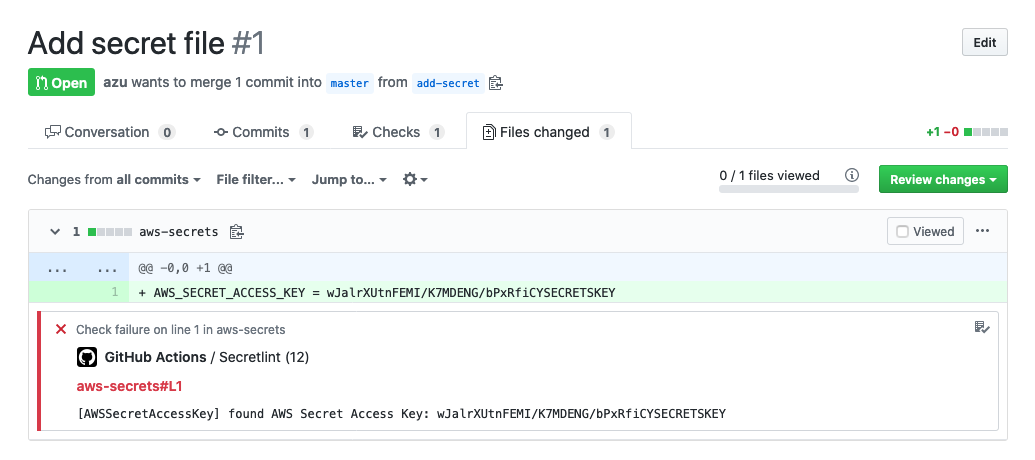
- Example Repository: https://github.com/secretlint/secretlint-github-actions-example
- Example Pull Request: https://github.com/secretlint/secretlint-github-actions-example/pull/1/files
If you want to only check diff files, please see following example:
name: test-diff
on:
  push:
  pull_request:
jobs:
  test-diff:
    permissions:
      contents: read
    name: "Run secretlint to diff files"
    runs-on: ubuntu-latest
    steps:
      - name: checkout
        uses: actions/checkout@v4
        with:
          # fetch history to get all changed files on push or pull_request event
          fetch-depth: 0
      - name: Get changed files
        id: changed-files
        uses: tj-actions/changed-files@v44
        with:
          quotepath: "false"
      - name: setup Node ${{ matrix.node-version }}
        uses: actions/setup-node@v4
        with:
          node-version: 22
      - name: Show changed files
        run: echo "${{ steps.changed-files.outputs.all_changed_files }}"
      - name: Install
        if: steps.changed-files.outputs.any_changed == 'true'
        run: npm ci
      - name: Run secretlint
        if: steps.changed-files.outputs.any_changed == 'true'
        run: npx secretlint --no-glob ${{ steps.changed-files.outputs.all_changed_files }}
Mega-Linter
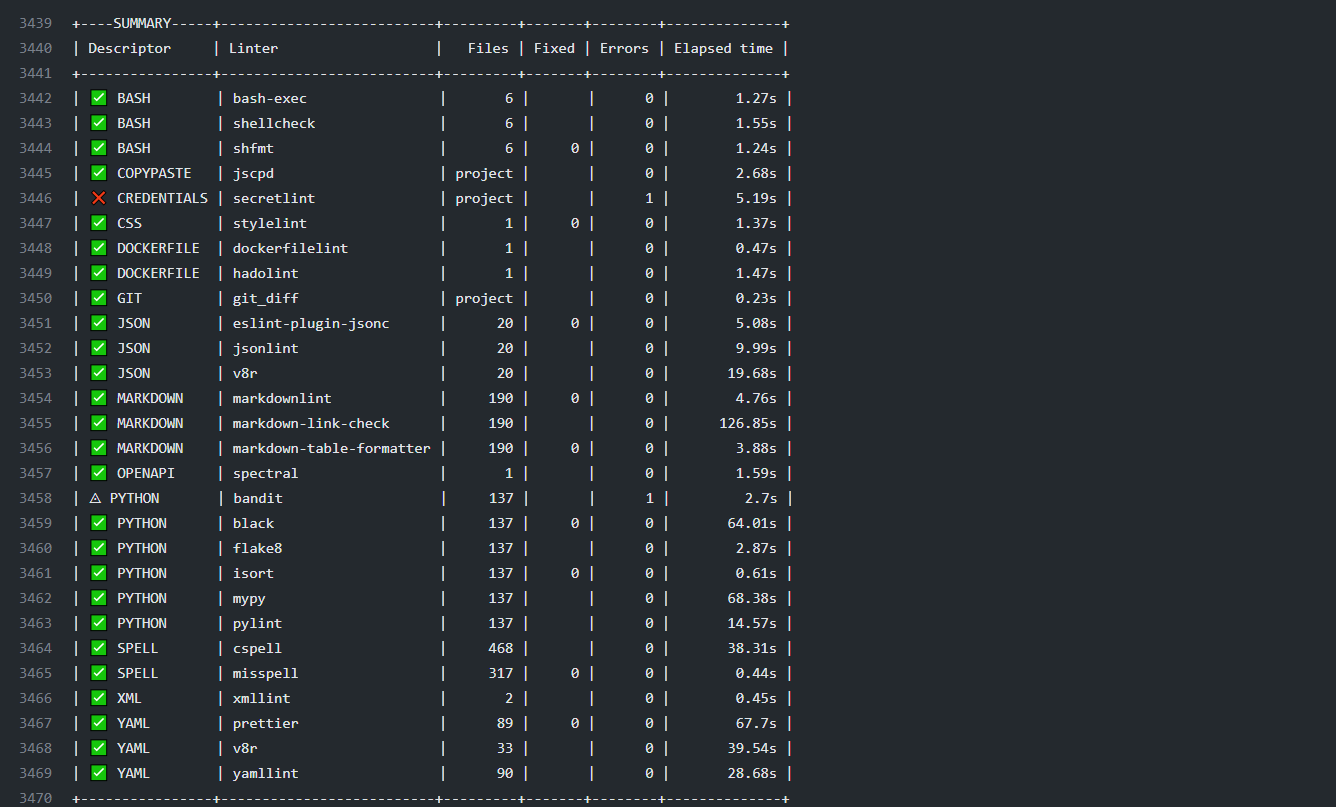
Mega-Linter is a linters aggregator natively compliant with any CI tool, embedding 80+ linting apps, including secretlint by default.
You can install it on any repository project using the following command (Node.js must be installed previously)
npx mega-linter-runner --install
Browser
Secretlint WebExtension works on your browser.
- Firefox: https://addons.mozilla.org/ja/firefox/addon/secretlint/
- Chrome: https://chrome.google.com/webstore/detail/secretlint/hidpojbnemkajlnibhmeilpgoddkjjkf
This web extension aims to find credentials that are included in your request/response.
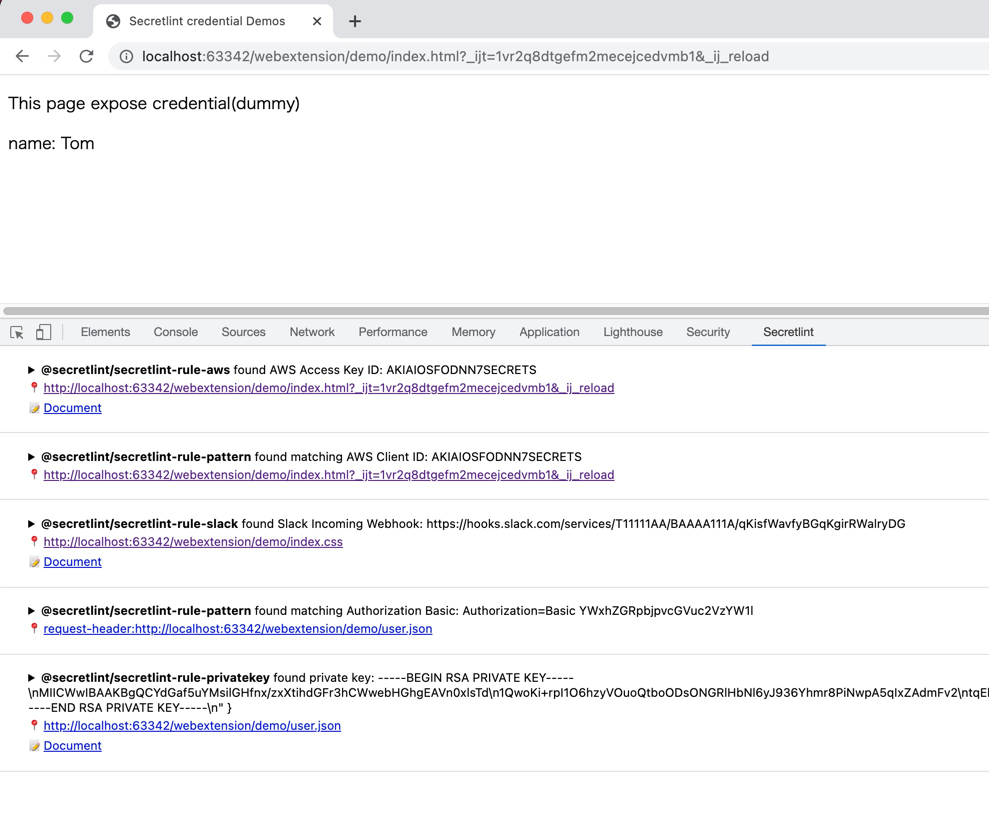
Secretlint WebExtension integrates to DevTools in Chrome/Firefox. This extension helps web developers to notice exposed credentials.
macOS
SecureClipboard is a macOS menu bar application that uses Secretlint to detect and mask secrets in your clipboard before they are pasted elsewhere.
Others
SARIF format support
Please use @secretlint/secretlint-formatter-sarif.
npm install @secretlint/secretlint-formatter-sarif --dev
secretlint --format @secretlint/secretlint-formatter-sarif "**/*"
Semantic Versioning Policy
Secretlint project follows Semantic Versioning(secretlint-rule-preset-canary is an exception).
- Patch release (intended to not break your lint build)
- A bug fix to the CLI or core (including formatters).
- Improvements to documentation.
- Non-user-facing changes such as refactoring.
- Re-releasing after a failed release (i.e., publishing a release that doesn't work for anyone).
- Minor release (might break your lint build)
- A new option.
- An existing rule is deprecated.
- A new CLI capability is created.
- New public API are added (new classes, new methods, new arguments to existing methods, etc.).
- It might break TypeScript definitions
- A new formatter is created.
- Major release (break your lint build)
- A new option to an existing rule that results in secretlint reporting more errors by default.
- An existing formatter is removed.
- Add new default rule to rule preset.
- Part of the public API is removed or changed in an incompatible way.
Motivation
- git-secrets is useful, but it is hard to setup per project.
- Its main use-case is global installation
- Secretlint wants to install for a project and customize setting per project.
- repo-security-scanner, Gitleaks and truffleHog is good scan tools
- Secretlint needs flexible customization that includes ignoring definitions, custom rules.
- detect-secrets is similar tools, but it adopts opt-out approach
- Secretlint adopts opt-in approach
- We also need to custom rules by user
- GitHub support secret scanning, but it only works after commit
push- Secretlint works on your local machine, Secretlint can prevent to commit
Philosophy
- Reduce false-positive of linting
- Integration to developing workflow
- Empower Users to Contribute
Opt-in instead of Opt-out
Secretlint adopt opt-in approach.
In our experience, linting tools that report various errors by default are difficult to use. Opt-in approach helps to introduce Secretlint incrementally.
It will help to reduce false-positive by configuration.
Rule as Documentation
We think a rule as a documentation. So, Each rule should have reasonable documentation.
We need to describe why this file is error. A rule that has no documentation is just opinionated.
Describe the reason of error and then it will lead to reduce false-positive error.
Also, Secretlint CLI support hyperlink in Terminal. It means that you can jump to rule documentation from lint error message directly.
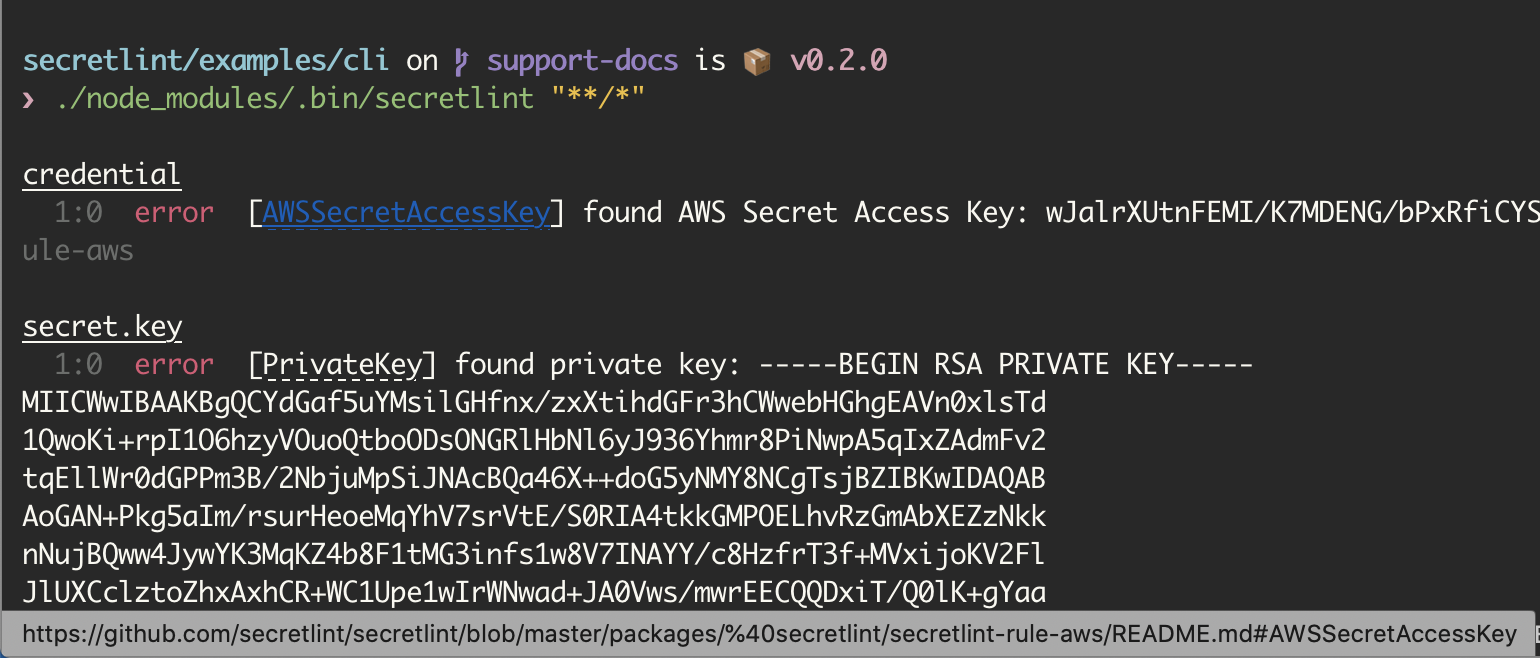
Example on iTerm 2: Cmd + Click error's messageId and open AWSSecretAccessKey on your browser.
If you want to know support terminal, please see Hyperlinks in Terminal Emulators.
Also, Welcome to Contribution about secretlint documentation!
Why Node.js?
- Package Manager
- Require package manager to realize flexible pluggable system
- Node.js has npm and pnpm as package manager
- Package manager help to install custom plugin/rule by user
- Exist Reference Implementation
- Node.js already has pluggable linting tools like ESLint, textlint, stylelint etc
- So Node.js users are familiar with pluggable linting tools
- Previously, I created textlint with the same approach, so I am familiar with Node.js
- Users
- JavaScript is a popular language
- It empowers users to contribute
- Users can create own rule by own hand
Of course, secretlint also support Docker.
Changelog
See Releases page.
Contributing
Pull requests and stars are always welcome.
For bugs and feature requests, please create an issue.
See also, CONTRIBUTING.md and CODE_OF_CONDUCT.md
Add New Rule
You can use pnpm run gen:rule command to create new rule.
For more details, please see CONTRIBUTING.md
Benchmark
Benchmark workflow is run on every commit.
License
MIT © azu
如有侵权请联系:admin#unsafe.sh