Kubernetes RBAC Analysis made EasyKrane is a simple Kubernetes RBAC static analysis tool. I 2026-8-31 00:27:11 Author: kitploit.com(查看原文) 阅读量:11 收藏
Kubernetes RBAC Analysis made Easy




Krane is a simple Kubernetes RBAC static analysis tool. It identifies potential security risks in K8s RBAC design and makes suggestions on how to mitigate them. Krane dashboard presents current RBAC security posture and lets you navigate through its definition.
Features
- RBAC Risk rules - Krane evaluates a set of built-in RBAC risk rules. These can be modified or extended with a set of custom rules.
- Portability - Krane can run in one of the following modes:
- Locally as a CLI or docker container.
- In CI/CD pipelines as a step action detecting potential RBAC flaws before it gets applied to the cluster.
- As a standalone service continuously analysing state of RBAC within a Kubernetes cluster.
- Reporting - Krane produces an easy to understand RBAC risk report in machine-readable format.
- Dashboard - Krane comes with a simple Dashboard UI helping you understand in-cluster RBAC design. Dashboard presents high-level overview of RBAC security posture and highlights detected risks. It also allows for further RBAC controls inspection via faceted tree and graph network views.
- Alerting - It will alert on detected medium and high severity risks via its Slack integration.
- RBAC in the Graph - Krane indexes entirety of Kubernetes RBAC in a local Graph database which makes any further ad-hoc interrogating of RBAC data easy, with arbitrary CypherQL queries.
Contents
- Quick Start
- Usage Guide
- Architecture
- Kubernetes Deployment
- Notifications
- Local Development
- Contributing to Krane
- Community
- Roadmap
- License
Quick Start
You can get started with Krane by installing it via Helm chart in your target Kubernetes cluster or running it locally with Docker.
Install Helm chart
It is assumed that you have Helm CLI installed on your machine.
$ helm repo add appvia https://appvia.github.io/krane
$ helm repo update
$ helm install krane appvia/krane --namespace krane --create-namespace
Follow Helm chart installation output on how to port-forward Krane dashboard.
Run with Docker
It is assumed that you have docker running on your local machine. Install docker-compose if you haven't already.
Krane depends on FalkorDB. docker-compose stack defines all what's required to build and run Krane service locally. It'll also take care of its FalkorDB dependency.
Krane docker image will be pre-built automatically if not already present on local machine.
Note that when running docker-compose locally, Krane won't start RBAC report and dashboard automatically. Instead, the container will sleep for 24h by default - this value can be adjusted in docker-compose.override.yml. Exec into a running Krane container to run commands. Local docker-compose will also mount kube config (~/.kube/config) inside the container enabling you to run reports against any Kubernetes clusters to which you already have access to.
Exec into a running Krane container.
docker-compose exec krane bash
Once in the container you can start using krane commands. Try krane -help.
To inspect what services are running and the associated ports:
To stop Krane and its dependency services:
Usage Guide
Commands
$ krane --help

  NAME:

    krane

  DESCRIPTION:

    Kubernetes RBAC static analysis & visualisation tool

  COMMANDS:

    dashboard Start K8s RBAC dashboard server
    help      Display global or [command] help documentation
    report    Run K8s RBAC report

  GLOBAL OPTIONS:

    -h, --help
        Display help documentation

    -v, --version
        Display version information

    -t, --trace
        Display backtrace when an error occurs

  AUTHOR:

    Marcin Ciszak <[email protected]> - Appvia Ltd <appvia.io>
Generate RBAC report
With local kubectl context
To run a report against a running cluster you must provide a kubectl context
krane report -k <context>
You may also pass -c <cluster-name> flag if you plan to run the tool against multiple clusters and index RBAC graph separately for each cluster name.
From RBAC files stored in directory
To run a report against local RBAC yaml/json files, provide a directory path
krane report -d </path/to/rbac-directory>
NOTE: Krane expects the following files (in either YAML or JSON format) to be present in specified directory path:
- psp
- roles
- clusterroles
- rolebindings
- clusterrolebindings
If Pod Security Policies are not in use you may bypass the expectation above by creating a psp file manually with the following content:
Note, PodSecurityPolicy was deprecated in Kubernetes v1.21, and removed from Kubernetes in v1.25.
Inside a Kubernetes cluster
To run a report from a container running in Kubernetes cluster
NOTE: Service account used by Krane will require access to RBAC resources. See Prerequisites for details.
In CI/CD pipeline
To validate RBAC definition as a step in CI/CD pipeline
krane report --ci -d </path/to/rbac-directory>
NOTE: Krane expects certain naming convention to be followed for locally stored RBAC resource files. See section above. In order to run krane commands it's recommended that CI executor references quay.io/appvia/krane:latest docker image.
CI mode is enabled by --ci flag. Krane will return non zero status code along with details of breaking risk rules when one or more dangers have been detected.
Visualisation Dashboard
To view RBAC facets tree, network graph and latest report findings you need to start dashboard server first.
Cluster flag -c <cluster-name> may be passed if you want to run the dashboard against specific cluster name. Dashboard will look for data related to specified cluster name which is cached on the file system.
Command above will start local web server on default port 8000, and display the dashboard link.
The server binds to 0.0.0.0 so that it is reachable when running in a cluster. Pass -b 127.0.0.1 to keep it on the loopback interface when running locally.
The dashboard has no authentication. It serves everything Krane knows about your cluster's RBAC to anyone who can reach the port, so do not expose it directly. Reach it with kubectl port-forward, restrict access with a NetworkPolicy (the chart already labels the pod with network/krane: "true"), or put an authenticating proxy in front of it.
The dashboard is a set of static files served from dashboard/compiled, and the report writes its data into the same directory. A report generated while the dashboard is running is picked up without a restart.
Views
- Overview counts the risk rules that matched, by severity.
- Findings lists every matched rule for a chosen severity, with the affected objects and the rule's mitigation notes.
- RBAC tree shows RBAC by namespace, actor, role and resource access. Branches load as they are expanded, so a large cluster does not have to be downloaded before the first row appears. Search covers the loaded branches and reports how many names match in branches that are still closed. Selecting a node reads its path back as a sentence, for example
Namespace kube-system admits Group system:bootstrappers:kubeadm:default-node-token to resource [certificates.k8s.io] certificatesigningrequests action create defined by ClusterRole system:node-bootstrapper. - RBAC graph shows what a chosen namespace, actor or role reaches, within one, two or three hops. Pick a node from the search box, by clicking one, or from the tree. With nothing selected it lists the nodes nothing is bound to.
- Risk rules shows the rules the report was evaluated against, as searchable cards and as the raw
rules.yaml.
Architecture
RBAC Data indexed in a local Graph database
Krane indexes RBAC entites in FalkorDB. This allows us to query network of dependencies efficiently and simply using subset of CypherQL supported by FalkorDB.
Schema
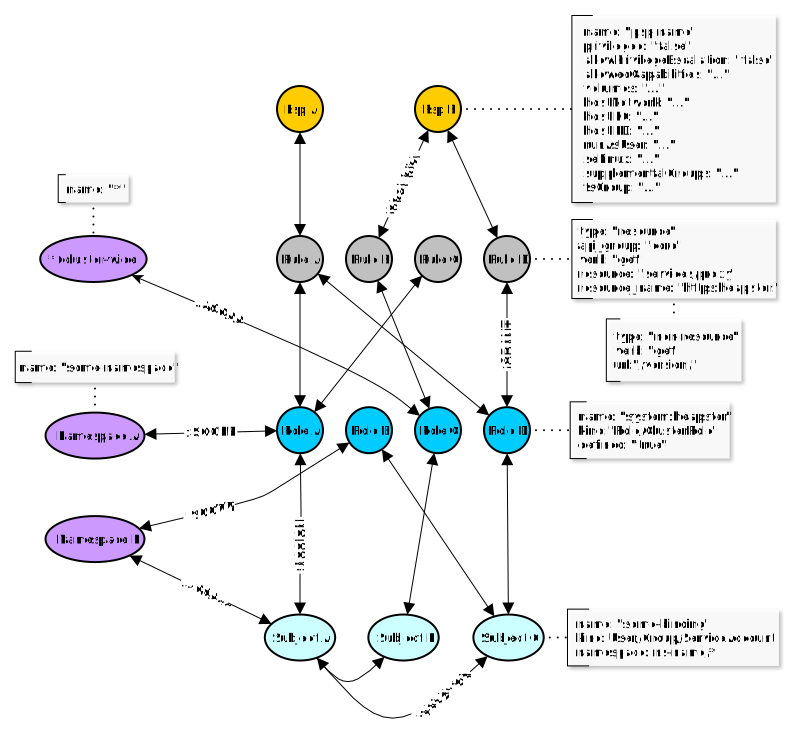
Nodes
The following nodes are created in the Graph for the relevant RBAC objects:
Psp- A PSP node containing attributes around the pod security policy. Only applicable when working with K8s < 1.25.Rule- Rule node represents access control rule around Kubernetes resources.Role- Role node represents a given Role or ClusterRole.kindattribute defines type of role.Subject- Subject represents all possible actors in the cluster (kind: User, Group and ServiceAccount)Namespace- Kubernetes Namespace node.
Edges
:SECURITY- Defines a link between Rule and Psp nodes. Only applicable when working with K8s < 1.25.:GRANT- Defines a link between Role and Rule associated with that role.:ASSIGN- Defines a link between an Actor (Subject) and given Role/ClusterRole (Role node).:RELATION- Defines a link between two different Actor (Subject) nodes.:SCOPE- Defines a link between Role and Namespace nodes.:ACCESS- Defines a link between Subject and Namespace nodes.:AGGREGATE- Defines a link between ClusterRoles (one ClusterRole aggregates another)A-(aggregates)->B:COMPOSITE- Defines a link between ClusterRoles (one ClusterRole can be aggregated in another)A<-(is a composite of)-B
All edges are bidirectional, which means graph can be queried in either direction.
Only exceptions are :AGGREGATE and :COMPOSITE relations which are uni-directional, though concerned with the same edge nodes.
Querying the Graph
In order to query the graph directly you can exec into a running falkordb container, start redis-cli and run your arbitrary queries. Follow official instructions for examples of commands.
You can also query the Graph from Krane console. First exec into running Krane container, then
# Start Krane console - this will open interactive ruby shell with Krane code preloaded

console

# Instantiate Graph client

graph = Krane::Clients::FalkorDB.client cluster: 'default'

# Run arbitrary CypherQL query against indexed RBAC Graph

res = graph.query(%Q(
  MATCH (r:Rule {resource: "configmaps", verb: "update"})<-[:GRANT]-(ro:Role)<-[:ASSIGN]-(s:Subject)
  RETURN s.kind as subject_kind, s.name as subject_name, ro.kind as role_kind, ro.name as role_name))

# Print the results

res.print_resultset
# Results...
+----------------+--------------------------------+-----------+------------------------------------------------+
| subject_kind   | subject_name                   | role_kind | role_name                                      |
+----------------+--------------------------------+-----------+------------------------------------------------+
| ServiceAccount | bootstrap-signer               | Role      | system:controller:bootstrap-signer             |
| User           | system:kube-controller-manager | Role      | system::leader-locking-kube-controller-manager |
| ServiceAccount | kube-controller-manager        | Role      | system::leader-locking-kube-controller-manager |
| User           | system:kube-scheduler          | Role      | system::leader-locking-kube-scheduler          |
| ServiceAccount | kube-scheduler                 | Role      | system::leader-locking-kube-scheduler          |
+----------------+--------------------------------+-----------+------------------------------------------------+
Note: Example query above will select all Subjects with assigned Roles/ClusterRoles granting access to update configmaps.
Configuration
RBAC Risk Rules
RBAC risk rules are defined in the Rules file. The structure of each rule is largely self-explanatory. Built-in set can be expanded / overridden by adding extra custom rules to the Cutom Rules file.
Default and vendor managed roles
Most rules skip roles the cluster operator did not author, because a finding against a role nobody can edit
is noise rather than a risk. That covers the roles Kubernetes bootstraps itself, labelled
kubernetes.io/bootstrapping: rbac-defaults, and the RBAC a managed control plane installs and reconciles on
your behalf — EKS, GKE, AKS and OpenShift all ship their own, and none of it carries the bootstrapping label.
Vendor managed roles are recognised by the markers their provider stamps on the RBAC it owns, rather than by an enumeration of role names that would go stale with each provider release. A role qualifies when it carries one of these labels:
| Label | Provider |
|---|---|
eks.amazonaws.com/component | EKS |
addonmanager.kubernetes.io/mode | GKE, AKS |
kubernetes.azure.com/managedby | AKS |
or when its name begins with a prefix the provider has reserved: eks:, aws-node (EKS); gce:,
system:gcp-, system:gke- (GKE); aks-, system:azure- (AKS); openshift-, system:openshift:
(OpenShift).
To audit vendor RBAC as well, set TREAT_VENDOR_MANAGED_ROLES_AS_DEFAULT=false — vendor roles are then judged
like any other, while Kubernetes' own defaults stay excluded. The Helm chart exposes this as
params.treatVendorManagedRolesAsDefault. Setting
RISK_RULE_QUERY_EXCLUDE_DEFAULT_ROLES=false goes further and brings both back into the role oriented rules.
In the other direction, individual roles can be exempted by name through whitelist_role_names in the
Whitelist.
Unauthenticated access
Most built-in rules judge a subject by the permissions it holds. The unauthenticated-subject-access rule
judges it by who it is: any binding to system:anonymous (the identity the API server assigns to requests
carrying no credentials) or to the system:unauthenticated group is reported as a danger, whatever the
bound role grants.
Two things make this rule behave differently to the others, both tunable through its custom_params:
- It does not skip Kubernetes' own default roles. Every other subject rule filters them out, but
cluster-admin,admin,edit,viewand thesystem:*ClusterRoles are precisely what an accidental anonymous binding tends to reference, and the most damaging when it does. - It excludes, via
baseline_role_names, the anonymous access a cluster legitimately ships with, so that anything reported is worth acting on:system:public-info-viewer, bound tosystem:unauthenticatedto serve/healthz,/livez,/readyzand/version; andkubeadm:bootstrap-signer-clusterinfo, bound tosystem:anonymousto serve thecluster-infoConfigMap thatkubeadm joindiscovery reads.
To report that baseline access too, empty the list in Custom Rules:
rules:
- id: unauthenticated-subject-access
  custom_params:
    baseline_role_names: []
The same mechanism widens the check — add system:authenticated to unauthenticated_subject_names to also
report permissions available to every authenticated principal. Roles listed under whitelist_role_names in
the Whitelist are excluded as well, for cluster-specific exceptions.
Risk Rule Macros
Macros are "containers" for a set of common/shared attributes, and referenced by one or more risk rules. If you choose to use macro in a given risk rule you would need to reference it by name, e.g. macro: <macro-name>. Note that attributes defined in referenced macro will take precedence over the same attributes defined on the rule level.
Macro can contain any of the following attributes:
query- FalkorDB query. Has precedence overtemplate. Requireswriterto be defined.writer- Writer is a Ruby expression used to formatqueryresult set. Writer has precedence overtemplate.template- Built-in query/writer template name. Ifquery&writerare not specified then chosen query generator will be used along with matching writer.
Risk Rule attributes
Rule can contain any of the following attributes:
-
id[Required] Rule id is a unique rule identifier. -
group_title[Required] Title applying to all items falling under this risk check. -
severity[Required] Severity, as one of :danger, :warning, :info. -
info[Required] Textual information about the check and suggestions on how to mitigate the risk. -
query[Conditonal] FalkorDB query.- Has precedence over
template. Requireswriterto be defined.
- Has precedence over
-
writer[Conditonal] Writer is a Ruby expression used to format query result set.- Writer has precedence over
template. Requiresqueryto be defined.
- Writer has precedence over
-
template[Conditonal] Built-in query/writer template name. Ifquery&writerare not specified then chosen query generator will be used along with matching writer.-
Some built-in templates require
match_rulesattribute to be specified on individual rule level in order to build correct query. Templates currently requiring it:- risky-role - Builds multi-match graph query based on the access rules specified by
match_rules. Generated graph query returns the following columns:- role_name
- role_kind
- namespace_name (an array is returned if multiple items returned)
- risky-role - Builds multi-match graph query based on the access rules specified by
-
-
match_rules[Conditonal] Required whentemplaterelies on match rules in order to build a query.-
Example:
 match_rules:
 - apiGroups: ['batch']
   resources: ['cronjobs']
   verbs: ['update']
Attributes and values follow Kubernetes RBAC role specification.
Values of a given attribute are matched together (logical AND), so a role only matches when it grants all of them.
apiGroupsare the exception - a role rule names a single API group per resource, so their values are matched as alternatives (logical OR), and the*API group is always accepted alongside them. OmittingapiGroupsmatches a role rule naming any API group, which for a resource that exists in one group only (or for the*resource) reports a wider scope than the role actually grants.
-
-
custom_params[Optional] Map of custom key-value pairs to be evaluated and replaced in a rulequeryandwriterrepresentation.- Example:
Template placeholders for the keys above
custom_params: attrA: valueA attrB: valueB attrC: ['valueC1', 'valueC2']{{attrA}},{{attrB}}and{{attrC}}will be replaced withvalueA,valueBand["valueC1", "valueC2"]respectively. A list value is rendered as a CypherQL list, so it can be used directly with anINpredicate.
- Example:
-
threshold[Optional] Numeric value. When definied this will become available as template placeholder{{threshold}}in thewriterexpression. -
macro[Optional] Reference to common parameters defined in a named macro. -
disabled[Optional] When set totrueit'll disable given rule and exclude it from evaluation. By default all rules are enabled.
Risk Rule examples
Explicit query & writer expression
- id: verbose-rule-example
  group_title: Example rule
  severity:    :danger
  info:        Risk description and instructions on how to mitigate it goes here
  query: |
    MATCH
      (s:Subject)-[:ACCESS]->(ns:Namespace)
    WHERE
      NOT s.name IN {{whitelist_subject_names}}
    RETURN
      s.kind as subject_kind,
      s.name as subject_name,
      COLLECT(ns.name) as namespace_names
    ORDER BY
      subject_kind,
      subject_name,
      namespace_names DESC
  threshold: 2
  writer: |
    if result.namespace_names.count > {{threshold}}
      "#{result.subject_kind} #{name_of(result.subject_name)} can access namespaces: #{namespaces_of(result.namespace_names)}"
    end
  disabled: true
The example above explicitly defines a graph query which is used to evaluate RBAC risk, and a writer expression used to format query result set. The query simply selects all Subjects (excluding whitelisted) and Namespaces to which they have access to. Note that the result set will only include Subjects having access to more than 2 Namespaces (Noticed threshold value there?). Last writer's expression will be captured as formatted result item output.
writer can access the result set item via result object with methods matching elements returned by the query, e.g. result.subject_kind, result.subject_name etc.
writer can also mark the object names in its output, which the dashboard renders in bold so they can be told apart from the surrounding words:
name_of(value)marks a name.namespaces_of(value)marks one or more namespace names, writing the*namespace as* (All NS)for consistency with the rest of the dashboard.
Marking is optional. Output with nothing marked is displayed as it is.
Note:
{{threshold}}placeholder in thewriterexpression will be replaced by the rule'sthresholdkeyword value.{{whitelist_subject_names}}represents a custom field which will be interpolated with Whitelist values defined for a given ruleid. If a placeholder field name is not defined in the whitelist it'll be substituted with an empty array['']by default. Read more on whitelisting below.
Templated Risk Rule
Built-in templates simplify risk rule definition significantly, however, they are designed to extract specific kind of information and may not be a good fit for your custom rules. If you find yourself reusing the same query or writer expressions across multiple rules, you should consider extracting those to a macro and reference it in your custom rules to DRY them up.
- id: risky-any-verb-secrets
  group_title: Risky Roles/ClustersRoles allowing all actions on secrets
  severity: :danger
  info: Roles/ClusterRoles allowing all actions on secrets. This might be dangerous. Review listed Roles!
  template: risky-role
  match_rules:
  - apiGroups: ['']
    resources: ['secrets']
    verbs: ['*']
Example above shows one of the built-in rules. It references risky-role template which upon processing will expand the rule by injecting query and writer expressions before rule evalutation triggers. match_rules will be used to build appropriate match query.
RBAC Risk Whitelist
Optional whitelist contains a set of custom defined attribute names and respective (whitelisted) values.
Whitelist attributes
Attribute names and their values are arbitrary. They are defined in the Whitelist file and divided into three separate sections:
global- Top level scope. Custom attributes defined here will apply to all Risk Rules regardless of the cluster name.common- Custom attributes will be scoped to specific Risk Ruleidregardless of the cluster name.cluster(with nested list of cluster names) - Custom attributes will apply to specific Risk Ruleidfor a given cluster name.
Each Risk Rule, upon evaluation, will attempt to interpolate all parameter placeholders used in the query, e.g. {{your_whitelist_attribute_name}}. If a placeholder parameter name (i.e. a name between the double curly brackets) matches any of the whitelisted attribute names for that Risk Rule id, it will be replaced with its calculated value.
If no values are found for a given placeholder, it'll be substituted with [''].
Whitelist examples
Example whitelist below produces the following placeholder-key => value mapping for a Risk Rule with id attribute value matching "some-risk-rule-id"
{{whitelist_role_names}}    => ['acp:prometheus:operator']
{{whitelist_subject_names}} => ['privileged-psp-user', 'another-user']
The placeholder keys above, when used in the custom graph queries, will be replaced by their respective values upon Risk Rule evaluation.
Example:
---
rules:
  global:                        # global scope - applies to all risk rule and cluster names
    whitelist_role_names:        # custom attribute name
      - acp:prometheus:operator  # custom attribute values

  common:                        # common scope - applies to specific risk rule id regardless of cluster name
    some-risk-rule-id:           # this corresponds to risk rule id defined in config/rules.yaml
      whitelist_subject_names:   # custom attribute name
        - privileged-psp-user    # custom attribute values

  cluster:                       # cluster scope - applies to speciifc risk rule id and cluster name
    default:                     # example cluster name
      some-risk-rule-id:         # risk rule id
        whitelist_subject_names: # custom attribute nane
          - another-user         # custom attribute values
Kubernetes Deployment
Krane can be deployed to a local or remote Kubernetes clusters easily.
K8s Prerequisites
Kubernetes namespace, service account along with appropriate RBAC must be present in the cluster. See the Prerequisites for reference.
Default Krane entrypoint executes bin/in-cluster-run which waits for FalkorDB instance to become available before starting RBAC report loop and dashboard web server.
You may control certain aspects of in-cluster execution with the following environment variables:
KRANE_REPORT_INTERVAL- Defines interval in seconds for RBAC static analysis report run. Default:300(in seconds, i.e. 5 minutes).KRANE_REPORT_OUTPUT- Defines RBAC risk report output format. Possible values:json,:yaml,:none. Default::json.TREAT_VENDOR_MANAGED_ROLES_AS_DEFAULT- Whether RBAC installed by a managed control plane is skipped by the risk rules, along with the Kubernetes defaults. See Default and vendor managed roles. Default:true.
Local or Remote K8s Cluster
Helm Chart
Before we begin, you'll need the following tools:
Install helm chart:
$ helm repo add appvia https://appvia.github.io/krane
$ helm repo update
$ helm install krane appvia/krane --namespace krane --create-namespace
See values.yaml file for details of other settable options and parameters.
K8s manifests
kubectl create \
  --context <docker-desktop> \
  --namespace krane \
  -f k8s/falkordb-service.yaml \
  -f k8s/falkordb-deployment.yaml \
  -f k8s/krane-service.yaml \
  -f k8s/krane-deployment.yaml
Note that Krane dashboard service is not exposed by default!
kubectl port-forward svc/krane 8000 \
  --context=<docker-desktop> \
  --namespace=krane

# Open Krane dashboard at http://localhost:8000
You can find the example deployment manifests in k8s directory.
Modify manifests as required for your deployments making sure you reference the correct version of Krane docker image in its deployment file. See Krane Docker Registry for available tags, or just use latest.
Compose-on-Kubernetes
If your K8s cluster comes with built-in Compose-on-Kubernetes controller support (docker-desktop supports it by default), then you can deploy Krane and its dependencies with a single docker stack command:
docker stack deploy \
  --orchestrator kubernetes \
  --namespace krane \
  --compose-file docker-compose.yml \
  --compose-file docker-compose.k8s.yml krane
Note: Make sure your current kube context is set correctly prior to running the command above!
The application Stack should be now deployed to a Kubernetes cluster and all services ready and exposed. Note that Krane will automatically start its report loop and dashboard server.
docker stack services --orchestrator kubernetes --namespace krane krane
Command above will produce the following output:
ID                  NAME                MODE                REPLICAS            IMAGE                         PORTS
0de30651-dd5        krane_falkordb      replicated          1/1                 falkordb/falkordb:v4.20.3     *:6379->6379/tcp
aa377a5f-62b        krane_krane         replicated          1/1                 quay.io/appvia/krane:latest   *:8000->8000/tcp
Check your Kubernetes cluster RBAC security posture by visiting http://localhost:8000.
Note that for remote cluster deployments you'll likely need to port-forward Krane service first
kubectl --context=my-remote-cluster --namespace=krane port-forward svc/krane 8000
To delete the Stack
docker stack rm krane \
  --orchestrator kubernetes \
  --namespace krane
Notifications
Krane will notify you about detected anomalies of medium and high severity via its Slack integration.
To enable notifications specify Slack webhook_url & channel in the config/config.yaml file, or alternatively set both SLACK_WEBHOOK_URL and SLACK_CHANNEL environment variables. Environment variables will take precedence over config file values.
Local Development
This section describes steps to enable local development.
Setup
Install Krane code dependencies with
Dependencies
Krane depends on FalkorDB. docker-compose is the quickest way to get Krane's dependencies running locally.
docker-compose up -d falkordb
To inspect FalkorDB service is up:
To stop services:
Development
At this point you should be able to modify Krane codebase and test results by invoking commands in local shell.
$ ./bin/krane --help                    # to get help
$ ./bin/krane report -k docker-desktop  # to generate your first report for
                                        # local docker-desktop k8s cluster
...
The dashboard is served from dashboard/compiled, which a fresh clone does not
have. Build it once before running krane dashboard:
$ cd dashboard && npm ci && npm run build
To work on the Dashboard UI
$ cd dashboard
$ npm ci
$ npm run dev
This starts the Vite dev server with hot reload. It serves report data from dashboard/compiled/data, so generate a report first for the dashboard to have anything to show.
Other dashboard commands:
$ npm run lint          # eslint
$ npm run typecheck     # vue-tsc
$ npm run test          # vitest
$ npm run build         # production build into dashboard/compiled
$ npm run check:offline # fail if the build references anything remote
Krane comes preconfigured for improved developer experience with Skaffold. Iterating on the project and validating the application by running the entire stack in local or remote Kubernetes cluster just got easier. Code hot-reload enables local changes to be automatically propagated to the running container for faster development lifecycle.
skaffold dev --kube-context docker-desktop --namespace krane --port-forward
Tests
Run tests locally with
Contributing to Krane
We welcome any contributions from the community! Have a look at our contribution guide for more information on how to get started. If you use Krane, find it useful, or are generally interested in Kubernetes security then please let us know by Starring and Watching this repo. Thanks!
Get Involved
Join discussion on our Community channel.
Krane is a community project and we welcome your contributions. To report a bug, suggest an improvement, or request a new feature please open a Github issue. Refer to our contributing guide for more information on how you can help.
Roadmap
See our Roadmap for details about our plans for the project.
License
Author: Marcin Ciszak [email protected]
Copyright (c) 2019-2020 Appvia Ltd
This project is distributed under the Apache License, Version 2.0.
A note on the graph database
Krane stores its RBAC graph in FalkorDB, which is licensed under the Server Side Public License v1 (SSPL). SSPL is a source-available licence, not an OSI-approved open source one. Krane itself remains Apache-2.0: it contains no FalkorDB code and does not redistribute it. FalkorDB runs as a separate process that Krane talks to over the Redis wire protocol, and the container image is pulled from Docker Hub at deploy time.
For the overwhelming majority of users this changes nothing. SSPL places no conditions on running the database - including inside a company, on internal clusters, for colleagues. Its one obligation (section 13) is triggered by offering the database's functionality to third parties as a service, which is not what Krane does.
Krane previously used RedisGraph, which was itself source-available under the Redis Source Available License, so this is a change of restrictive licence rather than a departure from an open one.
如有侵权请联系:admin#unsafe.sh