
Each feature that you add to a website results in a new element that has to be managed.The credentia 2026-8-19 20:6:49 Author: blog.sucuri.net(查看原文) 阅读量:20 收藏
Each feature that you add to a website results in a new element that has to be managed.
The credentials are accepted by a login page, the data by a contact form, new code is introduced by a plugin, and an API is used to connect your website to another service. It is also possible that an old staging site or a forgotten backup may still be accessible from the internet.
The collection of these exposed components constitutes your website attack surface.
Understanding your attack surface answers a practical security question: what an attacker can access and what might happen if one of those areas is vulnerable.
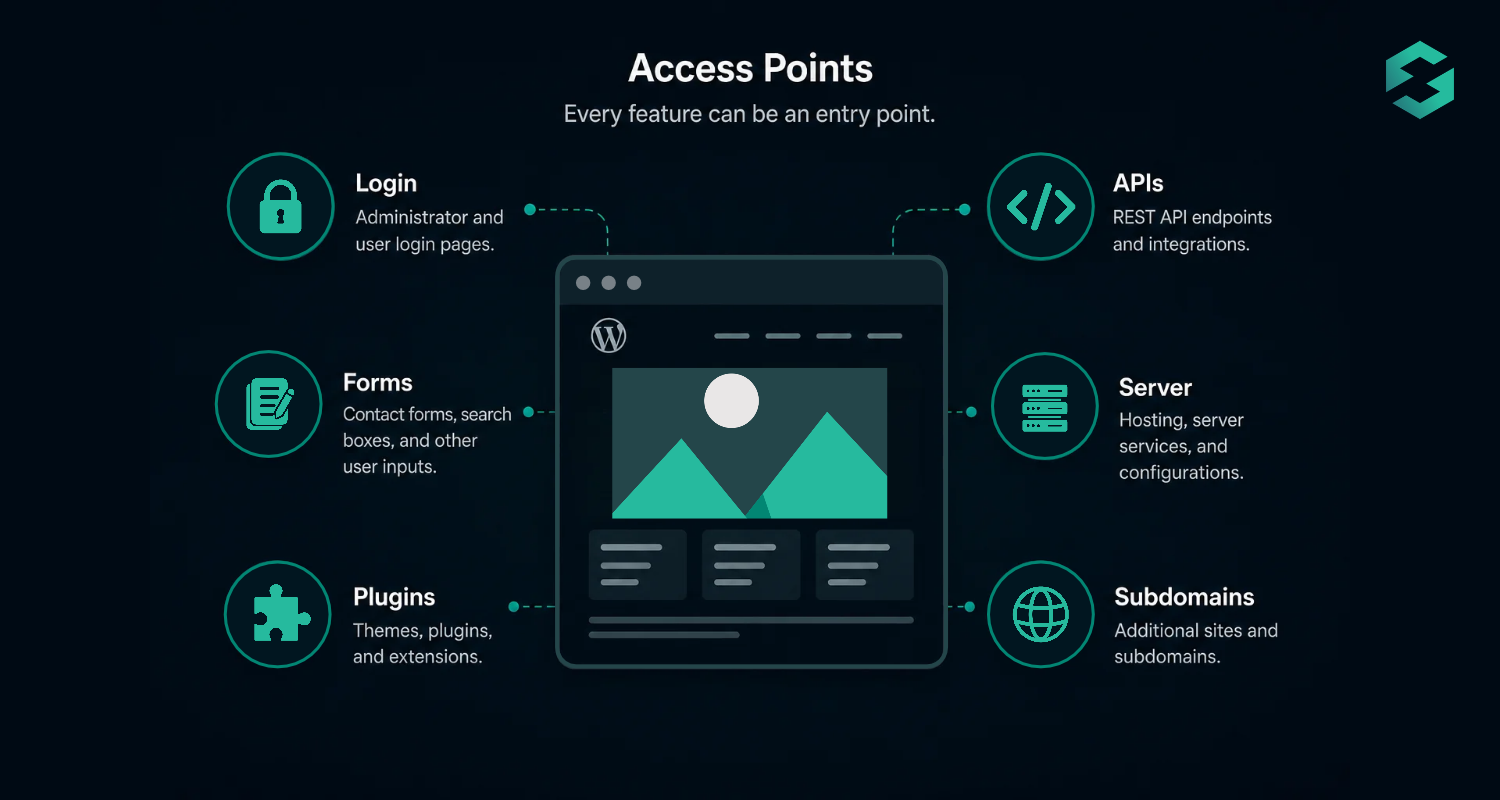
What we want is not to get rid of all the features, but to work out which ones are visible, take out those that are unnecessary, and ensure that the ones that need to stay do stay.
What constitutes a website attack surface?
The attack surface of a website refers to all the points at which an attacker might attempt to enter the system, affect its operation, or gain access to data.
According to NIST, an attack surface consists of the places from which someone might try to gain access, produce an effect, or obtain data from a system.
For a typical website, that can include:
- Login and administrator pages
- Forms and search boxes
- Plugins, themes, and extensions
- APIs
- File uploads
- Server services
- Databases
- Third-party integrations
- Subdomains
- Staging and development environments
- Backups
- User accounts and credentials
OWASP recommends these entry and exit points be examined in order to determine which sections of the application require extra testing and protection.
The fact that a website has a larger attack surface doesn’t mean that it is insecure. However, each extra component will add another area that has to be patched, configured, monitored, and protected.
What does the attack surface actually look like?
Suppose there is a small ecommerce website.
At first sight it might seem to consist of nothing more than a storefront and an administrator dashboard, however, it could also have:
- Customer login accounts
- A payment integration
- A contact form
- A newsletter connection
- Several plugins
- An XML or JSON API
- A hosting control panel
- SFTP accounts
- A staging subdomain
- DNS records
- An old site backup
- Analytics scripts
Every component has a valid purpose and at the same time provides another possible route which requires security controls.
What usually expands the attack surface of a website?
Unused plugins, themes, and extensions
Risk may still exist with regard to software that you no longer use if the files from that software remain on the server.
Turning off a plugin is not always equivalent to getting rid of it. If the component is unnecessary, then uninstalling it means less code has to be maintained.
The same principle holds true in the case of abandoned themes, test scripts, old CMS installations, and leftover migration tools.
Too many user accounts
Each account sets up a further method of authentication.
Administrator accounts are particularly important since they have wide-ranging privileges and any old employee, contractor, developer, or agency accounts should be deleted when access is no longer needed.
For those who are active users, the principle of least privilege should be applied by granting each person only the permissions necessary for carrying out their job.
Public administrator interfaces
CMS dashboards, database administration tools, hosting panels, and other administrative interfaces can be accessed from the internet.
They may need to remain accessible, but they deserve stronger controls such as:
- Multi-factor authentication
- Strong, unique passwords
- IP restrictions where practical
- Limited administrator accounts
- Login monitoring
APIs and integrations
Websites and services can automatically exchange information through the use of APIs.
They can be used for making payments, for shipping, for mobile applications, for inventory management, for CRM systems, for analytics, and for a number of other purposes. Yet each API endpoint or credential means that something has to be secured.
Get rid of any integrations that are not any longer in use and cancel the old API credentials.
Staging and development sites
A site used for staging can have the same software, administrative accounts, and database records as the production environment.
When it is publicly accessible or is in a state of poor maintenance, it provides attackers with another means of probing.
When testing is over, remove the temporary environments and apply access controls to protect the staging environment.
Forgotten subdomains
Organizations often accumulate subdomains such as:
- dev.example.com
- old.example.com
- test.example.com
- portal.example.com
A number of them stay online long after the purpose for which they were originally created is no longer there.
Make a list of the subdomains that are currently active and delete the DNS entries and applications that are no longer needed.
Old backups and files
It is essential to have backups if you want to recover data, but backup files that are not properly stored may also reveal the source code, configuration details, or the contents of the database.

Do not leave downloadable archives in web directories that anyone can access.
For example:
example.com/backup.zipIt could turn into a serious problem if it is possible for anyone to retrieve it. Secure the backups and limit who can access them.
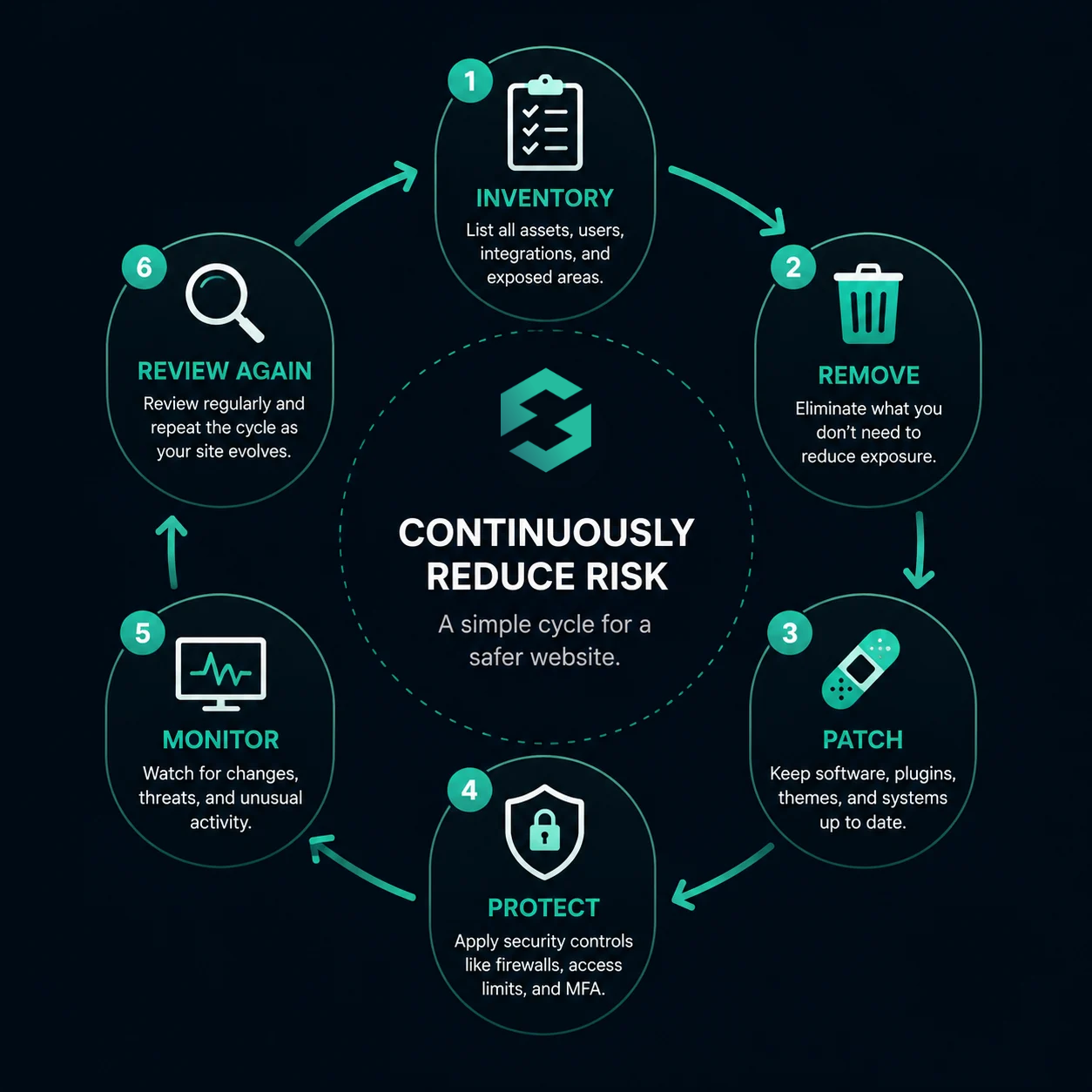
How to reduce your website attack surface
Reducing the attack surface is mainly about getting rid of any unnecessary exposure and at the same time reinforcing the parts that you still need.
1. Make a list of everything you currently own.
It is impossible to guarantee ownership of assets of which you are unaware.
Create a basic inventory of:
- Domains and subdomains
- Websites and CMS installations
- Plugins, themes, and extensions
- Hosting and server accounts
- Administrator users
- APIs and integrations
- Staging environments
- Databases
- Backups
For smaller websites, a spreadsheet will be sufficient.
Keep a record of who owns each component and whether it is still required.
2. Get rid of anything that you no longer need
Review the inventory and ask:
Does the website still require this?
If the answer is negative, take it out properly.
It could involve removing a plugin, erasing an abandoned CMS installation, closing an old account, cancelling an API token, or retiring a temporary subdomain.
Simplifying by removing unneeded components also makes maintenance easier.
3. Make sure that the necessary software is patched
It is not possible to get rid of all components that are accessible over the internet, so you should keep those that are left.
Keep the following up to date:
- CMS
- Plugins
- Themes
- Server software
- PHP or other runtime
- Ecommerce components
- Development dependencies
Fixing the known vulnerabilities involves patching, and at the same time, removing unused software gets rid of components that no longer need to exist.
They are connected but distinct security practices.
4. Reduce unnecessary privileges
Restrict the actions that accounts can perform.
Do not grant Administrator access to anyone who merely needs to publish content or check orders.
Get rid of inactive accounts and take back the credentials when employees, developers, or vendors no longer require access.
5. Guard the exposed entry points
The website relies on them and so those areas cannot be deleted.
Secure those areas using multiple layers of security.
For example:
- It is recommended to use multi-factor authentication with administrator accounts.
- Restrict sensitive administrative tools.
- Check and protect file uploads.
- Monitor login attempts.
- Use HTTPS.
- Apply appropriate security headers.
- Filter malicious requests by using a web application firewall.
A website firewall can act as a protective barrier between internet traffic and the website, enabling it to filter out malicious requests before these requests get to the application.
6. Monitor for changes
The area that can be attacked varies with time.
A developer can introduce a new API, marketing can install a plugin, a temporary subdomain can become permanent, and a new employee can be given administrator access.
It is recommended by OWASP that the attack surface should be reviewed whenever an application is changed since new interfaces, authentication methods, user roles and technologies could all bring about different risks.
As part of regular website maintenance, carry out an attack-surface review.
What is the difference between an attack surface and a vulnerability?
Although these terms are connected, they are not interchangeable.
An attack surface refers to anything that is exposed and with which an attacker can interact.
A weakness constitutes a vulnerability.
For example, any plugin that is available to the public adds to your attack surface. When that plugin has a software defect which can be exploited, then the defect is a vulnerability.
Getting rid of a plugin that is not being used completely eliminates the attack surface.
The need for the plugin to function means that the vulnerability can be dealt with without reducing the attack surface of the website.
This distinction is useful because good website security requires both approaches:
Minimize unnecessary exposure and address the weaknesses in the components that you retain.
Attack surface vs. attack vector
An attack vector is the means or route that an attacker uses when trying to carry out a compromise.
For example:
- The login page forms part of the attack surface.
- It may be used as an attack vector against it by means of credential stuffing.
Similarly:
- The attack surface includes a vulnerable file upload feature.
- An attack vector could be the act of uploading a malicious file.
Considering matters in this way can simplify the process of making security decisions; you should first determine what is exposed and then think about the ways in which those areas could be attacked.
A simple website attack surface checklist
Review your website and ask:
- Have we identified every area and every subarea in which we are operating?
- Do we still need all the CMS installations?
- Have the plugins and themes that are not being used been removed?
- Is it still necessary to have administrator accounts?
- Is it the case that users have only the permissions they need?
- Is it still the case that APIs and third-party integrations are active and necessary?
- Have the old API credentials been revoked?
- Is it protected to have staging and development sites?
- Is it the case that backups are stored in directories that are not publicly accessible?
- Are security updates required for the software?
- Is the access for administrators properly protected?
- Is there monitoring of significant changes and suspicious activity?
It is not necessary to deal with all the issues at once. Instead, begin with the components that are exposed and offer little or no business value, since these usually present the simplest opportunity for reducing risk.
Is it possible for a website to have a zero attack surface?
It’s not realistic for a public website to have no means by which it can be attacked.
If the visitors are able to connect with it, then there must be something that is reachable.
What we are aiming for, therefore, is not to achieve zero. Instead, our aim should be to keep the attack surface as small as is practical while at the same time protecting the services that the website actually needs.
It involves getting rid of unnecessary components, restricting access, fixing any software problems, keeping an eye on changes, and installing defensive measures at all key entry points.
Make attack surface review part of website maintenance
It’s simpler to ensure website security if you know precisely what you are trying to protect.
Your attack surface includes more than the pages visitors see. It extends to logins, software components, APIs, user accounts, hosting tools, development environments, subdomains, integrations, and backups.
Start by making those components visible. Remove what you do not need. Patch and restrict what remains. Then monitor your website as its attack surface changes.
For additional visibility, use Sucuri SiteCheck to scan publicly accessible website pages for known malware and certain security issues, and consider website security monitoring to help detect changes and threats.

如有侵权请联系:admin#unsafe.sh