Messages travel directly between peers over libp2p and are encrypted with theSignal-style Olm/Mego 2026-8-20 07:30:11 Author: kitploit.com(查看原文) 阅读量:11 收藏
Messages travel directly between peers over libp2p and are encrypted with the Signal-style Olm/Megolm protocols (via vodozemac) before they ever leave your device. The only server involved is a small directory that helps peers find each other's current address. It never sees message content, and it's purgeable in one command.
See docs/THREAT_MODEL.md and
docs/SECURITY.md for what's actually protected against
and how.
Contents
- Screenshots
- Features
- How it works
- Project layout
- 1. Prerequisites
- 2. Building
- 3. Running it in dev mode
- 4. Testing
- 5. Backend (directory server) setup
- 6. Using the app
Screenshots
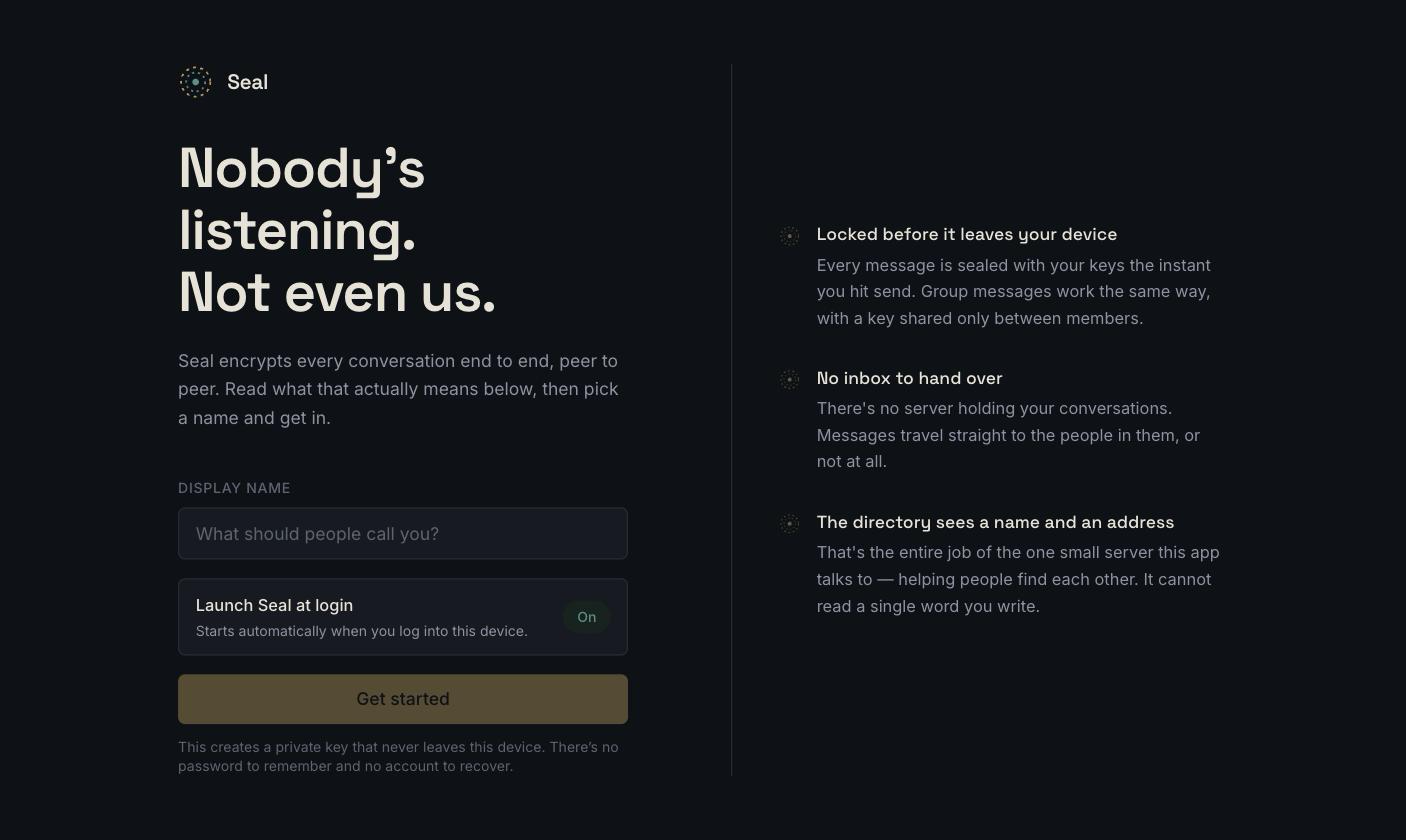
First run — pick a name; nothing else to set up.
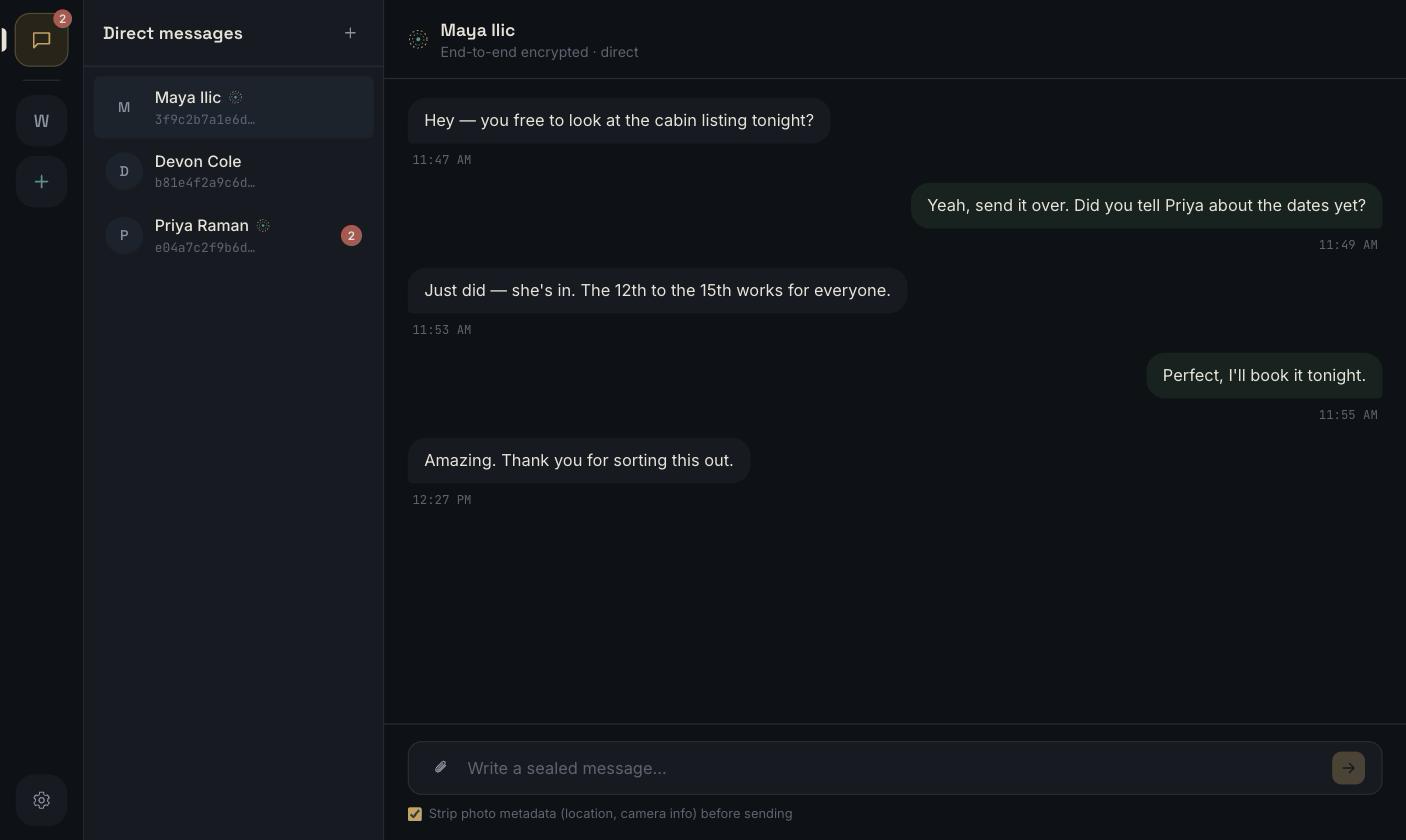
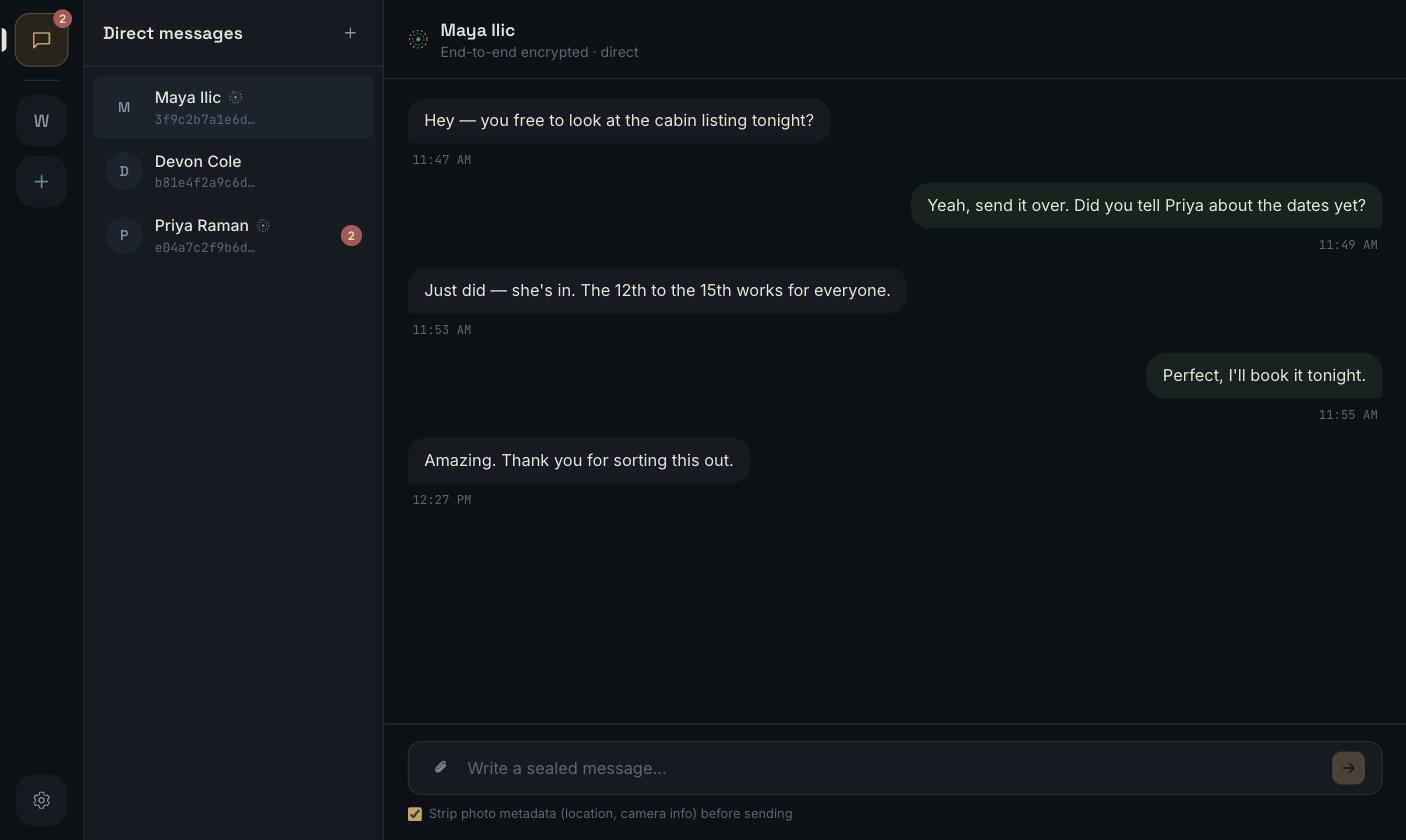
Conversations — the group rail, contact list, and an end-to-end encrypted chat pane.
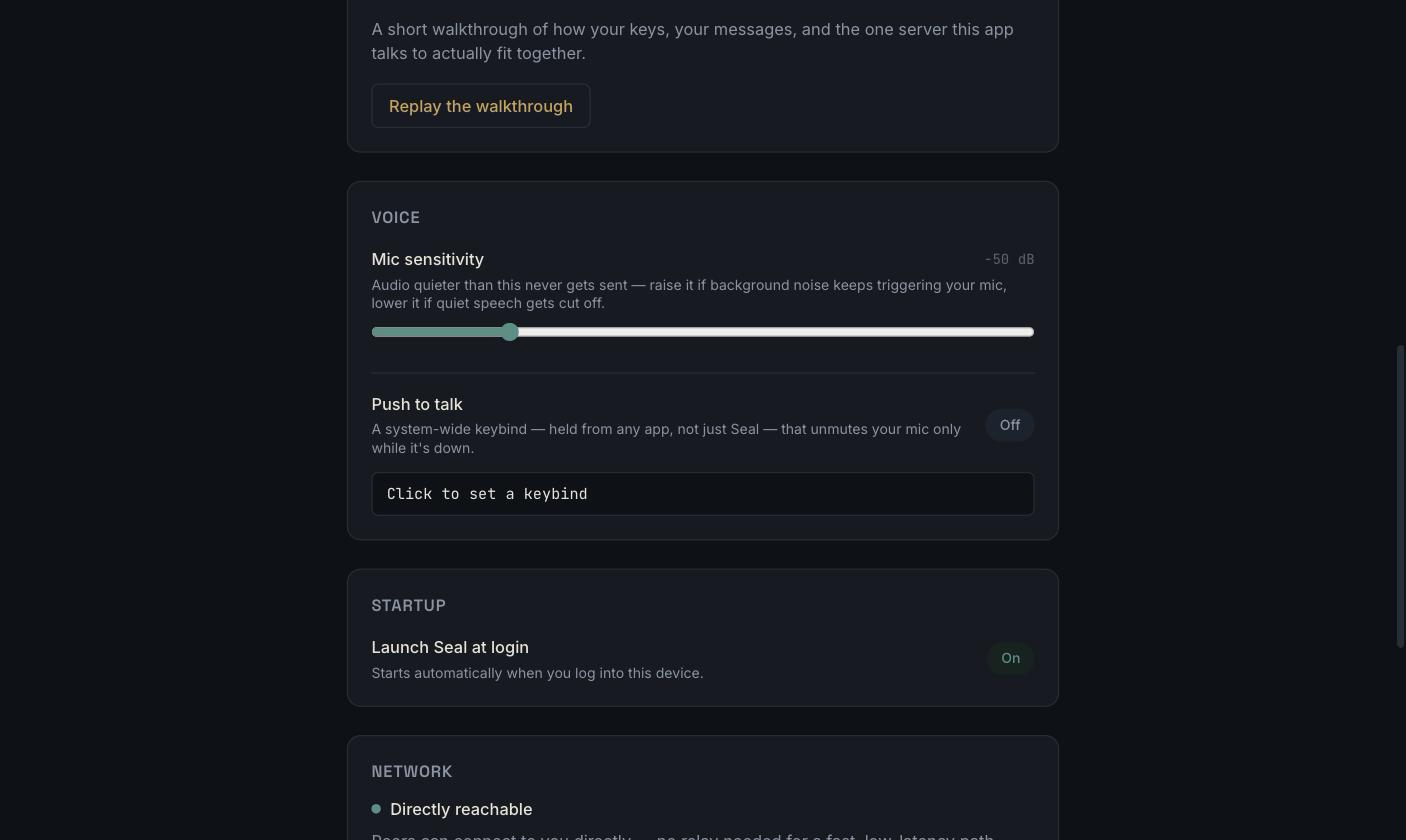
Settings — mic sensitivity, push-to-talk, launch-at-login, network reachability.
Features
- End-to-end encrypted, always — every message is sealed with Olm (1:1) or Megolm (groups) before it ever leaves your device, using vodozemac's Double-Ratchet-style scheme: every message gets its own key.
- No inbox, ever — messages travel over a direct peer-to-peer connection (libp2p: QUIC/TCP + Noise, with relay and hole-punching for NATs). If the recipient is offline, the message waits locally and retries — it's never queued on anyone else's infrastructure.
- A directory, not a database — the one server involved
(
crates/directory-server) maps a user ID to a current network address and nothing else. It's structurally incapable of reading message content: itsCargo.tomldoesn't even depend on the crates that know how. - Multiple accounts, one device — fully separate identities (keys, contacts, messages) that you can switch between without restarting.
- Groups with real membership changes — text and voice channels per group; removing someone rotates the group's key so they can't read anything sent afterward.
- Voice, built in — push-to-talk on a system-wide shortcut (works from any app, not just Seal), adjustable mic sensitivity, and an optional voice changer.
- Attachments without the metadata — EXIF data (GPS location, camera/device info) is stripped from images before they're sent, on by default.
- A real panic button — Settings → Data & Privacy instantly and irreversibly deletes every key, contact, and message on this device, with zero effect on anyone you've talked to.
- Launch at login, if you want it — on by default, a toggle away in Settings.
- One codebase, three platforms — native windows on macOS, Windows, and Linux, via Tauri.
How it works
There are two kinds of identity in this app, and they're deliberately kept separate:
- Your chat identity is an Ed25519/Curve25519 keypair generated locally
by vodozemac the first time you
open the app (
identity::Identity). Your public "user ID" is just the fingerprint of that key (wire_proto::user_id_from_ed25519). It can't be issued or revoked by any server, because no server is involved in creating it. - Your network identity is a separate libp2p keypair (
PeerId), used only for the transport layer. It can change across restarts without affecting your chat identity at all; the two are bound together only by a presence record you sign yourself.
Finding someone and actually talking to them are two different steps:
                     ┌────────────────────────┐
                     │     directory server    │
                     │  (axum + one SQLite     │
                     │   file: users,          │
                     │   presence, group       │
                     │   rosters. Never        │
                     │   message content.)     │
                     └─────────┬───────────────┘
             1. "where is bob  │  2. "here's my current
                 right now?"   │      address" (signed,
                                │      expires in minutes)
                     ┌─────────┴───────────────┐
                     ▼                         ▼
                 ┌───────┐   3. direct libp2p   ┌───────┐
                 │ alice │◄──── connection ────►│  bob  │
                 └───────┘   (Noise + Olm/      └───────┘
                              Megolm encrypted)
- Alice looks Bob up on the directory by his user ID. This returns his
public keys and his last-announced network address. That's the entirety
of what the directory holds: public keys, display names, group
membership lists, and short-lived address announcements
(
crates/directory-server). - Alice dials Bob directly over libp2p (QUIC or TCP+Noise, with relay +
hole-punching for peers behind NATs; see
crates/net). The directory is completely out of the picture from here on. - The actual message is encrypted with Olm for a 1:1 chat, or
Megolm for a group (
crates/crypto-session), a Double-Ratchet-style scheme where every message gets its own key, before it's ever placed on that libp2p connection. There is no server-side inbox: if Bob's offline, the message waits locally and is retried, not stored on anyone else's infrastructure.
Everything above is orchestrated by crates/core's AppService, which is
what the Tauri app's Rust backend (apps/desktop/src-tauri) actually calls
into; the UI never talks to the network directly.
Project layout
crates/
  wire-proto        shared signed-request types for the directory API
  identity          vodozemac identity, OS-keychain key management
  storage           local encrypted store (contacts, messages, groups)
  net               libp2p transport + directory HTTP client
  crypto-session    Olm (1:1) / Megolm (group) session management
  core              orchestrates the above into `AppService` / `ChatNode`
  directory-server  the one server component (axum + SQLite)
apps/desktop         the Tauri + React app
scripts/             build + backend-deployment scripts (§2, §5)
1. Prerequisites
You need Rust and Node.js on every platform, plus a platform-specific
toolchain Tauri needs to build a native window. storage and directory-server
also bundle-compile SQLite from source, which needs a plain C compiler (no
OpenSSL or other native crypto library required anywhere in this project).
Common to all platforms:
macOS
That's it. Xcode Command Line Tools provide both the C compiler and the frameworks Tauri's macOS backend (WKWebView-based) needs.
Linux
Install a C compiler, pkg-config, and the WebKitGTK/AppIndicator dev
packages Tauri's Linux backend links against.
Debian/Ubuntu:
sudo apt update
sudo apt install libwebkit2gtk-4.1-dev build-essential curl wget file \
  libxdo-dev libssl-dev libayatana-appindicator3-dev librsvg2-dev pkg-config
Fedora:
sudo dnf install webkit2gtk4.1-devel openssl-devel curl wget file \
  libappindicator-gtk3-devel librsvg2-devel pkgconf-pkg-config
sudo dnf group install "C Development Tools and Libraries"
Arch:
sudo pacman -S --needed webkit2gtk-4.1 base-devel curl wget file openssl \
  appmenu-gtk-module libappindicator-gtk3 librsvg pkgconf
(Package names shift between Tauri releases: if a build fails looking for a
missing .pc file, check the
current Tauri Linux prerequisites
for your distro.)
Windows
- Install the Microsoft C++ Build Tools (Visual Studio Installer → "Desktop development with C++" workload), needed both for Tauri's native shell and to compile bundled SQLite.
- Install the MSVC Rust toolchain:
rustup default stable-msvc. - WebView2: already present on Windows 11 and most up-to-date Windows 10 installs; if not, Tauri's build will prompt you to install the Evergreen runtime.
2. Building
From the repo root:
# Rust workspace (backend crates + the directory server)
cargo build --workspace --release

# Frontend + the actual desktop app bundle (installer/.app/.exe)
cd apps/desktop
npm install
npm run tauri build
npm run tauri build produces a platform-native installer under
target/release/bundle/ at the repo root (this is a Cargo workspace, so all
crates, including the Tauri app, share one top-level target/ directory).
Cross-compiling (e.g. building the Windows installer from macOS) isn't set
up: build on each target platform, or use Tauri's GitHub Actions workflow
if you want CI-built releases.
Or use the scripts
scripts/ has one build script per platform/output, each independently
runnable and each verified to actually produce a working artifact:
| Script | Produces |
|---|---|
scripts/build-mac-dmg.sh | macOS .dmg installer |
scripts/build-mac-app.sh | Raw macOS .app bundle, no installer |
scripts/build-linux.sh | Linux .AppImage + .deb |
scripts/build-windows.ps1 | Windows .msi + .exe (NSIS) |
Each just wraps npm run tauri build --bundles <...> with the right flags
and platform check; run the raw command yourself if you want a different
bundle combination (npx tauri build --help from apps/desktop).
scripts/release.sh vX.Y.Z bumps the version everywhere it needs to live
and tags the commit — see docs/RELEASING.md. Runs on
macOS and Linux; doesn't commit or push.
Baking in your own "Seal" network
The server-choice screen (§3) always shows three options: Seal (your own official network), Custom server, and a small Local test server link at the bottom. "Seal" is disabled (greyed out, with "Not set up in this build yet") until you bake in a URL at build time:
SEAL_DEFAULT_DIRECTORY_URL=https://directory.example.com npm run tauri build
Once you've stood up your own server (§5) and have a real domain pointed at it, set this and rebuild: every copy you distribute from then on shows "Seal" as a real, selectable option using that URL, without touching any other code. Leave it unset for ordinary/dev builds: there's no official server hosted by this repo, so "Seal" stays disabled and people fall back to a custom server or the local one, rather than the app silently pointing at a placeholder domain that isn't actually running anything.
3. Running it in dev mode
cd apps/desktop
npm install
npm run tauri dev
This starts the Vite dev server, compiles the Rust backend in debug mode, and opens a native window with hot-reload on the frontend. First build compiles the whole dependency tree and takes a few minutes; subsequent runs are fast.
Choosing a server (first run)
The first time you launch, Seal asks which directory server to use, in this order:
- Seal: the official network, if this build has one baked in (see §2). Disabled until it is; this repo doesn't ship pointing at a placeholder domain.
- Custom server: anyone's, including your own (§5).
- Local test server: a small, deliberately de-emphasized link at the
bottom. Spins up the app's own embedded server (binds
127.0.0.1:47100/47101, data under your OS's app-data directory), fine for trying Seal out or testing instances on one machine, not a real deployment. If a second instance finds those ports already taken, it just reuses the first instance's server instead of starting another one, which is what lets two instances on one machine find each other. This is what gets picked automatically if "Seal" isn't configured and you don't choose anything else.
The choice is saved (server.json next to the app's other local data) and
reused silently on every later launch; change it from Settings → Directory
server, which takes effect the next time you start the app rather than
trying to hot-swap a running connection. For scripted/dev use, an
environment variable skips the prompt entirely:
P2P_CHAT_DIRECTORY_URL=https://directory.example.com npm run tauri dev
Running two instances locally (to actually test messaging)
Each instance needs its own identity. Seal supports multiple accounts
natively (Settings → Accounts on this device), but for two separate
processes on one machine, P2P_CHAT_PROFILE is the quicker path: it
auto-creates (first time) or auto-resumes (every time after) an account
with that name, non-interactively, skipping the account picker entirely:
# terminal 1
P2P_CHAT_PROFILE=alice npm run tauri dev

# terminal 2
P2P_CHAT_PROFILE=bob npm run tauri dev
The server choice (server.json) and the account list (accounts.json)
are both shared across processes on one machine, not per-profile. The
first instance you ever launch picks the server, and every profile after
that (including bob here) reuses it silently. Both windows end up on the
same embedded directory server, so you can add each other as contacts by ID
and message between them.
Vite's dev server needs a real, fixed port for Tauri's webview to point at,
which normally means only one npm run tauri dev can run at a time — the
second one would find port 1420 already taken and fail outright.
npm run tauri is actually a small wrapper (apps/desktop/scripts/tauri.mjs)
that picks the next free port (1421, 1422, …) for every instance after the
first and wires it through automatically, so running the two commands above
in two terminals just works; you don't need to do anything differently. It
only changes behavior for dev — npm run tauri build and everything else
pass straight through to the real CLI.
Testing against a real build (not dev mode)
./scripts/run-two-mac-instances.sh          # profiles: alice, bob
./scripts/run-two-mac-instances.sh carol dave
Same idea as above, but launches the actual built app (build-mac-app.sh /
build-mac-dmg.sh's output, or an installed copy in /Applications) twice
with different P2P_CHAT_PROFILEs instead of npm run tauri dev, closer
to what a real user runs. Prints the PIDs and how to stop both.
Debugging
- Rust logs: set
RUST_LOGbefore launching, e.g.RUST_LOG=debug npm run tauri dev(orRUST_LOG=p2p_core=debug,net=debugto scope it down). Logged fields are limited to metadata (peer/group/user IDs, error types); seedocs/SECURITY.mdfor why that's safe to leave verbose. - Frontend: the dev window is a real webview; right-click → Inspect Element (or open dev tools) works like a normal browser.
- Backend crates in isolation: each crate has its own test suite you can run and iterate on without touching the UI at all; see §4.
- A standalone directory server, instead of the embedded one: see §5.
4. Testing
# everything
cargo test --workspace

# one crate, e.g. the full backend-to-backend flow a Tauri command would trigger
cargo test -p p2p-core --test app_service

# lint + format check (what CI runs)
cargo fmt --all -- --check
cargo clippy --workspace --all-targets -- -D warnings

# dependency vulnerability scan
cargo install cargo-audit --locked   # once
cargo audit

# frontend type-check + build
cd apps/desktop && npm run build
5. Backend (directory server) setup
Recap of what this actually is, since it's easy to over-imagine: one axum
process, one SQLite file, three kinds of record (public keys, short-lived
presence announcements, group rosters), all writes signed by the caller's own
identity key. It is never in the path of a message. See
docs/THREAT_MODEL.md for why that's true
structurally, not just by policy: directory-server's Cargo.toml doesn't
even depend on the crates that know how to read message content.
Fastest path: the setup script
sudo ./scripts/setup-backend.sh
Interactive, Linux + systemd only (see the script's header for why). It
asks which distro family you're on (Debian/Ubuntu, Fedora/RHEL/Rocky/Alma,
Arch/Manjaro, or openSUSE, pre-filled with a guess from /etc/os-release,
so it's usually a one-keystroke confirm) and installs that distro's build
prerequisites with a dedicated function per family, offers to install Rust
via rustup if it's missing, builds the release binary, creates a dedicated
system user, generates an admin token, asks whether you want it to
configure a domain with automatic HTTPS via Caddy
(installing Caddy itself, per-distro, falling back to Caddy's official
static binary if a distro's package isn't available), or to just bind
loopback/plain-HTTP if you'd rather front it yourself, then writes and
enables the systemd service. Safe to re-run.
Everything below is what it's actually doing, if you'd rather do it by hand
or understand it before running it.
macOS: a quick LAN test server
./scripts/run-mac-test-server.sh
Not for real hosting: for testing the app across two devices on the same
network (e.g. your Mac + another machine, or two people on the same Wi-Fi)
without setting up a domain, TLS, or systemd (which doesn't exist on macOS
anyway). It builds the release binary, generates an admin token (reused on
later runs), binds the public API to all interfaces, and prints the URL to
use: your Mac's actual LAN IP (via ipconfig getifaddr), not just
127.0.0.1, so other devices can reach it too. The admin port stays on
loopback only. Runs in the foreground; Ctrl-C stops it. Data lives under
~/.seal-test-server.
Quick local run
DIRECTORY_DB_PATH=/var/lib/seal-directory/directory.sqlite3 \
DIRECTORY_PUBLIC_ADDR=0.0.0.0:8080 \
DIRECTORY_ADMIN_ADDR=127.0.0.1:8090 \
DIRECTORY_ADMIN_TOKEN=$(openssl rand -hex 32) \
cargo run --release -p directory-server --bin directory-server
| Variable | Required | Meaning |
|---|---|---|
DIRECTORY_DB_PATH | no (default directory.sqlite3, cwd) | Where the single SQLite file lives. Parent directory must exist. |
DIRECTORY_PUBLIC_ADDR | no (default 0.0.0.0:8080) | The rendezvous API that apps talk to. Fine to expose publicly. |
DIRECTORY_ADMIN_ADDR | no (default 127.0.0.1:8090) | The purge endpoint. Keep this off the public internet; see below. |
DIRECTORY_ADMIN_TOKEN | yes | Bearer token for the admin API. The process refuses to start without one. Generate with openssl rand -hex 32 or similar; don't reuse it anywhere else. |
The process logs which addresses it bound on startup and warns loudly if
DIRECTORY_ADMIN_ADDR isn't loopback.
Pointing the app at it
Three ways, in the order you'd normally reach for them:
- First-run screen: pick "Custom server" and enter the URL. See §3.
- Settings → Directory server: change it later; takes effect on next restart.
P2P_CHAT_DIRECTORY_URL, set before launching: skips asking entirely and overrides whatever was saved, useful for dev/scripted runs:P2P_CHAT_DIRECTORY_URL=https://directory.example.com npm run tauri dev
Everyone who wants to find each other needs to point at the same directory instance; it's how they look each other up in the first place.
Running it as a real service (systemd)
Show the systemd unit + notes
# /etc/systemd/system/seal-directory.service
[Unit]
Description=Seal directory server
After=network.target

[Service]
Type=simple
User=seal-directory
Group=seal-directory
Environment=DIRECTORY_DB_PATH=/var/lib/seal-directory/directory.sqlite3
Environment=DIRECTORY_PUBLIC_ADDR=127.0.0.1:8080
Environment=DIRECTORY_ADMIN_ADDR=127.0.0.1:8090
EnvironmentFile=/etc/seal-directory/admin-token.env   ; DIRECTORY_ADMIN_TOKEN=...
ExecStart=/usr/local/bin/directory-server
Restart=on-failure

# Sandboxing: this process needs almost nothing
ProtectSystem=strict
ProtectHome=true
PrivateTmp=true
NoNewPrivileges=true
ReadWritePaths=/var/lib/seal-directory

[Install]
WantedBy=multi-user.target
Notes:
DIRECTORY_PUBLIC_ADDRis bound to loopback here on purpose; put a reverse proxy in front for TLS (below) rather than exposing axum directly to the internet.- Create the
seal-directorysystem user/group and/var/lib/seal-directoryfirst (useradd --system --no-create-home seal-directory && install -d -o seal-directory -g seal-directory /var/lib/seal-directory), and copy the builtdirectory-serverbinary (fromtarget/release/) to/usr/local/bin/. - Put the admin token in a root-only-readable
EnvironmentFile, not directly in the unit file (unit files are often world-readable).
TLS via a reverse proxy
Show the Caddy / nginx config
Caddy gets you automatic HTTPS with the least config:
# /etc/caddy/Caddyfile
directory.example.com {
    reverse_proxy 127.0.0.1:8080
}
caddy run (or systemctl enable --now caddy) handles certificate
issuance/renewal on its own. If you'd rather use nginx, terminate TLS there
and proxy_pass http://127.0.0.1:8080;, since the app only needs plain HTTP
from the proxy's perspective.
Firewall-wise: only the public port needs to be reachable from outside
(8080 in the examples above, fronted by 443 via the proxy). The admin port
should never be reachable from outside; reach it over SSH port-forwarding
(ssh -L 8090:127.0.0.1:8090 your-server) when you need to run a purge
remotely.
Purging it
cargo run --release -p directory-server --bin directory-admin -- \
  --admin-url http://127.0.0.1:8090 --token "$DIRECTORY_ADMIN_TOKEN" purge
This deletes the SQLite file and recreates an empty schema: no DELETE
statements, no partial state. It's safe to run without warning anyone first:
every record in it is a cache of data each client already holds locally
(their own registration, presence, and any group rosters they're a member
of), so clients just re-populate it within moments of their next action.
There's deliberately no backup policy for this database; see
docs/SECURITY.md for why keeping one would undermine
the whole point.
6. Using the app
- First launch, first question: which directory server to use (§3). The default is whatever's baked into the build you're running (a local test server, unless whoever built it configured an official one); pick "Custom server" to point at one you or someone you trust hosts.
- Pick a display name. This generates a private key pair on your device (nothing to remember, and nothing recoverable if lost: that's deliberate) and walks you through a short in-app explanation of how the encryption actually works. Replay it anytime from Settings. Every later launch skips straight back in with no prompt; this only happens once per account. Add more accounts (fully separate identities) from Settings → Accounts on this device, and switch between them without restarting.
- Add someone: click + next to "Direct messages" and enter their ID (found in their Settings → My Identity). There's no directory to browse by design; you connect the same way you'd share a phone number.
- Message them: pick their name from the list and type. The first message to someone establishes an encrypted session automatically.
- Start a group: click + on the icon rail, name it, then invite people by ID the same way. Removing someone rotates the group's key so they can't read anything sent afterward.
- Delete everything: Settings → Data & Privacy. This is instant, local-only, and irreversible: it destroys your keys, contacts, and history on this device and has no effect on anyone you've talked to.
如有侵权请联系:admin#unsafe.sh