A browser application can report success while the user’s project has already failed.The upload com 2026-8-6 12:31:9 Author: hackernoon.com(查看原文) 阅读量:1 收藏
A browser application can report success while the user’s project has already failed.
The upload completed. The preview rendered. The progress bar reached 100 percent. A PDF appeared in the Downloads folder. Every event the application could easily observe looked correct.
Then the user opened the file in a print dialog, selected “Fit,” printed sixteen pages, trimmed them, and discovered that the rows no longer aligned. From the browser’s point of view, the job succeeded. From the user’s point of view, paper, ink, and an hour of work were wasted.
This gap appears whenever software creates an output that must continue through systems it does not control. A tiled-poster generator is a useful example because its pipeline crosses several distinct environments:
source image → browser model → preview → PDF renderer → printer driver → paper → manual assembly
Each arrow is a validation boundary. At each boundary, units can change, metadata can disappear, defaults can override intent, and a technically valid artifact can become operationally wrong.
I encountered this problem while working on Rasterbator.app, a browser-based tool that divides one image across ordinary sheets of paper. The interesting engineering problem was not merely generating a multipage PDF. It was deciding what the application could prove, what it could only estimate, and what the user still needed to verify outside the browser.
The same reasoning applies to label makers, sewing-pattern exporters, laser-cutting planners, packaging templates, floor-plan tools, QR-code sheets, and any product whose output eventually touches a physical process.
A Successful Function Call Is Not a Successful Workflow
Developers naturally validate what is closest to the code. We test that an upload endpoint accepts a file, that a canvas can decode the image, that a layout function returns page rectangles, and that a PDF library produces bytes.
Those checks are necessary, but they validate components rather than outcomes.
Consider a simplified export function:
const pdf = await buildPosterPdf(layout, image);
await downloadBlob(pdf, "poster.pdf");
showToast("Your poster is ready");
The toast is truthful only in a narrow sense. A file is ready. The poster is not.
The user’s real acceptance criteria may include all of the following:
- the assembled width fits a specific wall;
- the text remains readable at the intended distance;
- every page is printed at 100 percent scale;
- the overlap is wide enough for alignment;
- partial edge pages are not mistaken for missing content;
- the sheets can be sorted after printing;
- the final rows and columns meet without cumulative drift.
Most of those conditions cannot be proven by buildPosterPdf().
The first design improvement is therefore conceptual: define success at the end of the user journey, then identify which pieces of evidence the browser can contribute.
Boundary 1: Source Pixels Become Physical Intent
An uploaded image has pixel dimensions. A wall has millimetres or inches. The conversion between them is not intrinsic to the file.
A 2400-pixel-wide image might produce a sharp small poster, an acceptable large poster viewed across a room, or an unreadable diagram if it contains tiny labels. The number of pixels alone does not determine success.
At the input boundary, the application should distinguish several different questions:
- Can the browser decode the file?
- Does the image have enough pixel information for the intended physical size?
- Does the content type tolerate enlargement?
- What viewing distance will hide or reveal the loss of detail?
A photograph can often survive aggressive enlargement because viewers interpret tones and shapes from a distance. A timetable, map, QR code, or text-heavy graphic is less forgiving.
This means a useful validation model cannot be a single “resolution good/bad” badge. It should expose the inputs behind the judgement: source pixels, planned poster dimensions, approximate effective pixel density, and content-specific warnings.
The application does not need to promise print-shop quality. It needs to make the trade-off visible before the user commits materials.
Boundary 2: Screen Pixels Become Page Geometry
A responsive preview lives in CSS pixels. A printable document lives in physical units. Treating them as the same coordinate system is a common source of subtle errors.
PDF libraries usually express geometry in points, where one point is 1/72 of an inch. Paper sizes are often specified in millimetres. The conversion is straightforward:
const mmToPt = (mm: number): number => mm * 72 / 25.4;
The difficult part is not the formula. The difficult part is maintaining one authoritative physical model while rendering it into multiple views.
Suppose the user selects A4 paper, a margin on every edge, and an overlap between adjacent sheets. The logical distance advanced by one column is not the full sheet width. It is the printable width minus the shared overlap:
const printableWidth = paperWidth - marginLeft - marginRight;
const printableHeight = paperHeight - marginTop - marginBottom;

const columnAdvance = printableWidth - horizontalOverlap;
const rowAdvance = printableHeight - verticalOverlap;
If the preview independently re-derives these values from its scaled screen rectangles, it can drift from the PDF model. The preview may look convincing while representing a slightly different poster.
A safer architecture calculates the layout once in physical units and treats every visual representation as a projection of that model.
type PosterPage = {
  row: number;
  column: number;
  paperRectMm: Rect;
  printableRectMm: Rect;
  sourceCropNormalized: Rect;
};
The PDF renderer converts millimetres to points. The browser preview converts millimetres to screen coordinates. The page-count summary reads the same rows and columns. No layer invents its own geometry.
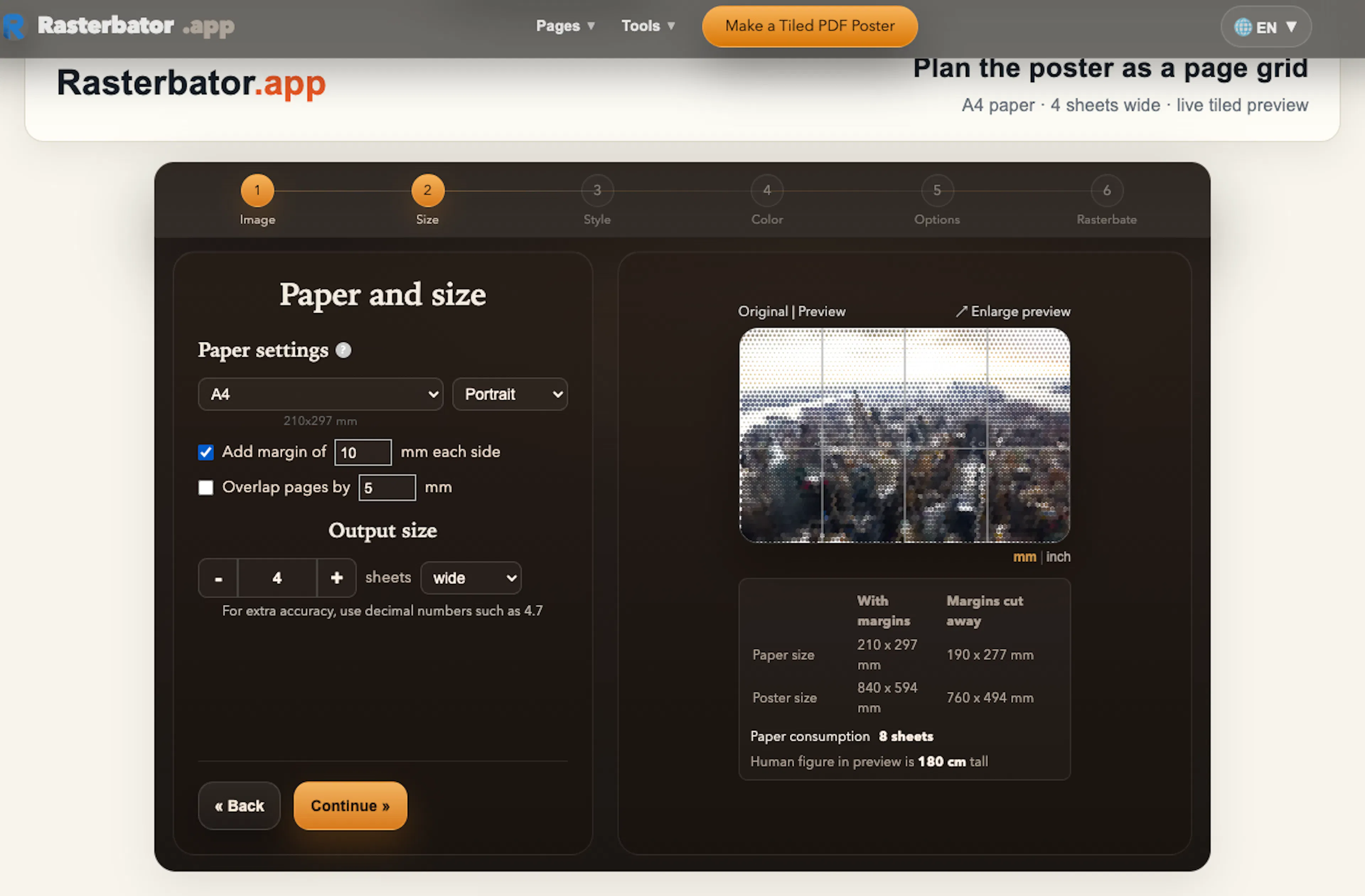 Browser preview showing a source image divided into labelled printable sheets
Boundary 3: A Valid PDF Can Still Encode the Wrong Assumptions
A PDF file can open correctly and still be wrong for the project.
Examples include:
- the page boxes use the wrong paper size;
- image crops leave a one-pixel seam because of inconsistent rounding;
- overlap is drawn visually but not included in the crop calculations;
- page order is technically consistent but confusing during assembly;
- edge pages contain only a narrow strip and look blank at first glance;
- the file is so large that the viewer becomes unstable on a mobile device.
This boundary benefits from deterministic tests.
For a known source aspect ratio and a known paper configuration, the layout engine should produce predictable rows, columns, poster dimensions, crop rectangles, and page labels. Golden tests can compare the exported page model without relying on screenshots.
expect(layout.columns).toBe(4);
expect(layout.rows).toBe(3);
expect(layout.pages).toHaveLength(12);
expect(layout.pages[0].label).toBe("R1-C1");
expect(layout.posterWidthMm).toBeCloseTo(expectedWidth, 3);
The most valuable assertions are invariants across pages:
- crop coordinates remain within the normalized image bounds;
- neighbouring crop rectangles overlap by the configured amount;
- the union of all crops covers the intended source region;
- row and column labels are unique;
- no page has a negative printable dimension;
- page order remains stable across preview and export.
These tests do not guarantee a good print. They guarantee that the PDF faithfully represents the application’s physical model.
Boundary 4: The Printer Driver Is an Uncontrolled Transformation
The browser can produce a PDF with exact page dimensions. It cannot force a printer dialog to preserve them.
The most dangerous printer setting is often automatic scaling. “Fit,” “Shrink oversized pages,” or a vendor-specific equivalent can alter every sheet. A one-percent reduction sounds harmless, but across several columns it changes the assembled dimensions and the relationship between printed overlap guides.
Printer drivers also introduce non-printable margins, duplex behaviour, page rotation, colour-management changes, and tray-specific paper assumptions.
This is where product design must become explicit about its limits. The application should not imply that export is the last step. It should provide a handoff checklist such as:
- select the same paper size used in the layout;
- print at Actual Size or 100 percent;
- disable automatic fitting or shrinking;
- print single-sided unless the project intentionally uses duplex output;
- print one test page before sending the full job;
- measure a known guide or page dimension if accuracy matters.
This guidance is not an afterthought. It is part of the product because the user cannot complete the intended outcome without it.
Boundary 5: Correct Pages Become an Assembly Problem
Once the sheets leave the printer, software observability drops almost to zero.
The user must identify pages, trim selected edges, align overlap zones, prevent row drift, join sheets, and mount the result. A mathematically correct grid can still be frustrating if the physical sequence is unclear.
The PDF can carry information across this boundary:
- visible row and column labels;
- trim marks that distinguish cut edges from preserved edges;
- overlap guides;
- a thumbnail map of the full grid;
- orientation indicators;
- optional page numbers and project names.
The objective is not to cover every sheet with instructions. It is to preserve enough context that pages remain understandable after they are separated from the browser.
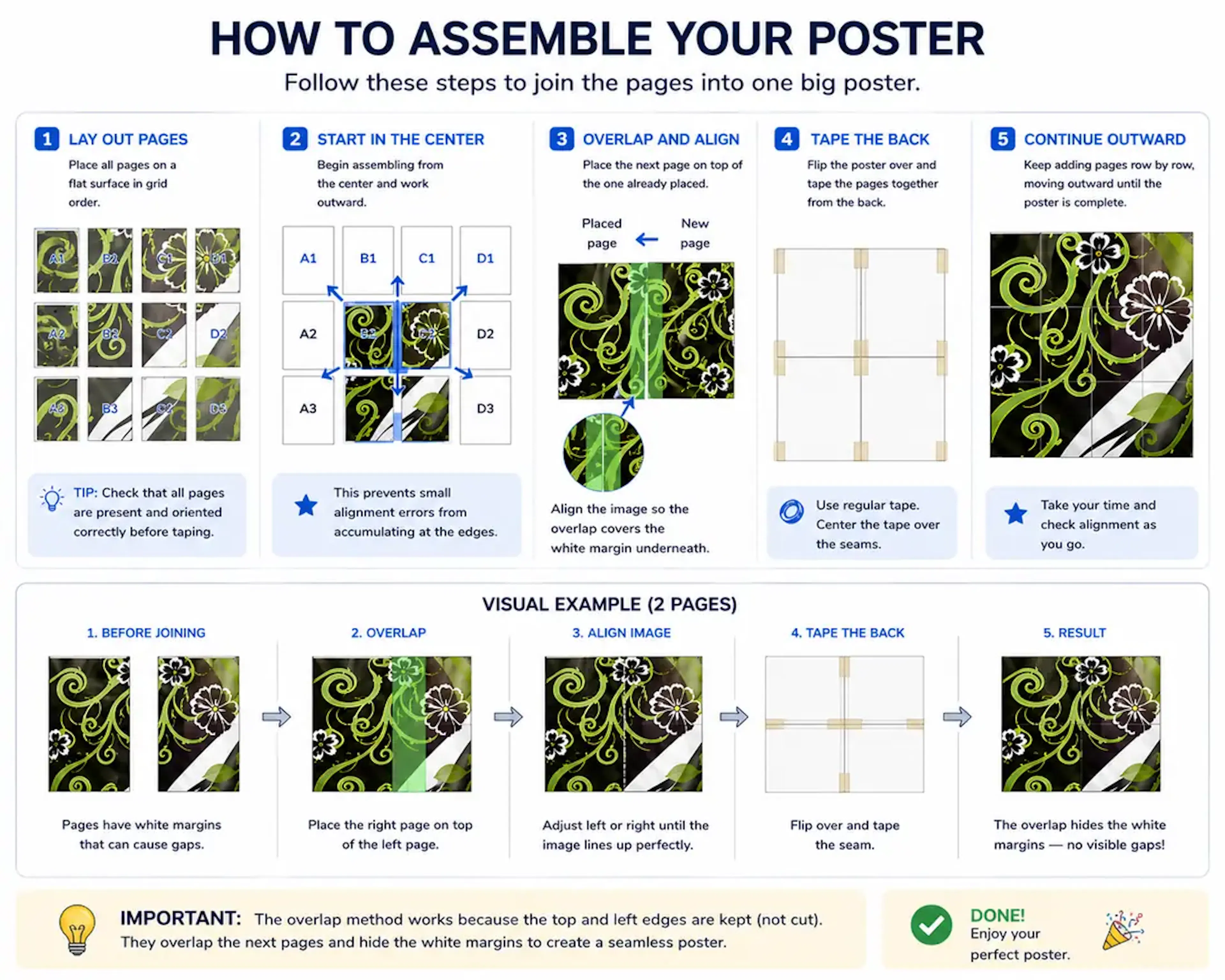 Printed poster sheets being trimmed, aligned, and joined into one physical display
A useful assembly method also limits cumulative error. Instead of joining all sheets in one long chain, build small modules, verify their edges, and then combine the modules. The principle resembles numerical error control: do not let a tiny alignment offset propagate unchecked across the entire system.
Validation Should Follow the Risk, Not the Interface
A common test plan mirrors the screen:
- test the upload form;
- test the settings controls;
- test the preview;
- test the download button.
A stronger test plan mirrors the failure cost:
- test whether the source is suitable for the intended output;
- test whether the physical model is internally consistent;
- test whether the PDF preserves that model;
- test whether the handoff warns about uncontrolled printer transformations;
- test whether a human can identify and assemble the pages.
This changes prioritisation. A polished animation on the download button may matter less than a clear warning that the selected layout will consume forty-eight sheets. A perfect responsive grid may matter less than proving that the PDF uses the selected paper size. A fast export may matter less than recovering cleanly when the browser runs out of memory.
Validation effort should concentrate where the user’s cost becomes irreversible.
Use a Prototype as an End-to-End Contract Test
The most practical end-to-end test is not a massive poster. It is a four-page prototype.
A small prototype crosses every important boundary while keeping failure cheap:
- upload a representative image;
- choose a 2×2 layout;
- inspect the predicted physical dimensions;
- export the PDF;
- confirm the paper size in the file;
- print at 100 percent;
- trim and join the four sheets;
- view the result from the intended distance.
This test reveals issues that isolated unit tests cannot: printer scaling, ink behaviour, border visibility, overlap usability, page labels, tape choice, and the visual effect of seams.
For a browser-to-paper product, the prototype is the equivalent of a staging environment that includes the real dependency chain.
Observability Ends Before Responsibility Does
Software teams often define the product boundary by what they can instrument. That is convenient but misleading.
The browser may stop observing the workflow after download, yet the user still associates the print result with the tool. Responsibility extends beyond telemetry.
The solution is not to pretend the application controls the printer or the person holding the scissors. The solution is to be precise about the contract at every boundary:
- what enters the stage;
- what the software guarantees;
- what can change outside its control;
- what evidence the user should inspect;
- how to test cheaply before scaling.
That model produces more honest success messages, more useful previews, better error handling, and fewer wasted physical resources.
A PDF generator is complete when it emits a file. A browser-to-paper product is complete when it helps a user carry intent through pixels, points, printer defaults, and physical assembly without losing the result along the way.
To inspect these boundaries yourself, create a four-page prototype with Rasterbator.app and treat each handoff—not just the download—as part of the test.
如有侵权请联系:admin#unsafe.sh