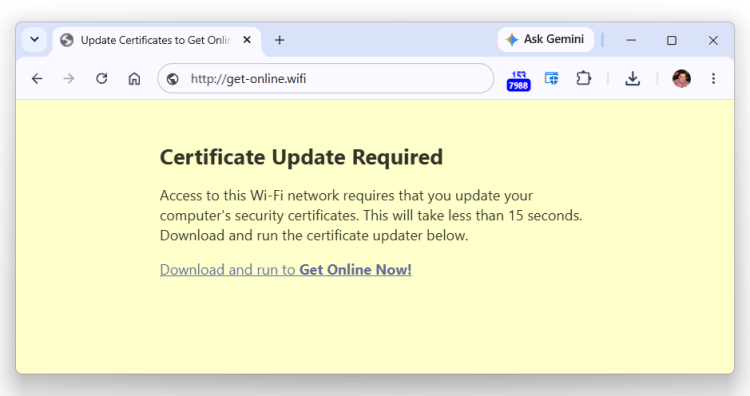
When a device first joins a network, the upstream network hardware has full control over its traffic and can allow/block any packets sent from the device from reaching the Internet. Many public networks (typically Wi-Fi, but sometimes wired, located in hotels, coffee shops, mass transit, schools, etc.) require that the user accept Terms of Use or otherwise interact with a webpage before gaining broader/unrestricted access to the network.
The restricted client is called a “captive” and the webpages to allow removal of the access limitation are called Captive Portals, the subject of a previous post.
When Windows detects that a network is blocking internet access with a Captive Portal, a link is provided to launch the captive user’s default browser:

The captive browser is navigated to a non-secure HTTP url, and the network is expected to intercept the non-secure request and redirect to the Captive Portal webpage.
The Attack
Over the last few years, there have been a series of attacks (2025, 2026) where attackers have used fake “captive portal” web pages that entice users to download and run malware…

… or follow malicious instructions that result in compromise of the device, with this initial access being abused to steal credentials and move laterally within the victim’s organization.

Defenses
Beyond educating users not to follow any unusual instructions on captive portal pages, users can set ShellSmartScreenLevel to BLOCK to help prevent users from running downloaded malware when working offline with security services unreachable.

For enterprise-managed devices, organizations can choose to prevent Wi-Fi connections to networks that have not been provisioned via MDM. See AllowManualWifiConfiguration.
Threat Analysis
From a security perspective, untrusted networks attacks are mostly equivalent to the fake captive portal threat described here. In both, an attacker on the network path can observe and tamper with all non-secure (e.g. HTTP) requests, and can partially-observe, block, or delay any secure (e.g. HTTPS, VPN) connections. Network attackers can behave selectively, allowing some connections while interfering with others.
Compared to traditional network attacks, the key differences for Captive Portal attacks are:
- Users have been primed (by prior experience) to expect Captive Portal pages and comply with their instructions. There’s no standard for how Captive Portals behave and virtually every venue has different instructions for connections. This non-uniformity means that users are more easily socially-engineered into performing unsafe operations.
- All captive portal flows inherently start with a non-secure HTTP request. Using HTTP is what allows a legitimate guest network to direct the user to the Captive Portal page because HTTPS encryption prevents tampering. Features like “automatic HTTPS upgrades” have to be disabled in Captive Portal scenarios because they break the expected flow.
This non-secure protocol usage allows the network-based attacker to take over the flow.
Stay safe out there!
-Eric
Impatient optimist. Dad. Author/speaker. Created Fiddler & SlickRun. PM @ Microsoft 2001-2012, and 2018-, working on Office, IE, and Edge. Now working on Microsoft Defender. My words are my own, I do not speak for any other entity. View more posts