Home > Jamf Pro, Jamf Pro API > Creating a Jamf Pro API Role with all available API privileges 2026-7-29 16:58:21 Author: derflounder.wordpress.com(查看原文) 阅读量:43 收藏
Home > Jamf Pro, Jamf Pro API > Creating a Jamf Pro API Role with all available API privileges using a Jamf Pro user account with Administrator account privileges
Creating a Jamf Pro API Role with all available API privileges using a Jamf Pro user account with Administrator account privileges
I’ve been doing some work with API clients on Jamf Pro, which use API Roles to assign API privileges to the API client. One difference between assigning API privileges to an API Role as opposed to assigning API privileges to a Jamf Pro user account is that API privileges associated with a Jamf Pro user account are on a one to one basis with the Jamf Pro user account’s assigned account privileges. This means that API privileges associated with a user account can be assigned using the following Jamf Pro account privilege sets:
- Administrator: Grants all account privileges
- Auditor: Grants all account read privileges
- Enrollment Only: Grants all account privileges required to enroll computers and mobile devices
API Roles do not have a corresponding set of API privilege sets, so each privilege assigned to an API Role must be set individually.
The reason why this matters is that Jamf Pro enforces a privilege-escalation guard, where an API Client can’t be used to authenticate an API call which creates a API Role and assigns API privileges to that Role which the API Client does not already hold itself. If you’re trying to set up an API Role which is assigned all API privileges, this means you would have manually assign all available API Role privileges in the Jamf Pro admin console at least one time.
However, in the event that you do need to create an API role that has all available API privileges assigned to it, there’s a way to sidestep the need to manually assign all available API privileges to an API Role. This method uses a Jamf Pro user account which has been assigned the Administrator account privileges set. The same privilege-holding rule still applies, but a Jamf Pro user account with the Administrator privileges set assigned to it has been granted all available API privileges. This enables an Jamf Pro account to be set up, assigned the Administrator account privileges set and subsequently be able to grant all available API privileges to an API Role via an API call.
To assist with this task, I’ve developed a script which uses a Jamf Pro user account with the Administrator account privileges assigned to perform the following actions:
- Create a new API role on a Jamf Pro server.
- Assign all available API privileges to that newly-created API role.
For more details, please below the jump.
The script is named create_jamf_pro_api_role_with_all_available_privileges.sh and is available via the link below:
This script connects to the Jamf Pro API on a Jamf Pro server and creates a new Jamf Pro API Role which is then granted every available API privilege.
Three items are required to use this script:
- The URL of the appropriate Jamf Pro server.
- The username for a Jamf Pro user account with the Administrator privileges set assigned to it.
- The password for that account.
For this example, I want to create a new API role named All API Privileges Granted and use a Jamf Pro user account named apiadmin which has been assigned the Administrator privileges set to create the new All API Privileges Granted API Role.
With the example conditions, you should see similar output to what’s shown below when using the script to create the new All API Privileges Granted API Role:
This file contains hidden or bidirectional Unicode text that may be interpreted or compiled differently than what appears below. To review, open the file in an editor that reveals hidden Unicode characters.
Learn more about bidirectional Unicode characters
| username@computername ~ % /Users/Shared/create_jamf_pro_api_role_with_all_available_privileges.sh | |
| Please enter your Jamf Pro server URL : https://jamfpro.server.here | |
| Please enter your Jamf Pro user account : apiadmin | |
| Please enter the password for the apiadmin account: | |
| Retrieving the list of available API Role privileges … | |
| Found 524 total API Role privileges on this server. | |
| Verifying the 'apiadmin' account holds every privilege in the catalog … | |
| Account holds every privilege in the catalog. Proceeding … | |
| Name for the new all-privileges API Role: All API Privileges Granted | |
| Creating API Role 'All API Privileges Granted' with all 524 privileges … | |
| API Role created successfully: | |
| ID: 15 | |
| Display Name: All API Privileges Granted | |
| Privileges: 524 (every privilege in the API Role catalog) | |
| username@computername ~ % |
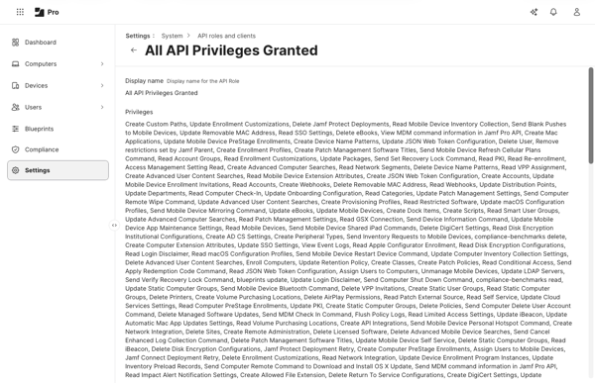
You should then be able to check on the Jamf Pro server and verify that the API Role has been created and that it has all available permissions assigned to it.


As part of its run, the script will verify if the account being used to create the API Role itself has all available API privileges assigned to it. If the account does not have all available API privileges assigned to it, it will stop and display warnings similar to what is shown below:
This file contains hidden or bidirectional Unicode text that may be interpreted or compiled differently than what appears below. To review, open the file in an editor that reveals hidden Unicode characters.
Learn more about bidirectional Unicode characters
| username@computername ~ % /Users/Shared/create_jamf_pro_api_role_with_all_available_privileges.sh | |
| Please enter your Jamf Pro server URL : https://jamfpro.server.here | |
| Please enter your Jamf Pro user account : apiadmin | |
| Please enter the password for the apiadmin account: | |
| Retrieving the list of available API Role privileges … | |
| ERROR: Failed to retrieve API Role privileges. Please try again using a Jamf Pro account which has been assigned the Administrator privileges set. Response from Jamf Pro server: { | |
| "httpStatus" : 403, | |
| "errors" : [ { | |
| "code" : "INVALID_PRIVILEGE", | |
| "description" : "Forbidden", | |
| "id" : "0", | |
| "field" : null | |
| } ] | |
| } | |
| username@computername ~ % |
This file contains hidden or bidirectional Unicode text that may be interpreted or compiled differently than what appears below. To review, open the file in an editor that reveals hidden Unicode characters.
Learn more about bidirectional Unicode characters
| username@computername ~ % /Users/Shared/create_jamf_pro_api_role_with_all_available_privileges.sh | |
| Please enter your Jamf Pro server URL : https://jamfpro.server.here | |
| Please enter your Jamf Pro user account : apiadmin | |
| Please enter the password for the apiadmin account: | |
| Retrieving the list of available API Role privileges … | |
| Found 524 total API Role privileges on this server. | |
| Verifying the 'apiadmin' account holds every privilege in the catalog … | |
| ERROR: The account 'apiadmin' is missing 389 of the 524 privileges in the API Role catalog which means the Administrator privileges set is not assigned to the account. Please try again using a Jamf Pro account which has been assigned the Administrator privileges set. | |
| username@computername ~ % |
如有侵权请联系:admin#unsafe.sh