If you’ve been programming in other Android environments, you already know how typical debugging wor 2026-7-1 06:57:26 Author: hackernoon.com(查看原文) 阅读量:1 收藏
If you’ve been programming in other Android environments, you already know how typical debugging works: your app runs on a phone, and your IDE runs on a computer. The two talk to each other over a USB cable or Wi-Fi through Android Debug Bridge (ADB). The PC does the heavy lifting, the phone runs the app, and the cable or network connects them.
Code on the Go (CoGo™) breaks that model entirely. The IDE and the app being debugged are both running on the same Android device. There’s no PC, no cable, and no external connections or devices of any kind.
Getting a real debugger to work in these circumstances required some non-trivial rethinking of each layer of the standard Android debug stack. Here’s how we did it.
The traditional Android debugging “bridge” model
To understand what we had to work around, it helps to know how ADB normally works in a non-phone-native IDE. The system has three parts:
- The client: Your IDE or command-line tool, running on your PC, is what issues commands.
- The server: A background process on your PC manages traffic between the client and the device.
- The daemon (adbd): A process running on the Android device receives the commands and carries them out.
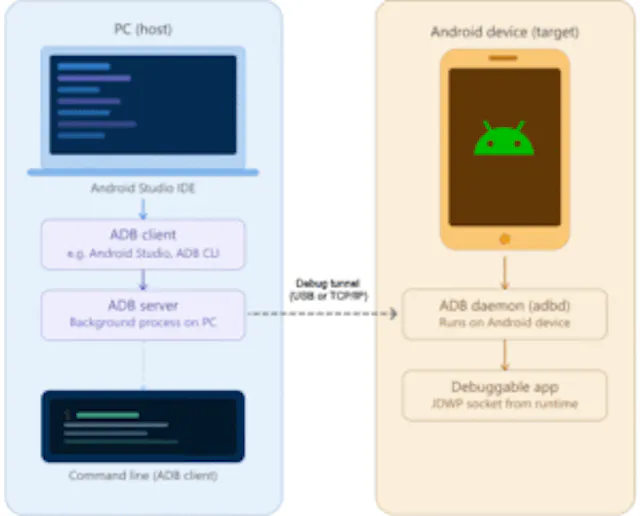
In this “host-target” relationship, the PC and the phone are separate worlds connected by a tunnel (usually a USB cable). When you want to debug, the PC talks to a specific debug port on the phone.
But on a single device, this model falls apart. A regular Android app cannot talk to ADB because ADB is a privileged system tool. Your phone’s security sandbox prevents one app (your IDE) from reaching into another app (your project) to see what it’s doing.
So we needed a different approach.
The key insight: JDWP over a local socket
Luckily the underlying Java Debug Wire Protocol (JDWP) is socket-based. On Android, two apps can communicate over a local socket without special permissions. The OS sandbox blocks things like direct memory access between processes, but it doesn’t block socket communication.
That meant that if we could figure out which socket the target app’s runtime had opened for debugging, we could connect to it directly. No ADB, no port forwarding, no cable.
The harder problem was getting the necessary access to make that connection in the first place.
How we bootstrapped privileged access
Our first step was to take a page from an open-source project called Shizuku. Shizuku is a general tool for letting third-party apps access privileged Android APIs without a rooted device, and the mechanism it uses to establish that access turned out to be exactly what we needed.
When a user enables wireless debugging in Android’s Developer Options, the OS advertises two services over multicast DNS (mDNS), discoverable through Android’s NsdManager API without special permissions:
_adb-tls-connect._tcp:the connection service, available whenever wireless debugging is on._adb-tls-pairing._tcp:the pairing service, which only appears when the user opens the “Pair using pairing code” dialog, and disappears the moment pairing completes.
Shizuku’s approach to the pairing flow is worth understanding. The pairing dialog is somewhat fragile. If the user navigates away, it closes and they have to start over. Shizuku handles this by starting a foreground service before opening Developer Options, then scanning for the pairing mDNS service in the background. The moment the pairing dialog appears and the service is detected, Shizuku fires a high-priority notification with a text field. The user types the displayed code into that notification and submits it. The foreground service completes the pairing handshake, all without the user leaving the settings screen.
Once pairing is complete, Shizuku can use the shell-level access it just acquired to spawn a persistent background process (shizuku_server) that survives even if the user later turns wireless debugging off, and persists until the device reboots.
Because Shizuku is open source (Apache License 2.0), we were able to fork the relevant components and embed them directly into Code on the Go. We stripped out the broker functionality so the server only communicates with our own app, and renamed the process cotg_server so it’s clearly identifiable in the process list. The result is a self-contained bootstrapping mechanism that lives entirely inside our app, with no external dependencies.
Launching the target app in debug mode
With cotg_server running and shell-level access established, we can launch a target app in a way that Android runtime doesn’t normally expose to ordinary apps.
The Android activity manager (/system/bin/am) accepts an --attach-agent flag that loads a native debug agent into the new process before it starts executing user code. We use this to attach libjdwp.so (the system’s own JDWP implementation) with a specific configuration:
suspend=n: don’t freeze the app waiting for a debugger to connectserver=n: client mode; connect outward rather than waiting for an inbound connectiontransport=dt_socket: use a socket for communicationaddress=<port>: our debugger is listening on this port
This reverses the usual direction of the JDWP handshake. Instead of the IDE connecting to the app, the app’s JDWP agent dials out to our debugger the moment the process starts. By the time the app’s first line of code runs, the debug connection is already established.
From that point on, communication is standard JDWP over a local socket. It no longer requires ADB, port forwarding, or a USB connection.
Speaking JDWP from the IDE
Establishing the transport layer was only half the problem. We also needed a way for the IDE itself to send JDWP commands and receive responses: inspect stack frames, set breakpoints, receive pause events, and so on.
The standard high-level API for this is Java Debug Interface (JDI), but JDI is again a desktop JDK component. It has no presence on Android devices.
The solution we found came from the Android Open Source Project (AOSP). Android’s oj-libjdwp project includes its own implementation of the JDWP agent and a JDI client library. Building it from source produces sun-jdi.jar, which delivers the full JDI interface we needed. Because Google includes this code as part of Android’s developer toolchain, it integrates cleanly and gives us a well-tested, spec-compliant foundation, which is much better than reimplementing the JDWP protocol from scratch ourselves.
What the debugger can now do
With cotg_server handling privilege bootstrapping, --attach-agent injecting the JDWP agent, and sun-jdi.jar providing the JDI interface, we finally have a debugger with a meaningful feature set:
- Virtual machine (VM) control. You can suspend and resume the target VM at any time, kill it, or restart it cleanly (using the
-Sflag to force-stop the process and relaunch it). - Breakpoints. Set and remove breakpoints at any point. When the VM hits one, the JDWP connection delivers the event and execution pauses.
- Stepping. Once paused, you can step into a method call, step over the current line, or step out of the current method frame.
- Variable inspection and editing. At any breakpoint, you can browse the current thread list and inspect local variables in scope. Primitive values (integers, booleans, floats) can be modified on the fly, which is useful for testing edge cases without recompiling.
- Source navigation. When a breakpoint is hit, the IDE opens the relevant source file and scrolls to the exact line. You get a full GUI for walking through live code with the running program state visible alongside it.
Current limitations and compromises
We’re proud of what we’ve done so far, but there are still a few limitations and challenges that we want to address:
- Java-only debugger (for now). Currently, the mapping between the code on your screen and the machine code in the app works only for Java projects. Since Kotlin is now the standard for Android, we are working on the complex task of reading Kotlin’s specific debug metadata to make it just as smooth.
- Primitive variable editing only. Primitive values can be changed at runtime, but object reference modification requires heap allocation support that is not yet implemented.
- The bootstrapping setup still requires user action. Wireless debugging pairing requires user interaction because Android’s security model doesn’t allow full automation here. The flow is guided, but it’s still not as simple as plugging in a cable.
- We use the system’s JDWP library. We deliberately rely on
libjdwp.sofrom the device rather than shipping our own. Using the system agent means behavior depends on the Android version. If future features require capabilities not present on older devices, shipping a custom agent may become necessary.
While these limitations are real, none of them fundamentally affect the core use cases: setting breakpoints, stepping through code, and inspecting state in a debuggable app. And everything is from the device itself, without ever requiring a separate device or connection.
What’s coming next
Here’s a quick overview of what we’re actively working toward in future releases:
- Kotlin support, which is one of the most important gaps to close for an Android-based IDE
- Conditional breakpoints that pause execution only when a specified condition is true
- Expression evaluation to evaluate arbitrary expressions in the context of a paused stack frame
- Exception breakpoints that automatically pause when a specific exception type is thrown
- Variable watches to pin expressions or variables to a panel that updates each time execution pauses
- Inline variable hints that display current variable values directly alongside the source
- Attach to a running process, so you can connect the debugger to an app that’s already running, without restarting it
A phone is not simply a small laptop. Building a debugger on a phone required us to rethink over a decade of “PC-centric” development rules. By combining the power of open-source tools like Shizuku with the native libraries of Android itself, we’ve proven that you don’t need a desk and a cable to build full-fledged Android apps. Please try out CoGo and the debugger at https://www.appdevforall.org/codeonthego and let us know what you think. Happy coding!
如有侵权请联系:admin#unsafe.sh