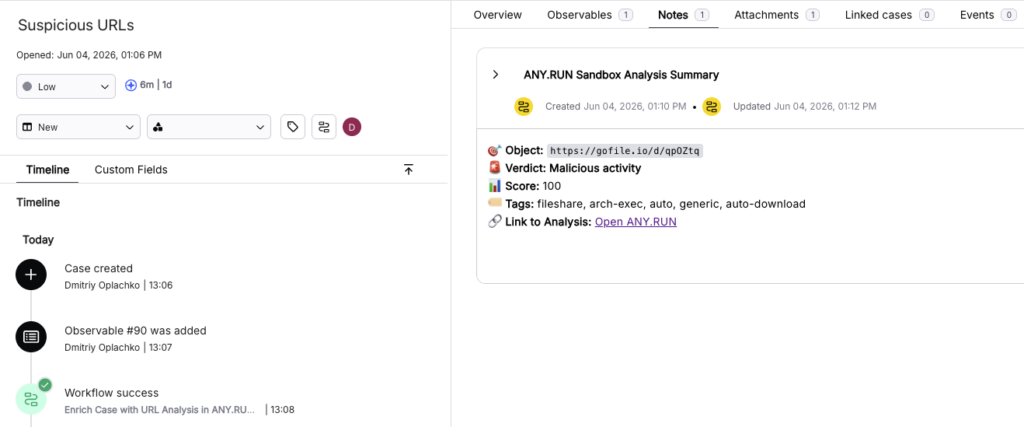
Lack of alert context makes it difficult for Security Operations Centers (SOC) to distinguish actual threats from false positives. ANY.RUN’s integration with the Torq AI SOC Platform bridges this gap by delivering conclusive malware & phishing verdicts and actionable intelligence.
The result for your team is faster incident resolution, reduced alert fatigue, and proactive threat detection.
ANY.RUN & Torq Integration
Unlike legacy SOAR approaches that often require custom code and months of implementation, Torq allows SOC and MSSP teams to build response logic visually. The ANY.RUN integration adds a critical layer of malware analysis, phishing detection, and IOC enrichment to these workflows.
ANY.RUN users have access to five ready-to-use Torq HyperAgents™ designed to accelerate time-to-verdict:
Results, including reputation data, threat names, tags, and structured JSON responses, are delivered directly into Torq Case Management. Teams can edit the current templates to fit their specific processes, adding actions, changing conditions, or using ANY.RUN as one specific step in a complex, multi-tool automation.
Available on ANY.RUN Threat Intelligence and Interactive Sandbox plans with API access, the integration helps analysts streamline their workflows, gaining full alert or threat context quickly with an average reduction in MTTR of 21 minutes.
Interactive Sandbox Templates in Torq
The Interactive Sandbox workflows allow analysts to detonate suspicious objects in real-time environments (Windows, Linux, macOS or Android) to uncover evasive behaviors. There are two types of templates available for sandbox analysis:
1. Case-Based Workflows
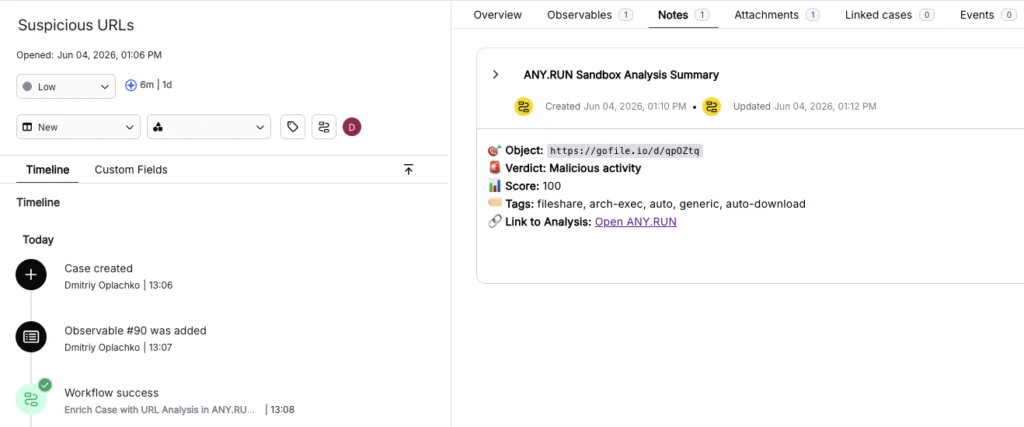
These are triggered directly from a Torq Case, where observables and attachments are automatically ingested from sources like EDR, SIEM, XDR, or email security tools.
- Process: The analyst opens a case and launches the workflow. The system automatically retrieves observables or attachments, filtering for supported objects such as URLs or files. Analysts can then select specific objects for detonation.
- Result: Analysis data is added to the case notes in real-time. This includes a brief context, reputation, threat names or tags, and a structured JSON response. Additionally, a direct link is provided, allowing the analyst to jump into the ANY.RUN session to continue a manual, interactive analysis.
The list of case-based templates:
2. Sandbox Analysis Workflows
These templates are designed to be embedded as a specific step within a larger, custom incident response flow.
- Process: Unlike case-based templates, these function independently of a specific case. They accept a URL or File as an input parameter and initiate the ANY.RUN Sandbox analysis.
- Result: The workflow waits for the analysis to complete and returns a structured JSON object containing the final verdict, analysis metadata, a list of IOCs, and a link to the full report. This data can then be passed further down the custom automation chain.
The list of sandbox analysis templates:
Threat Intelligence Lookup Templates in Torq
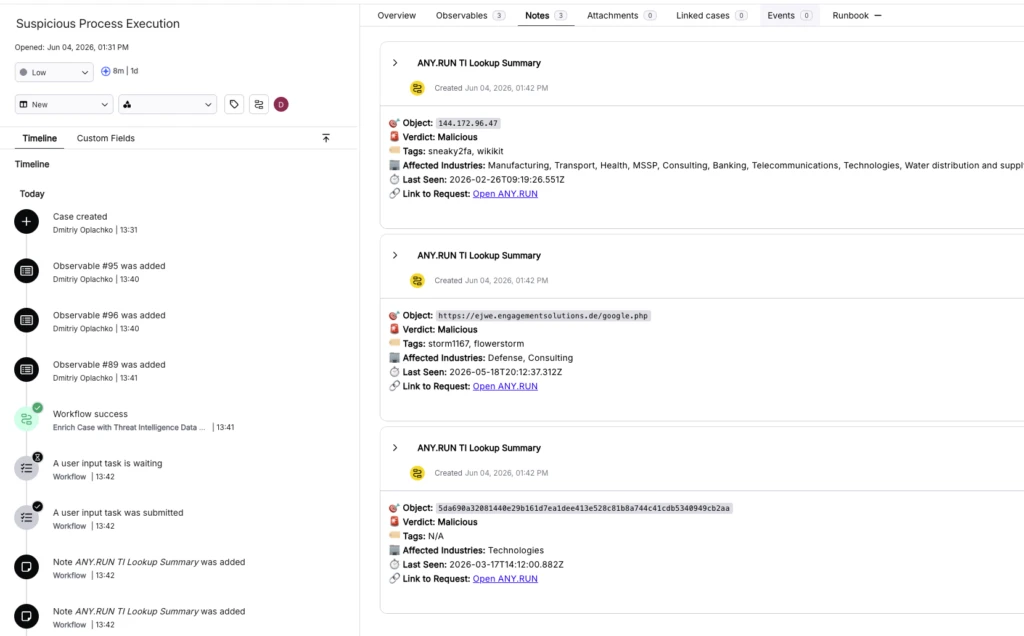
The Threat Intelligence (TI) Lookup integration focuses on rapid enrichment of “raw” observables found in alerts, such as IPs, domains, hashes, and URLs.
- Automation at Scale: When a case contains suspicious indicators, the TI Lookup workflow queries ANY.RUN’s vast database of threat data—continuously updated from millions of sandbox sessions.
- Instant Context: The workflow returns high-fidelity data including the reputation of the indicator, threat names, and specific tags. This allows analysts to immediately understand the nature of a threat and decide whether to block the indicator or escalate the incident.
- Enrichment Integration: Much like the sandbox workflows, TI Lookup results are delivered directly into the Torq interface as JSON data or case notes, ensuring that the analyst never has to leave their primary workspace to gather intelligence.
Explore the TI Lookup template.
How to Integrate ANY.RUN in Torq
Setting up the integration is straightforward and requires no custom coding:
- Navigate to Integrations within Torq and locate ANY.RUN.
- Click Add, create a new instance, and enter your API key.
- Go to the Templates tab and search for ANY.RUN templates.
- Select your previously configured ANY.RUN integration to begin using the workflows.
By default, these playbooks are configured to be launched manually. This is a deliberate design choice to ensure that only appropriate objects are sent for analysis.
However, for high-volume environments, these templates can be easily integrated into broader, fully automated playbooks.
Key SOC & MSSP Benefits of Integrating ANY.RUN in Torq
ANY.RUN’s deep behavioral visibility with Torq’s hyper-automated orchestration levels up the efficiency of modern security operations, moving beyond simple automation toward maximizing security ROI.
- Faster incident resolution (MTTR): Automating sandbox analysis and threat intelligence correlation allows you to cut incident resolution time by tens of percent. Analysts get clear verdicts in seconds, enabling them to block threats before they spread.
- Operational Scaling: Teams can handle a growing volume of alerts with Torq HyperAgents™ & handling routine Tier 1 tasks, allowing analysts to focus on complex threats without increasing headcount.
- Zero development overhead: Unlike custom integrations that require months of engineering, this no-code setup is ready in minutes. You get a functional automation foundation without the cost of writing or maintaining scripts.
- Standardized investigation logic: Every alert is checked using the same high-fidelity criteria. This ensures consistent results and reduces the risk of human error, regardless of an analyst’s experience level.
- Higher ROI on existing tools: ANY.RUN works as an enrichment layer inside Torq, making your SIEM, EDR, and other security investments more effective by providing them with immediate, actionable context.
- Reduced analyst burnout: By eliminating manual data entry and constant switching between tools, you allow your team to focus on meaningful security work, which improves overall SOC productivity.
About ANY.RUN
Trusted by over 600,000 cybersecurity professionals and 15,000+ organizations worldwide, ANY.RUN helps security teams investigate threats faster and with greater accuracy.
Our Interactive Sandbox accelerates incident response by allowing you to analyze suspicious files in real time, while our Threat Intelligence solutions (TI Lookup and TI Feeds) provide the necessary context to anticipate and stop today’s most advanced attacks.
The integration of ANY.RUN with Torq adds a specialized layer of malware analysis, phishing detection, and IOC enrichment to your security operations. By utilizing these automated workflows, SOC teams can seamlessly embed ANY.RUN’s deep visibility into their existing triage and incident response flows.