Data breach notification letters have become a familiar routine. They usually start with “We value y 2026-5-18 20:4:13 Author: blog.sucuri.net(查看原文) 阅读量:46 收藏
Data breach notification letters have become a familiar routine. They usually start with “We value your privacy” and offer a year of free credit monitoring. But the most important part is often hidden in the middle:
A list of what actually got out.
A leaked email address is not a leaked admin password. A hashed credential is not a session token. There is no universal post-breach checklist. The right response depends on the data exposed, so read the notice carefully and match your response to the level of exposure.
For website owners, breach notifications carry a second layer of risk, as any compromised credential might also be a key to a live site. Here’s how to triage correctly.
First, verify the notice is real
Major data breaches quickly attract phishing campaigns. Soon after a breach is announced, fake emails appear, pretending to be from the affected company and offering “immediate verification” or “free protection.” Clicking the wrong link can give your credentials to scammers.
Before clicking anything:
- Do not use links or phone numbers from the notice itself. Go to the company’s website directly, or use contact information you already trust. State breach portals like the California Attorney General’s can help confirm a public notice is real.
- Read the notice carefully and identify exactly what was exposed. Early notices are often incomplete; forensic investigations expand the list over weeks or months, so check back periodically.
- Document everything. Save the notice, dates, reference numbers, and any case IDs.
- Check Have I Been Pwned to see if your email appears in known breach databases. It serves as supporting evidence, not confirmation that a particular notice is authentic.
Map the credential blast radius
This step is what turns a controlled response into a success instead of a slow-moving disaster. A leaked credential is a risk anywhere that the same password, or a similar one, has been used.
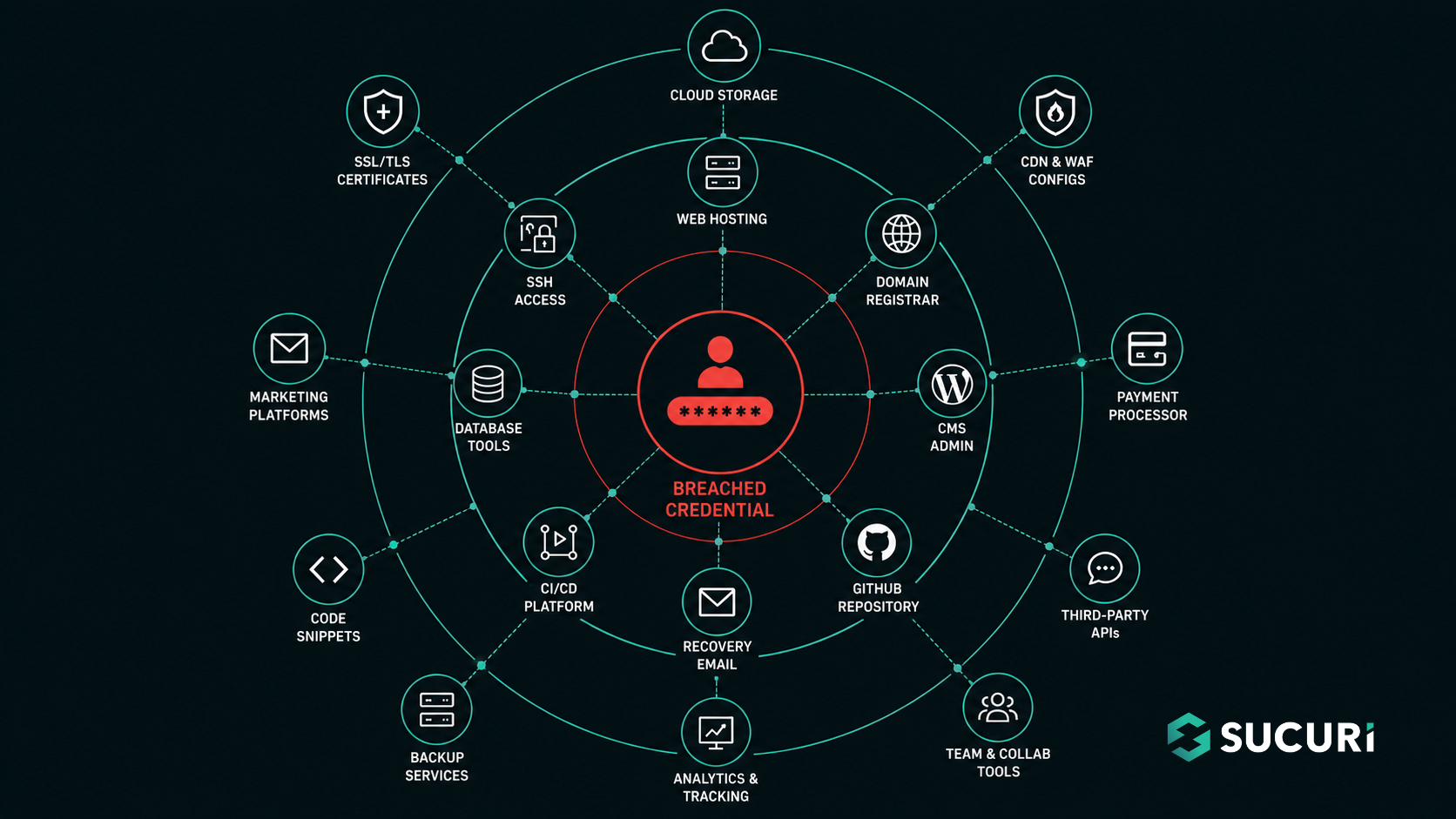
For a typical website owner, that radius is wider than most people realize. Walk through these accounts and ask whether the breached password ever touched them:
- Hosting control panel
- Domain registrar
- CMS admin (WordPress, Joomla, Drupal, etc.)
- GitHub or other code repositories
- CDN and DNS providers
- Payment processor dashboards
- Email used for password recovery on any of the above
- CI/CD platforms, deployment tools, SSH keys
- Database admin tools
- Any third-party plugin, theme, or service tied to the site
Everything on this list should be considered Tier 1. Credential-stuffing bots will test the breached password on every common login page online. For example, while some site owners customize or obscure WordPress login paths, the default /wp-admin and /wp-login.php endpoints remain widely used and heavily targeted by automated attacks.
If credentials leaked
Reusing passwords is what allows one data breach to cause many problems. If a password was leaked, change it on the breached site and anywhere you used the same or a similar password. (“Summer2024!” and “Summer2024!!” are not different passwords to a determined attacker.) Even if the notice says passwords were hashed, change it anyway. Weak hashing and offline cracking can make “hashed” passwords usable faster than most companies admit. Use a password manager so every account has a unique password.
Then enable MFA, and prioritize the stronger flavors. NIST SP 800-63-4, finalized in 2025, reinforces a practical hierarchy:

- Best: Passkeys or hardware security keys like YubiKey. These are phishing-resistant because the credential is tied to the real website, so a fake login page cannot capture it.
- Good: Authenticator apps generating TOTP codes.
- Last resort: It is better than having no MFA, but it is the weakest choice for important accounts because of SIM swap and phishing attacks.
A few special cases worth flagging:
If the reused password was used for the email account that recovers hosting, registrar, or CMS logins, address that first. Email is the main way to recover most accounts. Whoever controls it can reset everything else, including your site. Change the password, end active sessions, check forwarding rules, and set up phishing-resistant MFA before anything else.
If MFA seeds, backup codes, or session tokens leaked, treat it as urgent. A stolen session cookie skips both passwords and MFA. Use “sign out of all sessions” to invalidate active tokens, re-enroll the authenticator, and regenerate backup codes.
Cleanup checklist for site owners
If a breached password was used on a live site, you should assume an attacker may have already used it. Our incident response team has found SocGholish infections linked to compromised admin accounts, where attackers log in with stolen credentials, upload a malicious plugin, and quickly turn a real site into a malware source. Later, they may create hidden admin users with fake plugins, add auto-login backdoors disguised as JavaScript files, or inject login stealers into core files to capture future credentials.
Work the cleanup in this order:
- Rotate every credential in the blast radius. Hosting, registrar, and CMS passwords first, then database credentials, SSH keys, API tokens, and deployment secrets.
- Rotate session-binding secrets. In WordPress, this means regenerating the authentication keys and salts in
wp-config.php. These values sign the cookies that keep users logged in. Rotating them invalidates all current login cookies and forces every active session, even those an attacker may have created, to log in again. Other CMS platforms have similar features; find and rotate yours. - Audit every admin and editor account. Look for users created recently or with names that don’t match real team members. Lower-privilege accounts count too; they’re commonly used in privilege-escalation attacks.
- Review FTP/sFTP accounts and remove anything unfamiliar.
- Enable 2FA on every admin-facing dashboard. Where possible, put admin paths behind a Web Application Firewall that restricts access by IP, geography, or risk signals.
- Review access logs for successful logins, plugin uploads, new admin creation, file edits, and unusual
POSTrequests to admin endpoints. Preserve logs before cleaning if the incident may need to be reconstructed. - Run a malware scan and file integrity check. A compromised credential may already have been used; the absence of obvious symptoms doesn’t mean the site is clean.
If personal information leaked too
Most third-party data breaches also expose personal data, and the website-focused cleanup above doesn’t address it. A quick triage for the non-credential side:
- Phone number: Enable a port-out PIN with your carrier to block SIM-swap attacks, and move SMS-based MFA to an authenticator app.
- Social Security Number: Freeze credit at the three national bureaus (free under federal law since 2018), get an IRS Identity Protection PIN at IRS.gov, and pull free weekly reports from AnnualCreditReport.com.
- Bank account or routing numbers: Call the bank’s fraud department within 24 hours and reissue the account.
- Payment cards: Reissue credit cards by calling the number on the back. Debit cards should be handled even faster, since fraud can remove money from your account while disputes are still being resolved.
The FTC’s IdentityTheft.gov walks through deeper personal-recovery steps for each category. For site owners, the priority is making sure none of these exposures becomes a foothold into the site through account-recovery flows.
Make the next breach a non-event
Don’t make the common mistake of thinking a breach on one site will not affect another, or treating cleanup as a single event instead of a chance to improve security overall.
All major sources, including the FTC, CISA, and NIST, agree that your response should match the type of exposure, but your security habits should be ongoing. Since so much credential data is already out there, the best approach is to use unique passwords, phishing-resistant MFA, a Web Application Firewall for admin paths, and regular file integrity scans as standard practice.
Breach letters will continue to arrive. The real question is whether each one turns into a crisis or just requires a quick update to a strategy you already have in place.
FAQs
Can a data breach at another company really affect my website?
Yes. The most common path to a compromised website is credential reuse: a password leaked in an unrelated breach gets tried against hosting panels, CMS admin pages, and recovery email accounts through automated credential-stuffing attacks. WordPress login URLs like /wp-admin and /wp-login.php are among the most targeted endpoints on the internet because they’re identical on every WordPress site.
How do I know if my WordPress site was compromised after a credential breach?
Check for unfamiliar admin or editor accounts, recently uploaded plugins you don’t recognize, modifications to core files like wp-login.php, and unusual entries in access logs (especially POST requests to admin upload endpoints from unknown IPs). Running a malware scan and file integrity check will catch most active infections, though stealthier backdoors may require professional incident response.
Should I change my WordPress password if a different site got breached?
Yes, if the same password (or a close variant) was used on the WordPress admin or its recovery email. Credential-stuffing attacks specifically test breached passwords against WordPress login pages. Also rotate the authentication keys and salts in wp-config.php to invalidate any active sessions an attacker may have established.
Is SMS-based two-factor authentication safe enough for a website admin account?
SMS is better than no MFA, but it’s the weakest common option because of SIM-swap attacks and SS7 vulnerabilities. For website admin accounts, use phishing-resistant methods like passkeys or hardware security keys (such as YubiKey) where available, or an authenticator app generating TOTP codes as a strong second choice.

如有侵权请联系:admin#unsafe.sh