Home > Mac administration, macOS > Using pmset to set your Mac to automatically power on when p 2026-5-12 01:19:53 Author: derflounder.wordpress.com(查看原文) 阅读量:57 收藏
Home > Mac administration, macOS > Using pmset to set your Mac to automatically power on when power is available on macOS Tahoe 26.5.0
Using pmset to set your Mac to automatically power on when power is available on macOS Tahoe 26.5.0
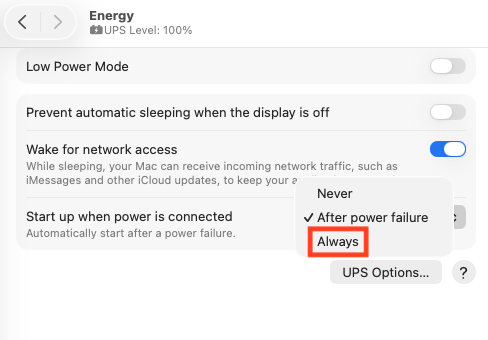
One of the features included with macOS Tahoe 26.5.0 is a new option in the Energy preferences in System Settings for automatically starting a Mac when power is connected to it, either following a power failure or when the Mac is plugged in to power.

This setting does not appear to be manageable via MDM or DDM management as of this time, but it can be managed via the pmset command line tool. For more details, please see below the jump.
In the pmset man page , there is an autorestartatconnect setting which is listed as controlling this behavior. The autorestartatconnect setting can be set to an integer value of 0 or 1.

To turn on automatic restart on power connect, the following command should be run with root privileges:
This file contains hidden or bidirectional Unicode text that may be interpreted or compiled differently than what appears below. To review, open the file in an editor that reveals hidden Unicode characters.
Learn more about bidirectional Unicode characters
| /usr/bin/pmset autorestartatconnect 1 |
This file contains hidden or bidirectional Unicode text that may be interpreted or compiled differently than what appears below. To review, open the file in an editor that reveals hidden Unicode characters.
Learn more about bidirectional Unicode characters
| username@computername ~ % sudo /usr/bin/pmset autorestartatconnect 1 | |
| username@computername ~ % |
To verify that the setting has been set, run the following command and see if it returns a value of 1.
This file contains hidden or bidirectional Unicode text that may be interpreted or compiled differently than what appears below. To review, open the file in an editor that reveals hidden Unicode characters.
Learn more about bidirectional Unicode characters
| pmset -g | awk '/autorestartatconnect/ {print $2}' | sed '/^$/d' |
This file contains hidden or bidirectional Unicode text that may be interpreted or compiled differently than what appears below. To review, open the file in an editor that reveals hidden Unicode characters.
Learn more about bidirectional Unicode characters
| username@computername ~ % pmset -g | awk '/autorestartatconnect/ {print $2}' | sed '/^$/d' | |
| 1 | |
| username@computername ~ % |
In the Energy preferences in System Settings, you should see the Start up when power is connected setting is set to Always.

To turn off automatic restart on power connect, the following command should be run with root privileges:
This file contains hidden or bidirectional Unicode text that may be interpreted or compiled differently than what appears below. To review, open the file in an editor that reveals hidden Unicode characters.
Learn more about bidirectional Unicode characters
| /usr/bin/pmset autorestartatconnect 0 |
This file contains hidden or bidirectional Unicode text that may be interpreted or compiled differently than what appears below. To review, open the file in an editor that reveals hidden Unicode characters.
Learn more about bidirectional Unicode characters
| username@computername ~ % sudo /usr/bin/pmset autorestartatconnect 0 | |
| username@computername ~ % |
To verify that the setting has been set, run the following command and see if it returns a value of 0.
This file contains hidden or bidirectional Unicode text that may be interpreted or compiled differently than what appears below. To review, open the file in an editor that reveals hidden Unicode characters.
Learn more about bidirectional Unicode characters
| pmset -g | awk '/autorestartatconnect/ {print $2}' | sed '/^$/d' |
This file contains hidden or bidirectional Unicode text that may be interpreted or compiled differently than what appears below. To review, open the file in an editor that reveals hidden Unicode characters.
Learn more about bidirectional Unicode characters
| username@computername ~ % pmset -g | awk '/autorestartatconnect/ {print $2}' | sed '/^$/d' | |
| 0 | |
| username@computername ~ % |
In the Energy preferences in System Settings, you should see the Start up when power is connected setting is set to Never.

如有侵权请联系:admin#unsafe.sh