This article walks through sixteen distinct techniques for enumerating users inside 2026-4-28 17:31:1 Author: www.hackingarticles.in(查看原文) 阅读量:40 收藏
This article walks through sixteen distinct techniques for enumerating users inside Active Directory, drawing on the full spectrum of protocols an attacker can reach the directory through — LDAP, SAMR, RPC, and even native Windows APIs. Each tool is paired with the exact command used and the output it produces against the ignite.local lab domain (Domain Controller at 192.168.1.8), authenticated as the low-privileged user raj. The objective is twofold: equip offensive practitioners with a complete reference of enumeration tradecraft and give defenders the visibility they need to detect and contain it.
Table of Contents
- Introduction
- NetExec (nxc) — LDAP Enumeration
- PyWerView — Python Port of PowerView
- net rpc — Samba RPC Enumeration
- Impacket — net user
- BloodyAD — Active Directory Toolkit
- LDeep — LDAP Enumeration with Caching
- rpcclient — Classic SAMR Enumeration
- enum4linux-ng — All-in-One Enumeration Suite
- Impacket — samrdump
- Impacket — GetADUsers
- Impacket — lookupsid (SID Brute Forcing)
- BloodHound — Graph-Based Enumeration
- ldapsearch — Raw LDAP Queries
- ldapdomaindump — Full Domain Dump to HTML
- AD Explorer — GUI Reconnaissance
- PowerView — Native Windows Enumeration
- Mitigation Strategies
- Conclusion
Introduction
User enumeration is the foundational reconnaissance step that precedes virtually every Active Directory attack. Before an adversary can spray passwords, kerberoast service accounts, or pivot toward Domain Admin, they must first answer one question: who lives inside this domain? Active Directory, by design, allows any authenticated principal to query the directory for a list of accounts, and a rich ecosystem of offensive tooling has grown around exploiting that openness.
NetExec (nxc) — LDAP Enumeration
NetExec is the modern successor to CrackMapExec and ships with a dedicated LDAP module. The –users flag used in the following command asks the Domain Controller for every user object along with key attributes such as Last Password Set and Bad Password Count.
nxc ldap 192.168.1.8 -u raj -p Password@1 --users
For More Details: Active Directory Pentesting Using Netexec Tool: A Complete Guide

The output cleanly tabulates every account in the domain — Administrator, krbtgt, raj, and the rest of the 27-user population — alongside their last password change timestamps. The Bad Password Count column doubles as a passive health check: an account such as aarti showing 7 bad attempts often indicates either a recent lockout or active spraying activity worth pivoting on.
PyWerView — Python Port of PowerView
PyWerView ports the iconic PowerShell PowerView toolkit into Python, letting Linux operators reproduce the same enumeration without leaving Kali. The get-netuser command queries the directory and returns the full attribute set per user; piping the output to grep isolates only the SamAccountName values.
pywerview get-netuser -w ignite.local -u raj -p 'Password@1' --dc-ip 192.168.1.8 | grep samaccountname
For More Details: Active Directory Enumeration: pywerview

The grep reduces noise to a clean column of usernames. PyWerView is invaluable when the operator wants programmatic access to deeper user attributes — manager, description, lastLogonTimestamp, servicePrincipalName — without writing custom LDAP queries.
net rpc — Samba RPC Enumeration
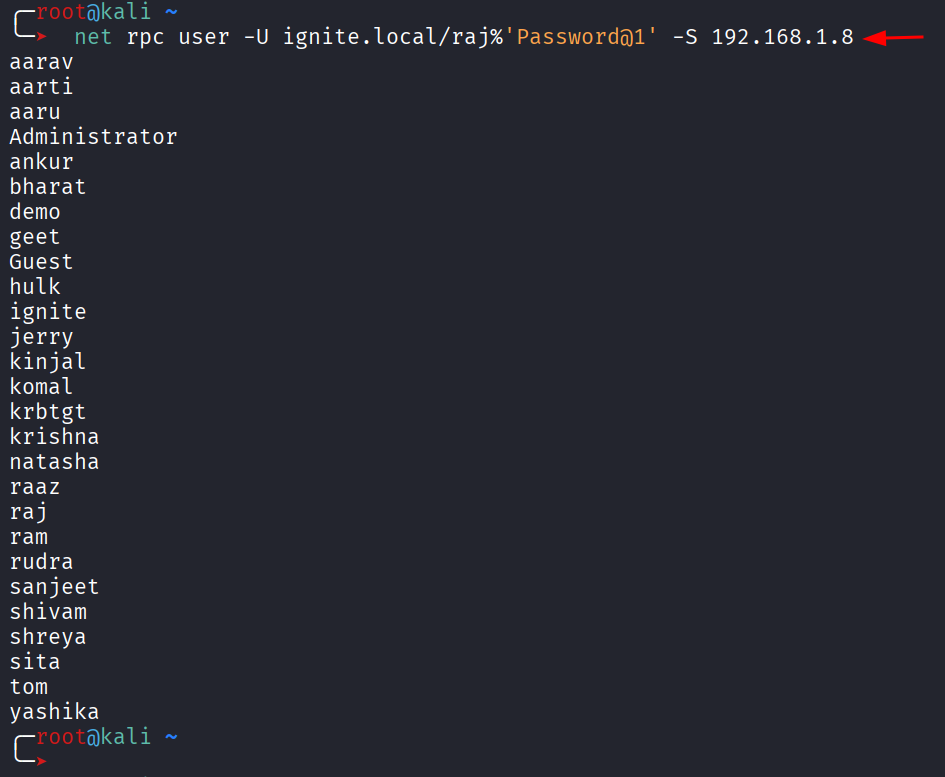
The net rpc utility, shipped with Samba, speaks MSRPC directly to the Domain Controller. The user subcommand asks the DC for the global user list through the SAMR interface.
net rpc user -U ignite.local/raj%'Password@1' -S 192.168.1.8

The output is minimal — just usernames in alphabetical order — which makes it ideal for piping into other tools or building wordlists. Because the request travels over RPC rather than LDAP, this command also succeeds in scenarios where LDAP queries are restricted.
Impacket — net user
Impacket’s net.py utility offers a Python-native alternative to Samba’s net rpc. It performs the same SAMR enumeration but returns a numbered list, useful when chaining the results into other Impacket modules.
impacket-net ignite.local/raj:Password@[email protected] user

The numbered format makes Impacket-net an easy starting point for scripting — every line can be split on the period to extract the username and feed it directly into impacket-GetUserSPNs, impacket-GetNPUsers, or any password spraying engine.
BloodyAD — Active Directory Toolkit
BloodyAD is a feature-rich AD exploitation framework that doubles as a powerful enumerator. The get children command with –otype useronly returns the distinguished names (DNs) of every user object.
bloodyAD --host 192.168.1.8 -d ignite.local -u raj -p 'Password@1' get children --otype useronly
For More Details: Active Directory Penetration Testing with BloodyAD

Distinguished names reveal far more than usernames alone. The output shows that most accounts live under OU=Tech (raj, aarti, sanjeet, komal, etc.) while a smaller set sits inside the default CN=Users container. Mapping that organisational structure helps an attacker target a specific business unit and identify privileged accounts misplaced in the wrong OU.
LDeep — LDAP Enumeration with Caching
LDeep performs deep LDAP enumeration and caches every query for offline analysis. The user’s module returns just the SamAccountName values, providing a clean wordlist.
ldeep ldap -u raj -p Password@1 -d ignite.local -s 192.168.1.8 users
For More Details:Active Directory Enumeration: ldeep

LDeep’s strength lies in its broader catalogue of subcommands — computers, groups, gpo, trusts, and more — which combine into a complete offline picture of the domain after a single authenticated session.
rpcclient — Classic SAMR Enumeration
rpcclient is the venerable Samba MSRPC client. After connecting with valid credentials, the enumdomusers command asks the DC for every user along with their Relative Identifier (RID).
rpcclient -U raj%Password@1 192.168.1.8
for More Deails: Active Directory Enumeration: RPCClient

RIDs are highly significant. The Administrator account always carries RID 500 (0x1f4), krbtgt always 502 (0x1f6), and any account assigned an RID below 1000 inside Builtin or default groups warrants extra attention. The hexadecimal RID column transforms a flat user list into a privilege-aware reconnaissance map.
enum4linux-ng — All-in-One Enumeration Suite
enum4linux-ng is the modern Python rewrite of the classic enum4linux script and bundles together every common SMB and RPC enumeration technique.
enum4linux-ng -U 192.168.1.8 -u raj -p Password@1

The tool first reports its target configuration, confirming the credentials and the username it will use during enumeration. The -U flag tells the script to focus on user enumeration.

The real power of enum4linux-ng surfaces in the description field, which most administrators overlook. The output reveals operationally devastating clues: aarti has “LAPS” written in her description, sanjeet is tagged “GMSA”, komal is annotated “AS-Rep Roasting”, krishna is labelled “Domain Admin”, aaru carries “Generic All Domain Admin”, shivam is marked “DC Dync”, and sita is flagged “Shadow Credential”. An attacker reading these descriptions builds an entire attack path within minutes.
Impacket — samrdump
samrdump.py is a focused Impacket utility that walks the SAMR interface and lists every user along with their UID because of the following command:
impacket-samrdump ignite.local/raj:Password@[email protected]

The UID column equates to the RID and quickly identifies built-in privileged accounts. Notably, the output also surfaces machine accounts when present, although in this lab the SAMR call returns only user principals.
Impacket — GetADUsers
The following command uses GetADUsers.py to query the directory through LDAP and returns a far richer dataset than SAMR-based tools. The -all flag asks for every user, along with PasswordLastSet and LastLogon timestamps.
impacket-GetADUsers ignite.local/raj:Password@1 -dc-ip 192.168.1.8 -all

The PasswordLastSet column highlights stale credentials ripe for cracking, while the LastLogon column identifies dormant accounts that defenders are unlikely to monitor. Accounts showing <never> in the LastLogon column — such as Guest, krbtgt, several service identities, and a number of test accounts — make perfect targets for persistence operations because their use will not break a behavioural baseline.
Impacket — lookupsid (SID Brute Forcing)
lookupsid.py exploits the LSARPC interface to translate Security Identifiers into account names. Because the domain SID is predictable and RIDs are sequential, the tool can brute-force every principal — users, groups, computers, and even deleted objects. And to achieve this we will use the following command:
impacket-lookupsid ignite.local/raj:Password@[email protected]

lookupsid is the most thorough of all enumeration techniques. The output exposes objects that other tools miss — computer accounts (DC$, MSEDGEWIN10$, WIN-SQL$, fakepc$, fakecomp$), Group Managed Service Accounts (MyGMSA$), and security groups all appear alongside users. The presence of a computer named fakecomp$ in particular is a strong indicator of prior offensive activity that defenders should investigate.
BloodHound — Graph-Based Enumeration
BloodHound ingests collected AD data into a Neo4j graph and lets analysts visualise relationships between users, groups, computers, and permissions. Searching for the Domain Users group renders every member as a node connected by MemberOf edges.
For More Deails: Active Directory Enumeration: BloodHound

The graph immediately conveys the size of the user population, identifies high-value accounts marked with the marquis-style indicator (Administrator, krbtgt, raj, ram, sita, raaz, shivam), and provides one-click pivots into each principal’s outgoing privileges. BloodHound’s strength is not raw enumeration — it is the relational context that lets an attacker plan the shortest path to Domain Admin within minutes.
ldapsearch — Raw LDAP Queries
When tooling fails or the operator needs surgical control, ldapsearch speaks the LDAP protocol directly. A targeted filter retrieves only the sAMAccountName attribute for every user object.
ldapsearch -x -H 192.168.1.8 -D "[email protected]" -w 'Password@1' -b "DC=ignite,DC=local" "(&(objectCategory=person)(objectClass=user))" sAMAccountName

The LDIF output exposes both the username and its full distinguished name, revealing OU structure in the same query. Because ldapsearch supports any LDAP filter, an attacker can pivot to far more selective queries — accounts with adminCount=1, accounts with servicePrincipalName set, or accounts where userAccountControl indicates Kerberos pre-authentication is disabled.
ldapdomaindump — Full Domain Dump to HTML
ldapdomaindump performs a comprehensive LDAP enumeration and writes the results to navigable HTML reports — the offensive equivalent of a domain audit.
ldapdomaindump -u 'ignite.local\raj' -p 'Password@1' 192.168.1.8

The tool produces a series of HTML files covering users, computers, groups, policies, and trusts. Opening domain_users.html in a browser reveals the report below.

The report’s value lies in its group-membership column, which surfaces privileged accounts at a glance: ankur, raaz, and krishna are flagged as Domain Admins; aaru is an Administrator; sita holds Enterprise Key Admins; ram has Backup Operators; and Administrator carries the trifecta of Group Policy Creator Owners, Domain Admins, Enterprise Admins, and Schema Admins. ldapdomaindump compresses what would otherwise take hours of manual analysis into a single browser session.
AD Explorer — GUI Reconnaissance
Active Directory Explorer is a Sysinternals graphical client that lets operators browse the directory like a file system. The tool is especially useful for offline analysis after taking a snapshot of the entire directory.

After authenticating with raj’s credentials, the operator gains full read access to every object the user can see — which, in a default AD configuration, is essentially everything.

The tree view exposes the complete schema layout — DC=ignite,DC=local at the root, OU=Tech holding most users, OU=Domain Controllers, and the CN=Users container with built-in groups and accounts. Every object can be inspected for its raw attributes, which makes AD Explorer the gold standard for understanding a target environment without running noisy command-line queries.
PowerView — Native Windows Enumeration
PowerView, part of the PowerSploit project, runs natively on any domain-joined Windows host and queries Active Directory through .NET classes. Once the module is imported, using the following commands, Get-DomainUser pulls every user object.
Import-Module .\PowerView.ps1

Get-DomainUser | Select SamAccountName

Because PowerView relies on built-in Windows authentication, no credentials need to be supplied — the cmdlet runs in the security context of the current user. This makes PowerView the stealthiest enumeration option available, since the queries blend in with legitimate domain traffic and require no foreign tooling on the endpoint.
Mitigation Strategies
Active Directory is built to permit authenticated enumeration, but defenders can dramatically raise the cost and detectability of the activity through the following measures:
- Sanitise account descriptions. Treat every description and comment field as publicly readable. Strip mentions of “Domain Admin”, “DCSync”, “AS-REP Roastable”, “LAPS managed”, “GMSA”, or any other clue that maps an account to a privileged role or a known weakness.
- Restrict anonymous and authenticated LDAP queries. Set the dsHeuristics attribute to disable anonymous binds, and apply the “Pre-Windows 2000 Compatible Access” group restriction so unauthenticated principals cannot enumerate users.
- Enable LDAP query auditing through Event ID 1644. Configure thresholds to surface high-volume or expensive LDAP searches, then alert on any single principal pulling thousands of user objects in a short window.
- Monitor SAMR and LSARPC traffic. Network-level inspection of MS-SAMR and MS-LSAT pipes catches rpcclient, Impacket-samrdump, Impacket-lookupsid, and net rpc enumeration that LDAP-only auditing misses.
- Deploy honey-token accounts. Plant fake high-value accounts (decoy Domain Admins, decoy service accounts) and alert on any LDAP, Kerberos, or NTLM activity that touches them — enumeration tools will surface them and attackers will inevitably target them.
- Restrict access to AD Explorer-style snapshots. Block the export of full directory snapshots through endpoint controls, and treat any sudden burst of read activity against the entire DC=domain,DC=tld subtree as a high-confidence indicator of compromise.
- Tier privileged accounts. Enforce Microsoft’s Tier 0/1/2 model: restrict DA logons to Tier 0 assets only, blocking post-enumeration credential pivots to workstations.
- >Implement BloodHound-aware defensive controls. Run periodic BloodHound collections: pinpoint shortest DA paths via ACLs/group memberships, then harden before adversaries exploit.
Conclusion
Active Directory user enumeration is trivial against a default domain configuration. Sixteen tools across LDAP, SAMR, LSARPC, MSRPC, and Windows APIs yield identical user data via distinct protocols. This redundancy renders enumeration evasion futile—block one, attackers pivot seamlessly.
Each tool, however, brings a unique angle to the problem. NetExec/ldapsearch yields raw users; GetADUsers/ldapdomaindump add timestamps/groups. rpcclient/lookupsid exposes RIDs/SIDs; enum4linux-ng leaks intel via descriptions; BloodHound visualises paths; PowerView blends as legit traffic. Mastering the full arsenal lets an attacker pick the protocol most likely to bypass the defender’s monitoring.
如有侵权请联系:admin#unsafe.sh