
好的,我现在需要帮用户总结一篇文章,控制在100字以内。首先,我得仔细阅读文章内容,了解主要信息。 文章讲的是微软解决了Outlook经典版的一个问题,导致使用Teams会议插件的用户无法使用。问题开始于3月12日,用户报告Outlook崩溃并提示进入安全模式。微软一周后承认问题,并归咎于旧版本的Outlook与新插件不兼容。修复已经推出,建议用户更新Outlook或禁用插件作为临时解决方案。 接下来,我需要将这些关键点浓缩到100字以内。重点包括:微软修复了Outlook经典版的问题、Teams会议插件导致崩溃、旧版本Outlook与新插件不兼容、修复已推出以及解决方法。 然后,组织语言,确保简洁明了。避免使用“这篇文章”或“内容总结”这样的开头,直接描述情况。 最后,检查字数是否符合要求,并确保信息准确无误。 </think> Microsoft修复了经典版Outlook因Teams会议插件导致的崩溃问题,并提供更新或禁用插件的解决方案。 2026-3-31 12:15:16 Author: www.bleepingcomputer.com(查看原文) 阅读量:12 收藏

Microsoft has resolved a known issue that rendered the classic Outlook email client unusable for users who enabled the Microsoft Teams Meeting Add-in.
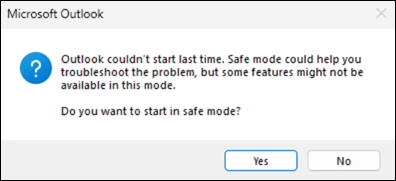
The bug was first reported on March 12, when affected Microsoft 365 customers began experiencing Outlook crashes and prompts to start it in safe mode.
Microsoft acknowledged the issue nearly a week later in a Microsoft 365 incident report (EX1254044), blaming a previous Outlook build for the crashes.
"Starting around March 12, 2026, classic Outlook might crash and then prompt to start in Safe Mode," it explains in a recently updated support document.
"This issue is happening when older builds of classic Outlook are using the newest version of the Teams Meeting Add-In build 1.26.02603. For example, this issue happens on Current Channel if the classic Outlook build is equal or lower than Version 2402 (Build 17328.20142)."
On Monday, Microsoft said the bug has been resolved and that a fix is rolling out with Microsoft Teams version 26058.712.4527.9297.
Microsoft advised affected users to update their classic Outlook client to the latest build, which addresses the issue. Those who can't immediately upgrade are advised to perform an Online Repair for click-to-run installs (which reinstalls all Office applications).
Users who need to stay on the older build of Office they're currently using can also disable the buggy Teams Meeting Add-in as a temporary workaround by going through the following procedure:
- Open Outlook in Safe Mode. To do this, hold down the Ctrl key when you start the application, or go to Open Outlook in safe mode and follow the steps.
- Select File > Options > Add-ins > Go.
- In the COM Add-ins dialog, uncheck Microsoft Teams Meeting Add-in for Microsoft Office, then select OK.
- Restart Outlook.
Last week, Microsoft also fixed a classic Outlook bug that had been triggering 0x800CCC0F and 0x80070057 errors when synchronizing Gmail and Yahoo accounts since February 26.
Earlier this year, it addressed another classic Outlook issue caused by the December 2025 updates that prevented Microsoft 365 customers from opening encrypted emails.
Microsoft is also investigating a bug that causes "Can't connect to the server" errors when creating groups in classic Outlook if Exchange Web Services (EWS) is enabled for the tenant.
Another issue, acknowledged by Microsoft almost two months after the first user reports, makes the mouse pointer disappear for some users in classic Outlook, OneNote, and other Microsoft 365 apps.

Automated Pentesting Covers Only 1 of 6 Surfaces.
Automated pentesting proves the path exists. BAS proves whether your controls stop it. Most teams run one without the other.
This whitepaper maps six validation surfaces, shows where coverage ends, and provides practitioners with three diagnostic questions for any tool evaluation.
如有侵权请联系:admin#unsafe.sh