好的,我现在需要帮用户总结一篇文章的内容,控制在100字以内。用户的要求很明确,不需要使用“文章内容总结”或“这篇文章”这样的开头,直接写描述即可。 首先,我仔细阅读了用户提供的文章。这篇文章主要介绍了EvilTokens,一个新的Phishing-as-a-Service(PhaaS)工具包,用于针对微软设备代码的钓鱼攻击。文章详细描述了EvilTokens的工作原理、其提供的功能以及它对网络安全的影响。 接下来,我需要提取关键信息:EvilTokens是一个新的PhaaS工具包,专门用于微软设备代码钓鱼攻击;它提供了多种模板和自动化功能;被广泛采用,并对全球多个地区的组织造成了影响。 然后,我要将这些信息浓缩到100字以内。确保涵盖主要点:工具包名称、类型、攻击目标、功能、影响范围和后果。 最后,检查语言是否简洁明了,没有使用复杂的术语,确保用户能够轻松理解。 </think> EvilTokens 是一种新型的 Phishing-as-a-Service (PhaaS) 工具包,专门用于针对 Microsoft 设备代码的钓鱼攻击。该工具包提供多种模板和自动化功能,允许攻击者轻松发起钓鱼活动并获取访问令牌。自 2026 年初以来,EvilTokens 被广泛采用,并对全球多个地区的组织造成了影响。 2026-3-30 07:3:43 Author: blog.sekoia.io(查看原文) 阅读量:49 收藏
This post was originally distributed as a private FLINT report to our customers on 25 March 2026.
Introduction
In March 2026, through our monitoring of phishing-focused cybercrime communities, Sekoia’s Threat Detection & Research (TDR) team uncovered EvilTokens, a new turnkey Microsoft device code phishing kit sold as Phishing-as-a-Service (PhaaS). These phishing pages have been circulating since mid-February 2026, and were rapidly adopted by cybercriminals specialising in Adversary-in-the-Middle (AitM) phishing and Business Email Compromise (BEC).
Our analysis showed that EvilTokens provides a turnkey Microsoft device code phishing kit and a range of advanced features to conduct BEC attacks, including access weaponisation, email harvesting, reconnaissance capabilities, a built-in webmail interface, and AI-powered automation.
The EvilTokens PhaaS operates through fully featured bots on Telegram and continuously improves its phishing kit with new capabilities. In the near future, the operator intends to extend support to Gmail and Okta phishing pages.
Given EvilTokens’s rapid adoption, advanced phishing capabilities, and BEC task automation, TDR analysts assess with high confidence that this kit will become a serious competitor in the phishing and BEC landscape.
This report explains the Microsoft device code authorisation flow and offers a technical analysis of the EvilTokens device code kit, covering its phishing pages, the weaponisation of harvested Microsoft tokens, and the functionalities available to affiliates. It also highlights the widespread adoption of EvilTokens by analysing delivery campaigns, and the large adversary’s infrastructure.
In a follow-up blog post, we will detail the PhaaS operations on Telegram and the additional services provided by the operator eviltokensadmin. It will highlight the advanced features that significantly facilitate BEC fraud by leveraging AI.
Device code phishing and its impact
To compromise Microsoft 365 accounts, EvilTokens pages rely on device code phishing, a technique that differs from the common AitM tactic of replicating Microsoft authentication pages. In this attack, victims are tricked into entering a device code on the legitimate login page, thereby granting attackers access to their accounts.
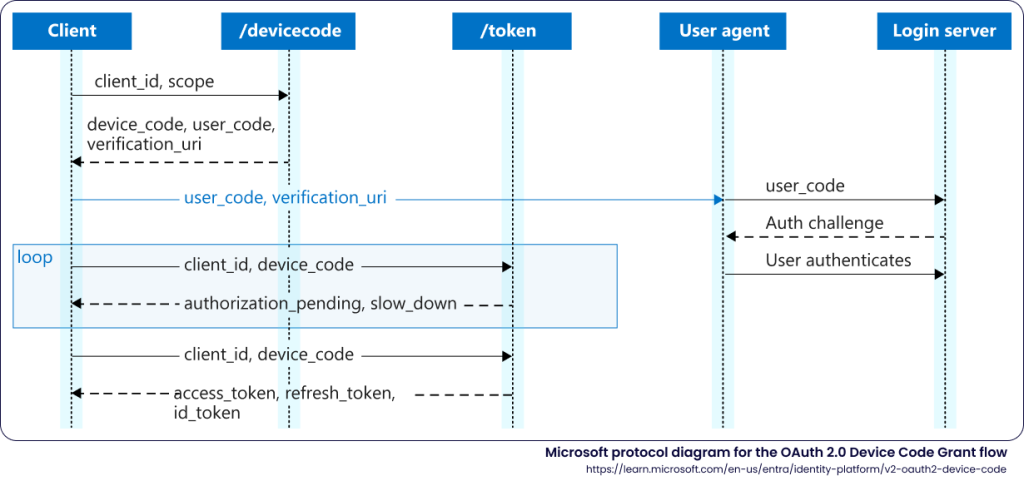
Microsoft device code authentication flow
The OAuth 2.0 Device Authorisation Grant enables authentication for endpoints with limited input capabilities, such as smart TVs, IoT devices, or printers. Rather than requiring a direct local login, the authentication flow delegates sign-in to a secondary host: the endpoint displays a user code, which the user enters in a browser on a separate device, typically a smartphone or computer, to authenticate. Once succeeded, the endpoint receives an access token and refresh token, resulting in a long-lived authenticated session on the device.
Microsoft’s implementation of this flow uses three endpoints:
- POST /oauth2/v2.0/devicecode: the device requests a code (user_code), which is alphanumeric characters associated with a session identifier (device_code), for a specified client and a scope.
- GET /devicelogin redirecting to /common/oauth2/deviceauth: the user signs in on a secondary host, by entering the user_code and authenticating using a common method.
- POST /<TENANT>/oauth2/v2.0/token: the device polls this endpoint to obtain the access token (access_token) and refresh token (refresh_token) granting a persistent access without re-authentication, once the user has authenticated. The refresh token is obtained when the offline_access scope is included in the authorisation request,
The following diagram illustrates this protocol, as provided by Microsoft1:
Device code phishing attack
The device code phishing attack exploits the inherent separation between the device to authenticate and the user sign-in in the OAuth 2.0 Device Authorisation Grant detailed above. Rather than relying on an adversary infrastructure, the attacker initiates a genuine device authorisation request to obtain access to the target’s account. By acting as the device’s client, the attacker tricks the victim into completing the standard authentication, taking advantage of the victim’s lack of knowledge regarding device code authentication, and thereby stealing the access grant.
Main steps of device code phishing attack are:
- The attacker sends a valid POST request to /oauth2/v2.0/devicecode using a legitimate client_id (e.g. a Microsoft first-party application, for example Microsoft Office client). The server returns a device_code, user_code, and the verification_uri.
- The attacker relays the user_code and verification_uri to the target. For this step, a social engineering lure must prompt the target to authenticate to the legitimate Microsoft URL delivered by the attacker by entering the user_code.
- The target browses the verification_uri which is a legitimate Microsoft endpoint hxxps://microsoft[.]com/devicelogin, redirecting to: hxxps://login.microsoftonline[.]com/<TENANT>/oauth2/v2.0/devicecode.
- The target enters the user_code delivered by the threat actor through the phishing page or another means, and completes authentication on the Microsoft sign-in page.
- The attacker polls the /<TENANT>/oauth2/v2.0/token to retrieve a valid access_token and refresh_token upon the target’s authentication.
The following diagram illustrates steps of a Microsoft device code phishing attack, between the attacker, the victim, and Microsoft authentication services:
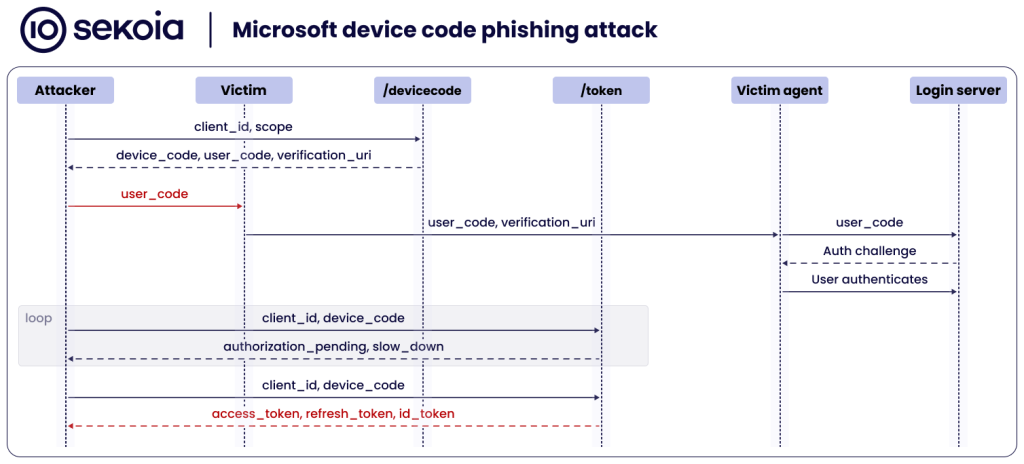
A Microsoft device code phishing attack aims for the attacker to harvest an access token for the specified application, and a refresh token tied to the device.
| Access token This short-lived token issued by Entra ID grants access to a target resource for 60-90 minutes, randomly determined. It is tied to the authenticated user, the authorised permission scopes, and the target resource. → In a device code phishing attack, an access token gives the threat actor immediate, direct access to the victim’s resources with no further authentication. |
| Refresh token This Entra ID token allows silent acquisition of new access and refresh tokens for 90 days (except in single-page applications and email one-time passcode flows). A refresh token is “rolling”, issuing a fresh 90-day token on each use and invalidating its predecessor. Additionally, a refresh token can register a device in Entra ID, a prerequisite for requesting a Primary Refresh Token (PRT). → Attackers steal refresh tokens to maintain persistent access to the victim’s account. |
| Primary Refresh Token (PRT) This long-lived token enables 90-day Single Sign-On (SSO) across the account’s applications. It is exchanged via token broker to request access and refresh tokens, permitting silent authentication to Microsoft and other cloud applications, with no further authentication. The PRT is a device-bound SSO artifact. |
Post-compromise, persistence and impact
Below is an overview of the potential post-compromise activities following a successful Microsoft device code phishing attack and their impact.
By leveraging the short-lived access token, the attacker can exfiltrate targeted user data for up to 60 minutes following the device code phishing attack. Depending on the targeted service, the attacker can access emails via Exchange Online, documents from Microsoft SharePoint Online and OneDrive, or conversation history in Microsoft Teams.
To establish persistence, the refresh token obtained during the device code phishing attack can be redeemed for new access tokens. With its rolling 90-day validity, this token allows the threat actor to maintain continuous access to the compromised account as long as the token is actively renewed and not revoked, without triggering any interactive authentication challenge.
In more advanced post-compromise scenarios, the attacker can leverage the harvested refresh token to register an additional device in Entra ID, then use the token together with the new device identity to request a PRT. Once a PRT is obtained, the threat actor can silently authenticate as the victim to the organisation’s Microsoft 365 applications, bypassing credential prompts and MFA, and move laterally to other services and resources beyond those originally targeted.
EvilTokens: device code phishing at scale
As of March 2026, no major phishing kit includes device code phishing pages. Instead, most Phishing-as-a-Service platforms rely on Adversary-in-the-Middle phishing to target Microsoft 365, Google Workspace, and other services.
By contrast, EvilTokens PhaaS distinguishes itself by providing device code phishing pages along with the suite of tools needed to execute account takeovers and post-compromise activities.
EvilTokens phishing pages
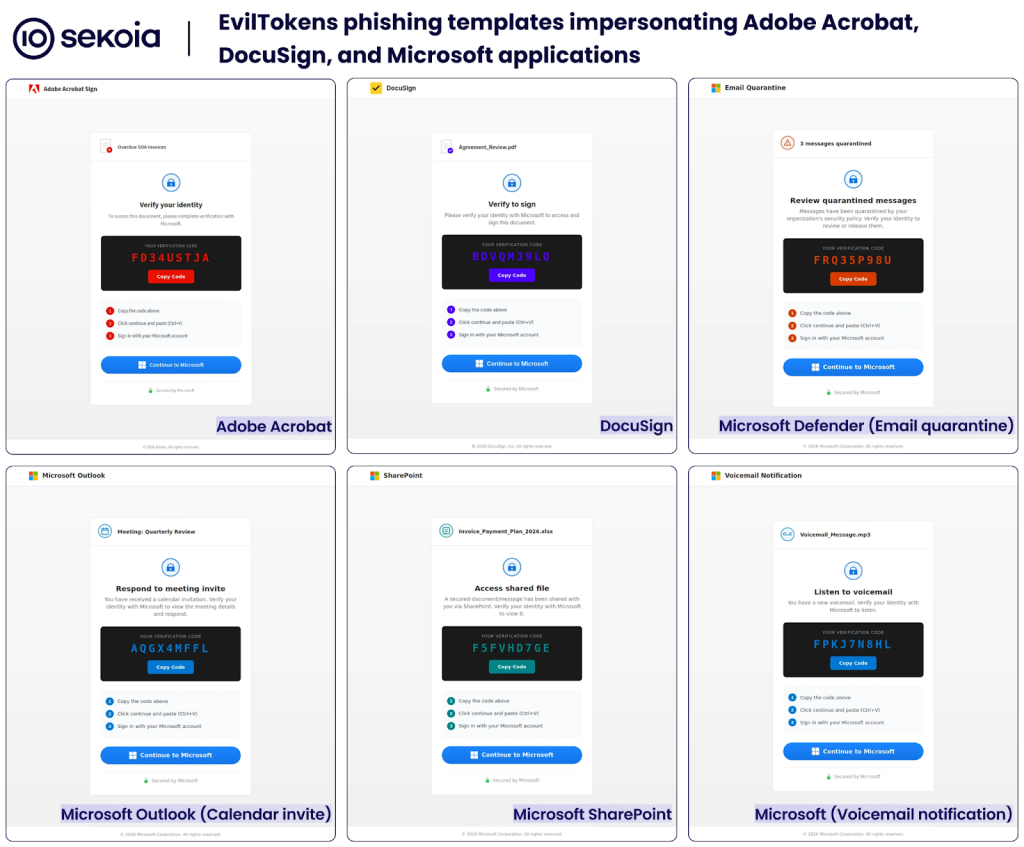
The EvilTokens PhaaS offers customers self-hosted phishing pages designed for device code phishing attacks. These phishing templates include:
- A decoy page impersonating a Microsoft service or trusted application (e.g. Adobe Acrobat or Docusign), prompting users to verify their identity to access a document.
- A verification code (the user_code from the Microsoft device code authorisation flow) for the user to copy.
- Instructions to complete identity verification via Microsoft.
- A “Continue to Microsoft” button that redirects to the legitimate Microsoft device login page (the verification_uri in the OAuth flow).
When the user copies the verification code and clicks on the “Continue to Microsoft” button, the phishing page opens the genuine Microsoft device sign-in in a pop-up window. After the user enters the verification code, they are redirected to the standard Microsoft authentication sign-in page. Upon successful sign-in, the attacker’s device receives access to the victim’s account for the targeted service.
The figure below illustrates an EvilTokens phishing pages impersonating Adobe Acrobat Sign and launching the device authorisation pop-up:
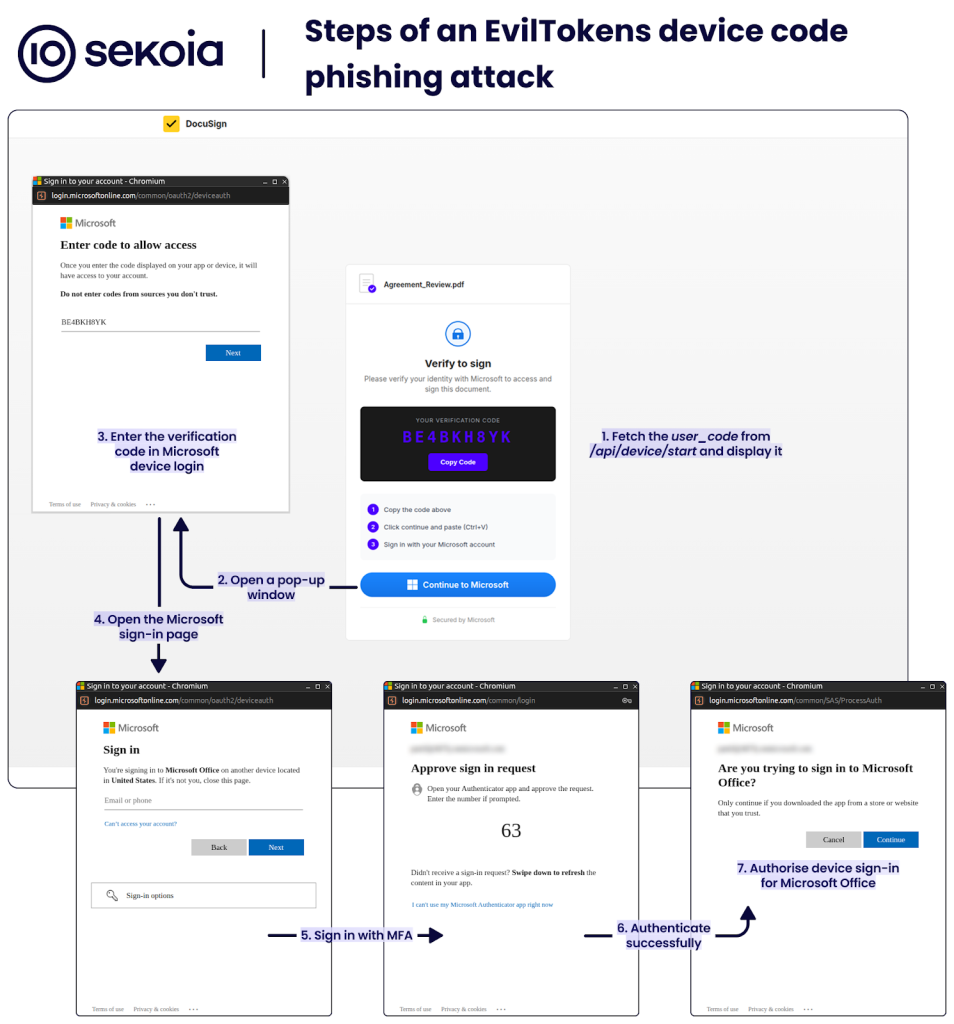
Of note, the Microsoft device login page warns: “Do not enter codes from sources you don’t trust”. This phishing tactic relies on impersonating a trusted service so that users overlook the warning and complete the device code authentication. The page then indicates that someone is signing in on another device in the same country as the phishing kit and instructs users to close the page if they do not recognise the device.
The user_code is requested by the PhaaS backend from the Microsoft API and remains valid for 15 minutes after the victim loads the phishing page. To obtain this code, the phishing page sends an HTTP POST to /api/device/start, which returns the user_code and a session ID. The phishing page then polls /api/device/status/<SESSION_ID> to check the authentication status. Once the code is redeemed, the page automatically redirects the user to the predefined URL, usually related to the original lure.
Phishing templates
As of March 2026, EvilTokens PhaaS includes a range of phishing templates that impersonate Adobe Acrobat Sign and Adobe Acrobat Viewer, DocuSign, email quarantine notices, calendar invites, SharePoint access request, voicemail notifications, password expiry warnings, OneDrive shared document, and eFax notification. All these templates are designed to lure users into completing a Microsoft device code sign-in flow, whether to access a protected document, review a security alert, respond to a meeting invitation, or listen to a voicemail.
This social engineering technique relies on users’ lack of awareness about Microsoft device authorisation and the full account access it grants.
The HTML for these phishing pages is an empty <div> and a <script> that asynchronously fetches a base64-encoded content, decrypts it with the Web Crypto API (crypto.subtle) using AES-GCM, and then injects the decrypted content into the document.
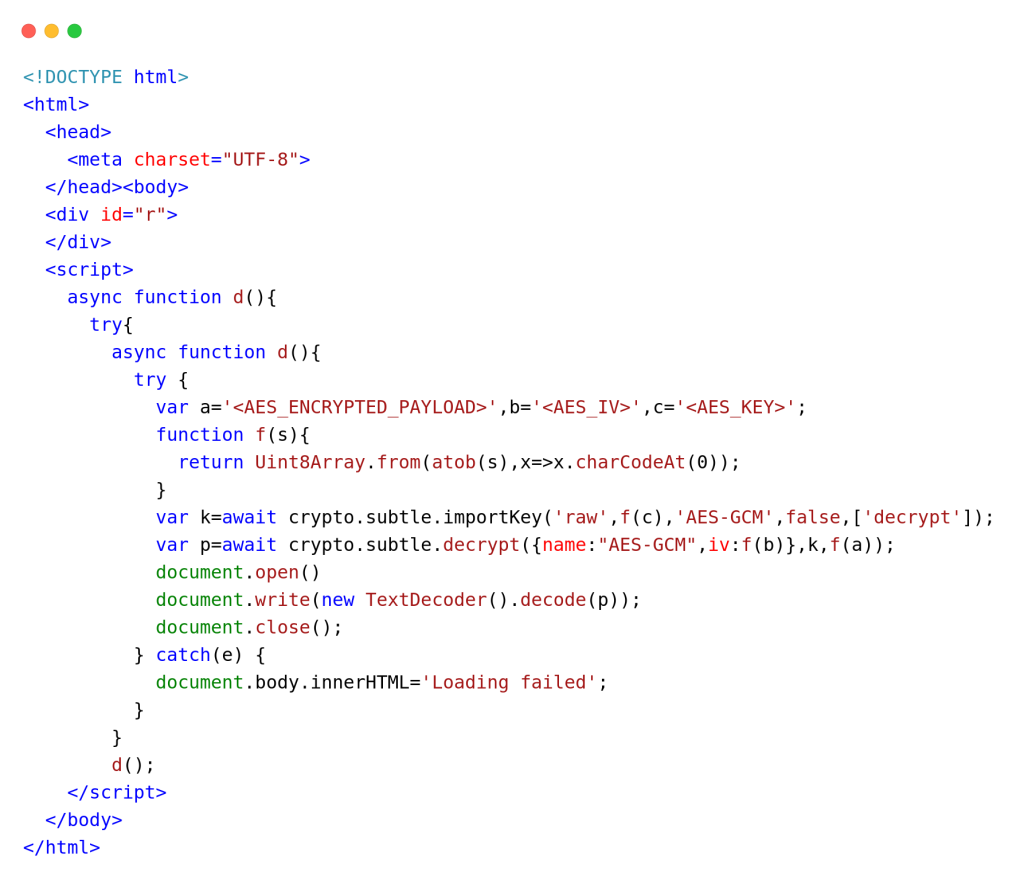
A YARA rule for detecting EvilTokens phishing pages is provided in the IoCs & Technical details section.
Backend code and phishing implementation
As detailed in the Device code phishing attack subsection, the adversary’s infrastructure initiates communication with the Microsoft API to start the device login authorisation flow and retrieve tokens that grant access to the compromised account.
TDR analysts had access to the EvilTokens backend code, and produced the analysis above.
EvilTokens relies on a single backend JavaScript to handle all interactions with Microsoft API and to serve phishing pages hosted by PhaaS affiliates. Its core functions, including device code phishing, Primary Refresh Token (PRT) conversion and token weaponisation, are exposed through the following REST API endpoints:
| API endpoints | Purpose | Main actions |
| POST /api/device/start | Start the device code flow | – Sends a POST request to /common/oauth2/devicecode with the client ID of Microsoft Office and the resource set to hxxps://outlook.office365[.]com/ |
| GET /api/device/status/:sessionId | Check device code status by polling Microsoft for token | – Sends a POST request to /common/oauth2/token with the client ID, device code, and other parameters – Saves the captured access and refresh tokens to the database – Sends a Telegram notification with the victim’s email and IP geolocation-Calls prt.convertToPRT() using the captured refresh token to auto-convert to a PRT – Sends a Telegram notification when the token has been converted to a PRT |
| GET /api/device/sessions | List all active device code sessions | – Runs cleanupExpiredSessions() to remove expired entries – Iterates over the array deviceCodeSessions and returns sessions |
| POST /api/prt/convert | Convert a refresh token to a PRT | – Calls the function prt.convertToPRT() to auto-convert the supplied refresh token to PRT – Stores the PRT data to the PostgreSQL database |
| POST /api/prt/refresh | Obtain a fresh access token for any resource | – Calls the function prt.refreshWithPRT() to get an access token for any target resource |
| POST /api/prt/exchange | Obtain a fresh access token for resource shorthand | – Calls the function prt.refreshWithPRT() to get an access token for resource shorthand (Outlook, Graph, Azure, Substrate, SharePoint) |
| POST /api/prt/cookie | Generate a cookie for one-click browser SSO hijack: x-ms-RefreshTokenCredential | – Calls the function prt.convertToPRT() to auto-convert to PRT if not already done – First calls prt.getServerNonce() to fetch a server nonce, then calls prt.createPRTCookie() to generate the x-ms-RefreshTokenCredential JWT cookie to access a live browser session with no password or MFA required. – Attempts to generate x-ms-DeviceCredential cookie if device key material is available – Returns the x-ms-RefreshTokenCredential cookie value, and other session data |
| POST /api/prt/owa-session | Obtain a OWA session cookies | – Sends a POST request to /common/oauth2/v2.0/token with the client IDs of Microsoft Authentication Broker and Microsoft Office to get an access token and an ID token – Sends a POST request to hxxps://outlook.office365[.]com/owa/ with the ID token and the access token to get an OpenID Connect cookie – Attempts to get a Bearer token header to collect additional cookies – Returns all collected cookies |
| POST /api/prt/recon | Obtain a Graph API token and perform reconnaissance | – Gets a new access token for Graph API by calling the function exchangeRefreshToken() – Sends all 7 reconnaissance queries in parallel to get information from /me, /organization, /users, /groups, /applications, /domains and /directoryRoles – Returns results |
| POST /api/prt/azure | Obtain an Azure token and perform enumeration | – Gets a new access token for Azure Management by calling the function exchangeRefreshToken() – Enumerates subscriptions from hxxps://management.azure[.]com/subscriptions, and for each subscription, resource groups and up to 50 resources – Returns results |
Although Sekoia’s TDR analysts cannot confirm that every feature is fully operational, the code is well structured and appears functional. Notably, we assess with high confidence that this backend code was vibe coded, and may have been entirely AI-generated.
Overall, our review demonstrates that EvilTokens goes beyond basic token harvesting. The PhaaS offers affiliates advanced capabilities for account takeover by converting tokens into browser cookies and supporting reconnaissance and enumeration.
Widespread EvilTokens campaigns
Victimology
By pivoting on EvilTokens infrastructure, we uncovered several phishing campaigns that delivered device code phishing pages via various attachment formats, including PDF, HTML, XLSX, SVG or DOCX formats. Each file contained either a QR code or a hyperlink leading to an EvilTokens page and often including a redirection step.
By 19 March 2026, of the 66 phishing attachments collected by TDR, most employed English-language lures that fall into these categories:
- Financial and investment documents: Attackers impersonate finance or advisory firms and offer investment proposals or cash-flow analysis. For example, attachments named Cash Flow & AP AR Review.pdf and GV Advisors Deck-Investment & Funding docs.pdf mimic board-level reports.
- Meeting and event invitations: These attachments pose as meeting or event invitations. Attackers also personalise the file name to include the recipient identity, e.g. jane.doe_meetInvitation-March 15, 2026.pdf.
- Logistics, shipping, and purchase orders: Likely targeting supply-chain, shipping or accounts payable teams, these phishing attachments look like regular shipment notifications, purchase orders or invoices. For example, attachments SPEED International Logistics.pdf and TR Purchase order no. 2627611142 delivered EvilTokens phishing pages in March 2026.
- Payroll adjustments, and Human Resource (HR) subjects: Attackers rely on fake salary changes or payroll adjustments to increase the interest of employees in opening the attachment and following the instructions.
- Generic documents: The attachments look like generic documents stored in the cloud, using services such as DocuSign, OneDrive, SharePoint, e.g. Secured Share Point 3.pdf and OPEN DOCUMENT NOW-22.pdf. Although less targeted, these non-specific lures allow broad campaigns without reconnaissance.
EvilTokens affiliates primarily target employees in finance, HR, transportation/logistics, and sales to facilitate Business Email Compromise (BEC). Some lure even reuse EvilToken template themes, including calendar invites and “secure access document requests. We assess with high confidence that affiliates adapt their attachments to match the phishing pages provided by the PhaaS.
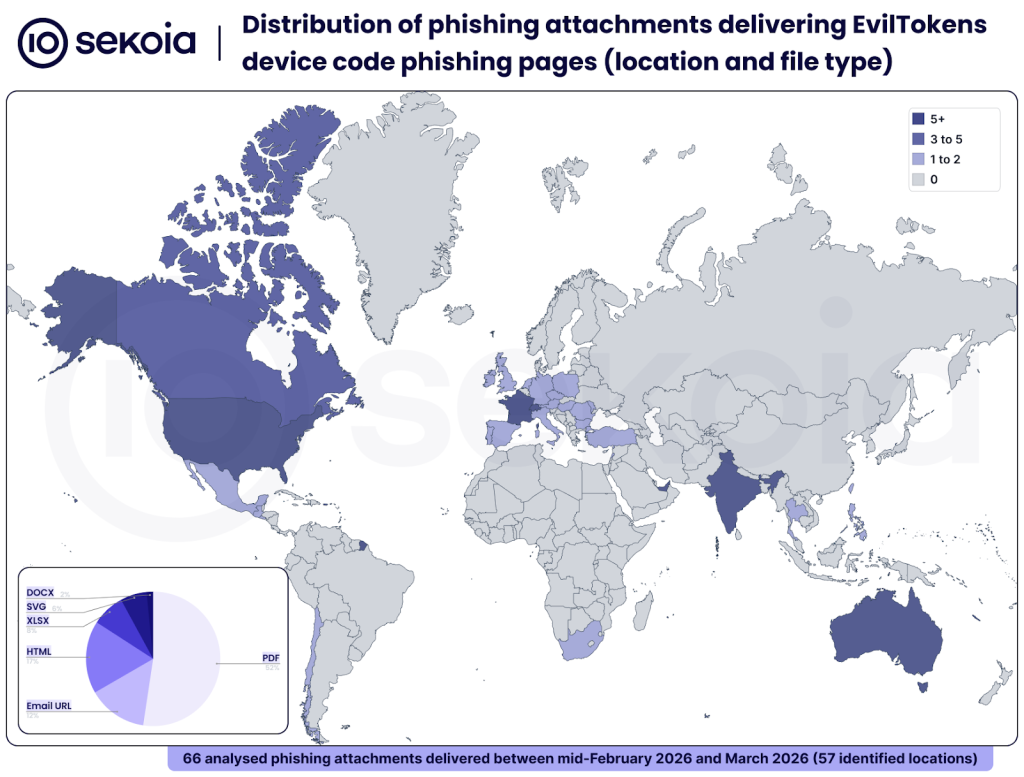
These campaigns have impacted organisations across North, Central and South America, Europe, the Middle-East, Asia and Oceania. The most affected countries are the United States, Australia, Canada, France, India, Switzerland and the United Arab Emirates.
The global reach and diversity of these campaigns indicate that the phishing and BEC ecosystem rapidly embraced EvilTokens. This PhaaS enables affiliates to launch large, convincing campaigns with minimal effort and likely archives high account takeover rates due to the victim’s lack of awareness about device code authentication.
Tracking opportunities
To track EvilTokens campaigns, Sekoia TDR analysts identify phishing domains and pages based on their distinctive patterns. We share our tracking methodologies and associated queries below.
Cloudflare Workers-hosted EvilTokens pages
EvilTokens phishing domains automatically deployed via Cloudflare Workers follow these patterns:
- Adobe Acrobat:
adobe-[a-z0-9]{3}\.[a-z0-9-]{3,}-s-account\.workers\.devpage-adobe-[a-z0-9]{3}\.[a-z0-9-]{3,}-s-account\.workers\.dev
- Calendar invite:
calendar_invite-[a-z0-9]{3}\.[a-z0-9-]{3,}-s-account\.workers\.dev
- DocuSign:
docusign-[a-z0-9]{3}\.[a-z0-9-]{3,}-s-account\.workers\.devpage-docusign-[a-z0-9]{3}\.[a-z0-9-]{3,}-s-account\.workers\.dev
- Email quarantine:
quarantine-[a-z0-9]{3}\.[a-z0-9-]{3,}-s-account\.workers\.dev
- Fax:
fax-[a-z0-9]{3}\.[a-z0-9-]{3,}-s-account\.workers\.dev
- OneDrive:
onedrive-[a-z0-9]{3}\.[a-z0-9-]{3,}-s-account\.workers\.dev
- Password expiry:
page-password-[a-z0-9]{3}\.[a-z0-9-]{3,}-s-account\.workers\.dev
- SharePoint:
sharepoint-[a-z0-9]{3}\.[a-z0-9-]{3,}-s-account\.workers\.dev
- Voicemail:
voicemail-[a-z0-9]{3}\.[a-z0-9-]{3,}-s-account\.workers\.dev
- Others:
index-[a-z0-9]{3}\.[a-z0-9-]{3,}-s-account\.workers\.dev
In addition, the subdomain sometimes embeds the target’s email with special characters replaced by dashes, for example:
index-exy.john-doe-example-com-s-account-.workers[.]dev
(targeting john.doe[@]example[.]com)
We use a similar query on urlscan.io:
By 23 March 2026, the urlscan.io query returned around 500 results, all associated with EvilTokens device code phishing pages.
URL patterns for fetching device code
As detailed in the analysis, EvilTokens phishing pages obtain the user code by sending an HTTP POST to /api/device/start and then polling /api/device/status/<SESSION_ID> to check the authentication status.
Sekoia TDR analysts use the following queries on urlscan.io and urlquery:
filename:("/api/device/start" AND "/api/device/status/")
(urlscan.io)
http.url.addr:(*\/api\/device\/start AND *\/api\/device\/status\/dev_*) (urlquery)
By 23 March 2026, these heuristics yielded over 1,000 results, all associated with EvilTokens device code phishing pages, including both Cloudflare Workers domains and numerous affiliate-hosted domains.
X-Antibot-Token HTTP header
The HTTP POST request to /api/device/start must include the HTTP header X-Antibot-Token to prove the request originates from a real browser rather than a bot.
The header value is computed server-side in PHP at page render time, as the SHA256 hash of TOKEN_SECRET + current Unix timestamp + “antibot”. When the phishing page loads, JavaScript automatically sends this header. The server then verifies the X-Antibot-Token timestamp is within 5 minutes.
From a defenders’ perspective, this unique HTTP header is a valuable indicator for detecting and tracking EvilTokens phishing pages.
Sekoia TDR analysts use the following queries on urlquery:
http.request.raw:"X-Antibot-Token"
By 23 March 2026, this query produced over 900 results, all confirmed EvilTokens phishing pages.
Conclusion
First identified by Sekoia in phishing-focused cybercrime communities in early March 2026, EvilTokens is a new Phishing-as-a-Service (PhaaS) that delivers a turnkey Microsoft device code phishing kit. The kit’s pages are designed to authorise the attacker’s device in the victim’s Microsoft account, enabling account takeover via the harvested access and refresh tokens.
Our analysis of the EvilTokens PhaaS revealed that it provides affiliates with fully operational phishing pages that harvest access and refresh tokens for a specific Microsoft services compromised account. TDR analysts assess that EvilTokens is the first PhaaS to offer turnkey Microsoft device code phishing pages and complementary capabilities for account takeover.
The kit also supports post-compromise operations to exchange those tokens with a Primary Refresh Token and additional tokens granting access to Outlook, Microsoft Graph, Azure, Substrate (Microsoft Cloud), and SharePoint. These advanced capabilities allow attackers to view and exfiltrate victims’ data, including emails from Exchange Online, documents from SharePoint Online and OneDrive, or conversation history in Teams.
Our investigation uncovered that cybercriminals rapidly and widely adopted this kit starting in early March 2026. Their phishing campaigns have impacted organisations across the Americas, Europe, the Middle-East, Asia and Oceania. Our tracking and Sekoia.io SOC platform telemetry indicates the adversary’s infrastructure spans over 1,000 domains hosting EvilTokens pages. This global reach indicates how quickly the phishing and BEC ecosystem embraced this new PhaaS.
A follow-up blog post will provide actionable insights into the EvilTokens’s Telegram-based operations, the affiliates’ administration panel, and the PhaaS’s AI-augmented fraud capabilities.
IoCs & Technical details
The indicators listed below and YARA rules are available in CSV format with additional metadata in the SEKOIA-IO/Community GitHub repository.
IoCs
EvilTokens device code phishing domains
Self-hosted by affiliates:
| authdocspro[.]com backdoor-hub[.]com bumpgames[.]net carbatterygurgaon[.]com careldutoit-el.co[.]za dao[.]com.au docusend.networkssolutionmail[.]com eqfit.co[.]za eventcalender-schedule[.]com evobothub[.]org framebound[.]cloud infinitechai[.]org | internalmemorecord.bxwancheng[.]com macmamo[.]com mirsanotolastik[.]com mirzanyapi[.]com newmobilepolojean[.]com notificationsmanagersec[.]com pelangiservice[.]com prcservis[.]com promanager.outboundciwidey[.]com serenitygovsupplys[.]com signaturerequired.thecoolcactus[.]com smstltle[.]net | statushelper.aguasomos[.]com suctwocesonesstory[.]com thesafarigarden[.]com topbuysella[.]com totalhomesafe[.]com update.youcreadio[.]cfd well.atlantaperlnatal[.]com xlkconsulting.co[.]za yankeepine[.]co youremplregroup[.]com |
Hosted by EvilTokens administrator:
adobe-lar.denise-chxhistory-com-s-account.workers[.]dev
docusign-vs4.finance-zltnservices-org-s-account.workers[.]dev
onedrive-au8.hayixa9795-pazard-com-s-account.workers[.]dev
adobe-b6d.tuwilika-fcsnam-com-s-account.workers[.]dev
onedrive-23n.sbutler-stateservice-us-s-account.workers[.]dev
onedrive-ac4.ryker-samik-dropmeon-com-s-account.workers[.]dev
onedrive-33i.amittal-prodwaresol-com-s-account.workers[.]dev
docusign-d0e.admin-treyripple-com-s-account.workers[.]dev
adobe-t9r.thomas-gibson-clyde-enq-com-s-account.workers[.]dev
onedrive-7fp.davarius-thackery-dropmeon-com-s-account.workers[.]dev
adobe-h7l.gregcausey-hyundaicrenshaw-com-s-account.workers[.]dev
sharepoint-uo2.angela-warrconstructioninc-onmicrosoft-com-s-account.workers[.]dev
onedrive-hea.jhaas-hapnehartmedia-com-s-account.workers[.]dev
page-custommmvx6290-9kb.snpfs90-outlook-com-s-account.workers[.]dev
index-8ni.shirdav-mail-com-s-account.workers[.]dev
docusign-gmx.medea-locallovechs-com-s-account.workers[.]dev
index-izk.rifkit-protonmail-com-s-account.workers[.]dev
docusign-t0o.accountsreceivable-greens-au-com-s-account.workers[.]dev
adobe-7bf.signature-on-invoice-required-mail-com-s-account.workers[.]dev
page-voicemail-3i6.ucbqzm9-ucl-ac-uk-s-account.workers[.]dev
adobe-y73.letsgo-birdynyc-com-s-account.workers[.]dev
onedrive-dsk.cassandra-warholak-ifrma-org-s-account.workers[.]dev
docusign-u0p.kevin-domae-ca-s-account.workers[.]dev
docusign-a5c.export-cellular-iberia-com-s-account.workers[.]dev
docusign-14g.jhipolito-arrow-food-com-s-account.workers[.]dev
adobe-qi2.pm-pdgrealty-proton-me-s-account.workers[.]dev
adobe-8dt.ishaan-zvi-dropmeon-com-s-account.workers[.]dev
adobe-of6.hayixa9795-pazard-com-s-account.workers[.]dev
docusign-ffp.garciarodriguezt-student-wpunj-edu-s-account.workers[.]dev
docusign-y8l.accountant-fitfranchisebrands-com-s-account.workers[.]dev
adobe-mxg.snpfs90-outlook-com-s-account.workers[.]dev
index-ap3.tyler2miler-proton-me-s-account.workers[.]dev
adobe-yzz.ejkim-gsglobalusa-us-s-account.workers[.]dev
docusign-520.mike-maplecityglass-net-s-account.workers[.]dev
voicemail-l1b.thomas-gibson-clyde-enq-com-s-account.workers[.]dev
docusign-ac3.christina-parsons-charter-comm-com-s-account.workers[.]dev
docusign-o4x.bhc-credit-services-edl-bayreer-com-s-account.workers[.]dev
onedrive-4um.accounting-malitzconstructioninc-co-s-account.workers[.]dev
More EvilTokens domains are available in Sekoia.io CTI feed.
YARA rule
YARA rule for EvilTokens phishing page:
rule phishing_eviltokens_phishing_page {
    meta:
        malware = "EvilTokens"
        description = "Find EvilTokens device code phishing pages based on characteristic strings"
        source = "Sekoia.io"
        creation_date = "2026-03-05"
        modification_date = "2026-03-05"
        classification = "TLP:CLEAR"

    strings:
        $html = "<!DOCTYPE html>" ascii

        $str01 = "<div id=\"r\">" ascii
        $str02 = "function f(s){" ascii
        $str03 = "return Uint8Array.from(atob(s),x=>x.charCodeAt(0))" ascii
        $str04 = "var k=await crypto.subtle.importKey(" ascii
        $str05 = "var p=await crypto.subtle.decrypt(" ascii
        $str06 = "name:\"AES-GCM\",iv:f(b)" ascii
        $str07 = "document.write(new TextDecoder().decode(" ascii
        $str08 = "document.body.innerHTML=\"Loading failed\"" ascii
        $str09 = "document.close()}catch(e)" ascii

    condition:
        $html at 0 and
        6 of them and filesize < 50KB
}
External references
Private report: [Sekoia.io] FLINT 2025-038 – OAuth phishing: When phishing URLs look legitimate
Public report on EvilTokens (with or without PhaaS association):
– [Paul Newton blog] Uncovering a New Device Code Phishing Campaign
– [Paul Newton blog] Device Code Phishing Campaign – Infrastructure Update
– [Palo Alto’s Unit42 GitHub] 2026-03-23 Device Code-based OAuth Phishing
– [Huntress] Riding the Rails: Threat Actors Abuse Railway.com PaaS as Microsoft 365 Token Attack Infrastructure
Feel free to read other Sekoia.io TDR (Threat Detection & Research) analysis here:
- Silver Fox: The Only Tax Audit Where the Fine Print Installs Malware
- OysterLoader Unmasked: The Multi-Stage Evasion Loader
- Meet IClickFix: a widespread WordPress-targeting framework using the ClickFix tactic
- Phishing Campaigns “I Paid Twice” Targeting Booking.com Hotels and Customers
- Global analysis of Adversary-in-the-Middle phishing threats
- Sneaky 2FA: exposing a new AiTM Phishing-as-a-Service
- Tycoon 2FA: an in-depth analysis of the latest version of the AiTM phishing kit
如有侵权请联系:admin#unsafe.sh