嗯,用户让我用中文总结一篇文章,控制在100字以内,而且不需要特定的开头。首先,我需要仔细阅读文章内容,抓住主要信息。 文章讲的是GlassWorm恶意软件,它通过开发者工具传播。攻击者通过恶意包感染开发者的系统,然后分阶段窃取数据、安装远程访问木马和假浏览器扩展。这些行为可能导致供应链攻击,影响公司和普通用户。 接下来,我需要将这些要点浓缩到100字以内。要确保涵盖传播方式、攻击阶段、潜在影响以及防护建议。同时,语言要简洁明了,避免使用复杂的术语。 最后,检查字数是否符合要求,并确保信息准确无误。这样用户就能快速了解文章的核心内容了。 </think> GlassWorm恶意软件通过感染开发者工具传播,窃取敏感数据并安装远程访问木马及伪装浏览器扩展进行监视。攻击始于开发者环境,但可能引发供应链攻击,威胁企业及普通用户安全。建议开发者定期审核工具来源、检查系统异常,并使用防病毒软件防护。 2026-3-26 13:0:39 Author: securityboulevard.com(查看原文) 阅读量:3 收藏
GlassWorm hides inside developer tools. Once it’s in, it steals data, installs remote access malware, and even a fake browser extension to monitor activity. While it starts with developers, the impact can quickly spread. With stolen credentials, access tokens, and compromised tools, attackers can launch wider supply chain attacks, putting companies and everyday users at risk.
How the infection starts
GlassWorm is usually distributed through developer channels. That means that programmers get their systems compromised by downloading malicious packages from code repositories like npm, GitHub, PyPI, and so on. These can be new malicious packages or altered packages from once-trusted, but now compromised, accounts.
The developer installs or updates a trusted or popular npm/PyPI package or VS Code extension, but the maintainer’s account or supply chain has been compromised.
What happens after installation
Once the package is pulled, a preinstall script or invisible Unicode loader runs and fingerprints the machine. If it finds a Russian locale, execution stops. If not, the script waits a few hours and then quietly contacts the Solana blockchain to discover where to fetch stage two of the infection. Rather than hardcoding a link that could be taken down, the attacker stores this information in the memo field of a Solana transaction.
Stage two: Data theft
The stage two payload is an infostealer that targets browser extension profiles, standalone wallet apps, and .txt/image files likely holding seeds or keys, along with npm tokens, git credentials, VS Code secrets, and cloud provider credentials. After gathering this information, it sends it to a remote server via a POST request.
Stage three: Full system compromise
After that, it’s on to stage three. The malware fetches two main components: the Ledger/Trezor phishing binary aimed at users with a Ledger or Trezor device plugged in, and a Node.js Remote Access Trojan (RAT) with several modules, including browser credential stealers and a Chrome‑extension installer. It gains persistence by setting up scheduled tasks and Run registry keys so that the RAT comes back on every reboot.
The RAT does not hardcode its main command and control (C2) address. Instead, it performs a distributed hash table (DHT) lookup for the pinned public key. DHT is a distributed system that provides a lookup service similar to a hash table. Key–value pairs are stored in a DHT and can be used to retrieve the value associated with a given key. If this method fails, the RAT goes back to the Solana blockchain to fetch a new IP address.
Browser surveillance and tracking
The RAT also force-installs a Chrome extension (in the example described by Aikido, it pretends to be “Google Docs Offline”), which acts as an onboard session surveillance. Besides stealing cookies, localStorage, the full Document Object Model (DOM) tree of the active tab, bookmarks, screenshots, keystrokes, clipboard content, up to 5,000 browser history entries, and the installed extensions list, it can also be used to take screenshots and act as a keylogger.
What this looks like to the victim
From the victim’s point of view, all this happens very stealthily. If they’re paying close attention, they may see a few suspicious outgoing connections, the startup entries, and the new browser extension.
Who’s at risk, and how this could spread
The current setup appears to focus on developers who may have cryptocurrency assets, but many of these components and the stolen information can be used to initiate supply chain attacks or target other groups of users.
How to stay safe
Because of the stealthy nature of this infection chain, there are two main strategies to stay safe:
- Prefer known‑good, pinned versions, and treat sudden ownership changes, new maintainers, or big code rewrites in minor releases as review triggers.
- Regularly audit browser extensions, remove anything you don’t recognize, and be suspicious of “Google Docs Offline”‑style clones or duplicates.
- Check your scheduled tasks and registry startup locations for unexpected entries.
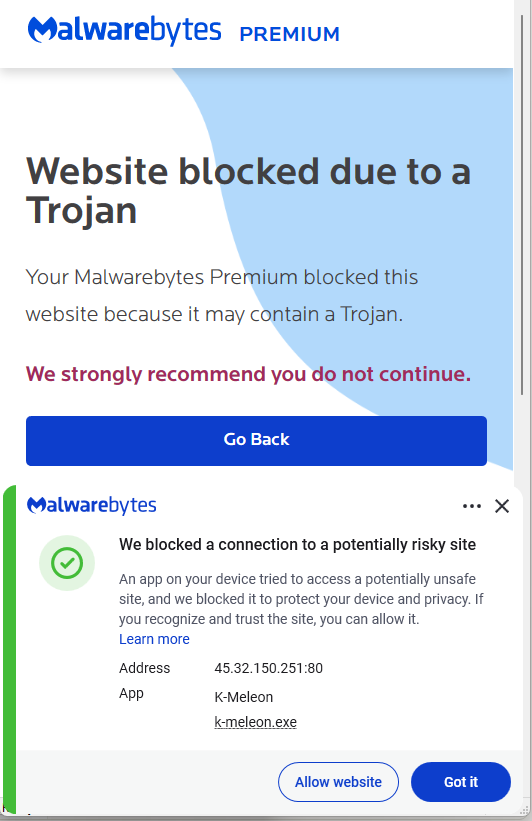
- Use an up-to-date, real-time anti-malware solution to detect and block malicious connections and the downloaded malware.
IOCs (Indicators of Compromise)
IP addresses:
45.32.150[.]251
217.69.3[.]152
217.69.0[.]159
45.150.34[.]158
Registry keys:
HKEY_CURRENT_USER\Software\Microsoft\Windows\CurrentVersion\Run\UpdateApp
HKEY_CURRENT_USER\Software\Microsoft\Windows\CurrentVersion\Run\UpdateLedger
Scheduled Task:
Name: UpdateApp which runs: AghzgY.ps1
Browser extension:
Display name: Google Docs Offline (version 1.95.1)
Windows extension directory name :jucku
macOS extension directory name: myextension
We don’t just report on threats—we remove them
Cybersecurity risks should never spread beyond a headline. Keep threats off your devices by downloading Malwarebytes today.
*** This is a Security Bloggers Network syndicated blog from Malwarebytes authored by Malwarebytes. Read the original post at: https://www.malwarebytes.com/blog/news/2026/03/glassworm-attack-installs-fake-browser-extension-for-surveillance
如有侵权请联系:admin#unsafe.sh