好的,我现在需要帮用户总结一篇文章的内容,控制在100字以内。用户已经提供了文章的详细内容,包括新发布的Claude插件、功能、测试结果以及工作原理等。 首先,我要确定文章的主要信息点。文章介绍了新发布的Claude插件,用于代码开发和审计,采用了维度分析技术。这个插件不同于其他安全分析工具,它通过LLM为代码添加维度类型注释,然后机械地标记不匹配的地方。测试结果显示召回率高达93%,优于基线提示的50%。 接下来,我需要将这些信息浓缩到100字以内。要确保涵盖主要功能、独特之处和测试结果。同时,语言要简洁明了,避免使用复杂的术语。 可能的结构是:介绍插件及其功能,说明其独特之处(使用LLM注释而非寻找漏洞),然后提到测试结果和优势。 最后,检查字数是否符合要求,并确保没有遗漏关键信息点。 </think> 发布新Claude插件,用于代码开发和审计,采用维度分析技术。该插件通过LLM为代码添加维度类型注释,并机械标记不匹配项。测试显示其召回率达93%,优于基线提示的50%。 2026-3-25 11:0:0 Author: blog.trailofbits.com(查看原文) 阅读量:51 收藏
We’re releasing a new Claude plugin for developing and auditing code that implements dimensional analysis, a technique we explored in our most recent blog post. Most LLM-based security skills ask the model to find bugs. Our new dimensional-analysis plugin for Claude Code takes a different approach: it uses the LLM to annotate your codebase with dimensional types, then flags mismatches mechanically. In testing against real audit findings, it achieved 93% recall versus 50% for baseline prompts.
You can download and use our new dimensional-analysis plugin by running these commands:
claude plugin marketplace add trailofbits/skills
claude plugin install dimensional-analysis@trailofbits
claude /dimensional-analysis
How our plugin differs from most skills
This plugin release is quite different from the wave of security analysis skills released over the past few weeks. The skills we’ve seen tend to take a relatively simple approach, where the LLM is primed with a set of vulnerability classes, exploration instructions, and example findings, and is then told to try to identify bugs within the scope of the skill.
Unfortunately, these approaches tend to produce low-quality results, with precision, recall, and determinism that is often much poorer than simply asking an LLM to “find the bugs in this project.”
What makes dimensional-analysis different is that instead of relying on LLM judgement to search for, identify, and rank vulnerabilities, it uses the LLM as a vocabulary-building/categorization machine that directly annotates the codebase. If the annotations are correct and a dimensional bug is present, that bug shows up as a mismatch between annotations instead of having to rely on an LLM’s judgement to determine how viable a finding is. In effect, this changes the calculus of how the LLM’s reasoning capability is being used, and produces much better results than baseline prompts that overly rely on LLM reasoning capabilities.
Benchmarking
We tested dimensional-analysis against a set of dimensional mismatch issues found during several unpublished audits and compared it to a baseline prompt using 10 samples per codebase. For this evaluation, the dimensional-analysis plugin had a recall rate of 93% with a standard deviation of 12%, versus the baseline prompt, which had a recall rate of 50% with a standard deviation of 20%. This means that dimensional-analysis performed both better and more consistently than the baseline prompt.
How it works
If you haven’t already, read our first blog post on the dimensional analysis technique. The plugin works over four main phases: dimension discovery, dimension annotation, dimension propagation, and dimension validation.
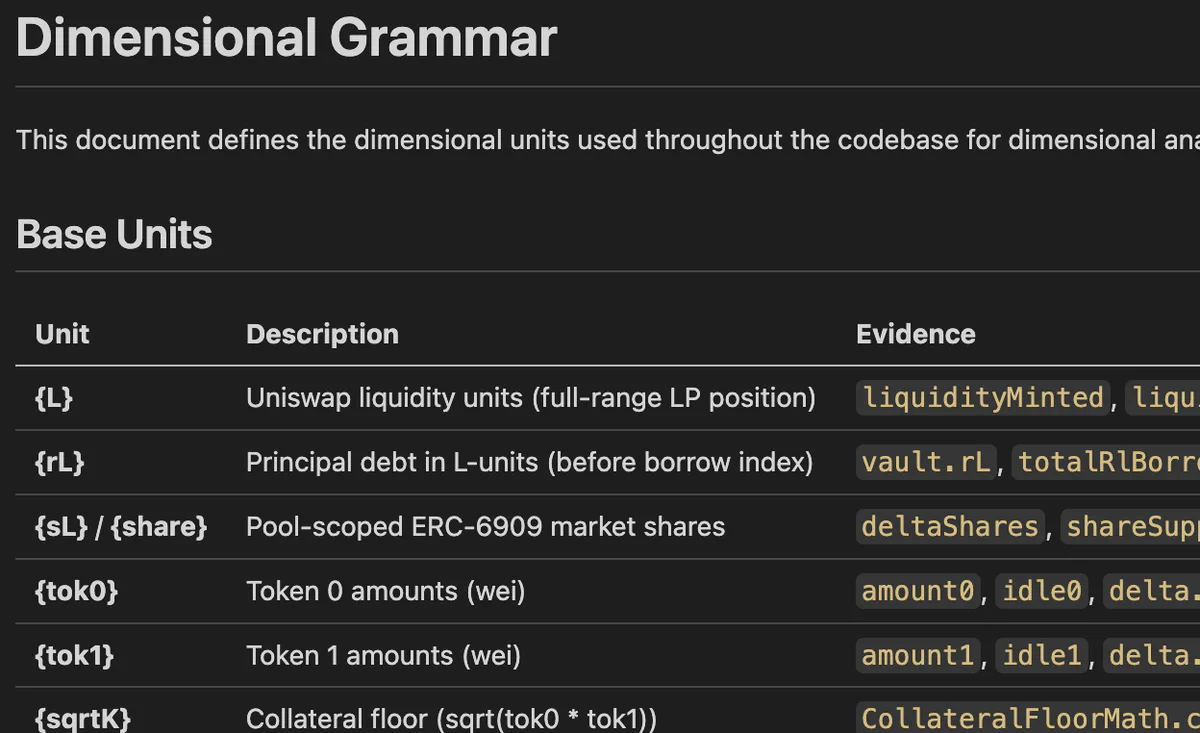
In the first phase, a subagent performs dimension discovery, with the goal of identifying a vocabulary of fundamental base units that every numerical term in the system is composed of. During this process, it also identifies a set of common derived units for quick reference by later agents.
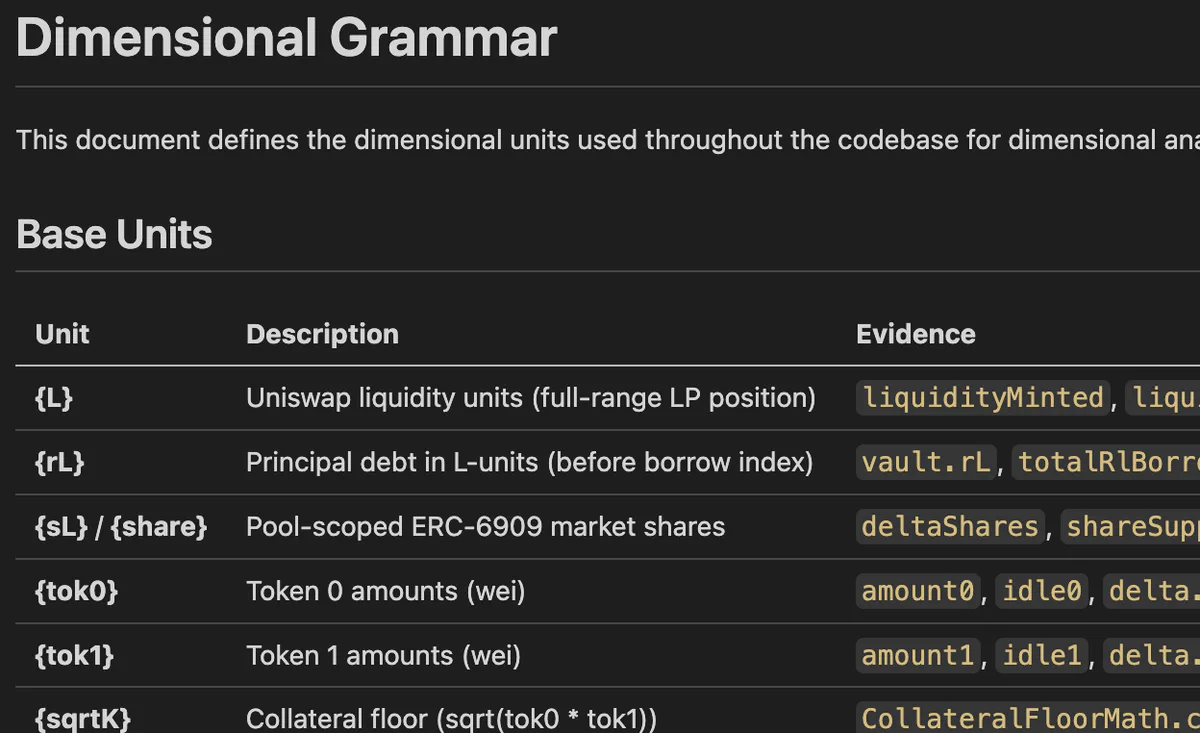
The dimensional vocabulary is persisted to DIMENSIONAL_UNITS.md, where it can be read by other agents or used during development if you choose to make the annotations a permanent part of your software development lifecycle.
In the second phase, a group of subagents is launched to directly annotate the codebase using the dimensional vocabulary. Each subagent is provided with the DIMENSIONAL_UNITS.md file, a batch of files to annotate, and instructions to annotate state variables, function arguments, variable declarations, and any portions of complex arithmetic. These initial annotations are called “anchor” annotations.
} else if (currentPrice < peakPrice) {
    // D18{1} = (D18{price} - D18{price}) * D18{1} / (D18{price} - D18{price})
    imbalance =
        ((peakPrice - currentPrice) * imbalanceSlopeData.imbalanceSlopeBelowPeak) /
        (peakPrice - eclpParams.alpha.toUint256());
} else {
    // D18{1} = (D18{price} - D18{price}) * D18{1} / (D18{price} - D18{price})
    imbalance =
        ((currentPrice - peakPrice) * imbalanceSlopeData.imbalanceSlopeAbovePeak) /
        (eclpParams.beta.toUint256() - peakPrice);
}In the third phase, dimensions are “propagated” across each file to callers and callees. This phase adds extra annotations to low-priority files that didn’t receive annotations on the first pass, and performs the first set of checks to make sure that dimensions agree within the same code context and across files.
It’s important to note that a dimensional mismatch at this stage doesn’t necessarily mean a vulnerability is present; sometimes it’s not possible to infer the precise dimension of a called function argument without reading the implementation of the function itself, and the system will over-generalize or make a poor guess. This third phase attempts to “repair” these over-generalized annotations and, if repair is not possible, flags them for triage in the final step.
In the fourth and final phase, the plugin attempts to discover mismatches and perform triage. Dimensional mismatching is checked for during assignment, during arithmetic, across function boundaries, across return paths, and across external calls. Dimensional mismatches are compared against a severity classification based on the nature of the mismatch, and a final report is returned to the user.
What’s next?
If you’re a developer working on an arithmetic-heavy project like a smart contract or blockchain node, we highly recommend running this plugin, then committing DIMENSIONAL_UNITS.md along with all of the annotations created by the plugin. Besides finding bugs, these annotations can greatly improve how long it takes to build a thorough understanding of a complex codebase and help improve both human and LLM understanding of the semantic meaning of your project’s arithmetic expressions.
While new tools are exciting, at this time we don’t believe that this tool can find every source of dimensional error. LLMs are probabilistic, which means there is always going to be some level of error. We’re interested in improving this plugin wherever possible, so if you run it and it misses a dimensional error, please open an issue on our GitHub.
如有侵权请联系:admin#unsafe.sh