
好的,我现在需要帮用户总结这篇文章的内容。用户的要求是用中文,控制在100字以内,并且不需要以“文章内容总结”或“这篇文章”这样的开头,直接写描述即可。 首先,我仔细阅读了文章内容。文章主要介绍了OpenAI推出的新功能“Library”,允许用户在ChatGPT中存储个人文件和图片到OpenAI的云存储中。这个功能适用于Plus、Pro和Business版本的用户,并且在全球范围内推出,但不包括欧洲经济区、瑞士和英国。 接着,作者提到自己刷新了ChatGPT网页后,Library自动出现在侧边栏,并发现里面已经有过去两周上传的一些文件。OpenAI解释说这是默认行为,上传的文件会被保存在一个专用的安全位置,方便以后参考使用。 此外,文章还提到如果用户使用ChatGPT生成AI图片,这些图片会继续出现在Images标签下。Library部分只包含用户上传的文件,并且用户可以通过特定步骤上传文件。OpenAI强调这些文件会被自动保存到用户的账户中,直到手动删除。删除包含文件的聊天记录并不会删除Library中的文件。 最后,文章指出删除文件后,OpenAI会在30天内从服务器中移除这些文件。虽然不清楚为什么需要这么长时间,但很可能是出于法律原因。 现在我需要将这些信息浓缩到100字以内。重点包括新功能名称、用途、适用版本、地区限制、默认保存行为、访问方式以及删除机制。 可能的结构是:介绍新功能及其用途,适用版本和地区限制,默认保存行为和访问方式,最后提到删除机制和时间。 检查一下字数是否符合要求,并确保没有使用禁止的开头语句。 </think> OpenAI推出新功能"Library"允许ChatGPT用户存储个人文件和图片至其云存储。该功能适用于Plus、Pro及Business版本用户,在全球范围内(除欧洲经济区、瑞士和英国)推出。默认情况下,上传的文件会被保存以供后续参考。 2026-3-24 00:0:20 Author: www.bleepingcomputer.com(查看原文) 阅读量:14 收藏

OpenAI is rolling out a new feature called 'Library' for ChatGPT, which allows you to store your personal files or images on OpenAI's cloud storage.
OpenAI says ChatGPT Library requires Plus, Pro, and Business. It's rolling out to customers across the world except the European Economic Area, Switzerland, and the United Kingdom.
I refreshed the ChatGPT web, and the Library automatically showed up on the sidebar.
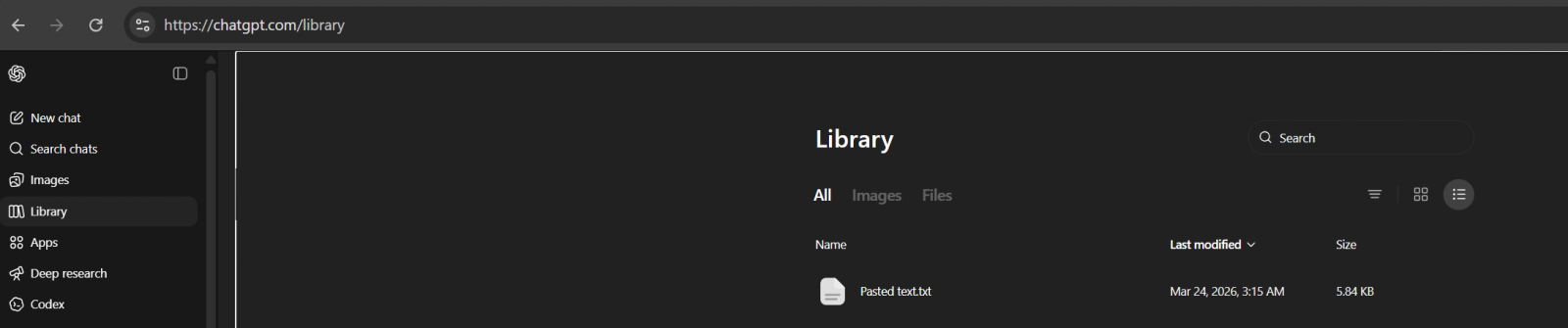
To my surprise, it's actually not empty, as ChatGPT has already saved some of the files I uploaded in the last two weeks.
Turns out it's an expected behaviour. By default, GPT will save your uploaded files in a dedicated, secure location, and they can be used for reference in a future chat.
"ChatGPT automatically saves uploaded and created files, including files uploaded in chats (for example: documents, spreadsheets, presentations, and images) in a dedicated, secure location so they can be easily accessed later," OpenAI noted in a document.
On the other hand, if you use ChatGPT to generate AI images, they will continue to appear in the Images tab.
The Library section only has files you uploaded, and you can upload files by following these steps:
- Open the composer menu (the attachment/add button).
- Select Add from library.
- Choose the file you want to use.
OpenAI says ChatGPT automatically saves uploaded and created files, including files uploaded in chats, in a dedicated, secure location so they can be easily accessed later.
This means files are saved to your account until you delete them manually, but deleting a chat containing a file does not delete those files saved to Library.
To delete a file:
- Select the file in the “Library” tab
- Click Delete, or click the trash icon next to the file.
OpenAI will remove files from its servers within 30 days of deletion.
It's unclear why it takes nearly a month to purge files, but it is likely due to legal reasons.

Red Report 2026: Why Ransomware Encryption Dropped 38%
Malware is getting smarter. The Red Report 2026 reveals how new threats use math to detect sandboxes and hide in plain sight.
Download our analysis of 1.1 million malicious samples to uncover the top 10 techniques and see if your security stack is blinded.
如有侵权请联系:admin#unsafe.sh