好的,我现在需要帮用户总结一篇文章的内容,控制在100字以内。首先,我得仔细阅读文章,理解其主要内容和重点。 文章主要讲的是混合工作模式在美国雇主中的普及情况,以及这种模式带来的安全挑战和应对措施。首先,52%的美国雇主采用了混合工作模式,这对企业来说有灵活性和生产力提升的优势。但同时也带来了新的安全风险,比如更大的攻击面、VPN的局限性、BYOD的风险以及不安全的沟通方式。 接下来,文章提出了几个最佳实践来改善混合工作的安全架构。包括使用安全的SD-WAN架构、采用零信任方法、自动化威胁检测以及使用EDR解决方案加强端点安全。 现在我需要将这些要点浓缩到100字以内。要确保涵盖主要的安全挑战和解决方案。可能需要简化一些技术术语,比如SD-WAN、ZTNA、SIEM、SOAR和EDR,但不需要详细解释。 最后,组织语言,确保流畅且信息完整。例如:混合工作模式普及带来灵活性和生产力提升,但也增加了网络安全风险。企业需通过零信任架构、端点检测响应工具等措施加强防护。 检查字数是否符合要求,并确保没有使用任何开头的固定句式。 </think> 文章指出混合工作模式在美国雇主中普及率高,带来灵活性和生产力提升的同时也增加了网络安全风险。企业需通过零信任架构、端点检测响应工具等措施加强防护。 2026-3-19 11:19:35 Author: securityboulevard.com(查看原文) 阅读量:9 收藏
According to Gallup, more than half (52%) of U.S. employers now follow a hybrid working model. For enterprises, there is a clear logic behind this approach. Hybrid work is more flexible, favored by employees and crucially, powers a more productive team. However, this method of working also creates risks. A more dispersed workforce presents new points of entry for cybercriminals. Therefore, an effective hybrid work security architecture is essential for securing your workforce.
Let’s explore the steps you can take to bolster security and protect critical data.
Challenges Faced by Enterprises
Hybrid work brings several security challenges. Enterprises should seek to mitigate the following risks:
- A Wider Attack Surface: Whether connecting via home Wi-Fi or through public internet, employees provide easier targets for attackers. The transmission of sensitive information over less secure networks increases the risk of data leaks.
- VPN Limitations: With a traditional VPN, as long as someone has the relevant credentials, they can gain access to a network. This means that, with the right login information, an attacker could obtain sensitive information.
- Bring Your Own Device (BYOD) Risks: Employees may use their own devices to connect to company networks. If unsecured, these devices act as entry points for attackers.
- Unsafe Communication Methods: It’s harder to obtain effective oversight of remote teams. Employees might use unsecured channels to share restricted information or files.

Best Practices for Improving Hybrid Work Security Architecture
Hybrid networks are built around a complex web of systems, infrastructure and endpoints. Enterprises need the right policies and oversight to secure these elements.
Here are some steps you can take to boost your hybrid work security architecture.
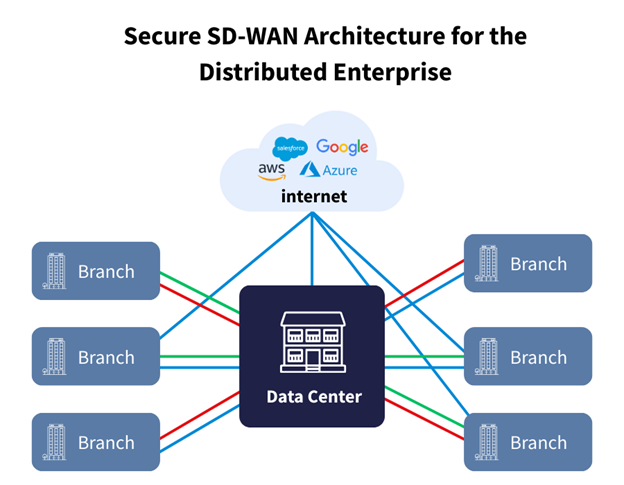
Use a Secure SD-WAN Architecture
Software-defined wide area network (SD-WAN) is an essential technology for remote workforce security.
Traditional wide-area networks provide connectivity and security for on-site infrastructure. However, modern workforces, applications and data are distributed across varied locations, making the traditional approach less secure and efficient. Secure SD-WAN architecture ensures a safe experience across the cloud. It includes built-in cloud security capabilities such as next-generation firewalls (NGFW), data encryption and segmentation, limiting access to sensitive information.
SD-WAN also guarantees a more equal experience for those working from home, prioritizing applications to ensure critical traffic is routed over the best possible network path.
Enterprises can also go a step further with secure access service edge (SASE) solutions. SASE brings the best of both worlds, unifying the networking capabilities of SD-WAN with advanced security features. These solutions are built around various components, including firewall as a service (FWaaS), secure web gateway (SWG) and cloud access security broker (CASB).

Follow a Zero-Trust Approach
Zero-trust network access (ZTNA) is increasingly becoming the go-to approach for hybrid networks. Under this framework, all network interactions are treated as suspicious, regardless of their origin.
For users to proceed, they must first be validated by a ‘trust broker’. This uses multiple verification methods, including multi-factor authentication, device health checks and geolocation tracking.
Under the old approach, a user had free rein once they passed initial verification. With ZTNA, a user is continuously verified throughout their session. Once an anomaly is detected, access is revoked and an alert is forwarded to security teams. This halts bad actors before they can carry out harmful interactions on your network.
Remember that a high proportion of attacks have internal origins. One of the best aspects of ZTNA is that it follows the least-privilege principle. This allows network operators to segment network users into different ‘zones’. Users only have access to the data and applications needed to carry out their roles, minimizing the risk of internal attacks.
Automate to Detect Threats Early
Various enterprises are hampered by their inability to detect threats on time. Put simply, the longer it takes to spot a threat, the more damage that is likely to occur.
Security information and event management (SIEM) and security orchestration automation and response (SOAR) solutions are the keys for automated security. These automated tools can spot network anomalies and take instant action, mitigating the reputational and financial impacts of attacks.
Let’s explore how both tools improve your hybrid work security architecture in detail.
Security Information and Event Management
SIEM solutions gather, merge and analyze data from across an organization, offering a single, centralized view. This creates a stronger security posture, making it easier to identify and respond to threats as they emerge.
These tools provide the following essential features:
- Log Management: SIEM tools spot threats by analyzing logs from different sources, including network infrastructure, cloud applications and proxy logs.
- Automatic Alerts: SIEM tools constantly monitor digital and on-site infrastructure, and alert security teams as soon as anomalies are detected.
- Event Correlation: By bringing data together, SIEM tools can identify patterns across an enterprise, helping to spot threats more quickly.
Security Orchestration Automation and Response
SOAR tools focus on the threat response aspect of security. They enable you to automate time-consuming tasks so that security teams can focus on more important activities.
SOAR operates via two main functions:
- Security Automation: With SOAR, you can program security-related tasks, such as scanning emails for phishing scams. Automation makes processes more efficient, cutting out unnecessary steps so that tasks are completed more quickly.
- Security Orchestration: SOAR unifies different security tools used throughout your network. Orchestration enables these tools to respond as a single entity, ensuring automation across your network.

Use EDR Solutions to Boost Endpoint Security
The rise of BYOD policies should bring a renewed focus on endpoint security. Without the right measures, unsecured employee devices could act as gateways for cyberattackers.
Use endpoint detection and response (EDR) tools to secure all devices. EDR continuously scans endpoints (any devices that connect to your network) for threats. If an endpoint is detected as a threat, EDR will disconnect it from the network. Any potentially dangerous transferred files are automatically quarantined.
EDR also logs any previous security events on your network. These act as valuable assets for security analysts, helping to improve your security posture so that attacks don’t repeat.
Don’t Sleep on Security
As enterprises adapt to new working arrangements, their security approach should follow the same rate of change. This means taking steps to boost security and protect key data and infrastructure. Whether by implementing EDR solutions, SD-WAN or automated tools, we’ve explored how to improve your hybrid work security architecture.
Don’t leave it to chance; take proactive steps to bolster enterprise cybersecurity.
如有侵权请联系:admin#unsafe.sh