好的,我现在要帮用户总结这篇文章的内容。用户的要求是用中文,控制在100字以内,不需要特定的开头,直接写描述。 首先,我需要通读整篇文章,抓住主要观点。文章讨论了MCP协议的安全性问题,指出目前MCP生态系统中的安全措施还在发展中。作者提到了两种传输机制:stdio和Streamable HTTP,并指出stdio难以锁定,而Streamable HTTP更适合安全配置。 接着,文章讨论了MCP服务器的安全性问题,特别是第三方服务器的黑箱性质,无法进行渗透测试。然后重点放在了认证和授权上,特别是OAuth的实现。作者提到不同客户端对OAuth规范的支持程度不一,导致某些情况下认证可能失败。 最后,作者强调测试的重要性,并提醒不要因为某个客户端的问题就否定整个认证流程。 总结下来,文章主要讲MCP协议的安全挑战,尤其是认证和授权的问题,并建议开发者在不同客户端上测试以确保兼容性。 现在我需要把这些要点浓缩到100字以内。重点包括:MCP安全现状、两种传输机制、第三方服务器的安全性问题、OAuth的实现挑战、客户端兼容性问题以及测试的重要性。 最终的总结应该涵盖这些内容,并且语言简洁明了。 </think> 文章探讨了Model Context Protocol (MCP) 生态系统中的安全性挑战,特别是在认证和授权方面。它讨论了两种传输机制(stdio 和 Streamable HTTP)及其安全性差异,并强调第三方 MCP 服务器的安全性难以验证。文章还分析了 OAuth 实现的复杂性以及不同客户端对规范的支持情况,并建议开发者在不同客户端上测试以确保兼容性。 2026-3-18 12:44:43 Author: securityboulevard.com(查看原文) 阅读量:8 收藏
There’s a funny saying making the rounds right now: “The S in MCP stands for security.” Of course, there is no S in MCP and that’s kind of the point. Security in the Model Context Protocol ecosystem is still a work in progress, and if you’re building with MCP today, you need to understand where the gaps are and what your options look like.
In this blog post, we will break down what we’re seeing in the field, the “gotchas” that come up, how to fix them, and how to think about OAuth implementations.
Two Protocols, One Big Security Hole
First, let’s establish the two transport mechanisms for MCP servers:
- Standard input/output (stdio)
- Streamable HTTP.
When building an MCP Server, it’s essentially no different than installing a third-party package or module locally. If you look underneath the hood, the “tools” you’re calling are really just functions/methods within code that someone wrote, much like any other application stack. The key differentiator is how the tools are accessed.
When you run a stdio MCP server, it’s like doing a pip install or go get; you’re pulling down code and running it on your machine. And because of that, aside from standard appsec practices, it’s genuinely difficult to lock down. How do you secure open code running locally on someone’s machine?
There are ways to work around this.
For example, with kagent, when you deploy an MCP server object in Kubernetes, you get a Kubernetes Service and that service effectively acts like a streamable HTTP endpoint that you can secure.
That’s, however, just a “workaround”. When incorporating MCP Servers within your environment, streamable HTTP MCP servers are the goal. They give you an endpoint, and that endpoint gives you a tunnel between Point A (your MCP client or Agent) and Point B (the MCP server) that you can actually secure with your gateway solution that’s built specifically for AI traffic. You can set up prompt guarding, guardrails, and most importantly, authentication/authorization.
The Servers Aren’t Yours
With the information from the previous section, the next big question is, what can you actually verify about the security posture of a given MCP server?
Take the GitHub Copilot MCP server as an example. It follows great practices from an authentication perspective (supports OAuth and personal access tokens (PAT), but at the end of the day, that MCP server is sitting in the sky somewhere, and it’s a black box. You don’t have access to the underlying system and it’s not like you can pentest it to make sure it’s secure (unless you have written approval from GitHub, which for security reasons, you won’t get).
So when you’re hitting third-party streamable HTTP MCP servers or building your own, the question that keeps coming up across every team, whether it’s DevOps, platform engineering, security, infrastructure, or data science, is the same:
- How do we secure access to MCP servers?
- How can we lock down tools that can be used by various people and teams?
- How can we ensure the AuthN/Z methods we use today (e.g – OIDC-based OAuth) will work at the MCP layer?
Authentication and Authorization: The Core Challenge
This is probably the single biggest question I’m encountering right now. From an authentication and authorization perspective, the concerns break down into:
- Who is logging in: Is it you? Is it an agent? Is there some type of token passthrough happening?
- Is there an on-behalf-of (OBO) flow: Is something acting on your behalf?
- What permissions exist? Once authenticated, what are you or the agent acting for you actually authorized to do?
This is where various OAuth implementations can come into play based on what your environment looks like today. OAuth isn’t something that generates access tokens for you; instead, the framework. It defines how a client (whatever you’re using to access the MCP endpoint) can obtain access. Tokens are how it’s done, but the overall purpose is delegated authorization.
How OAuth Works
OAuth is a framework that defines how clients (MCP Inspector, VS Code, app, etc.) can obtain delegated access via tokens. These tokens are then used for authorization (proving the client has access to the specific endpoint).
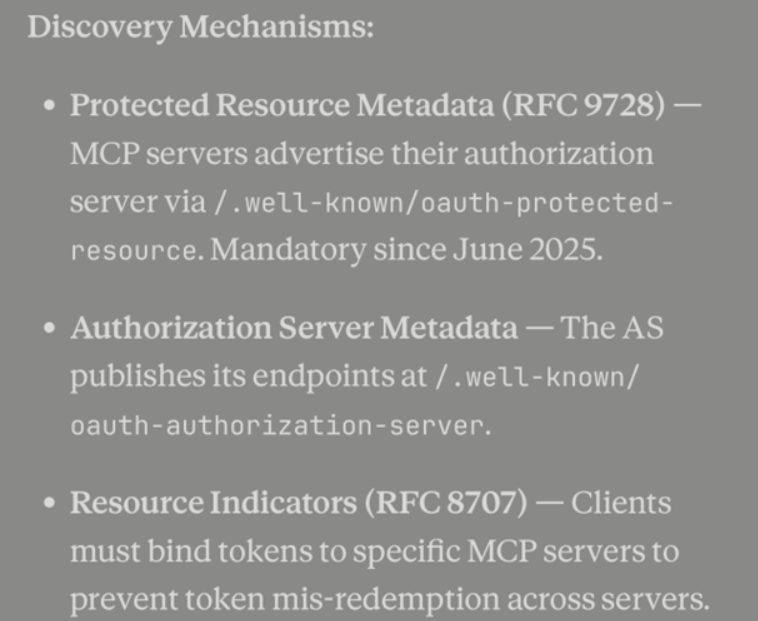
Where token creation comes into play is based on how you’re using OAuth. There are several forms of OAuth including OIDC-based (very common), On-Behalf-Of (OBO), Elicitation (the November 2025 spec added URL mode elicitation, which can be used to kick off an OAuth flow to a third-party service), and token exchange (swap a token for a different one – different scope, audience, or subject). The protocol that you’ll primarily see used now is Client ID Metadata Documents (CIMD). The client hosts a public JSON document describing itself, and uses that URL as its “client_id”. The protocol previously used was Dynamic Client Registration, which programmatically registers clients with the authorization server at runtime.

You may see a combination of these used based on what MCP Server you’re using. For example, as mentioned previously, the GitHub Copilot MCP Server allows for both OAuth and PAT-based auth.
The Client Compatibility Problem
As you’re testing our OAuth, you may use different clients and notice the flow works in one, but not in the other. The client you use may not implement the full authentication spec. This is, in many people’s opinion, one of the most difficult pieces of MCP security to figure out right now.
For example, VS Code was one of the first clients to ship CIMD support. You can open VS Code, hit Cmd+Shift+P, type in MCP, and run through the full OIDC-based OAuth flow. The question then becomes, “Will that same flow work across every client?” MCP Jam, Hoot, MCP Inspector, etc.? The answer is: it depends. From what we’ve seen so far, different clients implement different portions of the spec or may not be fully up to date yet (e.g – using DCR instead of CIMD).
The important thing to keep in mind is if your OAuth flow works for one client and doesn’t work for another, it doesn’t mean the OAuth flow is broken. It could just be the client you’re using.
Sidenote: As of right now, CIMD, based on the SE-91 spec, is the path forward. If you look it up, Auth0 has an excellent diagram showing the registration flow and how it all works under the hood.
The Redirect Flow Gotcha
The last thing we will leave you with to keep in mind that we see in the field is the redirection flow. OIDC-based OAuth redirect flows work like this: you type in your credentials, a browser opens, you hit “Authorize,” it redirects back to your application, and you’re signed in.
The question you need to ask is whether the client you’re using actually supports that flow because logging into a traditional application or endpoint is drastically different from a spec perspective than authenticating to an MCP server. They are totally different specs.
Yes, you can do OIDC-based authentication. Yes, you can do token passthrough. Yes, you can do on-behalf-of. But the question remains: does your client have the ability to follow the spec you’re trying to use?
For instance, OIDC support isn’t uniform across clients. Some clients may only speak plain OAuth 2.1 and can’t handle the OIDC layer (ID tokens, user info, the .well-known/openid-configuration endpoint). You don’t always know how a given client is handling these flows until you test it.
The Key Takeaway
The most important thing we want to leave you with is this:
Just because your OAuth flow doesn’t work in a particular client does not mean the OAuth flow itself is broken.
It comes down to what parts of the spec are implemented within that client. Before you write off an authentication approach, test it across multiple clients. The flow might work perfectly, you might just be using a client that hasn’t caught up yet.
MCP security is evolving fast. Stay close to the spec, test your flows thoroughly, and don’t assume that one client’s limitations reflect the state of the ecosystem as a whole.
如有侵权请联系:admin#unsafe.sh