
嗯,用户让我用中文总结这篇文章,控制在100字以内,而且不需要特定的开头。首先,我需要快速浏览文章内容,抓住主要信息。 文章讲的是一个钓鱼网站伪装成新上线的Pudgy World浏览器游戏,专门针对加密货币用户。这个钓鱼网站不仅模仿了游戏的外观,还伪造了钱包解锁界面,诱导用户输入密码或种子词。 接下来,我得提取关键点:钓鱼网站模仿Pudgy World,目标是加密用户,伪造钱包界面,导致密码泄露。然后用简洁的语言把这些点整合起来。 要注意字数限制,所以每个信息点要简明扼要。比如,“伪装”、“钓鱼网站”、“加密货币用户”、“伪造钱包界面”、“导致密码泄露”。 最后检查一下是否符合要求:100字以内,直接描述内容,没有特定开头。确保语言流畅自然。 </think> 一个伪装成新上线的Pudgy World浏览器游戏的钓鱼网站正针对加密货币用户展开攻击。该网站不仅模仿了游戏的外观和配色方案,还伪造了多个加密钱包的解锁界面,诱导用户输入密码或种子词。攻击者利用用户的信任和对钱包操作的习惯记忆进行诈骗。 2026-3-17 16:10:42 Author: securityboulevard.com(查看原文) 阅读量:2 收藏
A phishing site impersonating the newly-launched Pudgy World browser game is targeting crypto users with a technique that goes well beyond a convincing logo and matching color scheme.
Pudgy World is a free-to-play browser game built around the Pudgy Penguins NFT brand. Players explore a virtual world, customize penguin avatars, and complete quests. But some features are tied to digital collectibles and in-game items stored in cryptocurrency wallets.
That means the official game sometimes asks players to connect a crypto wallet to verify ownership of items or unlock additional features. The phishing site abuses that step: When a visitor selects their wallet on this fake site, it shows what appears to be that wallet’s own unlock screen. To the user, it looks for all the world like the real crypto wallet software they already trust.

“Connect your wallet to get started”
The Pudgy Penguins brand has had an extraordinary few months. The penguin NFT project, revived by CEO Luca Netz after he acquired it in 2022, has steadily built one of the most convincing crossover stories in Web3: physical plush toys on Walmart and Target shelves, a mobile game called Pudgy Party that crossed a million downloads, and a browser-based game called Pudgy World that went live on 10 March 2026 to immediate viral attention.
The official game asks players to connect a crypto wallet to get started. That text: “Connect your wallet to get started” is now appearing, verbatim, on a site that has nothing to do with Pudgy Penguins.
The domain in question is pudgypengu-gamegifts[.]live. It is not affiliated with Igloo Inc., the company behind Pudgy Penguins, in any way. The site reproduces the official game’s icy background artwork, the Pudgy Penguins logo, and the brand’s characteristic blue-and-white color palette with enough fidelity that a user arriving during the excitement of a new game launch would have no obvious reason for suspicion.
Eleven wallets, eleven convincing forgeries
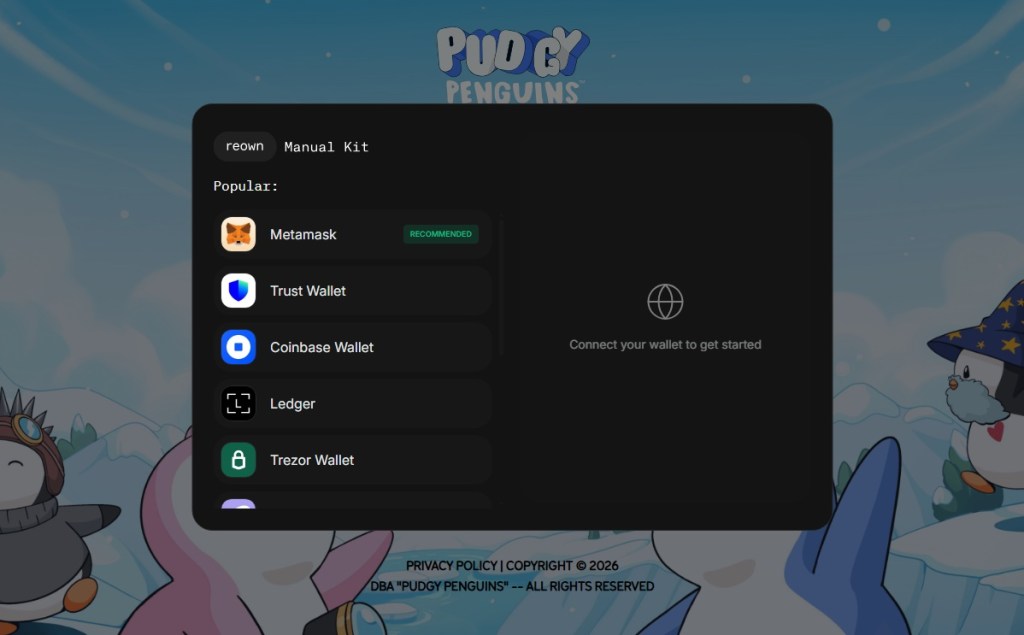
Clicking the CONNECT button opens a dark-themed pop-up window built to resemble the Reown WalletConnect connection kit—the open-source library that the real Pudgy World site uses to handle wallet connections. The modal even displays the “reown” and “Manual Kit” tab labels at the top, matching the genuine component.
Inside is a list of supported wallets:
MetaMask (marked “RECOMMENDED”), Trust Wallet, Coinbase Wallet, Ledger, Trezor Wallet, Phantom Wallet, Rabby Wallet, OKX Wallet, Magic Eden, Solflare, and Uniswap Wallet.
The attack becomes technically interesting at the next step.
Selecting a software wallet does not redirect the user to another page or open an external site. Instead, the page renders an overlay designed to look like the wallet’s actual browser extension unlock screen. The overlay appears at the edge of the browser viewport right where a real extension popup would appear.
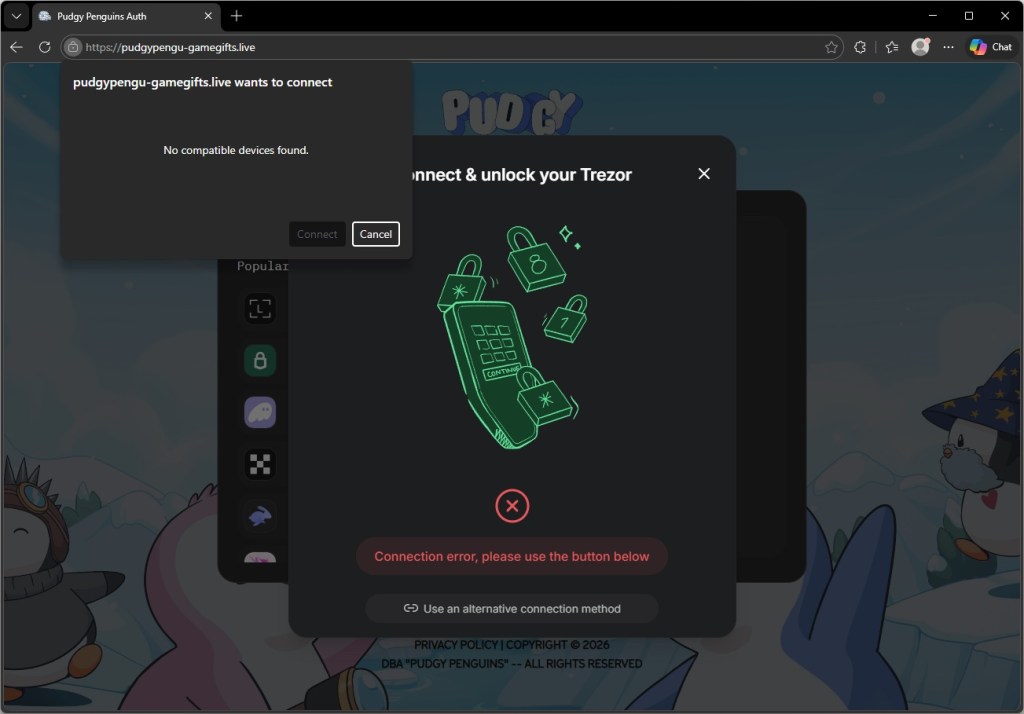
Hardware wallet flows behave differently. Selecting Trezor Wallet opens a center-screen dialog mimicking the Trezor Connect interface, rather than a corner overlay. In both cases, the result is that the user believes they are looking at their own installed software, when they are in fact looking at a webpage element controlled by the attacker.
The forgery sits exactly where your real extension would
For every browser extension wallet on the list, the phishing site renders an unlock screen built to match the real extension’s own visual identity, with the correct logo, color scheme, button layout, and wording.
The screenshots below show the forgeries alongside the genuine extensions. The differences are not visible to someone who is not looking for them.
Hardware wallet users are not exempt, and the targeting of Trezor is particularly telling.
Trezor devices are typically owned by people who have been in crypto long enough to invest in dedicated security hardware. In other words, users likely holding higher-value accounts.
Selecting Trezor Wallet on the phishing site triggers a dialog that closely mimics the Trezor Connect bridge interface. At the same time, the browser displays a native USB device permission prompt—the operating system’s own dialog, triggered by a WebUSB API call—reading “pudgypengu-gamegifts.live wants to connect.”
The prompt says “No compatible devices found” if no Trezor is plugged in, but the sequence is designed to look like a genuine hardware handshake.
A user who plugs in their Trezor at this point and approves the USB permission has granted the phishing site access to the device bridge.
For those without a device to hand, the dialog offers another option: “Use an alternative connection method.” That path is likely where the most damage is done. A user who cannot get the hardware flow to work and falls back to a manual option is one step away from being asked to type in their seed phrase, the master key to everything in their wallet, directly into a field the attacker controls.
The page that plays dead for researchers
The phishing page is more cautious than it first appears.
Embedded in the site is an obfuscated JavaScript loader, its real contents compressed and hidden behind multiple layers of encoding, that performs a series of checks before doing anything visible.
First, it tests whether the browser is being driven by an automated tool of the kind security researchers and sandboxes use to analyse suspicious pages in bulk. If it detects one, it quietly stops and the page appears clean.
Next, it reads the graphics hardware identifier to determine whether it is running inside a virtual machine, which is another common analysis environment.
Only once it is satisfied that a real user is present does it request a second, larger payload from the attacker’s server. That payload contains the code responsible for credential theft.
Even that request contains a safeguard. If the server response is smaller than 500 KB (the kind of placeholder response a security vendor might serve to a known malicious domain), the loader discards it and does nothing.
The practical consequence of all this is that automated scanning tools are likely to rate the initial page as benign, because on their infrastructure, it behaves like one. The malicious functionality never loads unless the attacker’s server decides the visitor is worth targeting.
Why this campaign targets Pudgy players
The timing seems to be deliberate. Pudgy World launched on March 10, 2026, and the phishing campaign appears to have been active around the same window. New players arriving at the game for the first time are walking through a Web3 onboarding flow they have never experienced before.
The legitimate “connect your wallet” step on the official site teaches users that this behaviour is normal. The phishing site then exploits that expectation before experience can challenge it.
The range of wallets targeted is also significant. The campaign leaves almost no wallet blind spot. Whether the victim holds Ethereum, Solana, or multi-chain assets, there is a convincing forgery waiting for them. Building 11 wallet-specific UI forgeries is not a trivial undertaking. It points either to a well-resourced threat actor or, more likely, to the reuse of a commercial phishing kit built for precisely this class of attack.
What to do if you may have been affected
Crypto phishing campaigns have long relied on fake airdrops and fake MetaMask pages. This campaign stands out for how precisely it imitates a wallet’s unlock screen, placing the prompt exactly where a real extension pop-up would appear and exploiting users’ muscle memory.
The attack also piggybacks on Pudgy World’s launch. As Web3 products reach wider audiences, they attract attackers targeting users unfamiliar with wallet security.
One rule still holds: a website can never display your real browser extension unlock screen.
- If you entered your MetaMask, Coinbase Wallet, or any other software wallet password on this site, change your password immediately by unlocking the extension normally and going to Settings. Consider transferring assets to a new wallet address whose seed phrase has never been used on any website.
- If you approved the USB device permission prompt for Trezor, disconnect your device and review your Trezor Suite connection history. A WebUSB connection alone does not expose your seed phrase, but it can allow a malicious page to communicate with the bridge. Revoke the permission in your browser’s site settings immediately.
- Bookmark the official Pudgy Penguins site (pudgypenguins.com) and the official game URL. Navigate to it directly from that bookmark, never from a link in Discord, Twitter, or a direct message.
- Install a browser extension that flags known phishing domains before you interact with them. Malwarebytes Browser Guard will block this domain.
- Remind yourself of this rule: your wallet’s unlock screen always appears in the bar at the very top of the window, not inside the page itself. Any page that appears to show you your wallet’s password prompt inside the page content is a phishing site.
Indicators of Compromise (IOCs)
Domains
pudgypengu-gamegifts[.]live
*** This is a Security Bloggers Network syndicated blog from Malwarebytes authored by Malwarebytes. Read the original post at: https://www.malwarebytes.com/blog/scams/2026/03/fake-pudgy-world-site-steals-your-crypto-passwords
如有侵权请联系:admin#unsafe.sh