
We’ve become aware of a scam campaign sending fake calendar invites that impersonate Malwarebytes and attempt to trick recipients into calling a scam “billing support” number.
We have written before about how calendar invites can be abused for phishing, and even about how Google Calendar invites can be weaponized to steal private data.
The amounts in these fake invites are large and attention-grabbing, usually several hundred dollars for multiple years of service.
The scammers want you to believe a considerable charge has already gone through so that you react immediately instead of thinking critically.
The goal is to get you to call, rather than click a link. The calendar description reads like a receipt, but the real call to action is always the same: urging you to call a number immediately to dispute or cancel the charge. m
Once you call, the scammer can pressure you in real time. They might ask for payment details, convince you to install remote-access software, or manipulate you into sending money.
What the fake calendar invite looks like
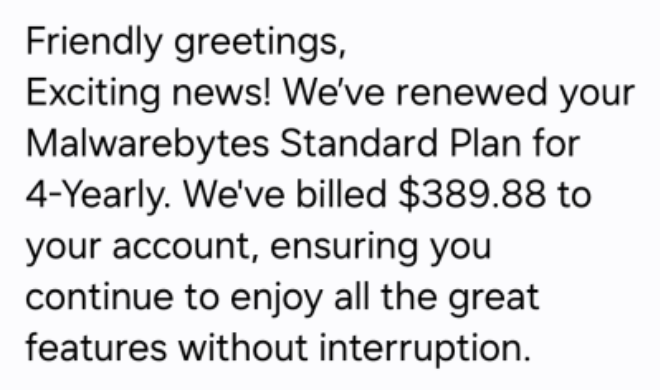

The body of the calendar invite is crammed with fake details intended to look like they came from a billing system:
- Multiple ID lines, such as Membership ID, Client UID, Customer ID, Service Number
- A string of made-up transaction or account codes
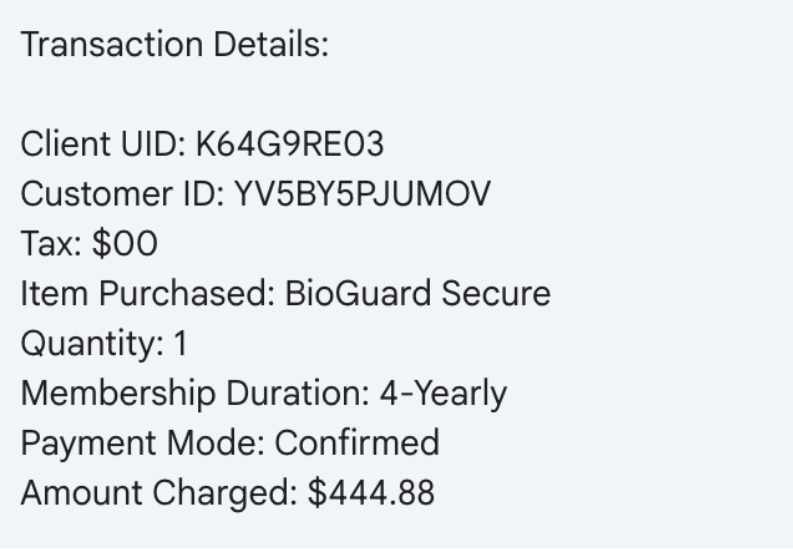
The language and formatting scream copied-and-pasted scam script rather than professional communication.
There are several inconsistencies you can look for:
Unnatural or incorrect phrasing:
- “Membership Duration: 4yrold”
- “We’re thrilled to have you with us for another year!” (in a 4-year renewal notice)
- “Your membership benefits remain fully active.”
Inconsistent capitalization and formatting:
- “FOUR YEAR (All Caps)”
- “04 Year”
- “USD344.55”
Phone numbers written with odd punctuation:
- 1.810.228.8708
- 1 865 3849684
Overly effusive, generic greetings and closings:
- “Dear Sir/Madam,” “Greetings to all,” “Hello there”
- “Yours in Respect,” “Much Gratitude,” “Always Appreciative,” “With Joy, best regards,”
Individually, any one of these might just be sloppy writing. Seeing many of them together in an unsolicited billing notice is a strong indicator of fraud.
What happens if you call the number
The calendar invite itself doesn’t charge you anything. Its purpose is to trick you into calling the scammer’s phone number.
Once they have you on the line, several things can happen.
Stealing payment card and bank details
A common script goes like this:
You call, upset about the huge “renewal.”
The scammer agrees it’s a mistake and says they can “reverse the charge.”
They then ask for:
- Your full card number, expiry date, and CVV.
- Your bank account and routing number.
- One-time passcodes sent by your bank “to confirm the refund.”
Once they have that information, they can:
- Make unauthorized purchases or withdrawals.
- Enroll you in other fraudulent subscriptions.
- Use your card details for further identity theft.
The phony renewal is just a pretext to make handing over financial data feel reasonable.
Convincing you to send money directly
In some versions, the scammer pretends to refund you too much. They may:
- Ask you to log in to online banking while they’re on the phone.
- Direct you to move money or manipulate your account, sometimes with remote-access software.
- Claim there’s been an error, and you must “return” the over-refund, often via unusual methods like gift cards, cryptocurrency, wire transfer, or peer-to-peer payment apps.
The result is that you send them real money to fix a problem that never existed.
Getting remote access to your computer
Tech support-style scammers often escalate the call by asking you to install legitimate remote-access tools like AnyDesk, TeamViewer, and others.
They claim they need access:
- to cancel the subscription
- to verify your account
- or to help you process the refund
Once on your machine, they can:
- Capture passwords and session cookies
- Move files or install malware
- Manipulate what you see in your browser (for example, by editing HTML to “prove” a refund went through)
The longer they stay connected, the more damage they can do.
Harvesting personal information for later fraud
Even if you hang up before giving bank details, the scammer may still try to extract:
- Full name, address, and date of birth
- Email addresses and passwords to “locate your account”
- Answers to common security questions (first school, mother’s maiden name, etc.)
Combined with other breached data, this information can be used later for:
- New account fraud (like opening loans or credit cards in your name)
- Account takeovers of your email, cloud storage, or other services
- Targeted phishing attacks that reference the earlier call
Building trust for future scams
Don’t be fooled. The person on the phone will usually sound patient, polite, and professional. They’re trying to convince you they work for the company named in the invite and normalize the idea that you should call them any time there’s a billing issue.
Once they’ve gained your trust, they may:
- Call you back weeks or months later with a new story
- Sell your details to other scammers who know you’re likely to respond
The one constant: they want you to act quickly and privately. The objective is to rush you into dealing with them, and only them, instead of checking independently with your bank or the real company.
How to recognize calendar scams
Legitimate companies send invoices and renewal confirmations as emails, in-app messages, or account notifications. They don’t send them as calendar appointments created by random people using private email addresses.
Red flags include:
- The “bill” appears as an event in Google Calendar, Outlook, or another calendar app.
- The title looks like a transaction status instead of a meeting:
- “Subscription Renewal Notice: [random code]”
- “Payment Processed Successfully: [random code]”
- “Renewal Approved: [random code]”
- You didn’t schedule this event yourself.
If a “receipt” shows up in your calendar instead of through your normal billing channels, treat it as suspicious by default.
How to remove fake entries from your calendar
We’ve included instructions in our article how to remove fake entries from your calendar, which covers how to do it on Outlook calendar, Gmail calendar, Android calendar, Mac calendar, and iPhone and iPad calendars.
How to prevent calendar spam
We’ve covered some of this already, but the main precautions are:
- Turn off auto-add or auto-processing so invites stay as emails until you accept them.
- Restrict calendar permissions so only trusted people and apps can add events.
- In shared or resource calendars, remove public or anonymous access and limit who can create or edit items.
- Use an up-to-date real-time anti-malware solution with a web protection component to block known malicious domains.
- Don’t engage with unsolicited events. Don’t click links, open attachments, or reply to suspicious calendar events such as “investment,” “invoice,” “bonus payout,” “urgent meeting”—just delete the event.
- Enable multi-factor authentication (MFA) on your accounts so attackers who compromise credentials can’t abuse the account itself to send or auto-accept invitations.
Pro tip: If you’re not sure whether an event is a scam, you can paste the message into Malwarebytes Scam Guard. It can help you decide what to do next.
IOCs
Phone numbers involved in these scams are:
- (810) 228-2614
- (810) 228-8708
- (810) 268-6113
- (865) 384-9684
- (865) 385-0070
We don’t just report on scams—we help detect them
Cybersecurity risks should never spread beyond a headline. If something looks dodgy to you, check if it’s a scam using Malwarebytes Scam Guard. Submit a screenshot, paste suspicious content, or share a link, text or phone number, and we’ll tell you if it’s a scam or legit. Available with Malwarebytes Premium Security for all your devices, and in the Malwarebytes app for iOS and Android.