嗯,用户让我帮忙总结一篇文章的内容,控制在100字以内,而且不需要特定的开头。首先,我需要仔细阅读文章,了解其主要内容。 文章主要讲的是VMRay Labs团队在2026年2月的工作重点,包括新增或改进的威胁识别器、配置提取器、UI增强以及新增的YARA规则。这些内容涉及检测恶意软件行为、提升分析能力等方面。 接下来,我要将这些要点浓缩到100字以内。需要注意的是,不要使用“文章内容总结”之类的开头,直接描述内容即可。 可能的结构是:VMRay Labs团队在2月专注于威胁识别器、配置提取器、UI改进和YARA规则的更新,以提升恶意软件检测能力。 现在检查字数是否符合要求,并确保信息准确全面。 </think> VMRay Labs团队在2026年2月专注于改进威胁识别器、配置提取器、UI增强和新增YARA规则,以提升恶意软件检测能力。 2026-3-13 11:8:31 Author: www.vmray.com(查看原文) 阅读量:9 收藏
The Labs team at VMRay actively gathers publicly available data to identify any noteworthy malware developments that demand immediate attention. We complement this effort with our internal tracking and monitor events the security community reports to stay up-to-date with the latest changes in the cyber threat landscape.
In February 2026, the VMRay Labs team has been focused on the following areas:
1) New VMRay Threat Identifiers addressing:
- Detecting checking system uptime via WMI
- Detect actively checking remote debugging
- Detecting
- Detecting DNS exfiltration
- Detecting image downloads from image hosting services
- Detecting modifying network configuration via the hosts file
- Catching DLL injection
- Detecting system script proxy execution with SyncAppvPublishingServer
2) New or updated Configuration Extractors for:
- Telegram-based phishkits
- SantaStealer malware family
3) VMRay’s AutoUI enhancements, including:
- Improved coverage for ClickFix variants
4) +30 new YARA rules
Now, let’s delve into each topic for a more comprehensive understanding.
In a series of these blog posts, we introduced you to the concept of the VMRay Threat Identifiers (VTIs). In short, VTIs identify threatening or unusual behavior of the analyzed sample and rate the maliciousness on a scale of 1 to 5, with 5 being the most malicious. The VTI score, which greatly contributes to the ultimate Verdict of the sample, is presented to you in the VMRay Platform after a completed analysis. Here’s a recap of the new VTIs that we added, or improved in the past month.
Detecting checking system uptime via WMI
Category: Discovery/Anti Analysis
MITRE ATT&CK® Technique: T1497/003, T1124
WMI stands for Windows Management Instrumentation. It’s a built-in Windows system for querying and controlling information about a computer. Admins and IT tools use WMI to list running processes and services, check installed software, OS version, hardware details, event logs, etc. Attackers like to abuse WMI because it’s:
- Built-in (no extra tools needed),
- Powerful (can gather lots of system info),
- Sometimes allowed in enterprise environments.
In a recent sample we analyzed, the malware used WMI to query system uptime, meaning how long a computer has been running since the last reboot (or since it was powered on). The purpose was not simple host reconnaissance, but sandbox/analysis evasion. Because many sandboxes execute malware in freshly started virtual machines, a very short uptime can act as a strong indicator that the sample is running under analysis. Malware can use this check to suppress malicious behavior, exit early, or act benign.
Detect actively checking remote debugging
Category: Anti Analysis
MITRE ATT&CK® Technique: T1622
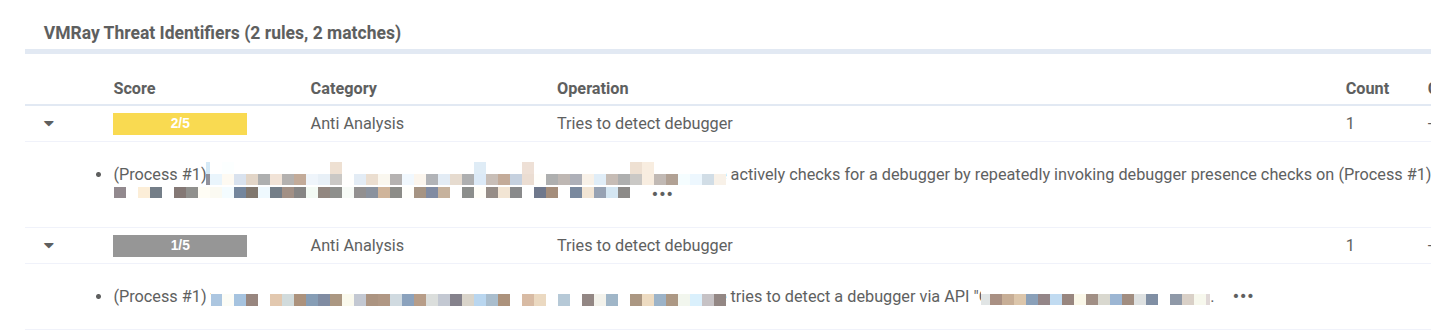
This VTI flags samples that actively check whether they are being debugged, which is a common anti analysis technique used to evade both sandboxing and manual inspection. In the observed sample, the malware called a Windows API to determine whether a debugger was attached to the process, including via remote debugging. Put simply, it was asking: Is anyone analyzing me right now?
When this check occurs repeatedly, it usually indicates polling behavior. Rather than performing a one-time environment check, the malware continuously reassesses whether debugging is present and can then adapt accordingly. If a debugger is detected, it may delay execution, conceal malicious functionality, or alter its behavior to frustrate analysis.
Detecting SMTP communication
Category: Command and Control
MITRE ATT&CK® Technique: T1071/003/
Attackers don’t only steal data, sometimes they turn infected machines into . In one of our recent malware investigations, we observed a sample attempting outbound connections to network ports commonly used for email submission, such as 587 and 465. These ports are typically associated with SMTP (Simple Mail Transfer Protocol), the standard way devices and applications send email.
Malware can abuse email in several ways. For example, it may connect to an SMTP server (for example, your company mail server or a public provider), authenticate, and then send large volumes of malvertising or phishing emails via the compromised account. To make this behavior easier to spot, we introduced a new VTI that detects when a sample attempts to contact email-related SMTP submission ports.
Detecting DNS exfiltration
Category: Exfiltration
MITRE ATT&CK® Technique: T1048/003/
DNS (Domain Name System) translates domain names to IP addresses so browsers can load internet resources. For example, domainabc.com would be translated to an IP number like 93.184.216.34. DNS exfiltration (sneaking data out of a computer) is a trick where an attacker uses DNS lookups to smuggle data out, because DNS traffic is very common and often less monitored than web traffic.
Since a DNS request contains a domain name, and domain names can be made to include lots of extra text, attackers might put stolen data into that extra text.
Example of a normal lookup:
www.example.com
Example of a stuffed lookup:
stolendata-goes-here.attacker.com
If the attacker controls attacker.com, their DNS servers will see the full request and can reconstruct the stolen data.
It’s also important here to notice the use of subdomains. A full DNS name is made of parts so chunk1.chunk2.chunk3.attacker.com. Everything before attacker.com is a subdomain. Attackers abuse this because they can generate endless unique subdomains, and each one can carry a piece of data, which was what we observed in the analyzed malware sample.
To be better against this technique, our new VTI triggers when sample sends many DNS lookups within a given timeframe.
Detecting image downloads from image hosting services
Category: Network Connection
An image hoster is a website or service that stores images online and provides a shareable link, such as https://.../myphoto.jpg. On its own, downloading an image is entirely normal behavior. In malicious activity chains, however, image downloads can be a common technique because they blend into everyday web traffic and often bypass simple allowlists or reputation-based controls.
One common abuse case is steganography. In these scenarios, the downloaded “image” can contain extra data that malware can read, such as configuration settings, URLs, keys, or commands. To a person, it still looks like a regular photo. To the malware, it’s a container that can be parsed to extract C2 addresses, campaign identifiers, decryption keys, or next-step instructions.
Detecting modifying network configuration via the hosts file
Category: System Modification
Some malware doesn’t try to break in loudly. It quietly changes how a machine reaches the internet. One common trick is editing the hosts file, a simple system file that can override normal internet lookups and decide where certain website addresses should go.
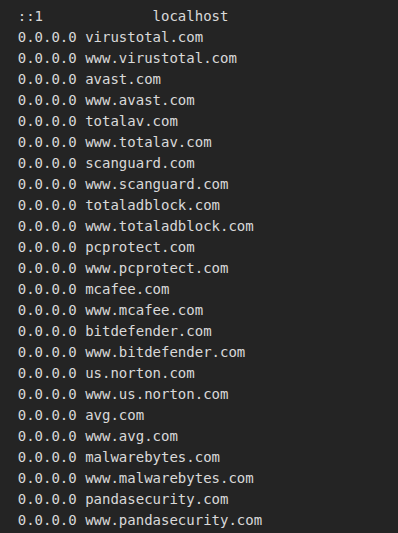
We recently observed this in UmbralStealer, which added multiple antivirus and security vendor domains to the hosts file and pointed them to 0.0.0.0 (a “nowhere” address). It means simply that this cuts the system off from those security sites. That can stop antivirus/EDR products from reaching update servers and reputation services, reducing their ability to detect or remove the threat and giving the malware more time to operate.
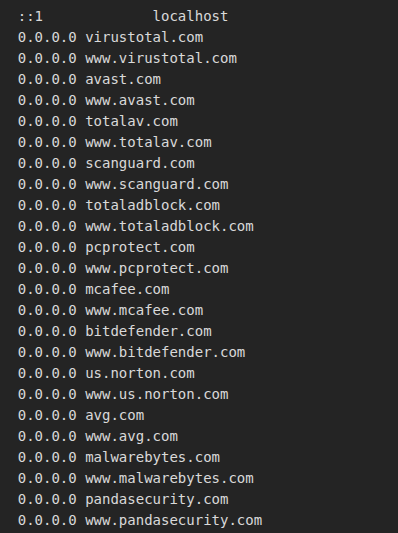
We also saw a related pattern in a DCRat sample, where security vendor domains were added to the hosts file but without an explicit redirect. On its own, that may not immediately block anything, but it’s still suspicious. It can indicate the malware is building a list of security-related domains or setting up for blocking later. Either way, it signals an intent to interfere with defenses.

Our new VTI detects this technique across any OS by triggering when well-known security vendor domains are added to the hosts file.
Catching DLL injection
Category: DLL Injection
MITRE ATT&CK® Technique: T1055
Some malware, rather than running as a new and obviously suspicious process, hides within trusted Windows applications that users and security tools expect to see, such as browsers, document viewers, or background system processes. To do that, a trick called DLL injection, which is about forcing a legitimate program to load an extra “plugin” (a DLL) that actually contains the attacker’s code.
Once the malicious DLL is loaded, the attacker’s code runs as if it belongs there. That makes it harder to spot, because the activity appears to come from a trusted program. From that hiding place, malware can quietly perform actions like spying on activity, stealing data, or manipulating the system.
Our new VTI not only detects process injection during analysis, but also highlights the specific injection method employed by the malware.
Detecting system script proxy execution with SyncAppvPublishingServer
Category: Defense Evasion
MITRE ATT&CK® Technique: T1216/002/
SyncAppvPublishingServer is a legitimate Windows/App-V component used in some environments to keep virtualized applications synchronized. Because it’s a trusted, built-in Microsoft tool, it typically doesn’t raise suspicion on its own.
Attackers can exploit that trust by using SyncAppvPublishingServer.vbs as a launcher for malicious activity. Rather than starting a suspicious tool directly, they run it through this script so the execution appears to originate from a normal Windows component. This can help malware bypass basic application controls and complicate investigation.
In the activity we observed (linked to ClickFix-style campaigns), the script is used as a middleman to start PowerShell. The key indicator is the process chain: SyncAppvPublishingServer.vbs runs first, and PowerShell starts immediately afterward.
Our new VTI detects this technique by flagging instances where SyncAppvPublishingServer.vbs is used to proxy the execution of other processes, especially PowerShell, which is a strong signal of living-off-the-land defense evasion.
AutoUI Enhancements
Improved coverage for ClickFix variants
A ClickFix attack is a growing social-engineering trick where a website pretends there’s a problem you need to fix (often a fake CAPTCHA, fake Windows update, or error message) and then guides you to run a command yourself. Recently, we updated VMRay AutoUI to better handle newer ClickFix and pastejacking variants that lure users into clicking buttons presented as fixes for fake errors in the browser.
In these cases, the malicious command isn’t copied manually; the button click places it on the clipboard as part of the lure. With this improvement, our AutoUI engine can now automatically reveal the next stages of the ClickFix threat.
Telegram-based phishkits
We added a new configuration extractor that focuses on Telegram-based phishkits, rather than a specific malware family. These phishkits steal credentials and then exfiltrate the data to attackers via Telegram. With this extractor, VMRay can automatically pull out key Telegram routing details from the kit, such as the Chat ID, Bot ID, and Bot Token, so analysts can quickly understand where stolen data is being sent.
SantaStealer
We also added a new configuration extractor for SantaStealer, a Malware-as-a-Service infostealer that was first released in December 2025. SantaStealer is commonly described as a rebrand of the earlier BlueLine stealer, continuing the same goal of harvesting sensitive information from infected systems.
Our hunt for new, undetected malware samples never stops. In the past 2 months, we added more than 65 fresh YARA rules to strengthen detection across a wide range of threats. This month, we’re continuing that momentum with around 30 new rules, focused on delivering a solid drop of high-quality detections. Here’s a quick preview of what we’re shipping this month.
New YARA detections for:
Stealers:
- Astaroth/Guildma
- AoteraStealer
- ZeroTrace Stealer
- RahidStealer
- RemusLogger
- MythStealer
- Vidar
Backdoor:
- Supper SOCKS5 backdoor
- VoidLink C2 [Linux]
Loader:
- New GootLoader variants
- RONINGLOADER
- DotLoader
- TsundereBot
Packer:
- TangleCrypt
- 198Protector
RAT:
- DesckVB-RAT
- PureRAT
Techniques:
- Added new YARA coverage for tunnel services
- Added new YARA coverage for malicious batch files
- Added new YARA coverage for malicious obfuscated JavaScript
- YARA coverage for detecting IP-based bot/VPN detection
- YARA coverage for suspicious iCalendar attachments
Phishing:
- Add new YARA coverage for custom hCaptcha
- Add new YARA coverage for Phishkit.FLS
- Add new YARA coverage for custom CAPTCHA Turnstile
- Added new YARA coverage for phishing redirectors
Other:
- Hydra Saiga APT samples
如有侵权请联系:admin#unsafe.sh