
好的,我现在需要帮用户总结一篇文章的内容,控制在100个字以内。用户给的文章是关于一个新的漏洞,叫做Zombie Zip,CVE编号是CVE-2026-0866。文章主要描述了一种创建畸形ZIP文件的方法,这种文件可以绕过大多数杀毒软件的检测。 首先,我需要理解文章的主要内容。Zombie Zip的原理是将压缩方法设置为STORED,但实际上内容是DEFLATED压缩的。这意味着ZIP文件头中的标志显示内容未被压缩,而实际上已经被压缩了。这种手法导致大多数杀毒软件无法检测到恶意内容。 接下来,作者介绍了两种分析这种畸形ZIP文件的方法:简单方法和复杂方法。简单方法使用了一个名为search-for-compression.py的工具来查找压缩块;复杂方法则使用了zipdump.py工具,并通过特定选项来解析文件结构,揭示隐藏的内容。 然后,我需要将这些信息浓缩到100个字以内。重点包括:漏洞名称、原理(压缩方法与实际不符)、绕过杀毒检测、分析工具和发现隐藏恶意文件的能力。 现在,我需要组织语言,确保信息准确且简洁。可能的结构是:介绍漏洞名称和原理,说明其绕过检测的能力,并提到分析工具的作用。 最后,检查字数是否在限制内,并确保没有使用任何开头语如“这篇文章总结了...”,而是直接描述内容。 </think> 研究人员发现了一个新的ZIP文件漏洞(CVE-2026-0866),称为"Zombie Zip"。该漏洞利用一种特殊技术创建畸形ZIP文件,通过将压缩方法设为STORED但实际上内容仍为DEFLATED压缩的方式绕过杀毒软件检测。研究人员提供了两种方法来分析此类文件,并展示了如何提取隐藏的恶意内容。 2026-3-11 09:57:26 Author: isc.sans.edu(查看原文) 阅读量:55 收藏
A new vulnerability (CVE-2026-0866) has been published: Zombie Zip.
It's a method to create a malformed ZIP file that will bypass detection by most anti-virus engines.
The malformed ZIP file can not be opened with a ZIP utility, a custom loader is required.
The trick is to change the compression method to STORED while the contend is still DEFLATED: a flag in the ZIP file header states the content is not compressed, while in reality, the content is compressed.
I will show you how to use my tools to analyze such a malformed ZIP file.
Simple Method
Just run my tool search-for-compression.py on the ZIP file (you can download the Zombie ZIP file here, it contains an EICAR file):

The largest compression blob is number 2, it is 77 bytes long. Let's select it:

That's the EICAR file.
Complex Method
We can use the latest version of zipdump.py to analyze the file:
Just using the tool fails (because the zip file is malformed):

Using option -f to bypass the Python ZIP library for parsing, and using custom code to look for ZIP records (-f l) shows us this is a ZIP file, containing a file with the name eicar.com:

Selecting the FILE record (at position 0x00000000, PK0304 fil) shows us all the meta data:
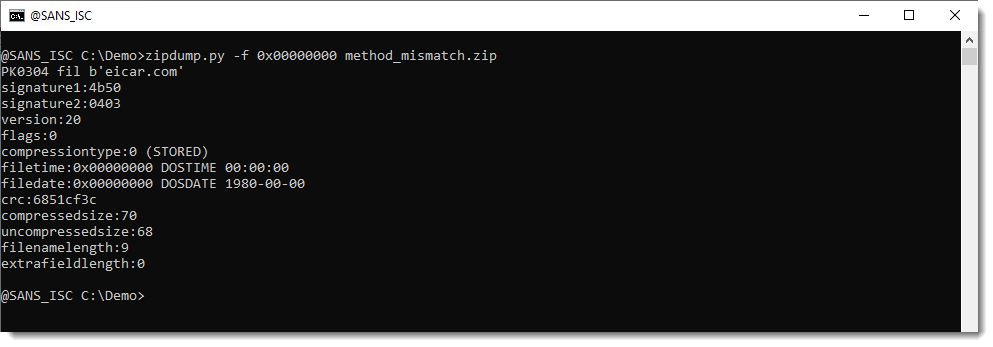
The compressiontype is 0 (STORED), this means that the content of the file is just stored inside the ZIP file, not compressed.
But notice that the compressedsize and uncompressedsize are different (70 and 68). It should be the same for a STORED file.
Let's select the raw file content (-s data) and perform an asciidump (-a):

This does not look like the EICAR file.
Let's force the decompression of the data: -s forcedecompress:

This reveals the EICAR file content.
Option forcedecompress is a new option that I just coded in zipdump.py version 0.0.35. Option decompress will only decompress if the compression type is DEFLATED, thus it can't be used on this malformed ZIP file. Option forcedecompress will always try to decompress (and potentially fail), regardless of the compression type.
Didier Stevens
Senior handler
blog.DidierStevens.com
如有侵权请联系:admin#unsafe.sh