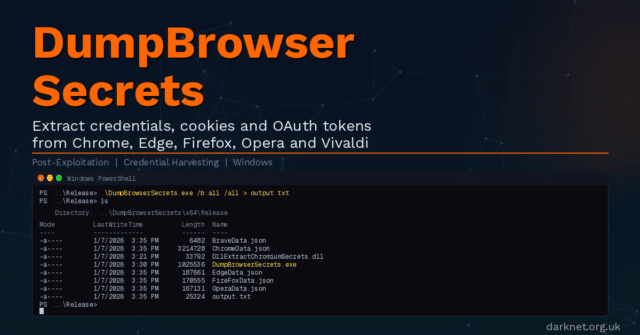
DumpBrowserSecrets is a post-exploitation credential-harvesting tool from Maldev Academy that extracts secrets across all major browsers from a single Windows executable. It is the successor to their earlier DumpChromeSecrets project, which is now deprecated, and extends coverage from Chrome alone to the full range of Chromium-based and Gecko-based browsers in common enterprise use.
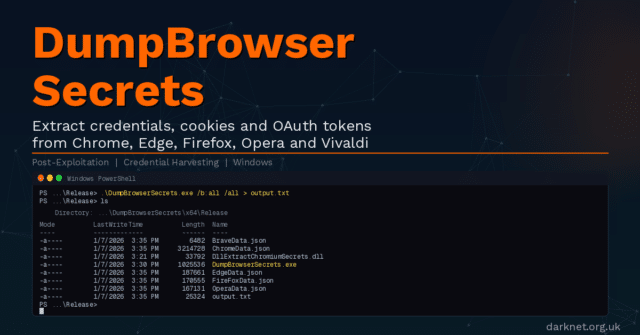
Modern browsers are credential vaults. Chrome, Microsoft Edge, Firefox, Opera, Opera GX, and Vivaldi all store saved passwords, session cookies, OAuth refresh tokens, credit card numbers, autofill data, and full browsing history in local SQLite databases and JSON files on disk. On a compromised Windows host, that data is frequently the fastest path to lateral movement, cloud account takeover, or persistent access to enterprise SaaS platforms without ever touching LSASS.
Where tools like Mimikatz target Windows credential stores such as LSASS and the Security Account Manager (SAM), DumpBrowserSecrets focuses entirely on the browser layer, where credentials are increasingly stored as enterprises adopt SSO, OAuth, and browser-based SaaS workflows. The threat model has shifted: a developer’s browser session today may hold active tokens for GitHub, AWS consoles, Okta, Slack, and internal tooling simultaneously.
How It Works
DumpBrowserSecrets consists of two components that work together: a compiled executable (DumpBrowserSecrets.exe) and a DLL (DllExtractChromiumSecrets.dll).
For Chromium-based browsers using App-Bound Encryption (Chrome, Brave, and Microsoft Edge), the challenge is that Google introduced App-Bound Encryption in Chrome 127, tying cookie and credential encryption keys to the Chrome application identity. The encryption key, stored as app_bound_encrypted_key in the browser’s Local State file, can only be decrypted via Chrome’s elevation service through the IElevator COM (Component Object Model) interface.
DumpBrowserSecrets handles this by spawning a headless Chromium process, then injecting the DLL into it via Early Bird APC (Asynchronous Procedure Call) injection, a technique that queues shellcode execution before the target process’s main thread begins. The DLL runs inside the Chromium process context, uses the IElevator COM interface to decrypt the App-Bound Encryption key, and returns the decrypted key to the executable via a named pipe. The executable then parses the browser’s on-disk SQLite databases and decrypts stored data locally.
For Opera, Opera GX, and Vivaldi, which use DPAPI (Data Protection API) keys rather than App-Bound Encryption, the same injection approach retrieves DPAPI keys instead.
For Firefox, which uses Mozilla’s NSS (Network Security Services) library with AES-256-CBC or 3DES-CBC encryption for logins, the executable handles all extraction and decryption directly with no DLL injection required.
The tool includes several evasion features relevant to operational use: compile-time string obfuscation, API hashing to defeat static analysis, PPID (Parent Process ID), and argument spoofing via NtCreateUserProcess with manual CSRSS registration, handle duplication to bypass file locks held by running browsers, and a custom SQLite3 file format parser (SQLoot, introduced in v1.1.1) that replaces the sqlite-amalgamation dependency to reduce the static footprint.
Extracted Data
The following data types are extracted per browser. Encryption models vary: Chrome, Brave, and Edge use App-Bound Encryption (V20); Opera, Opera GX, and Vivaldi use DPAPI (V10); Firefox uses NSS-based encryption for logins and stores other data types unencrypted.
- Chrome, Brave, Microsoft Edge (App-Bound / V20): cookies, saved logins, credit cards, OAuth tokens, autofill entries, browsing history, bookmarks.
- Opera, Opera GX, Vivaldi (DPAPI / V10): cookies, saved logins, credit cards, OAuth tokens (V10 + Base64 for Opera/Opera GX), autofill entries, browsing history, bookmarks.
- Firefox (NSS): cookies, saved logins (AES-256-CBC or 3DES-CBC encrypted), OAuth tokens from
signedInUser.json, autofill form history, browsing history, bookmarks.
Output is written as JSON to a file named <browser>Data.json by default, or to a path specified with the /o flag.
Installation
DumpBrowserSecrets is distributed as a pre-compiled Windows executable. No installation is required. Download the compiled binaries from the GitHub Releases page, copy DumpBrowserSecrets.exe and DllExtractChromiumSecrets.dll to the target host, and execute.
For operators who need to compile from source, the repository provides a Visual Studio solution file (DumpBrowserSecrets.sln) with three projects: Common, DllExtractChromiumSecrets, and DumpBrowserSecrets. Build in Visual Studio targeting x64 Release.
Usage
This repository does not provide a global --help flag in the traditional sense. The following usage block is reproduced verbatim from the README:
Usage: DumpBrowserSecrets.exe [options]

Options:
  /b:<browser> Target Browser: chrome, edge, brave, opera, operagx, vivaldi, firefox, all
               (default: system default browser)
  /o <file>    Output JSON File (default: <browser>Data.json)
  /all         Export All Entries (default: max 16 per category)
  /?           Show This Help Message

Examples:
  DumpBrowserSecrets.exe                            Extract 16 Entries From The Default Browser
  DumpBrowserSecrets.exe /b:chrome                  Extract 16 Entries From Chrome
  DumpBrowserSecrets.exe /b:firefox /all            Export All Entries From Firefox
  DumpBrowserSecrets.exe /b:brave /o Output.json    Extract 16 Entries From Brave To Output.json
  DumpBrowserSecrets.exe /b:all /all                Extract All From All Installed Browsers
By default, the tool extracts up to 16 entries per data category. The /all flag removes this cap. The /b:all flag targets every installed browser in a single run.
Attack Scenario
An operator lands on a developer workstation during a Windows assumed-breach engagement. The user is authenticated in Chrome to GitHub, an AWS console, Okta, and the company’s internal GitLab instance. LSASS is protected by Credential Guard and yields no useful information. The operator drops DumpBrowserSecrets.exe and its accompanying DLL to a writable directory and executes the following:
DumpBrowserSecrets.exe /b:all /all /o C:\Users\Public\out.jsonThe tool spawns a headless Chrome process, injects the DLL via Early Bird APC injection, and retrieves the App-Bound Encryption key via the IElevator COM interface, and decrypts the Login Data, Cookies, and Web Data SQLite databases. The resulting JSON contains active session cookies for all authenticated SaaS services, OAuth refresh tokens that survive password resets, saved plaintext credentials, and autofill data, including internal hostnames and usernames.
The operator then pipes the OAuth tokens to evilreplay for session replay against the target’s cloud services, and uses CredNinja to validate any recovered plaintext credentials against the domain before they are rotated. The entire credential extraction phase completes in under 30 seconds on a live endpoint.
Red Team Relevance
Browser credential theft is one of the most consistent post-exploitation steps in real-world intrusions. The infostealer market, including Redline, Raccoon, Vidar, and Lumma Stealer, is built almost entirely on the same primitives DumpBrowserSecrets implements. The distinction is that DumpBrowserSecrets is built for red team engagements rather than commodity malware deployment: it outputs structured JSON rather than exfiltrating to a C2 panel, and its evasion features are designed to survive EDR (Endpoint Detection and Response) scrutiny on hardened enterprise endpoints, not targeting unmonitored consumer machines.
App-Bound Encryption was Google’s deliberate attempt to raise the cost of this technique when it shipped in Chrome 127. It largely succeeded against older tools that relied solely on DPAPI decryption. DumpBrowserSecrets is one of the more complete public implementations of the IElevator COM bypass, making it directly relevant for testing whether an organisation’s endpoint controls detect or prevent this class of attack.
The tool is also useful for testing the realistic blast radius of a compromised developer endpoint, a scenario that is systematically underweighted in many assumed-breach exercises that focus on Active Directory paths while ignoring the SaaS credential surface.
Detection and Mitigation
Key detection opportunities are: process injection into a Chromium browser process from an unexpected parent, headless browser instantiation outside of CI/CD or automation contexts, reads against browser SQLite databases (Login Data, Cookies, Web Data) by processes other than the browser executable itself, and calls to the IElevator COM interface from non-browser processes.
The PPID and argument spoofing in DumpBrowserSecrets are specifically designed to defeat process lineage-based detection. EDR products that monitor IElevator COM interface calls directly, or that flag headless browser instantiation by process behaviour rather than ancestry alone, will be more effective against this technique.
At the policy level, credential managers that store secrets outside the browser (native desktop clients for Bitwarden, 1Password, or similar) avoid this attack surface entirely. Browser-stored passwords remain the weakest link in credential hygiene in most enterprise environments.
Frequently Asked Questions
Does DumpBrowserSecrets work on Chrome 127 and later with App-Bound Encryption enabled?
Yes. DumpBrowserSecrets is specifically designed to bypass App-Bound Encryption as implemented in Chrome 127 and later. It spawns a headless Chromium process, injects its DLL via Early Bird APC injection, and uses the IElevator COM interface from within the browser process context to decrypt the app_bound_encrypted_key. This makes it effective against current Chrome, Brave, and Microsoft Edge builds.
What browsers does DumpBrowserSecrets support?
DumpBrowserSecrets supports Chrome, Microsoft Edge, Brave, Opera, Opera GX, Vivaldi, and Firefox. Chrome, Brave, and Edge are handled via App-Bound Encryption bypass. Opera, Opera GX, and Vivaldi use DPAPI decryption. Firefox uses NSS-based decryption with no DLL injection required.
What data does DumpBrowserSecrets extract?
The tool extracts saved passwords, session cookies, OAuth refresh tokens, credit card numbers, autofill entries, browsing history, and bookmarks. Output is written as JSON to a file named after the target browser by default.
Does DumpBrowserSecrets require the target browser to be running?
For Chromium-based browsers using App-Bound Encryption, the tool spawns its own headless process to access the IElevator COM interface, so the browser does not need to be open. Handle duplication is used to bypass file locks on SQLite databases that may be held by a running browser instance.
Is DumpBrowserSecrets detected by antivirus or EDR?
The tool includes compile-time string obfuscation, API hashing, PPID spoofing via NtCreateUserProcess, and argument spoofing to reduce its static and behavioural detection footprint. Detection rates vary by product. EDR solutions that monitor IElevator COM interface calls by non-browser processes, or flag headless browser instantiation by process behaviour rather than parent lineage, are more likely to detect it.
What is the difference between DumpBrowserSecrets and Mimikatz for credential harvesting?
Mimikatz targets Windows credential stores including LSASS memory and the Security Account Manager (SAM). DumpBrowserSecrets focuses exclusively on browser-stored credentials, which exist in a separate layer that Mimikatz does not address. In environments where Credential Guard protects LSASS, browser credential harvesting is often the more reliable post-exploitation path.
Conclusion
DumpBrowserSecrets is a technically well-constructed post-exploitation tool that addresses a credential surface that most endpoint hardening programmes treat as an afterthought. Its coverage of the full range of major browsers, correct handling of both App-Bound Encryption and DPAPI models, and inclusion of operational evasion features make it a credible addition to a red team toolkit for assumed-breach engagements where the goal is to demonstrate realistic credential exposure beyond the traditional LSASS path.
You can read more or download DumpBrowserSecrets here: https://github.com/Maldev-Academy/DumpBrowserSecrets