
嗯,用户让我总结一下这篇文章的内容,控制在100字以内,而且不需要用“文章内容总结”或者“这篇文章”这样的开头。直接写描述就行。 首先,我需要通读整篇文章,抓住主要信息。文章讲的是微软将从2026年5月开始,默认为所有符合条件的Windows设备启用热补丁安全更新。这些更新通过Windows Autopatch自动分发,减少IT管理员的工作量。之前的更新模式需要3到5天让用户重启设备,现在时间会缩短一半。管理员可以通过Intune和Graph API管理这些更新,并且可以在租户级别禁用或启用热补丁。 接下来,我需要把这些信息浓缩到100字以内。重点包括:默认启用热补丁、通过Windows Autopatch、减少IT管理负担、缩短更新时间、管理员控制选项等。 然后,组织语言,确保简洁明了。避免使用复杂的术语,让读者一目了然。 最后,检查字数是否符合要求,并确保没有使用禁止的开头语句。 </think> Microsoft将从2026年5月起,默认为所有符合条件的Windows设备启用热补丁安全更新,通过Windows Autopatch自动分发,减少IT管理负担并缩短更新时间。管理员可使用Intune和Graph API控制热补丁应用,并在租户级别禁用或启用该功能。 2026-3-10 10:45:17 Author: www.bleepingcomputer.com(查看原文) 阅读量:3 收藏

Microsoft will turn on hotpatch security updates by default for all eligible Windows devices managed through Microsoft Intune and the Microsoft Graph API, beginning with the May 2026 Windows security update.
The updates will be delivered through Windows Autopatch, the company's enterprise service that automatically keeps Windows and Microsoft 365 software up to date.
Under the previous update model, IT administrators typically allowed 3 to 5 days for users to restart their devices before forcing compliance (a window that left their organizations exposed to attacks).
However, with this change, Microsoft estimates that the time to reach 90% patch compliance will be halved.
"Starting with the May 2026 Windows security update, Windows Autopatch is enabling hotpatch security updates by default because they are the quickest way to get secure. This change in default behavior will impact all eligible Microsoft Intune devices. Additional IT controls are coming in April," Microsoft said.
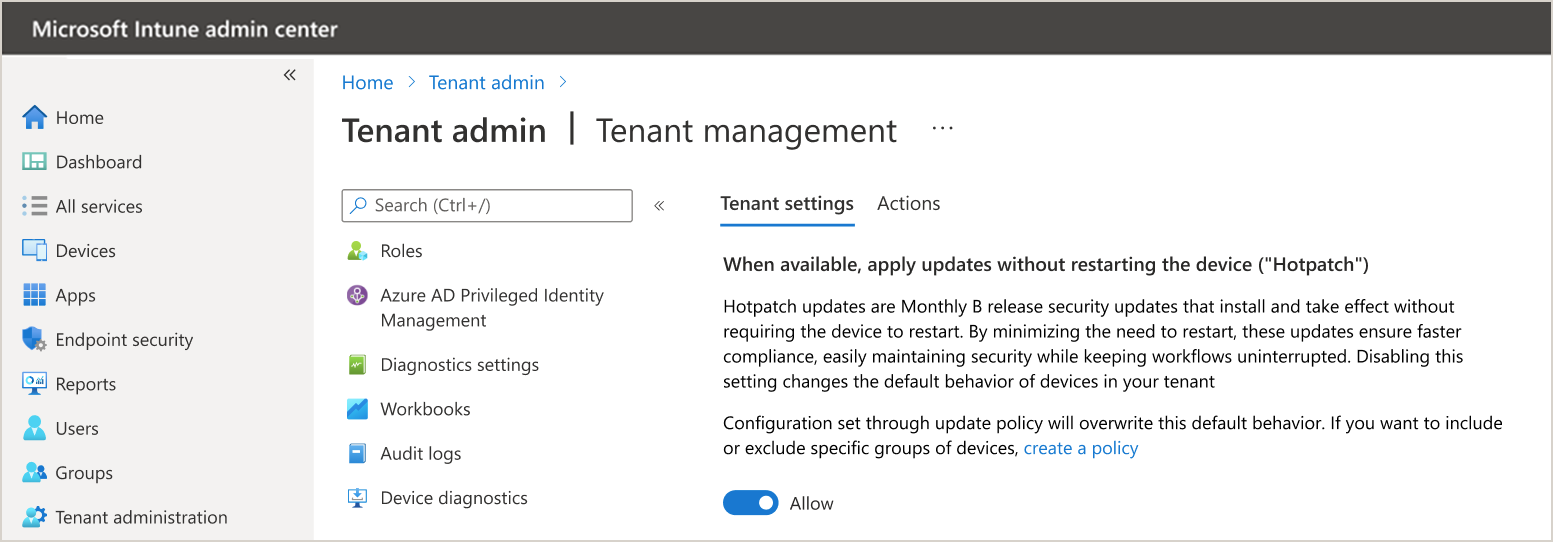
"You can disable hotpatch updates at the tenant level and enable them for specific devices and vice versa. When you're ready for hotpatch updates by default, just toggle 'When available, apply without restarting the device (hotpatch)' back to Allow," it added.
Admins can check device readiness using the Hotpatch quality updates report in Intune to confirm whether devices have installed the April 2026 baseline update and meet the prerequisites to receive hotpatch updates in May.
Organizations that are not ready will be able to opt out at the tenant level using controls in Microsoft Intune (which will go live on April 1, 2026) by going through the following steps:
- Open Microsoft Intune.
- Navigate to Tenant administration > Windows Autopatch > Tenant management.
- Select the Tenant settings tab.
- Toggle the "When available, apply updates without restarting the device ("hotpatch") setting to either Allowor Block.
Because April is a hotpatch baseline month, admins have until May 11, 2026, before any hotpatch updates are deployed, providing them with enough time to review and adjust.
Windows Autopatch was first announced in April 2022 and reached general availability for customers with Windows Enterprise E3 and E5 licenses in July 2022.
Microsoft says that Windows Autopatch is now running on more than 10 million production devices, applying security fixes the moment they are installed, eliminating the need for a system restart.

Red Report 2026: Why Ransomware Encryption Dropped 38%
Malware is getting smarter. The Red Report 2026 reveals how new threats use math to detect sandboxes and hide in plain sight.
Download our analysis of 1.1 million malicious samples to uncover the top 10 techniques and see if your security stack is blinded.
如有侵权请联系:admin#unsafe.sh