
好的,我现在需要帮用户总结一篇文章的内容,控制在100字以内。用户给的文章是关于在二进制分析工具Binary Ninja中添加平台支持到架构插件,以提高反编译效果的教程。文章分为三个部分,第一部分讲反汇编,第二部分讲提升(lifting),第三部分讲平台支持。 首先,我需要理解文章的主要内容。文章详细介绍了如何为Quark架构添加Linux平台支持,包括调用约定、系统调用、平台类型、类型库、函数签名等。通过这些步骤,用户可以改善反编译结果,使函数调用参数正确,并自动识别系统调用和标准库函数。 接下来,我要将这些内容浓缩到100字以内。需要涵盖主要步骤和效果:添加平台支持、调用约定、系统调用、类型库、函数签名,以及这些改进如何提升反编译质量。 可能的结构是:介绍添加平台支持的目的,然后列出关键步骤(调用约定、系统调用等),最后说明带来的好处。 现在开始组织语言: “本文介绍如何为Binary Ninja的Quark架构插件添加Linux平台支持,以提升反编译效果。通过实现调用约定、系统调用、类型库和函数签名等功能,改善了函数参数识别和系统调用注释,使反编译结果更准确。” 这样控制在100字以内,并且涵盖了主要信息。 </think> 本文介绍如何为Binary Ninja的Quark架构插件添加Linux平台支持,以提升反编译效果。通过实现调用约定、系统调用、类型库和函数签名等功能,改善了函数参数识别和系统调用注释,使反编译结果更准确。 2026-3-4 21:33:7 Author: binary.ninja(查看原文) 阅读量:22 收藏

Adding platform support to an architecture plugin is one of the best ways to improve decompilation. While disassembling and lifting give us good results, they are limited in scope and cannot fill in details about the operating system. With platform support, we can add rich annotations to the analysis and get better results. Let’s look through the many systems Binary Ninja includes for implementing platform support in a plugin of your own.
Contents
This is Part 3 of a three-part series. Here is the full list of contents:
In Part 1 we implemented a disassembler. In Part 2 we implemented a lifter. Together, that got us a working decompiler for Quark, with stack resolution, variable creation, and high-level control flow structures. What we have now is pretty good, though its output needs the user to annotate every part of every binary.
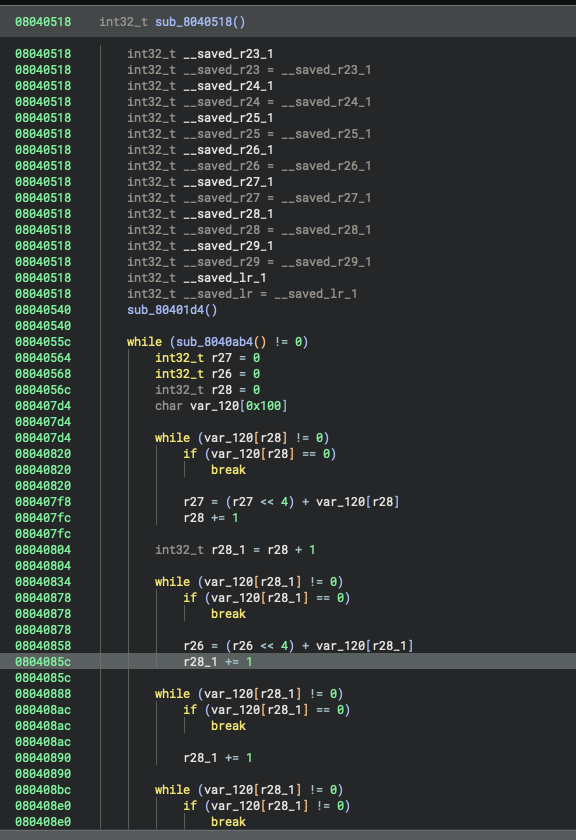 State of the decompilation results at the end of Part 2
Up until now, we’ve implemented all the functionality with a custom architecture, but we haven’t gotten to more specific details like calling conventions, system calls, and library signatures yet. For those, we need to implement a Platform subclass. Binary Ninja distinguishes between the concept of an architecture and a platform to allow for details to be defined at generic and specific places. Architectures describe processor behavior, like instructions, and platforms describe operating system behavior, like register selection and types. To make further platform-specific improvements to our decompilation results, we need to implement a platform.
You can register a Platform with the Binary View Type in a very similar manner to registering an Architecture. In the case of Quark on Linux, this is pretty straightforward:
class LinuxQuarkPlatform(Platform):
    name = "linux-quark"

qlinuxplatform = LinuxQuarkPlatform(qarch)
qlinuxplatform.register("linux")

# Linux uses ELF platforms 0 and 3, so register for both
BinaryViewType['ELF'].register_platform(0, qarch, qlinuxplatform)
BinaryViewType['ELF'].register_platform(3, qarch, qlinuxplatform)
Specifying the platform won’t have any visible changes immediately, but by implementing the next few sections we can improve decompilation significantly.
Calling Convention
The first thing to notice when looking at the decompilation results is that the control flow looks good, but the arguments to every function call are wrong. This is because, to get proper function call arguments detected, you need to specify them via a Calling Convention. These are relatively straightforward to declare– you just need to fill out a few fields:
class QuarkCallingConvention(CallingConvention):
    name = "qcall"
    caller_saved_regs = ['r1', 'r2', 'r3', 'r4', 'r5', 'r6', 'r7', 'r8', 'r9', 'r10', 'r11', 'r12', 'r13', 'r14', 'r15']
    callee_saved_regs = ['r16', 'r17', 'r18', 'r19', 'r20', 'r21', 'r22', 'r23', 'r24', 'r25', 'r26', 'r27', 'r28']
    int_arg_regs = ['r1', 'r2', 'r3', 'r4', 'r5', 'r6', 'r7', 'r8']
    int_return_reg = 'r1'
    high_int_return_reg = 'r2'
    arg_regs_for_varargs = False
caller_saved_regs- Registers that the caller assumes can be modified by the callee, so the caller must save them itselfcallee_saved_regs- Registers that the caller assumes are not modified by the callee, so the callee needs to save them if it modifies themint_arg_regs- Arguments passed to integer parameters at call sites, in order. Arguments passed after this are assumed to be on the stackint_return_reg- Register that return value is passed inhigh_int_return_arg- For double-width size return values, the high bits are passed in this registerarg_regs_for_varargs- Some compilers have variadic functions put all the variable arguments on the stack, instead of using the remaining register slots. If that is the case (and it is with SCC/Quark), then set this to False.
Other fields that Quark did not need, but you can specify:
float_arg_regs- If your architecture supports separate floating-point registers used for arguments, you can specify those as wellfloat_return_reg- If your architecture has a separate floating-point register used for return values, you can specify thatarg_regs_share_index- When passing mixed integer and floating point arguments to functions, some platforms use shared slot indices and some use split indices. With shared slot indices, each argument uses either the integer or floating point register for its index, and the other is reserved but unused. For a function with the signaturevoid foo(int, int, float, int, float), this leads to an argument list ofvoid foo(int @ i0, int @ i1, float @ f2, int @ i3, float @ i4)wheref0,f1,i2, andf3registers are unused. In contrast, split slot indices cause each integer and floating point argument to pull the next free register from their list, regardless of how many arguments of the other type are present. In these cases, the order of integer and floating point arguments does not affect one another, and each use registers from their set in order. This leads to argument lists likevoid foo(int @ i0, int @ i1, float @ f0, int @ i2, float @ f1)where, despite the arguments being interleaved, they don’t skip any registers in either set. This divergence in behavior can cause issues with recognizing parameters at call-sites, so if you see strange behavior for functions with mixed integer and floating point arguments, you may need to set this to True.stack_reserved_for_arg_regs- Certain platforms reserve stack space for arguments even when they are passed as registers. Set this to True when this is the case.stack_adjusted_on_return- Some platforms have the caller allocate stack space for arguments, then the callee frees the stack space itself (x86’s stdcall is one such example)eligible_for_heuristics- Binary Ninja will try to guess the calling convention at untyped call sites, but certain calling conventions should not be considered, such as syscall conventions. Those conventions should set this to False.global_pointer_reg- Certain calling conventions use a register as a “global pointer” with a value loaded early on in execution and remaining constant throughout the lifetime of the program. If this is specified, Binary Ninja will attempt to discover the value of this global pointer, and any use of that register will infer its value from what analysis discovered.implicitly_defined_regs- Certain calling conventions pass registers to calls which are not included in type signatures (such as how MIPS on Linux sets$t9to the address of the called function, but this should not clutter up the type signature).required_arg_regs- If specified, heuristic calling convention detection will only consider this calling convention if all the registers specified here are used before they are defined.required_clobbered_regs- If specified, heuristic calling convention detection will only consider this calling convention if the function clobbers all the registers specified here.
Then, we need to register the Calling Convention and tell the Platform and Architecture to use it:
# ... qarch = Architecture['Quark']
# ... qlinuxplatform = LinuxQuarkPlatform(qarch)

qcc = QuarkCallingConvention(qarch, "qcall")

qarch.register_calling_convention(qcc)
qarch.default_calling_convention = qcc

qlinuxplatform.register_calling_convention(qcc)
qlinuxplatform.default_calling_convention = qcc
After implementing the Calling Convention, decompilation for function calls looks significantly better. Function calls that previously had no parameters are now resolved, and many functions that were erroneously marked as __pure and eliminated are now called as expected:
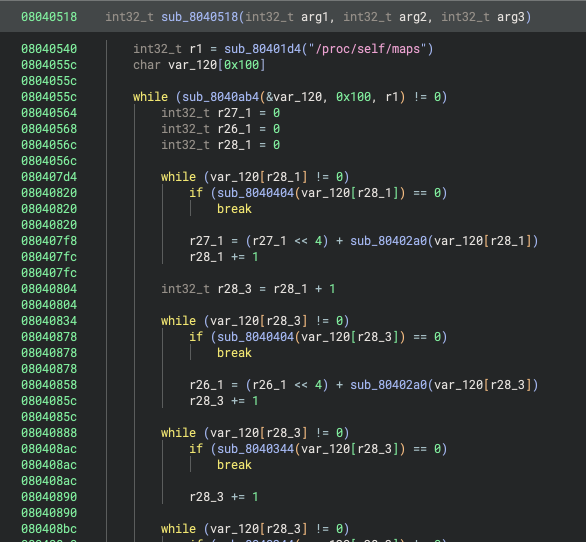 Function calls have proper arguments now
System Calls
System call names and types need to be defined by a Platform. They are specific to the operating system, since multiple operating systems could use the same architecture but have different meanings for the different system call numbers. As a result, system call details are defined by the Platform object.
Since the system call number must be specified in a register, this likely means you need to have a unique calling convention for system calls. The system call number register is always passed as the first argument to a system call, and this must be reflected in the calling convention definition. In the case of Quark, system call instructions include the syscall number, which is saved to a synthetic register we named syscall_num. Other notable changes here are that system calls won’t clobber any registers other than return registers and that the calling convention should be marked False for eligible_for_heuristics so that unresolved calls won’t have a chance to be assumed to be system calls.
class QuarkSyscallCallingConvention(CallingConvention):
    name = "qsyscall"
    caller_saved_regs = ['r1', 'r2']
    callee_saved_regs = ['r3', 'r4', 'r5', 'r6', 'r7', 'r8', 'r9', 'r10', 'r11', 'r12', 'r13', 'r14', 'r15', 'r16', 'r17', 'r18', 'r19', 'r20', 'r21', 'r22', 'r23', 'r24', 'r25', 'r26', 'r27', 'r28']
    int_arg_regs = ['syscall_num', 'r1', 'r2', 'r3', 'r4', 'r5', 'r6', 'r7', 'r8']
    int_return_reg = 'r1'
    high_int_return_reg = 'r2'
    eligible_for_heuristics = False
The system call calling convention is registered with the Platform and will be used for all system calls:
# ... qlinuxplatform = LinuxQuarkPlatform(qarch)

qlinuxplatform.register_calling_convention(qsyscall)
qlinuxplatform.system_call_convention = qsyscall
After defining a system call calling convention, we can now see syscall numbers and arguments being passed to syscalls, but they don’t have names yet. We will handle that in the sections on Platform Types and Type Libraries. But for now, at least we can see which ones are being used:
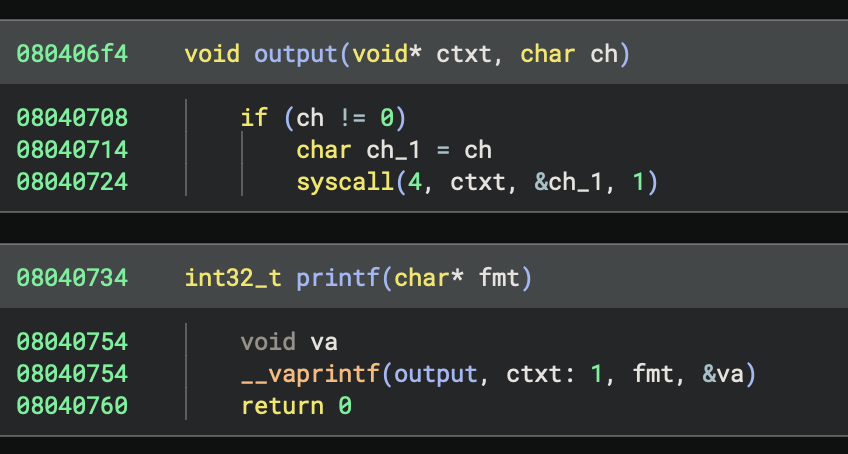 Now we can see it’s doing syscall number 4
Platform Types
Platform Types are types included by all binaries using the platform. These are often used for common library functions and system calls. While it can be tempting to put an entire standard library’s worth of types into Platform Types, you should try to keep them relatively short and only include what you expect to be used by all binaries. For the rest, consider using Type Libraries, whose types are only included in analyses if they are actually used. Usually, Platform Types only include what is necessary for the noreturn functions/system calls on the platform, and everything else goes in a Type Library.
Here is all we need to specify for Quark’s Platform Types:
// linux-quark.c

// C variadic args type is usually in platform types
typedef void* va_list;

// Syscalls for process termination are included
void sys_exit(int32_t status) __syscall(1) __noreturn;
void sys_exit_group(int32_t status) __syscall(252) __noreturn;

// Often, platforms have standard library exit functions.
// Quark doesn't have these, but here is how you could specify them
// void exit(uint32_t status) __noreturn;
// void _terminate(uint32_t status) __noreturn;
// void terminate(uint32_t status) __noreturn;
Then, we need to tell the Platform where our Platform Types source file is located. We’ll put this in a subdirectory of the plugin:
class LinuxQuarkPlatform(Platform):
    # ...

    # Platform types are in this file
    type_file_path = str(Path(__file__).parent / "types" / "linux-quark.c")
Now we can see that the exit system call gets resolved and annotated with its name and parameters. Other system calls are still unresolved; we will address those in the section on Type Libraries.
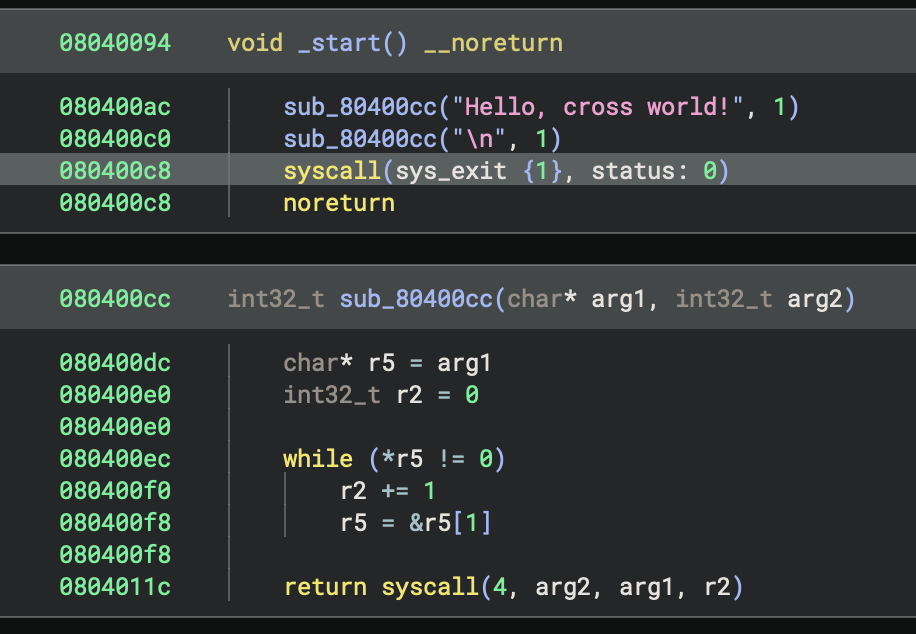 sys_exit now gets its name and type
Note: While not recommended, you can put the rest of the system call types and/or OS-defined standard library types into this file, and that will get you good results where they get resolved as expected. The problem with this is that they will clutter up every analysis’s System Types list and may cause conflicts between versions if you need to update them in the future. Binary Ninja’s first-party plugins generally choose to use Type Libraries instead for this reason. Thus, for this blog, we’re going to follow our recommended design and only put the noreturn library functions and system calls into the Platform Types. The rest will be defined by Type Libraries.
Type Libraries
Type Libraries are where Platforms store the bulk of standard library and system call types. They have the benefit of only importing types to your analyses when they are used, so you aren’t cluttering up your System Types. Usually, Type Libraries represent an individual, dynamically linkable shared library in your platform, such as libc or libpthread. There is also a special case Type Library used for system calls, which we will be covering as well.
Standard Library
Quark’s standard library is defined by a bunch of C headers, which we can parse using Binary Ninja’s type parser APIs to create Type Libraries. Generally speaking, it is recommended to create Type Libraries in an automated manner, since they are not possible to modify after-the-fact. This ends up being straightforward: we just need to specify a list of headers and what arguments to pass to the type parser, then we can parse the headers and add the parsed types to a new Type Library.
First, we specify the headers we are going to parse with the arguments they need:
HEADERS = [
    {
        "files": [
            "/Users/user/Documents/binaryninja/scc/runtime/posix/file.h",
            # ...
        ],
        "args": [
            # scc's headers need to know where the system headers live
            "-I/Users/user/Documents/binaryninja/scc",
            # scc's headers need va_list defined, so pull that from vararg.h
            "-include/Users/user/Documents/binaryninja/scc/runtime/vararg.h"
        ]
    },
    # ... more copies of this with slightly different args for different files.
]
Then, we construct a new Type Library for our Platform:
p = Platform["linux-quark"]

tl = TypeLibrary.new(p.arch, "stdlib")
tl.add_platform(p)  # critical: mark the Type Library as supporting this Platform
Then, we parse all the headers:
for group in HEADERS:
    for file in group["files"]:
        with open(file, "r") as f:
            source = f.read()
        parse, errors = TypeParser.default.parse_types_from_source(
            source,
            file,
            p,
            tl.type_container,
            group["args"]
        )
        if parse is None:
            print(f"Errors in {file}: {errors}")
        else:
            parse: TypeParserResult
            # ...
Then, we take the parsed types from the file and add them to our Type Library:
            for ty in parse.types:
                tl.add_named_type(ty.name, ty.type)

            # Add functions second, so they can reference the types we just added
            for func in parse.functions:
                tl.add_named_object(func.name, func.type)
Finally, we write the Type Library to a file:
tl.write_to_file(str(Path(__file__).parent / f"{tl.name}.bntl"))
After registering the Type Library, any time an executable dynamically links against the shared library with the same name as our Type Library, Binary Ninja will automatically include the Type Library in the analysis and import types from it as needed.
Alternate Names
Some operating systems are tricky, and their linker will resolve multiple different names to the same dynamic library. Since they all reference the same library, their types and definitions should all be the same. Instead of requiring you to make multiple identical copies of these libraries, Binary Ninja’s Type Library system allows you to specify alternate names for a Type Library. While Quark does not need to do this (it has no dynamic linker), Windows uses this extensively. Using the Type Library Explorer, which you can enable via the ui.experimental.typelibExplorer setting, we can observe this:
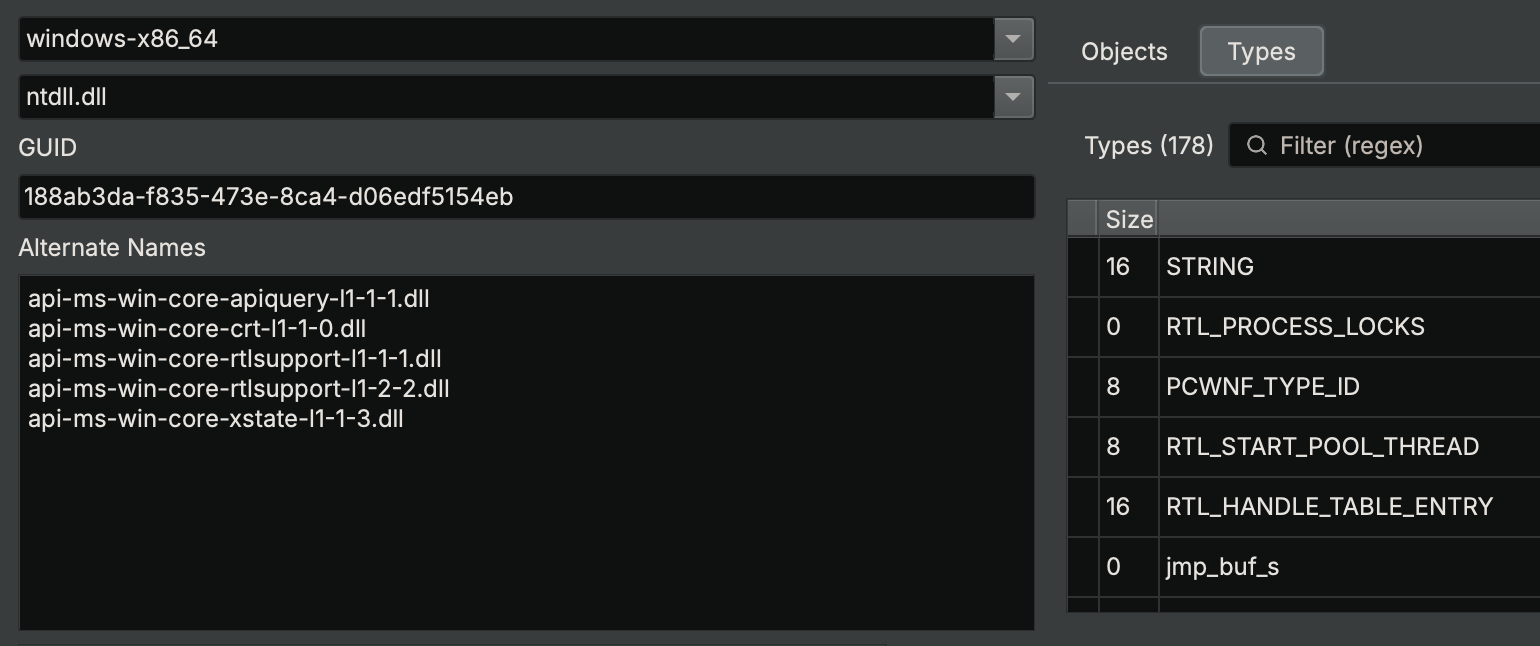 Windows’s
 ntdll.dll Type Library will be loaded if an executable links against api-ms-win-core-crt-l1-1-0.dll, among other names
There is an API to add alternative names to your Type Libraries. You must use it when creating the Type Library:
# ... tl = TypeLibrary.new(...)
tl.add_alternate_name("api-ms-win-core-crt-l1-1-0.dll")
System Calls
Binary Ninja will automatically load the SYSCALLS Type Library for every binary that uses system calls. We can generate one of those ourselves, then system calls will be resolved using their number. This will allow Binary Ninja to annotate them with their name and type. Using the same mechanism as for the standard library, put all the structure and enumeration types used by the system calls into a C source file. Then, add the system call definitions to the file as functions with the __syscall(N) attribute applied, specifying their system call numbers. Finally, use the script from above to create a Type Library named SYSCALLS from that source file. Your source should look something like this:
// Types used by the syscalls

typedef uint64_t dev_t;
typedef uint32_t __ino_t;
typedef uint32_t mode_t;
typedef uint32_t __nlink_t;
// ...
struct stat
{
    dev_t st_dev;
    int32_t st_pad1[0x3];
    __ino_t st_ino;
    mode_t st_mode;
    __nlink_t st_nlink;
    // ...
};

// System call definitions as functions
// ...
int32_t sys_stat(char const* pathname, struct stat* statbuf) __syscall(106);
int32_t sys_lstat(char const* pathname, struct stat* statbuf) __syscall(107);
int32_t sys_fstat(int32_t fd, struct stat* statbuf) __syscall(108);
// ...
Be sure to call the Type Library generated for system calls, SYSCALLS, so it will get loaded automatically once we register it.
Copying Existing Syscalls
Because Quark inherits the system calls from the platform executing its VM, we can create a Type Library with the contents of the SYSCALLS library from linux_x86. If you’re implementing the Linux platform and your architecture is identical to x86, you might be able to do the same. This is pretty easy with the API:
from pathlib import Path
from binaryninja import Platform, TypeLibrary, Architecture

tl = TypeLibrary.new(Architecture["Quark"], "SYSCALLS")
tl.add_platform(Platform["linux-quark"])

# linux_x86's SYSCALLS Type Library
xtl = Platform["linux-x86"].get_type_libraries_by_name("SYSCALLS")[0]

# Copy types and functions
for name, ty in xtl.named_types.items():
    tl.add_named_type(name, ty)
for name, ty in xtl.named_objects.items():
    tl.add_named_object(name, ty)

tl.write_to_file(str(Path(__file__).parent / f"syscalls_linux_x86.bntl"))
This will work if you know that all of your Linux syscall structures are exactly the same on your architecture as on x86, which is usually not the case. It may be helpful to instead print the syscall details to a source file and correct it by hand:
from binaryninja import TypeLibrary, Architecture

# linux_x86's SYSCALLS Type Library
xtl = Platform["linux-x86"].get_type_libraries_by_name("SYSCALLS")[0]
# Print types and functions
for name, ty in xtl.named_types.items():
    for line in ty.get_lines(xtl.type_container, name):
        for token in line.tokens:
            print(token.text, end="")
        print()
for name, ty in xtl.named_objects.items():
    for line in ty.get_lines(xtl.type_container, name):
        for token in line.tokens:
            print(token.text, end="")
        print()
Even if your system call structures are different, this can be a fast way to get started writing a system calls Type Library source file.
Registration
After creating our Type Libraries, before they can be loaded, we need to register them with Binary Ninja. This can either be done by having you (and all of your plugin’s users) copy the Type Libraries into $BN_USER_DIRECTORY/typelib/Quark, or you can do it from your plugin’s script with a few lines:
# Load all Type Libraries in plugin's typelib subdirectory
for file in (Path(__file__).parent / "typelib").glob("*.bntl"):
    tl = TypeLibrary.load_from_file(str(file))
    if hasattr(tl, 'register'):  # >= 5.3 need to register separately
        tl.register()
After all of this, we can now get names and types for the rest of the system calls:
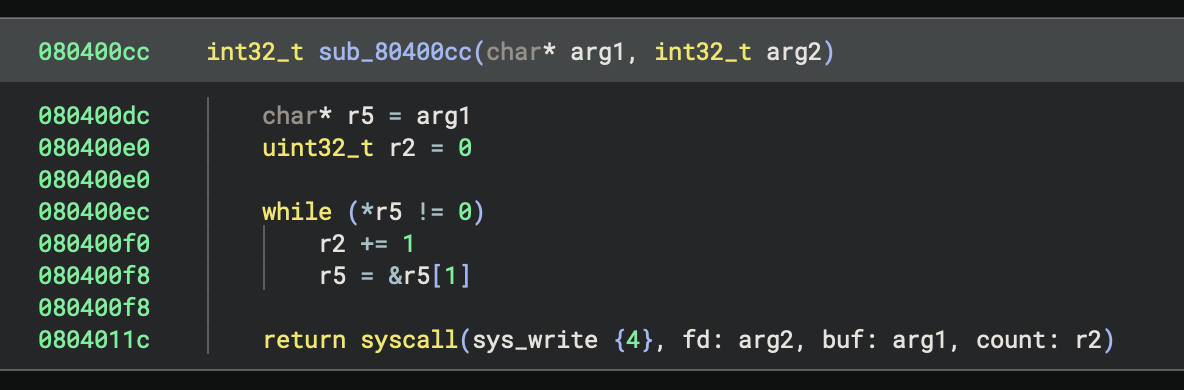 System calls now have their names and types annotated
Statically Linked Standard Library
You may ask: What if your standard library is fully statically linked and your targets never dynamically link any libraries? You could use WARP to match all the statically linked functions and assign them types (see below), but if any fail to match, you likely will want to have a Type Library so you can set their type yourself. You would have to import that Type Library into your analysis and pull types manually. Instead, you can add it to every binary automatically by using the Platform’s view_init callback. That is relatively easy to do:
class LinuxQuarkPlatform(Platform):
    # ...

    def view_init(self, view: BinaryView):
        # Note: in Binary Ninja 5.2 and prior, this callback had a bug
        # You can use this as a shim
        if not isinstance(view, BinaryView):
            view = BinaryView(handle=binaryninja.core.BNNewViewReference(view))

        # Add the Type Library
        view.add_type_library(TypeLibrary.from_name(self.arch, "stdlib"))
And that’s it! Now every binary will have the standard library’s types available:
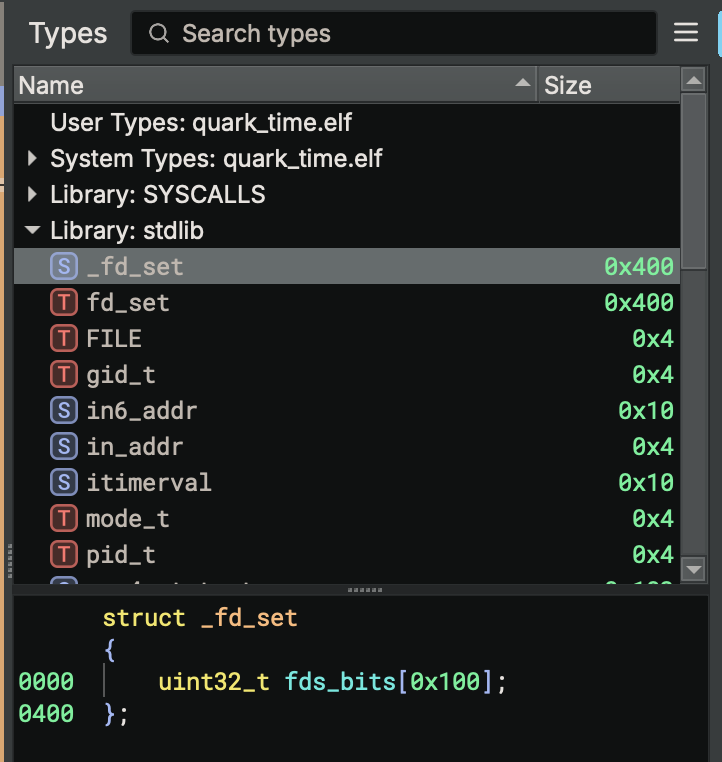 The standard library’s Type Library is available, and we can use its types
If your platform supports dynamic linking, you should not need to do this. Simply name the Type Libraries the same name as for what the dynamic linker would search for each library, and Binary Ninja should load the relevant ones automatically. Also, this is not necessary for the SYSCALLS Type Library, which will get loaded automatically.
Ordinals
Some libraries have the dynamic linker resolve their functions not by name but by ordinal. These ordinals are unique numbers, assigned to the functions when the library was linked, which need to be included for our Type Library to resolve them.
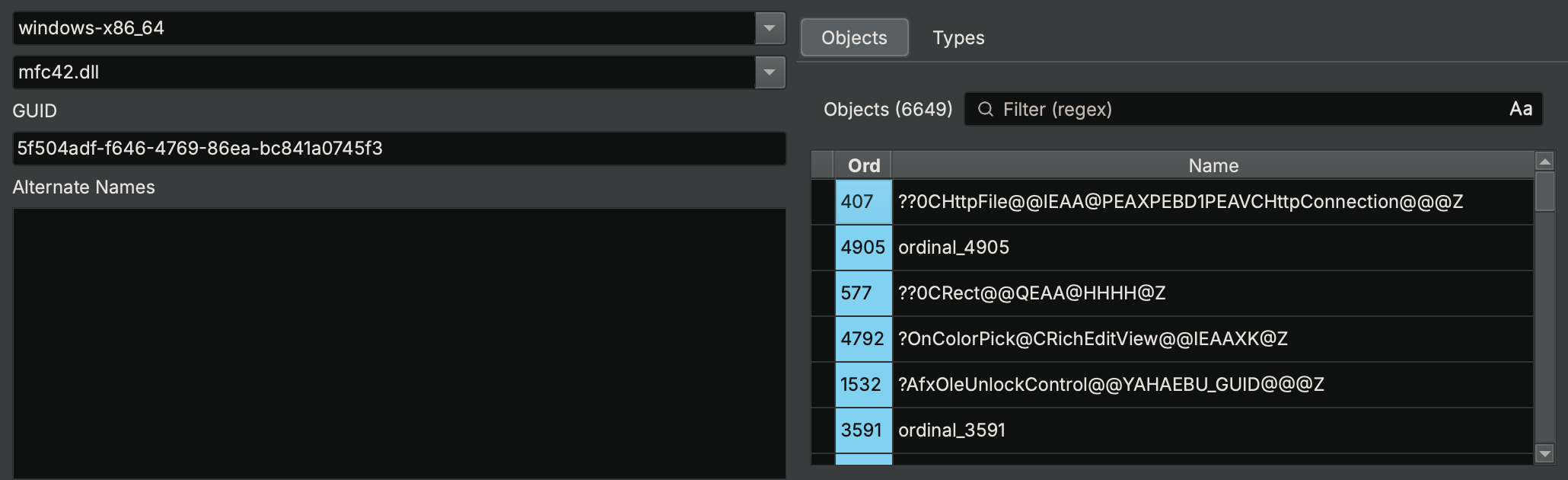 Windows’s mfc42.dll references all of its imported functions by ordinals, which can be seen in the Type Library Explorer
The process for mapping these ordinals to names is not well-specified, and neither is their API. Since these are highly platform-specific, the ordinal data is stored in a Metadata key on the Type Library, which is later read by the Binary View when it is loading binaries. This is only implemented on PE binaries in first-party plugins, but if you write a custom Binary View implementation, you can do the same.
Here’s how PEView does it. First, when resolving library imports, it loads the ordinals from the appropriate Type Libraries:
bool PEView::Init()
{
    // ...

    // Find type libraries using name of an imported library
    vector<Ref<TypeLibrary>> typeLibs = platform->GetTypeLibrariesByName(libName);
    for (const auto& typeLib : typeLibs)
    {
        if (GetTypeLibrary(typeLib->GetName())) // Don't load libraries twice
            continue;
        AddTypeLibrary(typeLib);
    }

    // Read ordinals from the libraries
    Ref<Metadata> ordinals;
    for (const auto& typeLib : typeLibs) // Account for there possibly being zero libraries
        ordinals = typeLib->QueryMetadata("ordinals");
    if (ordinals && !ordinals->IsKeyValueStore()) // Sanity check in case the library's ordinals is not a dictionary
        ordinals = nullptr;
Then, when resolving imported functions from that library, it consults the ordinals table (if it exists) to find the name of the function:
    // ...

    if (isOrdinal)
    {
        // Look up ordinal in ordinals dictionary
        Ref<Metadata> ordInfo = nullptr;
        if (ordinals)
            ordInfo = ordinals->Get(to_string(ordinal));
        // ... use ordInfo->GetString() to get function name
    }
Given this behavior, we can see that the ordinals in the Type Library are a dictionary, mapping ordinal number to function name, stored in the “ordinals” metadata key of the Type Library. We can query this from Python:
tl = Platform["windows-x86_64"].get_type_libraries_by_name("mfc42.dll")[0]
tl.query_metadata("ordinals")
# [('1000', '??1CPropertyPageEx@@UEAA@XZ'), ('1001', '??1CPropertySection@@QEAA@XZ'), ('1002', '??1CPropertySet@@QEAA@XZ'), ('1003', '??1CPropertySheet@@UEAA@XZ'), ('1004', '??1CPropertySheetEx@@UEAA@XZ'), ('1005', '??1CPtrArray@@UEAA@XZ'), ('1006', '??1CPtrList@@UEAA@XZ'), ('1007', '??1CPushRoutingFrame@@QEAA@XZ'), ('1008', '??1CPushRoutingView@@QEAA@XZ'), ('1009', '??1CReBar@@UEAA@XZ'), ...]
We can make our own Type Libraries include ordinal information by setting that key in their metadata when creating them:
# ...
# tl = TypeLibrary.new(...)
ordinals = {"0": "something", "1": "another thing", ...}
tl.store_metadata("ordinals", ordinals)
Note that, for the case of Quark, since we have not implemented a custom Binary View Type for loading our files, this will not do anything. We would need to either implement our own Binary View Type for a file format that uses ordinals or add support for Quark in PE files (which is possible but not covered here).
Function Signatures
For many embedded systems, there is no dynamic linker: all used library functions get bundled into every executable that uses them. They clutter up analysis and make you spend extra time identifying common functions. A lot of this extra work can be avoided by creating function signatures, which can automatically identify these statically linked functions and annotate them during initial analysis with their names and types.
In Binary Ninja, you can generate these signatures using WARP. You do this by marking up an analysis that contains the functions you want to match, and then have WARP generate a signature file from your analysis. In the case of Quark, we chose to create a source file that used every function in the standard library, so we could annotate them all at once.
Our source file looked something like this:
void file_group()
{
    puts("chdir");
    chdir("/");
    puts("close");
    close(0);
    struct stat buf;
    puts("fstat");
    fstat(0, &buf);
    char stuff[0x10];
    puts("read");
    read(0, stuff, 0x10);
    // ... every other file function
}
void main()
{
    file_group();
    // ... every other group of functions
}
After compiling, we are left with a binary that contains an implementation of every standard library function, each called immediately after a puts() call that contains its name, for easy locating. We then analyze that binary and annotate each of these functions with their name. Since they’re named, we can then use Import Header File to import the standard library’s headers and easily apply type signatures to every function we annotated.
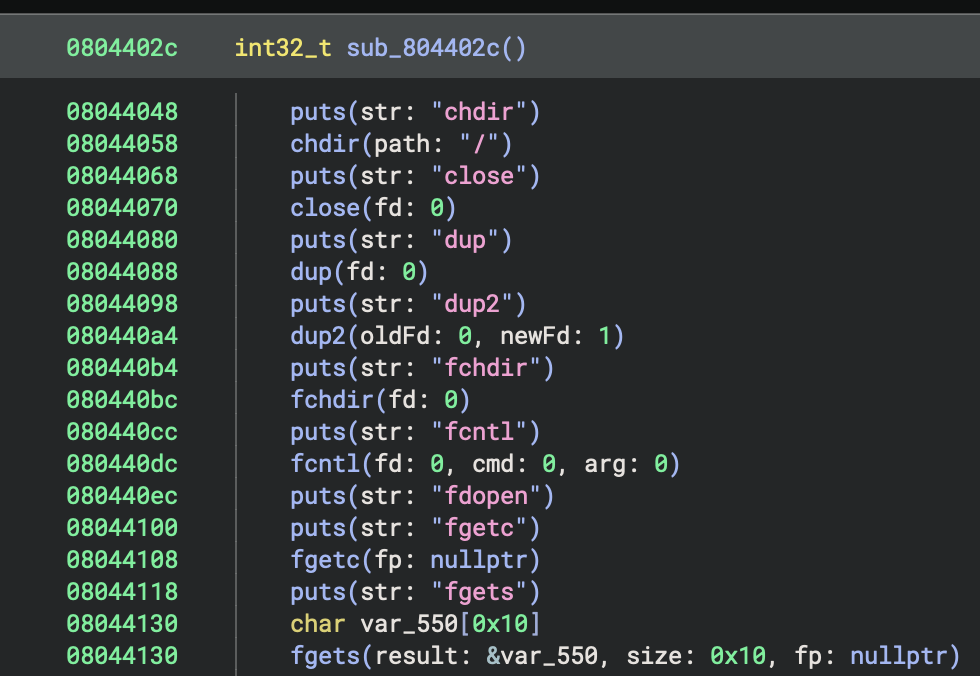 Analyzed standard library calls with names and types
With this analysis, we then mark all the standard library functions to be exported using the WARP - Include Function action. Next, we use the WARP - Create from Current View action to save a file containing signatures for the functions we marked. Now that we have signatures, we have to tell WARP to automatically include them when using the plugin, which is relatively easy. We do this by adding to our view_init from earlier:
class LinuxQuarkPlatform(Platform):
    # ...
    def view_init(self, view: BinaryView):
        # ...
        WarpContainer['User'].add_source(str(Path(__file__).parent / "signatures" / "quark_stdlib.warp"))
Now, any future binaries we load will have their statically linked standard library functions annotated automatically:
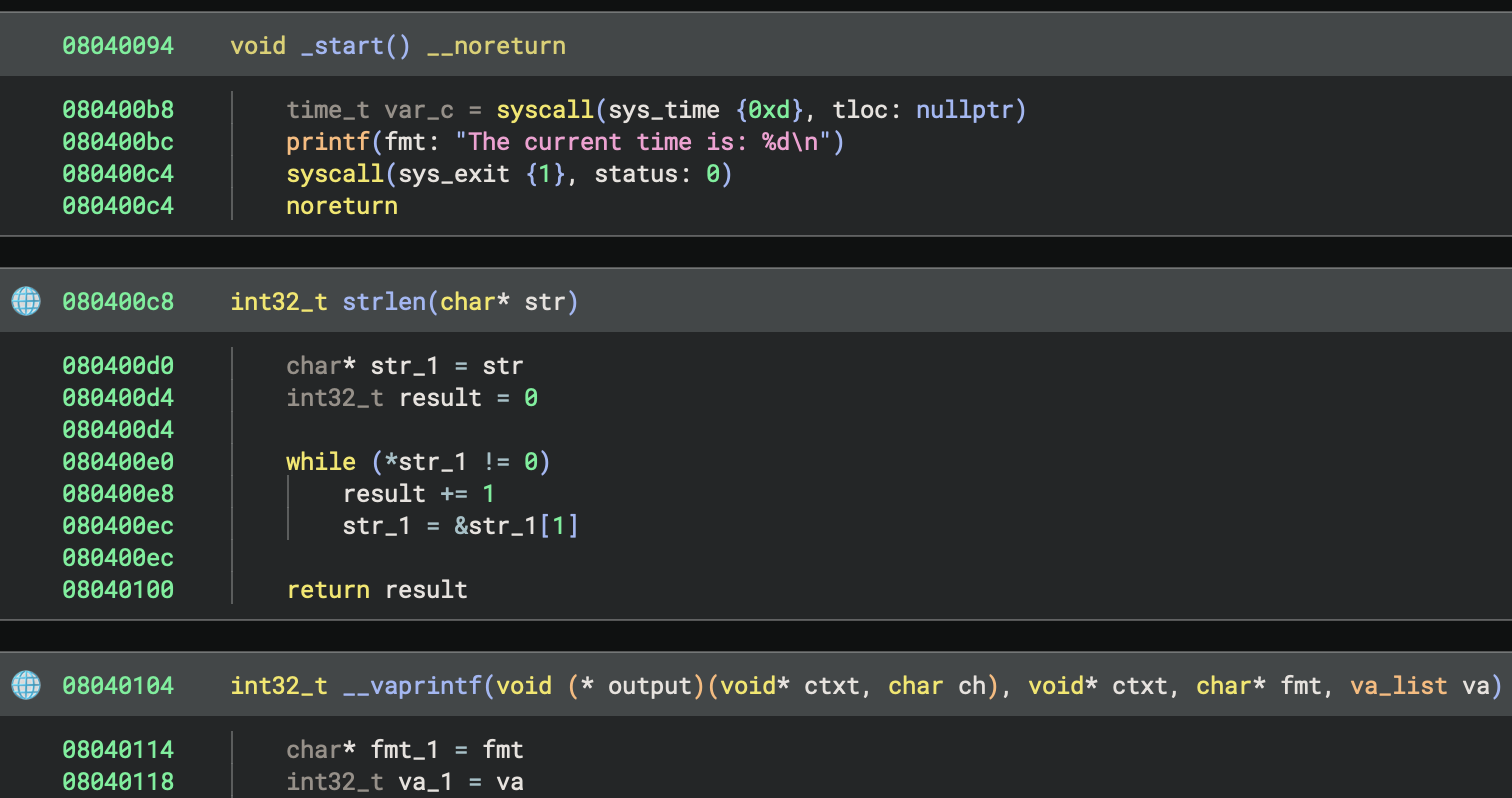 Statically linked standard library functions now have their names and types annotated for us
Inlined Functions
One of the problems we ran into when generating signatures is that SCC really likes to inline function calls. While we can’t do anything about this in the general case, we need to prevent it from happening in the analysis we’re using to generate signatures. That’s because it prevents those functions from being emitted separately in a form we can annotate. We can work around the compiler: since SCC only inlines functions when their caller is short, we can add a bunch of cruft to the end of the harness functions so SCC will not inline their callees:
#define dont_inline_me_bro() \
    puts(""); puts(""); puts(""); puts(""); puts(""); puts(""); \
    puts(""); puts(""); puts(""); puts(""); puts(""); puts(""); \
    puts(""); puts(""); puts(""); puts(""); puts(""); puts(""); \
    puts(""); puts(""); puts(""); puts(""); puts(""); puts(""); \
    puts(""); puts(""); puts("");

void file_group()
{
    // ...
    puts("write");
    write(0, stuff, 0x10);

    dont_inline_me_bro();
}
After this, none of the standard library functions are inlined in the analysis we are using to create signatures, and we can annotate them all. This won’t apply to other binaries, where the inliner could have run, but at least we have full coverage of the standard library in case the functions aren’t inlined.
IP-Relative Offsets
Another issue we ran into during signature generation is that standard library functions make use of ip-relative loads for referencing calls and variables. WARP is designed to ignore all relocatable (“variant”) instructions, as their contents will change depending on compilation order. In Quark, this works for call instructions but falls apart for referencing data variables. This is because call instructions include the relative offset in their bytecode, but relative loads use multiple instructions. Because of this, the ip-relative constant cannot be distinguished from a regular register load. We can see this by enabling the WARP Render Layer and inspecting which instructions get highlighted as variant. Notice how 0x0804290c is not marked, despite containing the ip-relative constant 0x52ad that gets added to ip in the following instruction:
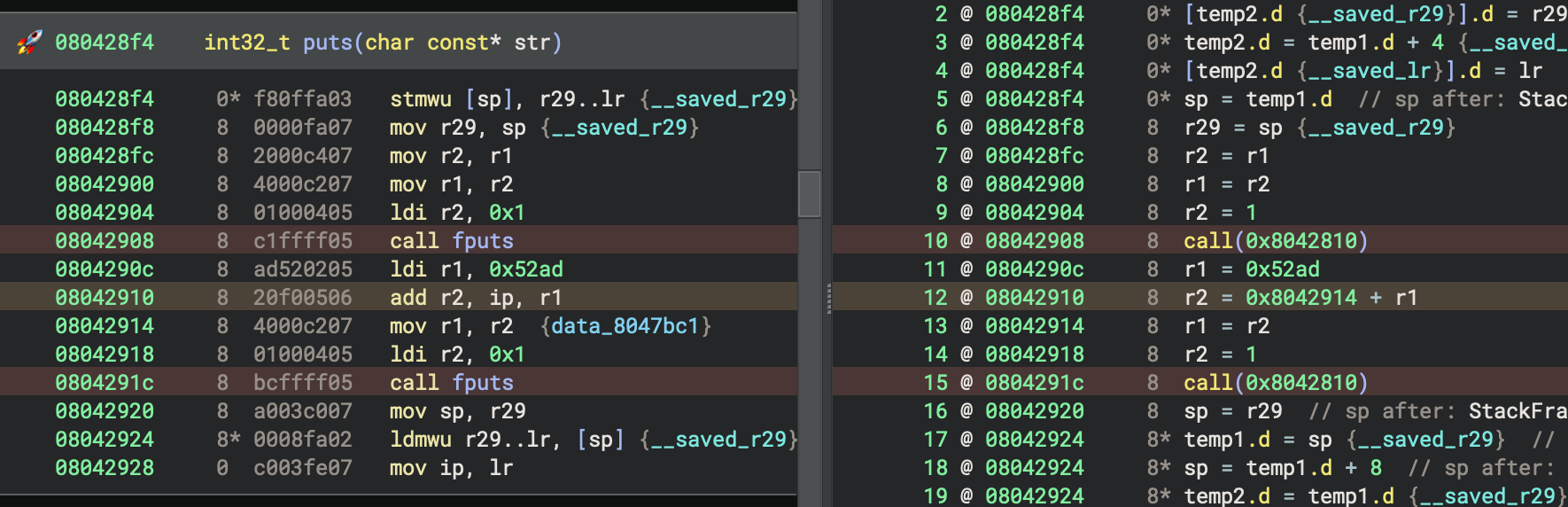 0x52ad is an ip-relative offset, and we need WARP to exclude it from signature generation
This causes other binaries using puts() to not match its signature, since they have a different constant loaded into r1 that does not match the one in the signatures:
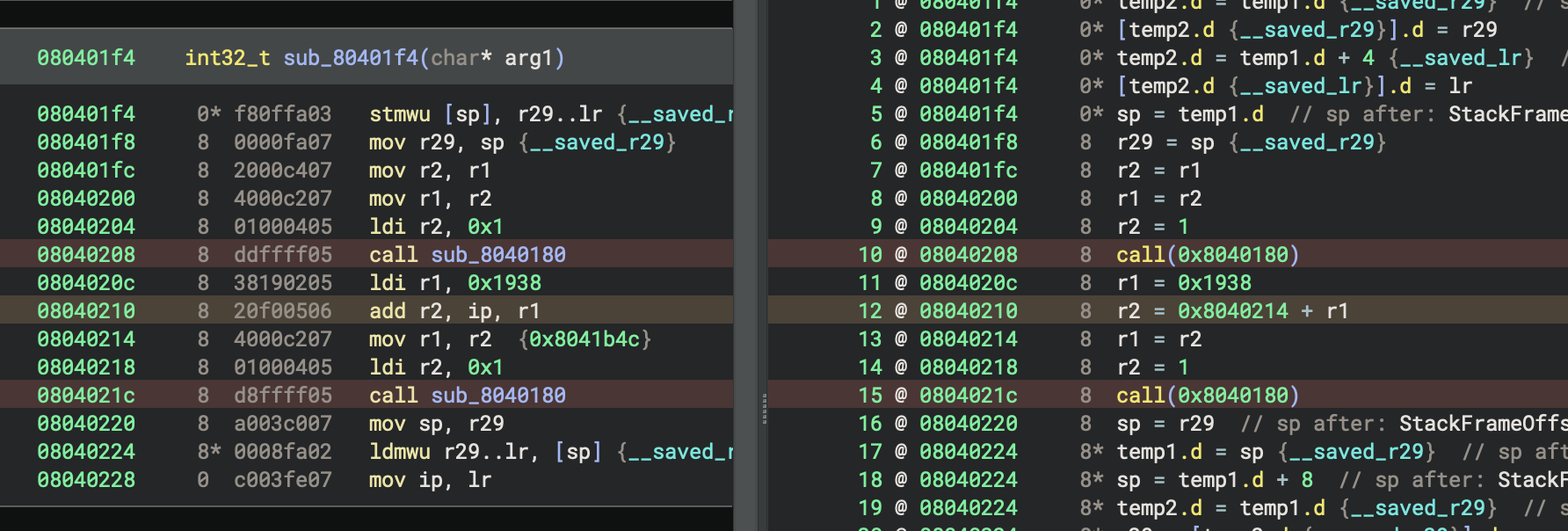 This version of puts() uses a different constant and doesn’t get matched.
Due to the complex problem of “what is this constant used for,” we can’t simply have WARP exclude all constant loads, or even just loads which are used on arithmetic with ip. However, we can constrain this specific case well enough to actually make a difference, due to a few convenient factors that may not generalize for other platforms:
- The constant is always loaded in the instruction directly before it is used
- The following instructions always clobber the register into which the constant was loaded
- The lifting of
ipcan be detected and so the whole pattern is possible to search for
Given that, we set out to replace the LLIL generated by these instructions with an equivalent statement that WARP can detect as variant and exclude from signatures. Specifically, we want to replace the sequence, r1 = <const> ; r2 = <ip> + r1 ; r1 = r2 with the sequence, r1 = <const + ip> ; r2 = <const + ip>, which has identical semantics but ensures both r1 and r2 are set with an ip-relative value that WARP can detect.
There are two ways to do this:
- In the Architecture, extend
max_instr_lengthto three times the instruction length. When lifting, search three instructions at a time and look for that sequence. If found, lift them all as the replacement sequence and make sure thatget_instruction_inforeports the instruction is three times the normal width. Otherwise, lift as normal and only report instructions as being the normal size. This requires adding special cases to the lifter, causing it to have inconsistent behavior when lifting a function versus one instruction at a time. It’s also a huge hack, which we would rather avoid (especially in a tutorial). Even so, this sort of technique has been used for other architectures to implement delay slots and conditional blocks. - Use a Workflow to detect the instruction sequence early during lifting and replace it before later analyses run. This requires writing and registering a custom Workflow, which can do these more powerful operations but adds complexity.
Given these options, we’ll write a Workflow. First, we set up the scaffolding for a Workflow with an Activity that is only active for Quark binaries:
def rewrite_lil_relative_load(context: AnalysisContext):
    # ...

qwf = Workflow("core.function.metaAnalysis").clone("core.function.metaAnalysis")
qwf.register_activity(Activity(
    configuration=json.dumps({
        "name": "arch.quark.rewrite_relative_load",
        "title": "Quark: Combine Relative Load Instructions",
        "description": "Combine the instructions for relative loads into one instruction, for improvements in signature generation",
        "eligibility": {
            "predicates": [
                # Only for linux-quark platform
                # Theoretically we want "only for quark arch" but arch predicates don't exist
                {
                    "type": "platform",
                    "operator": "==",
                    "value": "linux-quark",
                }
            ]
        }
    }),
    action=lambda context: rewrite_lil_relative_load(context)
))

qwf.insert_after("core.function.generateLiftedIL", [
    "arch.quark.rewrite_relative_load"
])
qwf.register()
Some key insights from this:
- The Activity is registered after
generateLiftedILso it applies to Lifted IL at the earliest point in analysis. We chose to put it at this level because it doesn’t need any of the dataflow from higher levels. - There is an eligibility predicate to check for the Platform being
linux-quark. Currently, there is no way to specify predicates for Architectures in general, but checking via Platform is good enough for us for now, since we’re only registering one Platform anyway. - We chose to modify the default
metaAnalysisWorkflow with an eligibility predicate instead of making a new Workflow, because we want our behavior to be enabled by default, but don’t want to modify the BinaryView (ELF view) to select a new Workflow for us.
With the Workflow registration out of the way, we can add the scaffolding for the transformation:
def rewrite_lil_relative_load(context: AnalysisContext):
    # Copy the Lifted IL to a new function with transformations
    any_replaced = False
    old_llil = context.lifted_il
    new_llil = LowLevelILFunction(old_llil.arch, source_func=old_llil.source_function)
    new_llil.prepare_to_copy_function(old_llil)
    for old_block in old_llil.basic_blocks:
        new_llil.prepare_to_copy_block(old_block)
        # !! Make an iterator of the old instructions, which we can advance to skip them
        # since our pattern replaces multiple instructions
        instructions = iter(range(old_block.start, old_block.end))
        for old_instr_index in instructions:
            old_instr: LowLevelILInstruction = old_llil[InstructionIndex(old_instr_index)]
            new_llil.set_current_address(old_instr.address, old_block.arch)

            # Replace instructions here
            # match ...:
            #     case ...:
            #         ...
            #         continue

            # Otherwise, copy instructions unchanged
            new_llil.append(old_instr.copy_to(new_llil))

    # Update analysis if we changed anything
    if any_replaced:
        new_llil.finalize()
        context.lifted_il = new_llil
This scaffolding is a generic Copy Transformation on Lifted IL, which iterates all blocks and instructions in the function, and, if a condition is met, modifies them. The only difference from the boilerplate used in the documentation is that we’re explicitly creating an iterator object for the old function’s instructions, so we can advance it to skip multiple instructions in one go.
The pattern we’re matching here is a rather specific sequence of instructions– so specific that we can actually use Python’s match statement and some conditionals:
            # Make sure we have 3 instructions to load
            if old_instr_index + 2 < old_block.end:
                # Load the next two instructions so we have a sequence of 3 instructions
                old_next_instr: LowLevelILInstruction = old_llil[InstructionIndex(old_instr_index + 1)]
                old_next_instr_2: LowLevelILInstruction = old_llil[InstructionIndex(old_instr_index + 2)]
                # Match all 3 instructions at once
                match (old_instr, old_next_instr, old_next_instr_2):
                    case (
                        # rA = const
                        # rB = <addr> + rA
                        # rA = rB
                        LowLevelILSetReg(dest=regA, src=LowLevelILConst(constant=const)),
                        LowLevelILSetReg(
                            dest=regB,
                            src=LowLevelILAdd(
                                left=LowLevelILConst(constant=const_2),
                                right=LowLevelILReg(src=regA_2)
                            )
                        ),
                        LowLevelILSetReg(dest=regA_3, src=LowLevelILReg(src=regB_2))
                    ) if const_2 == old_next_instr_2.address and regA == regA_2 == regA_3 and regB == regB_2:
                        # Emit replacement instructions ...
We match a tuple of the next three instructions against the corresponding Python classes for our pattern. The match statement lets us bind variables to the operands of those instructions, which we can then unify with a conditional, still in the match arm. Since our pattern requires that multiple instructions use the same register, we can name the bound variables regA, regA_2, and regA_3, and compare their equality in the condition.
Then, emitting the replacement instructions is simply a matter of constructing them. We can calculate the value of the constant ahead of time, and lift it as a const expression. We need to make sure to set both registers to the right value, to not change the behavior of the original instructions. We also need to be sure to transfer the source locations of the previous instructions to our new instructions so IL-to-disassembly mappings line up. We need to use the address of the ip-relative constant load instruction, which was the first instruction, so WARP can identify that address as variant and exclude it. Finally, we lift an extra nop instruction at the end, so all three source instructions’ addresses are used. That step is not critical, but without it, that instruction has no mapping in LLIL, and it causes oddities with stack resolution.
                    case ...:
                        # rA = <addr + const>
                        new_llil.append(
                            new_llil.set_reg(
                                old_instr.size,
                                regA,
                                new_llil.const(
                                    old_instr.size,
                                    const + const_2,
                                    loc=old_next_instr_2.source_location
                                ),
                                loc=old_instr.source_location
                            )
                        )
                        # rB = <addr + const>
                        new_llil.append(
                            new_llil.set_reg(
                                old_instr.size,
                                regB,
                                new_llil.const(
                                    old_instr.size,
                                    const + const_2,
                                    loc=old_next_instr_2.source_location
                                ),
                                loc=old_next_instr.source_location
                            )
                        )
                        # Adding a nop here fixes stack resolution on the third instruction in disassembly view
                        # Not sure why that happens, but this prevents it
                        new_llil.append(new_llil.nop(loc=old_next_instr_2.source_location))
                        # Skip the next two instructions in the IL function
                        # because we matched them above and are replacing them here
                        next(instructions)
                        next(instructions)
                        any_replaced = True
                        continue
All of this comes together to rewrite the IL for this common pattern into a form that WARP can detect as variant. From the WARP Render Layer, we can see that the instruction loading the ip-relative constant in the disassembly is now marked properly.
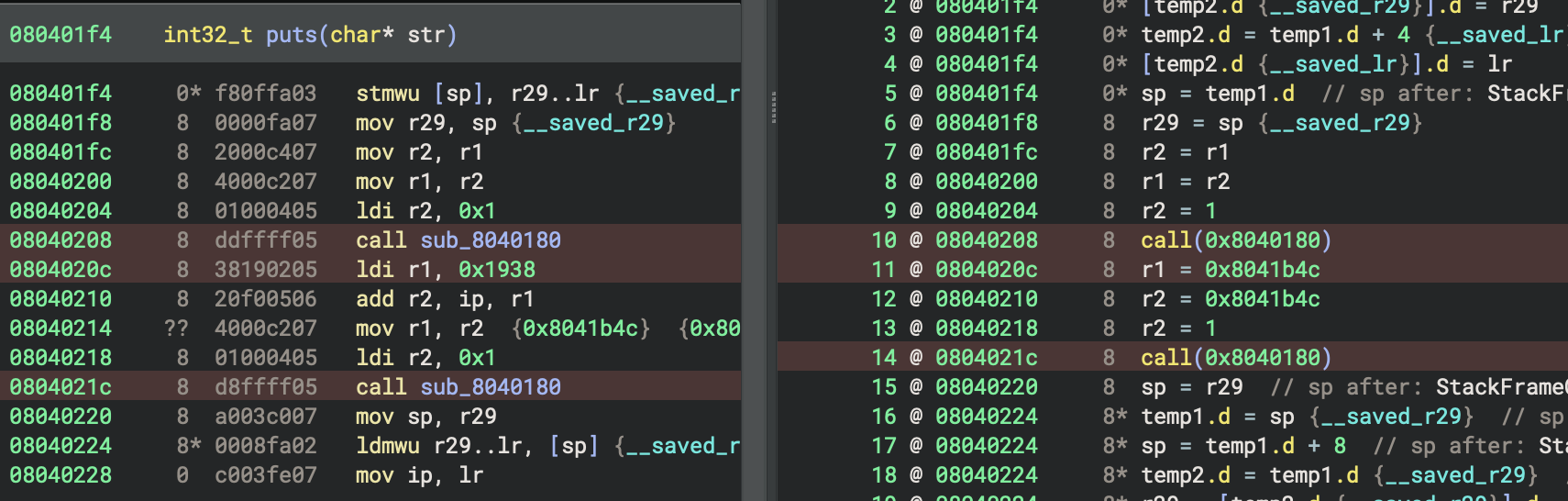 The ip-relative constant load is marked as variant now
The second instruction, which actually does the addition, is not highlighted as variant despite its IL also making use of an ip-relative constant. If you query WARP in the Python console, it seems to be properly considered as variant, so this might be due to a bug in the WARP Render Layer right now. That shouldn’t matter, though, since its opcode bytes don’t include any relative offsets.
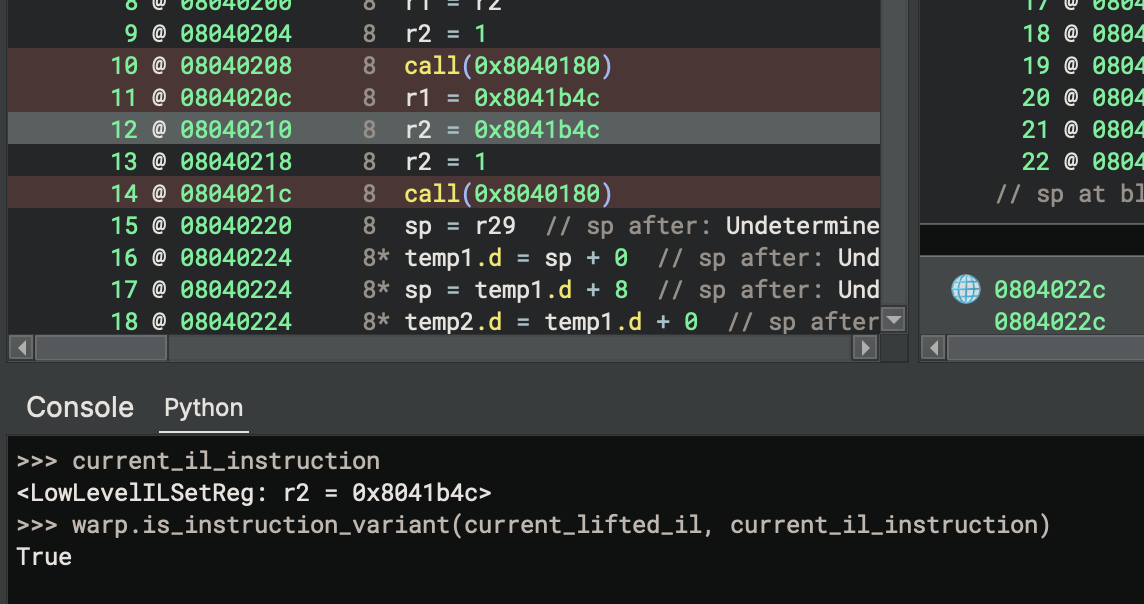 The other instruction is also variant, even if the Render Layer doesn’t notice
Regenerating the signatures again after this change, we can now see that puts() is being matched on other binaries:
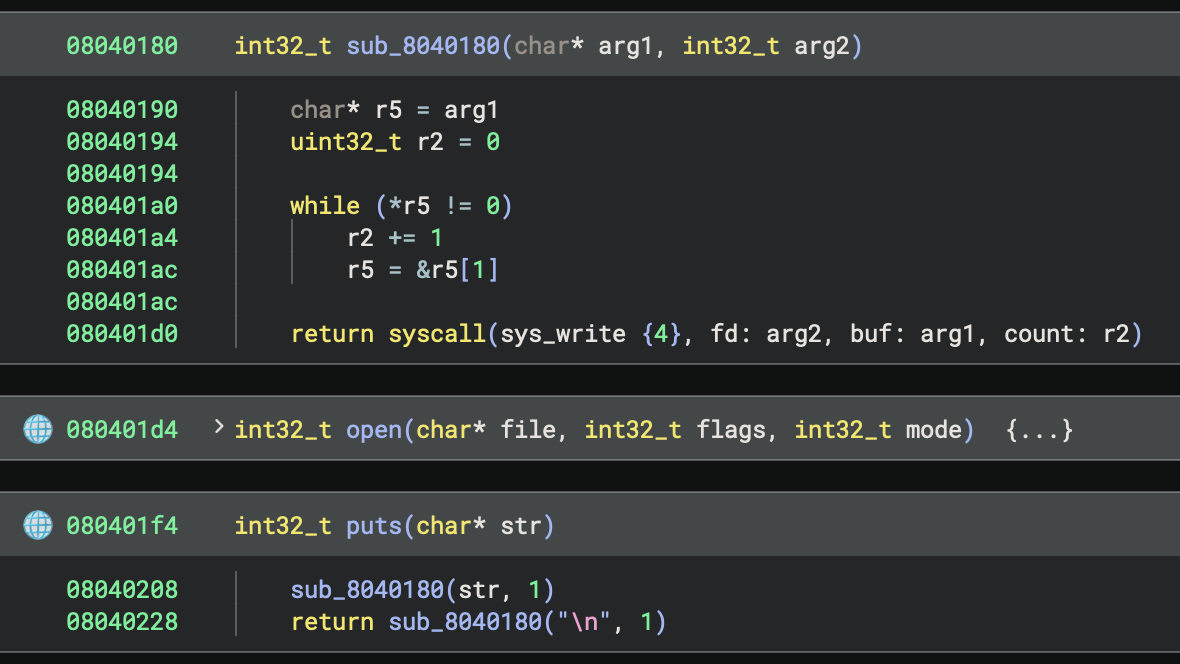
puts gets matched now
In this case, puts got matched properly, where it wasn’t before. You may notice that the call to fputs from within puts did not get matched, which is because its call to strlen was inlined. That will happen in any place a call gets inlined, and is not easy to resolve currently. Solving that would be a significantly more challenging problem, requiring us to either generate signatures for all possible combinations of inlining or be capable of un-inlining the call.
While this was a significant amount of effort for a small improvement, it serves as a good example of how Workflows and WARP can interact. This is just one of many ways you may choose to address improving signature generation for your own targets. There are likely many more options depending on what idioms your compiler generates.
Other
There are a few other platform-related systems not covered here:
- Function Recognizers: These callbacks are run after analysis completes for each function in the binary. With access to the function’s IL, they are able to modify the function in any way you want. Typically, these are used to annotate imported library function thunks, and in the case of Windows, annotate the
mainfunction (if possible). We didn’t cover them here because we couldn’t find a motivating use-case to demonstrate their operation. - Relocations: These are more the responsibility of the Binary View, requiring knowledge of file structures and the linker’s behavior. We didn’t cover them here because this series has been focused on Architectures and lifting, rather than file formats. Also, we didn’t cover them because Quark doesn’t have dynamic linking or relocations.
- Global Registers: Certain platforms have registers that are referenced by functions but set by the operating system, and they should not be considered as parameters to functions. Those global registers can be given types so that accesses to them can use structure type information for annotating decompilation. For example, the
fsregister on Windows x86 holds the TEB structure, with a type specified by the windows-x86 platform. Quark doesn’t have any of these, so we didn’t cover them above.
We hope this series helps you write custom architectures of your own and use some of the more advanced parts of Binary Ninja to improve your analysis. Enabling you to get professional-grade decompilation for obscure architectures has been one of our primary goals, since we can’t possibly have official support for every architecture. It may not be trivial, but there are a bunch of resources online to help you along the way. If you want to read more, you can check out our previous blog series about Z80, our open-source official plugins and examples, and some of our community plugins. The source code for this series is available on our GitHub as well.
We look forward to hearing about all the obscure architectures you plan on lifting, so please feel free to contact us if you have any questions about the process. Until then, happy hacking! :)
如有侵权请联系:admin#unsafe.sh