2026-03-04
4 min read
Most security teams spend their days playing a high-stakes game of Whac-A-Mole. A user’s credentials get phished, or they accidentally download a malicious file, and suddenly you’re in incident response mode.
We built our SASE platform, Cloudflare One, to stop that cycle. By placing Access and Gateway in front of your applications and Internet traffic, we gave you the tools to decide who gets in and where they can go.
Today, we’re making those decisions smarter. You can now incorporate User Risk Scores directly into your zero trust network access (ZTNA) policies. Instead of just checking "Who is this user?" and "Is their device healthy?", you can now ask, "How has this user been behaving lately?" and adjust their access in real time.
Step 1: From "what" to "how"
For years, traditional corporate access was binary. You either had the right login and the right certificate, or you didn’t. But identity is fluid. A legitimate user can become a risk if their account is compromised or if they start exhibiting "insider threat" behaviors — like impossible travel, multiple failed login attempts, or triggering data loss prevention rules by moving sensitive data.
Cloudflare One now continuously calculates a risk score for every user in your organization based on these behaviors.
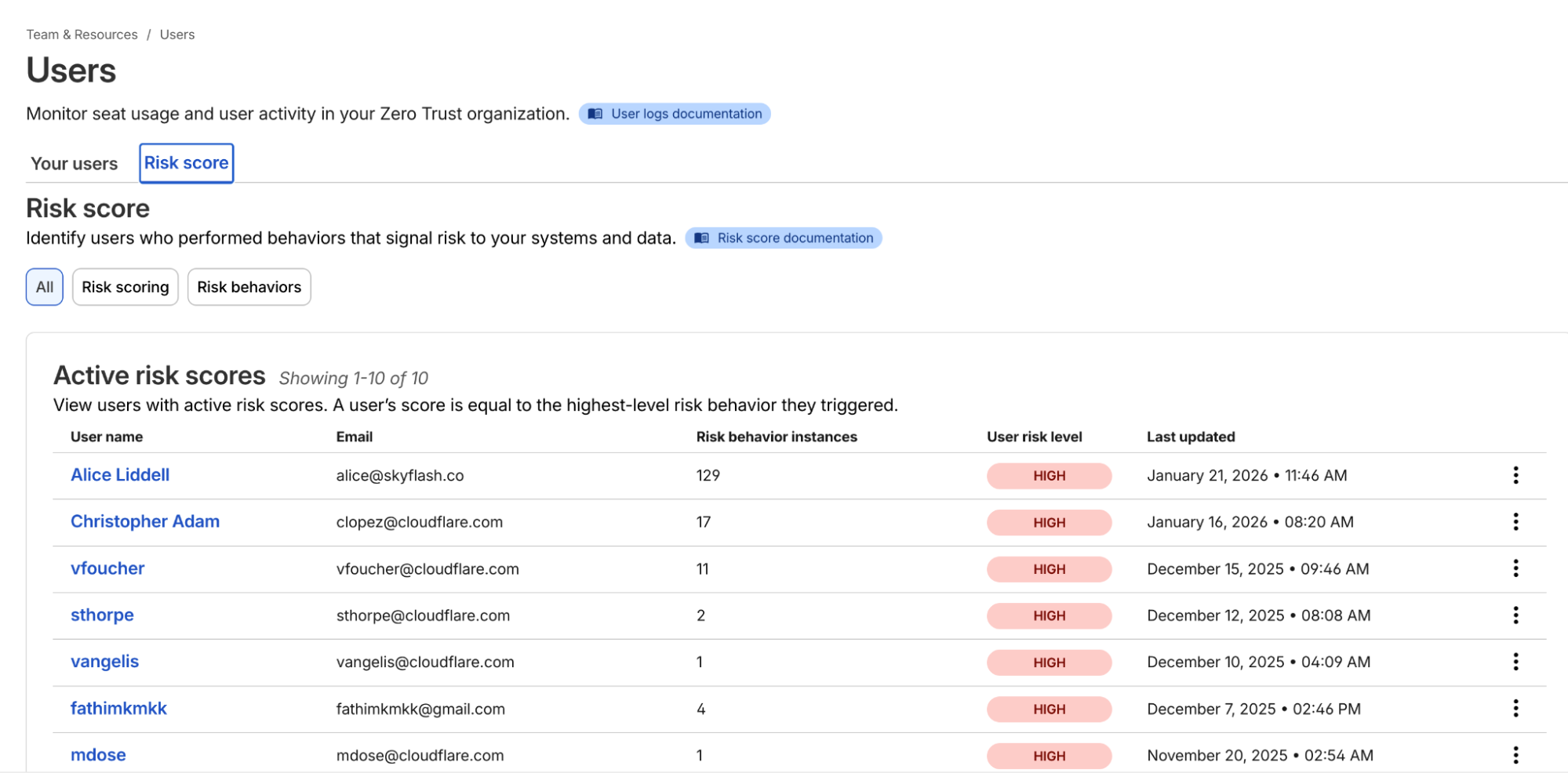
Example list of users and their risk scores
Once you’ve onboarded your team to Cloudflare One, you can navigate to the Team & Resources > Users > Risk Score section of the dashboard. Here, you can define which behaviors matter to you. For example, you might decide that impossible travel has a "high" risk level, while using a device in need of an update is "medium."
Cloudflare’s risk engine continuously evaluates telemetry from across the SASE platform. For internal signals, the engine monitors logs from Cloudflare Access (e.g., successful/failed logins, geographic context) and Cloudflare Gateway (e.g., malware hits, risky browsing categories, or sensitive data triggers in DLP).
For third-party signals, we’ve built service-to-service integrations with partners like CrowdStrike and SentinelOne. These integrations allow Cloudflare to ingest external telemetry, such as CrowdStrike’s device posture attributes, and map it to a user’s profile.
The calculation logic is designed to be deterministic:
Selection: Administrators choose which specific "risk behaviors" (impossible travel, DLP violations, and more) to enable for their organization.
Aggregation: The engine identifies all risk events associated with a user.
Scoring: A user’s risk score is determined by the highest risk level (low, medium, or high) of any enabled behavior triggered during that period.
Reset: If an admin investigates and clears an incident, they can manually reset the user’s score, which preserves the history but resets their access based on risk data gathered going forward.
Step 2: Easily apply adaptive access
Knowing a user is risky is step one. Doing something about it — automatically — is step two.
In the past, if a security analyst saw a suspicious user, they’d have to manually revoke sessions or move the user into a "restricted" group in their Identity Provider (IdP). That takes time — time an attacker uses to move laterally.
Now, you can build Adaptive Access policies. When you create or edit an Access policy, you’ll find a new selector: User Risk Score.
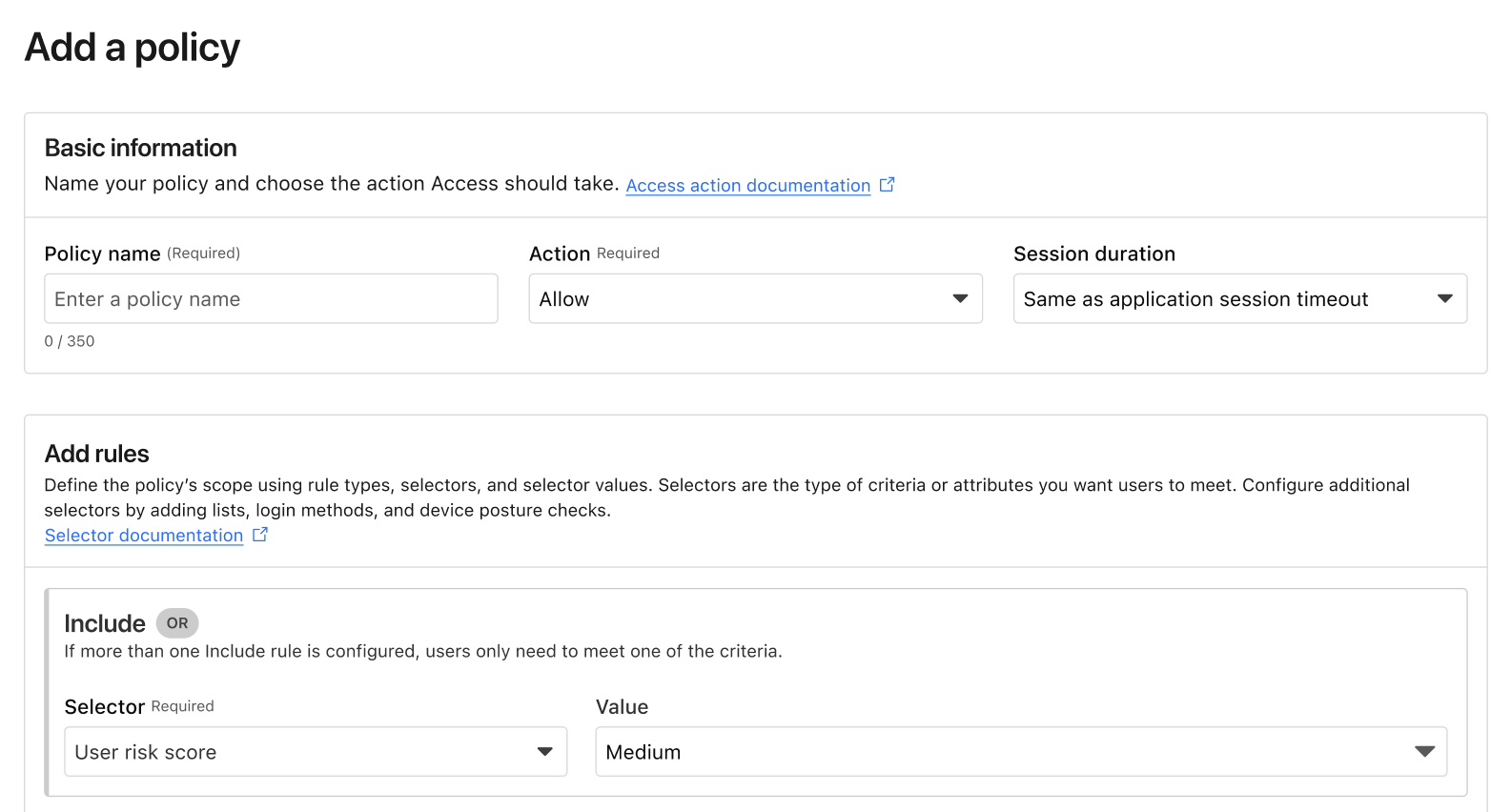
Example of the new User Risk Score selector in an Access policy.
This allows you to create global or application-specific rules such as: "If a user's risk score is high, they cannot access the Finance Portal," or "If a user's risk score is medium, they must use a physical security key to log in." Such rules ensure corporate operations are not interrupted while additional layers of security are applied.
Step 3: Closing the loop
The best part of this system is that it’s dynamic. If a user’s risk score drops after being reviewed and cleared by an investigator, their access is automatically restored based on your policy. Today, risk-based access can revoke access in the middle of an active session when risk score increases. In the future, we will explore expanding this to enforce step-up MFA in the middle of an active session when the risk score changes as well.
We’ve also made sure this works with the tools you already use. If you use Okta, Cloudflare can share these risk signals back to Okta, ensuring that a user flagged on the network is also restricted at the front door of your SSO. This integration uses the Shared Signals Framework, which enables the sharing of risk signals across platforms.
Move faster, stay secure
We built Cloudflare One so that security teams could stop being the "department of no" and start being the department of "yes, and safely." Incorporating user risk scores into your Access policies is the next step in that journey. It moves your security from a static snapshot at login to a continuous, living conversation with your network architecture.
If you’re already a Cloudflare customer, you can start exploring these risk signals in your dashboard today. If you’re still wrestling with legacy VPNs or manual security reviews, we’d love to help you flip the switch.
You can get started for free for up to 50 users — no sales call required. For larger organizations looking to integrate third-party signals like CrowdStrike or SentinelOne into their global policies, our team is ready to walk you through a ZTNA pilot.
Reach out to our team here to see how adaptive access can fit into your SASE roadmap.
Cloudflare's connectivity cloud protects entire corporate networks, helps customers build Internet-scale applications efficiently, accelerates any website or Internet application, wards off DDoS attacks, keeps hackers at bay, and can help you on your journey to Zero Trust.
Visit 1.1.1.1 from any device to get started with our free app that makes your Internet faster and safer.
To learn more about our mission to help build a better Internet, start here. If you're looking for a new career direction, check out our open positions.